
Construction CRM Pricing: What You'll Actually Pay in 2026
Construction CRM pricing typically runs from low double-digits per user for entry platforms to quote-based orchestration tiers for enterprise contractors. Entry-level plans generally land around $12 to $50 per user per month, mid-market platforms run $50 to $150 per user per month, and enterprise or heavily automated systems get quoted individually, often between $8,000 and $100,000+ per year depending on scope.
Here’s the budgeting rule that keeps contractors from getting blindsided: plan for license cost plus 1x to 2x that amount in first-year implementation, integration, and training expenses. A simpler way to think about it: Year 1 = license + onboarding + integrations + training. Skip any of those line items in your mental math and you’ll underbid your own software budget the same way an underbid job eats your margin.
Before you take a single sales call, get clear on three things:
- How many seats you actually need, split between office staff and field crews
- Which systems you already run that this CRM needs to talk to (accounting, estimating, scheduling)
- A written, itemized quote from every vendor you’re seriously considering, not a verbal ballpark
That last point matters more than most contractors realize. A verbal quote of “around $80 a user” can turn into a very different number once setup fees, data migration, and premium support get added at contract time.
Key Takeaways
Construction CRM pricing depends less on the sticker rate per seat than on implementation, integration, and training costs that typically add 30% to 60% to your first-year total.
| Point | Details |
|---|---|
| Know your price bands | Entry tiers run roughly $12–$50 per user/month, mid-market $50–$150, and enterprise is quote-based, often $8,000–$100,000+ annually. |
| Budget beyond the license | Plan Year 1 as license plus 1x–2x that amount for onboarding, migration, and training. |
| Hidden fees add up fast | Data migration, custom fields, and integrations commonly add 30% to 60% to sticker prices. |
| Ask for itemized, written quotes | Get seat definitions, integration costs, and cancellation terms in writing before signing. |
| Consider construction-specific platforms | High Level CRM bundles license, onboarding, and customization, with users reporting up to 35% conversion gains from automated lead tracking. |
Table of Contents
- How Is Construction CRM Pricing Structured?
- What Actually Drives Your Construction CRM Cost?
- What Hidden Fees and Timelines Should You Expect?
- Sample Budgets: What Contractors Actually Spend
- What Questions Should You Ask Before Signing a Contract?
- How Does High Level CRM Price Its Construction Features?
- What Makes Construction Costs So Hard to Predict?
- Get a Construction CRM Built Around Your Numbers, Not a Generic Template
- Sources
How Is Construction CRM Pricing Structured?
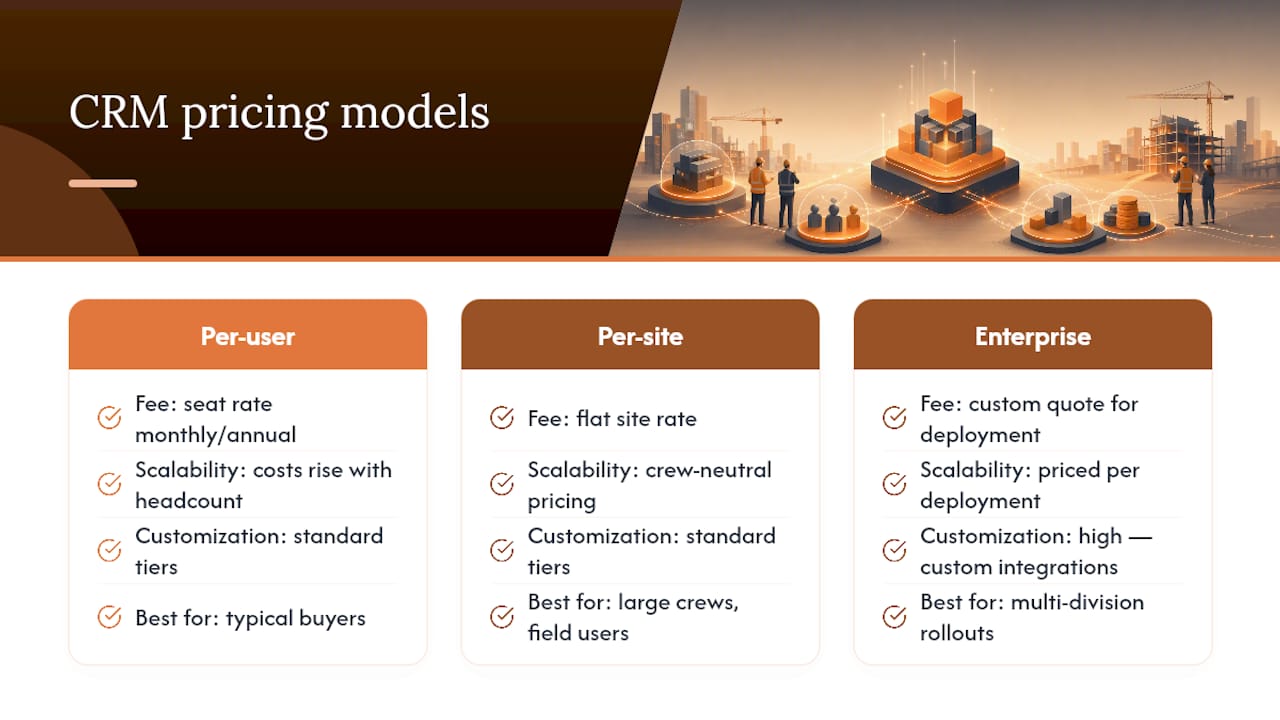
Construction CRM vendors sell through three basic models, and knowing which one you’re looking at changes how you should read every quote you get.
Per-user, per-month licensing is the most common structure. You pay a rate for each seat, billed monthly or annually, and the rate typically climbs with the feature tier. Per-site or flat licensing charges a fixed rate regardless of headcount, which tends to favor larger crews with lots of field users who’d otherwise rack up seat fees. Quote-based enterprise pricing throws out the per-seat math entirely and prices the whole deployment as a custom package, usually because the buyer needs deep integrations, dedicated support, or multi-division rollouts that don’t fit a standard rate card.
Annual billing is worth asking about regardless of which model you’re evaluating. Vendors commonly offer 15% to 25% savings for paying yearly instead of month to month, and multi-year commitments can push that discount further.
What each tier typically includes
Feature access maps fairly predictably to price band, though the exact cutoffs vary by vendor:
- Entry tier (roughly $12 to $50 per user/month): basic contact and lead tracking, limited or no mobile field access, minimal automation, standard email support
- Mid-market tier (roughly $50 to $150 per user/month): full mobile field access, bid pipeline management, pre-built integrations with common accounting and estimating tools, workflow automation, and custom reporting dashboards
- Enterprise/orchestration tier (quote-based, often $8,000 to $100,000+ annually): dedicated account management, custom integration development, advanced automation across multiple systems, SLA-backed support, and multi-division reporting
The jump from entry to mid-market is usually where mobile access and integrations get unlocked. That’s the point where a lot of small crews stall out, because manual data entry from the field becomes the bottleneck rather than the software cost. The jump from mid-market to enterprise is less about individual features and more about scale: more seats, more integrations, more compliance requirements, and pricing that reflects a custom deployment rather than a shelf product.
One thing to watch for: some platforms list attractive entry pricing but gate mobile access, integrations, or automation behind a higher tier, so the sticker price you see on a marketing page rarely reflects what a working field crew actually needs to pay. Industry market summaries show entry-level and free tiers exist for very small teams, but they trade off exactly the features growing contractors need most, which is why so many firms outgrow their first CRM within a year or two.
If you’re comparing a construction-specific platform against a general business CRM, the pricing logic shifts again. A construction CRM versus a generic platform like HubSpot usually comes down to how much custom development you’d need to bolt on bid tracking, job costing, or subcontractor communication that a construction-built system includes natively.
What Actually Drives Your Construction CRM Cost?
Four factors move your price more than anything else on a vendor’s rate card, and knowing which ones apply to your business lets you negotiate from a position of knowledge instead of guessing.
- Seat count and seat type. Office staff and field crews often get priced differently. Some vendors charge full rate for every seat; others discount field-only or mobile-only users since they touch fewer features. Ask specifically how “seat” is defined before you multiply your headcount by the quoted rate.
- Integration depth. Connecting your CRM to accounting software, estimating tools, or field apps ranges from a free, off-the-shelf connector to a custom integration that runs thousands of dollars in development time. The more specialized your estimating or accounting stack, the more likely you’ll need custom work rather than a plug-and-play connector.
- Automation level. Manual data entry costs you in labor hours, not software fees, but automating that entry shifts the expense from recurring staff time to a higher upfront implementation cost. For firms where skilled labor is scarce or rework from data errors is expensive, that trade pays back fast. For a two-person office that can tolerate manual rekeying, it often doesn’t pencil out yet.
- Support, security, and custom reporting. Dedicated account managers, guaranteed response-time SLAs, and custom dashboards beyond the standard templates all tend to sit in add-on pricing rather than the base rate.
Pro Tip: Before requesting quotes, count how many hours per week your team spends manually re-entering data between systems. If it’s more than five hours across your staff, an automation-heavy tier usually pays for its higher sticker price within the first year.
Platforms like EquipTrack illustrate how equipment and asset-tracking modules get priced separately from core CRM seats. If your CRM quote includes equipment tracking, ask whether that’s bundled or billed as its own line item.
What Hidden Fees and Timelines Should You Expect?
The sticker price on a construction CRM is rarely the number you end up paying in Year 1. Hidden costs like data migration, training, custom fields, and integrations can add 30% to 60% on top of the base license price, and that gap is the single biggest reason mid-size and larger firms end up spending far more than they budgeted for.
Here’s what typically shows up as a separate line item, whether or not the sales rep mentions it upfront:
- Onboarding and setup fees, often a flat one-time charge tied to how many workflows need configuring
- Data migration, especially if you’re moving years of project history, contacts, and bid records out of spreadsheets or a legacy system
- Custom configuration, for anything beyond the vendor’s standard templates
- Extra modules, like equipment tracking, advanced bid management, or supplier communication tools not included in the base tier
- API usage and storage overages, which rarely show up until you exceed a threshold you didn’t know existed
- Premium support tiers, if the standard email support isn’t fast enough for a live jobsite issue
Implementation and training frequently add 10% to 50% to first-year costs on their own, separate from the migration and module fees above. Stack those together and it’s easy to see how a $60-per-seat quote turns into a Year 1 bill that’s double what the rate card suggested.
Timelines scale with complexity, and they’re worth planning around your bidding season rather than around the vendor’s sales cycle. A self-serve, entry-tier setup for a small crew can go live in one to four weeks. A mid-market deployment with integrations and custom reporting typically takes four to twelve weeks. Enterprise rollouts with multi-division data migration, custom integrations, and staff training across departments often run three to six months or longer.
Ask any vendor for a written implementation timeline before you sign, not just a price. A quote without a timeline tells you nothing about when you’ll actually stop double-entering data.
Sample Budgets: What Contractors Actually Spend
Numbers mean more when they’re attached to a business that looks like yours. Here’s how Year 1 and multi-year costs typically break down across three common contractor profiles.
Small contractor, 1 to 10 users. At an entry-to-mid rate of roughly $40 per user per month, ten seats runs about $4,800 annually in license fees alone. Add a modest onboarding fee of $1,500 to $3,000 and basic training, and Year 1 typically lands between $6,500 and $9,000. Over three years, assuming flat pricing and no major add-ons, total cost of ownership runs roughly $18,000 to $23,000, most of it recurring license cost rather than one-time fees.

Growing contractor, 10 to 50 users. This is where the numbers get more serious, and where hidden costs matter most. Total Year 1 costs for a mid-market contractor in this range commonly run $17,000 to $54,000 once software, implementation, data migration, and training are all included. Year 2 recurring costs drop to roughly $7,200 to $24,000 once the one-time setup fees fall away. Over three years, a firm in this range should budget somewhere between $32,000 and $102,000 depending on how many integrations and custom modules they add.
Enterprise or multi-division contractor. Once you’re coordinating multiple offices, subcontractor networks, and custom integrations across estimating and accounting platforms, pricing moves entirely to quote-based, often ranging from $8,000 to well over $100,000 annually. Integration costs tend to dominate this budget more than seat count does. A firm connecting five legacy systems will often pay more in integration development than in software licensing itself.

Here’s a simple template you can adapt with your own numbers:
To use this yourself: pull your own headcount and target per-user rate into the license row, get written onboarding and migration estimates from each vendor, then add the rows for a true Year 1 figure instead of comparing bare license quotes side by side. Mid-market firms typically get the best ROI by choosing a platform with pre-built construction templates, since that reduces the configuration line item significantly.
What Questions Should You Ask Before Signing a Contract?
Getting an apples-to-apples comparison across vendors means asking the same eight questions of every sales rep, because vendors structure quotes differently on purpose, and vague answers on any of these usually signal a cost surprise later.
- What’s included in the base license, itemized line by line? Not a feature list. A price breakdown.
- What do integrations with our accounting and estimating tools cost, and is that a one-time or recurring fee?
- Who owns our data if we leave, and in what format can we export it?
- What’s the support SLA, and does response time change by tier?
- How does the upgrade policy work if we add seats or modules mid-contract?
- What are the trial limits, and does the trial environment reflect real field conditions or a stripped-down demo?
- How exactly do you define a “seat” or “active user”? Getting this in writing avoids surprise charges when your field crew count fluctuates seasonally.
- What are the cancellation terms, and is there an early-termination fee?
Watch for three contract red flags in particular: vague language around when upgrade fees trigger, seat licensing that isn’t clearly defined (does a foreman who logs in twice a week count the same as a full-time office admin?), and integration fees that get quoted as “custom” without a number attached.
To normalize quotes across vendors, build one spreadsheet column per vendor and fill in the same rows every time: base license, onboarding, migration, training, and any add-on modules you know you need. A vendor with a lower per-seat rate but a vague integration line often ends up costing more than a vendor with a higher rate and a fully itemized quote. If you’re evaluating platforms beyond the household names, a guide to construction CRM alternatives walks through how several platforms structure these same line items.
How Does High Level CRM Price Its Construction Features?
High Level CRM is built specifically for the problems generic CRMs weren’t designed to solve, developed with over 30 years of construction industry experience behind its feature set. That background shows up in the details: automated lead tracking that follows how bids and estimates actually move through a construction pipeline, workflow automation built around job phases rather than generic sales stages, and custom reporting dashboards tailored to what contractors need to see, not what a software company assumes they need.
The platform integrates with estimating and accounting tools contractors already run, so pricing conversations focus on which connections you need rather than whether the connection exists at all. That integration depth is exactly where generic CRMs tend to rack up custom development fees.
Contractors using High Level CRM report meaningful operational gains: reduced project-management time from automated workflows, and conversion rate increases of up to 35% as reported by users who adopted the automated lead tracking. Those numbers matter when you’re weighing a slightly higher license rate against the labor savings automation delivers.
Pricing components typically break down into three parts: the base license, onboarding and setup, and any customization for your specific workflows and integrations.
- License: scaled to seat count and feature tier
- Onboarding: setup, data migration, and initial configuration
- Customization: workflow automation and reporting tailored to your business
Pro Tip: Ask for a written breakdown of these three components before your demo call ends. A vendor confident in their pricing structure will hand it over without hesitation.
A simple checklist and TCO template you can copy
Before you contact a single vendor, run through this short checklist:
- Count your seats, split between office and field users
- List every system this CRM needs to integrate with
- Estimate the hours per week your team spends on manual data entry right now
- Set two or three success metrics you’ll use to judge whether the CRM is working (faster bid turnaround, fewer missed follow-ups, higher close rate)
Then build a template with these rows for every vendor quote you collect:
Fill in each row per vendor, total the column, and rank vendors by that Year 1 total rather than by the license rate alone.
What Makes Construction Costs So Hard to Predict?
The most useful thing this budgeting exercise reveals isn’t a price. It’s that construction CRM shopping rewards contractors who think like estimators, not like software buyers. You wouldn’t accept a bid from a sub without line items, yet plenty of contractors accept a CRM quote that’s just a per-seat number and a handshake.
The conventional advice, “compare license prices across vendors,” misses where the real money moves. A platform quoting $40 a seat with a vague integration fee will often cost more in Year 1 than one quoting $70 a seat with everything itemized. Sticker price is the least informative number in the entire decision.
What the numbers actually support is this: prioritize automation depth over license discount if your team is losing real hours to manual data entry, because that labor cost compounds every month a manual system stays in place. A construction-specific platform that’s already built around bid pipelines and subcontractor communication will almost always beat a cheaper generic CRM once you count the custom development you’d otherwise pay for. Get the itemized quote first. Then decide.
— Rowena
Get a Construction CRM Built Around Your Numbers, Not a Generic Template
Highlevelcrm-rconstructionsolutions gives you something most vendors in this article’s price ranges don’t: a platform priced around what contractors actually use, built from construction workflows instead of a generic sales pipeline you have to bend to fit your bid process. Instead of paying for integration development to connect a CRM to your estimating software, you get that connection as part of the platform’s design.
That matters most for the contractors this guide is written for: firms trying to convert a sticker price into a real Year 1 number before they sign anything. High Level CRM’s pricing components break down clearly into license, onboarding, and customization, so you can build the same TCO template covered above using real figures instead of estimates. If you supply, manufacture, or consult in construction rather than build directly, the platform’s industry-specific offerings cover those workflows too.
Request a demo call, ask for your itemized quote using the eight questions above, and compare the real number against what you’re paying now in manual hours and missed follow-ups.
Sources
- Best Construction CRM Software 2026
- CRM System for Construction: Architecture, Features & Selection Guide
- Construct CRM Pricing 2026: Real Costs, Fees & What Others Paid

