
Construction Estimate Templates: A Contractor's Guide | High Level CRM - R. Construction Solutions
The fastest way to cut estimate prep time is to build a small library of modular templates with prefilled unit rates and live lookup tables. Here are three actions you can take right now:
- Pick one recurring job type (kitchen remodel, roofing, driveway) and save it as your master template file.
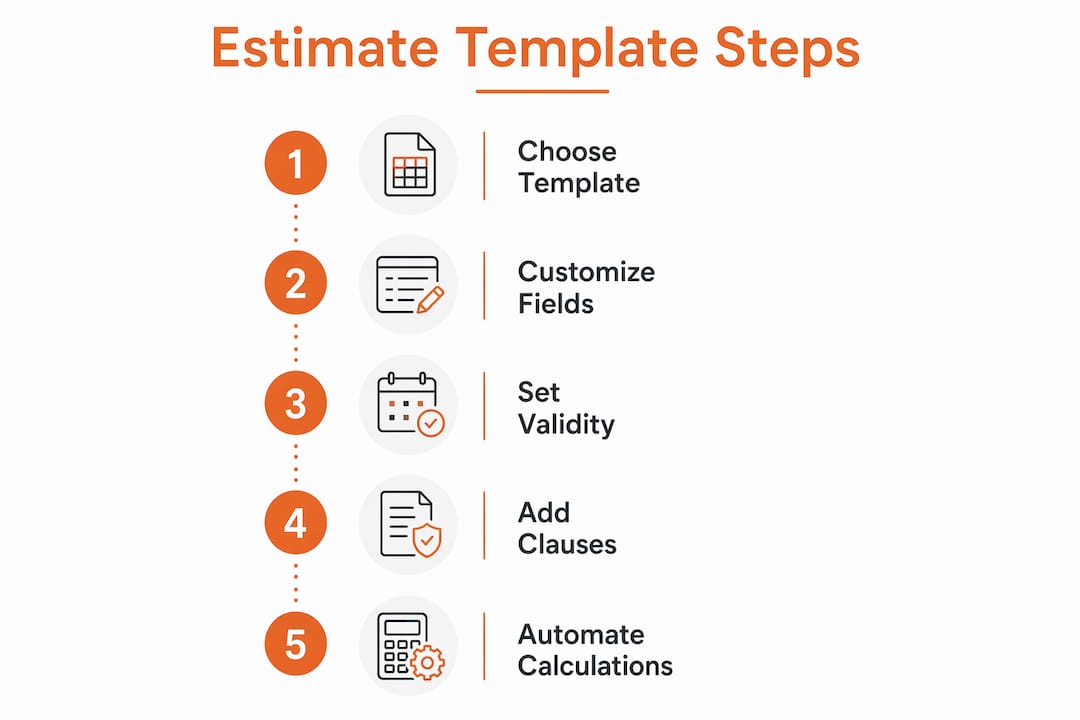
- Set a valid-until date on every estimate, a set valid-until date to protect yourself from material price swings, to protect yourself from material price swings.
- Add a fixed overhead and margin formula so every bid applies your target profit automatically, without manual recalculation.
With those three steps in place, you can send a professional estimate in minutes rather than hours.
Table of Contents
- Which template type should you start with?
- What every professional construction estimate must include
- Which file format fits your workflow?
- How to customize templates so you actually save time every bid
- High-impact speed hacks to cut estimate prep time today
- How to build a working estimate template in 10 minutes
- How to deliver estimates and reduce client disputes
- Key Takeaways
- Why the modular approach actually works in the field
- Highlevelcrm-rconstructionsolutions connects your estimates to your entire project workflow
- Useful sources and downloadable templates
Which template type should you start with?
Not every job needs the same form. Keeping a short library of purpose-built templates means you grab the right one and fill in the specifics, rather than rebuilding from scratch each time.

| Template Type | Best For | Starter Format |
|---|---|---|
| Simple / service call | Small repairs, single-trade jobs | Google Sheets or PDF |
| Residential remodel | Kitchen, bath, whole-house renovations | Excel master template |
| Commercial estimate | Multi-trade, phased projects | Excel with CSI divisions |
| Roofing | Material takeoff, tear-off labor, disposal | Trade-specific Excel sheet |
| Electrical / Painting | Labor-heavy, unit-rate driven bids | Google Sheets with rate table |
| Bid estimate | Competitive lump-sum submissions | Word/PDF final delivery |
Start with a Google Sheets residential remodel template. It lives in the cloud, your team can edit it from the jobsite, and version history is automatic. Once your rates stabilize, export to Excel for offline power use or lock it as a PDF for client delivery. Tools like ScopeGen offer ready-made starter files for more than 17 trades, which saves the initial build time entirely.
What every professional construction estimate must include
A professional construction estimate runs 2–5 pages and covers these elements. Miss any one of them and you are setting up a dispute before the first nail is driven.
Required fields:
- Company name, license number, insurance certificate number, and contact details
- Unique estimate number and issue date
- Client name, project address, and site contact
- Granular scope of work broken down by phase or trade
- Itemized material costs with quantities, units, and unit prices
- Itemized labor costs by trade and estimated hours
- Equipment, subcontractor, and permit line items
- Markup percentage and tax rate shown separately
- Payment schedule: a deposit schedule with a standard deposit portion, with progress milestones and a final payment trigger
- Valid-until date (see the speed hacks section for why this matters)
- Change-order process clause
- Warranty statement
- Exclusions list
Sample clauses you can copy directly into your template:
Change-order clause: “Any work outside the scope described above requires a written change order signed by both parties before work begins. Additional costs will be quoted and approved in advance.”
Validity clause: “This estimate is valid for 30 days from the issue date. Material prices are subject to change after that date.”
These two clauses alone prevent the majority of post-project billing disputes. For a deeper look at estimate structure best practices, the workflow guide on this site walks through each component in field-tested order.
Which file format fits your workflow?
The right format depends on who edits the estimate and how often your rates change.
| Format | Best Use Case | Key Advantage | Limitation |
|---|---|---|---|
| Excel (.xlsx) | Power users, offline work, macros | Local formulas, pivot tables, no internet needed | No live collaboration; version conflicts on shared drives |
| Google Sheets | Team collaboration, jobsite edits | Real-time multi-user editing, auto version history | Requires internet; formula limits on very large files |
| Word / PDF | Final client-facing delivery | Locked, professional appearance | Not editable for calculations |
| Lightweight estimating tool | High-volume shops, frequent rate changes | Auto-pricing, template reuse, CRM sync | Monthly cost; learning curve |
A practical decision rule: if more than one person touches the estimate before it goes to the client, use Google Sheets. If you are the only estimator and you work offline, Excel is faster. Lock the final version as a PDF before sending. Instant PDF generators can produce a branded, client-ready estimate with an expiry date in minutes, with no signup required, which works well for straightforward service calls.
When your bid volume grows to the point where updating material rates per-job takes more than 30 minutes a week, it is time to look at estimating tool categories that pull live pricing automatically.
How to customize templates so you actually save time every bid
The goal is to prefill everything that does not change job to job, and leave editable only what does.
-
Build one master template per recurring job type. A kitchen remodel master, a roofing master, a concrete driveway master. When material prices change, you update the master once and every future bid reflects it. This stops the clone-and-delete spreadsheet cycle that wastes 20 minutes per estimate.
-
Prefill unit rates in a dedicated rate table. Keep a separate tab or named range called
RATESwith your standard labor rates by trade and common material costs. Line items in the estimate tab pull fromRATESusing VLOOKUP or INDEX-MATCH. When lumber prices shift, you update one cell. -
Separate overhead and profit from direct costs. Store your fixed overhead rate and target margin as named cells (
OVERHEAD_PCT,MARGIN_PCT). Apply them as a formula layer on top of direct costs so you never accidentally bid away margin when adjusting a line-item price on the fly. Keeping overhead and profit separate from direct job costs is the single most reliable way to protect your bottom line across every bid. -
Use modular sections. Structure every template with these blocks: project header, scope summary, material list, labor block, equipment and subcontractor lines, allowances, contingency, and signature/terms. You can hide or show sections as needed without breaking formulas.
-
Add a canned item catalog tab. List your 50 most common line items with descriptions, units, and default quantities. During a bid, you copy rows from the catalog into the estimate rather than typing from scratch. Most contractors can send their first estimate within five minutes when working from a curated catalog like this.
Pro Tip: Name your rate ranges in Excel or Google Sheets (Insert → Named Ranges) instead of using cell references like B14. Named ranges survive row insertions and make formulas readable. A formula like =D5*RATES_LABOR_CARPENTER is far easier to audit than =D5*Sheet2!$B$14.
High-impact speed hacks to cut estimate prep time today
A few tactical changes produce the biggest time savings with the least setup effort.

Keep a single valid-until policy. Decide on 30 days and apply it to every estimate without exception. A clear valid-until date protects you from raw-material price volatility and creates a natural negotiation boundary with clients who stall. You stop fielding calls about whether last month’s price still applies.
Maintain a supplier price CSV. Once a month, pull current prices from your two or three main suppliers into a single reference file. Link your rate table to that file. You update prices in one place, not across a dozen open bids.
Automate waste factors and permit allowances. Add a waste factor row (typically 10–15% for framing lumber, 5–8% for tile) and a permit allowance line directly into the template formula. These recalculate automatically as quantities change, so you never forget them under deadline pressure.
Use AI-assisted drafting for speed, then verify. Tools like QuickEstimate can convert spoken or typed job details into itemized line items in under 60 seconds. Treat the output as a first draft to review and adjust, not a final bid. It is a useful starting point for straightforward service calls.
Contractors using professional estimating tools report 30–50% improvement in proposal close rates compared to manual spreadsheets, alongside significant reductions in prep time.
Pro Tip: The biggest time sink in estimating is not the math. It is hunting for information: last month’s lumber price, the client’s address, the subcontractor’s rate. Keep all of it in one place, whether that is a CRM, a shared drive, or a pinned spreadsheet, and your estimate time drops immediately.
How to build a working estimate template in 10 minutes
You need a blank Google Sheets file and about 10 minutes.
- Set up two tabs: name them
ESTIMATEandRATES. - Build the RATES tab first. Add columns: Item, Unit, Unit Price. Enter your 10–15 most common materials and labor tasks.
- In the ESTIMATE tab, create a header block with fields: Company Name, License #, Client Name, Project Address, Estimate #, Issue Date, Valid Until.
- Build the line-item table with columns: Description, Qty, Unit, Unit Price, Line Total. In the Unit Price column, use
=IFERROR(VLOOKUP(A[row],RATES!$A:$C,3,0),"")to pull from the RATES tab automatically. - Add a totals block below the line items:
| Row Label | Formula |
|---|---|
| Subtotal | =SUM(E:E) (line totals column) |
| Overhead (e.g., 15%) | =Subtotal*OVERHEAD_PCT |
| Margin (e.g., 20%) | =(Subtotal+Overhead)/(1-MARGIN_PCT)-(Subtotal+Overhead) |
| Tax | =(Subtotal+Overhead+Margin)*TAX_RATE |
| Grand Total | =Subtotal+Overhead+Margin+Tax |
- Add a terms block at the bottom with your valid-until clause, change-order clause, and payment schedule. Lock these cells so they do not get accidentally edited.
- Save version control. In Google Sheets, use File → Version History → Name current version with the date. In Excel, save copies to a dated archive folder using the naming convention
EstimateTemplate_YYYYMMDD_[initials].xlsx.
Templates with automatic calculations eliminate the manual recalculation step that costs estimators the most time per bid. The 10-minute build above gives you a functioning template that handles totals, markup, and tax without touching a calculator.
How to deliver estimates and reduce client disputes
Delivery workflow: Send a locked PDF to the client and retain the editable Sheets or Excel file internally. If your volume justifies it, use an e-signature tool so the client can approve directly on the document. Walk the client through the estimate on a call or in person rather than just emailing it. Clients who understand each line item are far more likely to accept the price without negotiating every row.
Lock these fields in the PDF: grand total, valid-until date, scope description, and terms. Keep the line-item detail editable in your working file so you can generate a change order quickly if scope shifts.
“Send a clean, itemized PDF within 48 hours. Walk the client through it in person or on a call. Clients who understand the costs are more likely to accept the price.” — SimplyWise contractor estimate guidance
Version control for teams: If multiple estimators work on the same template, use Google Sheets as the live working file and assign one person as the template owner who approves changes to the master. For Excel-based teams, a shared drive with a strict naming convention (ProjectName_v1_JD.xlsx) and a locked master in a separate folder prevents overwrite conflicts. For background on how bids and estimates differ in a client-facing context, the bid vs. estimate explainer covers the distinction clearly.
Pro Tip: Never send an estimate without a unique estimate number. It makes change orders, revisions, and invoice matching far faster, and it signals professionalism to clients who have seen sloppy paperwork from other contractors.
Key Takeaways
Building a modular template library with prefilled unit rates and automatic margin formulas is the single most effective way to cut estimate prep time and protect profit on every bid.
| Point | Details |
|---|---|
| Start with one master template | Build one template per recurring job type and update the master to refresh all future bids at once. |
| Include all required elements | A professional estimate covers scope, itemized costs, a typical deposit schedule, valid-until date, and change-order terms. |
| Automate overhead and margin | Store overhead and margin as named formula cells so rates apply consistently without manual recalculation. |
| Use Google Sheets for teams | Live collaboration and built-in version history prevent overwrite conflicts when multiple estimators work together. |
| Integrate with your CRM | Syncing estimate templates with a CRM like Highlevelcrm-rconstructionsolutions eliminates manual data re-entry and speeds the path from bid to signed contract. |
Why the modular approach actually works in the field
The conventional advice on estimating is to get more detailed. Add more line items, more contingency buffers, more notes. That advice is not wrong, but it misses the real problem most contractors face: the time cost of building every estimate from a blank page.
The modular, prefilled approach works because it separates the thinking from the typing. You do the hard thinking once, when you build the master template and set your rates. Every subsequent bid is mostly verification and adjustment, not creation. That shift is where the real time savings come from.
What most guides underestimate is the compounding effect of a well-maintained rate table. A contractor who spends 30 minutes updating their RATES tab once a month saves that time across every bid they send that month. Over a year, that adds up to days of recovered capacity.
The integration piece matters too. Estimates that live only in spreadsheets eventually create a data entry problem: someone has to retype client details, project addresses, and scope notes into a CRM or accounting system. Connecting your template workflow to a CRM from the start means that data flows once and gets used everywhere.
Highlevelcrm-rconstructionsolutions connects your estimates to your entire project workflow
Spreadsheet templates get you faster bids. What they cannot do on their own is carry that data forward into lead tracking, project scheduling, and client communication without someone retyping it.

Highlevelcrm-rconstructionsolutions is built specifically for contractors, with over 30 years of construction industry experience behind its design. It connects your estimate workflow to automated lead tracking, bid status dashboards, and subcontractor communication tools so your team stops working from disconnected files. Some users report notable improvement in lead conversion rates after centralizing their estimating and follow-up process in one platform.
- One-click template reuse: pull a saved job type, populate client data from the CRM, and send a branded estimate without re-entering a single field.
- Bid tracking dashboard: see every open estimate, its valid-until date, and follow-up status at a glance.
- CRM-driven client data: client contact details, project history, and prior estimates stay linked so nothing gets lost between the bid and the contract.
See how it fits your trade on the industries we serve page, or book a demo to walk through the estimating integration with your own job types.
Useful sources and downloadable templates
| Resource | What It Provides |
|---|---|
| SimplyWise General Contractor Template | Free PDF, Excel, and Google Sheets download; widely used by contractors |
| EstimationPro AI Template Tool | Free browser-based template with markup, tax, and PDF export for any trade |
| ScopeGen Contractor Estimate Generator | Trade-specific starter templates for 17+ contractor types |
| InstaBid Estimate Guidance | Best-practice notes on valid-until dates and estimate structure |
| Estimation Builder | Reusable template library with auto-calculation and item catalog features |
| ShearWise Pro | Structural calculation reports and downloadable outputs to attach to estimates for residential projects requiring engineered details |
| Highlevelcrm-rconstructionsolutions Blog | Construction estimating workflow best practices and CRM integration guides |
Download first: Start with the SimplyWise Excel template for residential remodels and the ScopeGen trade-specific pack for your primary trade. Together they cover the two most common bid scenarios and give you a working base to customize with your own rates and clauses.
Note on article imagery: photos used alongside this article should reflect the full diversity of the construction workforce, including contractors and estimators of different races, backgrounds, and genders. The industry looks like everyone, and the visuals should too.

