
Construction-Specific Software for Contractors | High Level CRM - R. Construction Solutions
Construction-specific tools are purpose-built software and equipment designed around the actual workflows of construction projects, including job costing, change order management, crew scheduling, and mobile field documentation. Generic off-the-shelf apps simply do not account for these needs. That gap is why contractors need construction-specific tools to protect margins, reduce rework, and keep field and office teams aligned in real time. For a $50M project, rework alone can cost $2.5M or more in avoidable losses. The right tools close that gap before it opens.
Why contractors need construction-specific tools to cut rework costs
Rework is one of the most expensive problems in construction. Rework averages 5%–20% of total project costs, and on complex projects it can reach 30%. That is not a minor line item. It is a margin killer that compounds when design errors go undetected under subsequent work.
The root cause is almost always a visibility gap. When field crews cannot document conditions in real time and push that data to the office immediately, problems stay hidden. Poor site visibility delays detection of design errors, and by the time those errors surface, other trades have already built on top of them. Construction-specific tools like Openspace and Fieldwire by Hilti solve this by linking location-based photo documentation directly to project plans.
Real-time visual documentation is not just a convenience. It creates a defensible record of site conditions, progress, and deviations that generic tools like Microsoft Excel or Google Sheets cannot replicate. When a subcontractor disputes a change order or a delay needs to be documented for a claim, timestamped field photos tied to a specific plan location are the difference between winning and losing that dispute.
“The highest ROI from construction-specific tools comes from tightening the feedback loop between field documentation and estimating and cost control, enabling earlier intervention to reduce rework.” — Fieldwire by Hilti
Pro Tip: Capture delays, changed conditions, and verbal change order approvals the moment they happen. Waiting until end of day means details get lost and compounded mistakes become harder to untangle.
How do generic tools fail contractors on job sites?
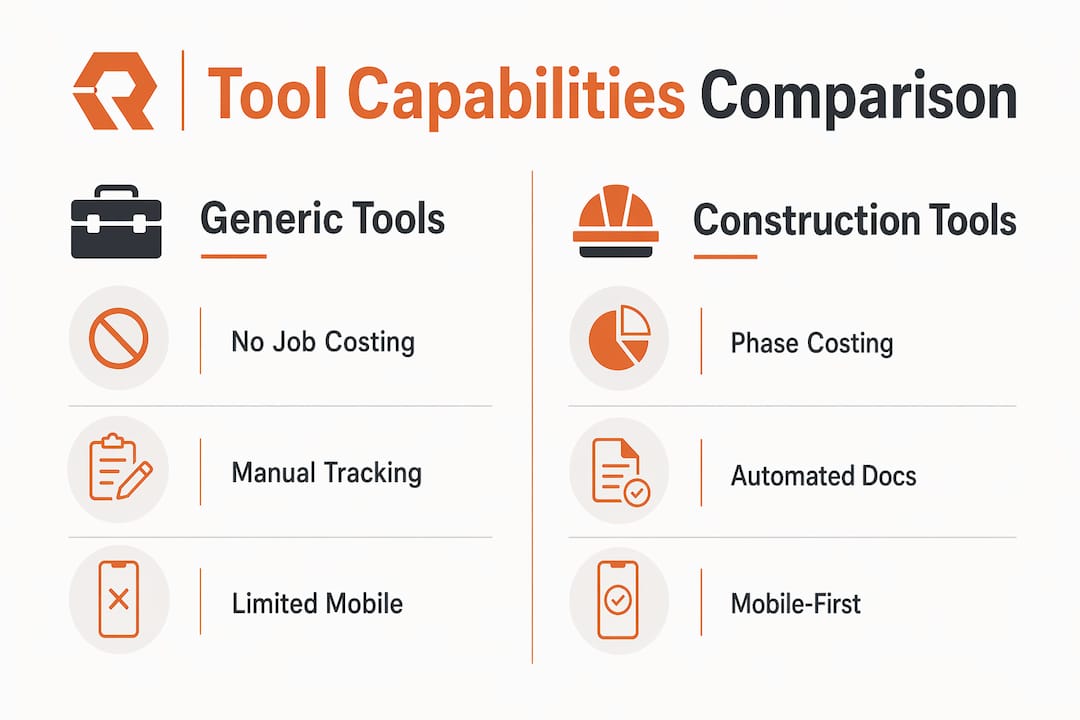
Generic off-the-shelf tools lack the construction workflows contractors depend on daily. Job costing, change order tracking, crew scheduling, and phase-based reporting are absent from standard business apps. The result is duplicated manual data entry at every stage, from estimate to invoice.

Contractors who rely on tools like QuickBooks alone or generic project management apps end up maintaining parallel spreadsheets to fill the gaps. That manual process introduces errors, delays approvals, and creates financial discrepancies that only show up at month-end when it is too late to course-correct. Contractors fail not from lack of effort but because their tools do not match the pace and complexity of construction work.
The table below shows the core capability gap between generic tools and construction-specific software.
| Feature | Generic tools | Construction-specific tools |
|---|---|---|
| Job costing by phase | Not available | Built in with cost codes |
| Change order management | Manual workaround | Automated tracking and approval |
| Crew scheduling | Basic calendar only | Location-based task assignment |
| Field documentation | File attachments | Plan-linked photo and video capture |
| Real-time cost forecasting | Not available | Live reforecast against budget |
| Mobile-first field access | Limited or desktop-only | Designed for crew use on site |
Field-first design is not optional. Mobile-first workflows with field reports, time tracking, and photos improve communication between crews and the office in ways desktop-centric tools cannot. A foreman who has to log into a laptop to update a task will not do it. A foreman who can tap a photo on a phone and attach it to a plan location will.
Pro Tip: Before selecting any construction software, test it on a mobile device in the field. If the interface requires more than three taps to log a task or upload a photo, your crew will find a workaround and your data will be incomplete.
How do specialized tools improve job profitability?
Real-time job cost visibility is the single biggest financial advantage construction-specific tools provide. Basic accounting software cannot automate job cost tracking, forecasting, or resource management the way a construction ERP system does. Delayed approvals and manual data entry cause financial discrepancies that erode margin on every project.
Construction ERP platforms like Penta and Viewpoint connect field labor, equipment, and material costs directly to the job cost ledger without manual entry. When a foreman logs hours against a cost code in the field, that data flows immediately to the project manager’s cost report. That speed matters because a cost overrun caught in week three is fixable. The same overrun caught in week ten is a loss.
The benefits of automating field-to-office workflows include:
- Faster approvals. Change orders routed digitally get approved in hours, not days, protecting cash flow.
- Accurate labor tracking. Crew time logged against specific cost codes eliminates timesheet guesswork and reduces payroll errors.
- Live budget vs. actual reporting. Project managers see real cost performance daily, not at month-end.
- Reduced manual errors. Consistent cost codes and change order structures baked into specialized software reduce the unreliable spreadsheet maintenance that generic tools require.
- Faster reforecasting. When scope changes, the system updates the cost-to-complete automatically rather than requiring a manual rebuild.
Integrated construction ERP software enables faster decisions, reduces errors, and improves financial control for growing contractors managing multiple projects simultaneously.
Pro Tip: Standardize your cost codes before you go live on any new construction software. Inconsistent codes across projects make job cost comparisons meaningless and undercut the reporting value you paid for.
Best practices for adopting construction tools on job sites
Adoption is where most construction software implementations fail. Field adoption is critical. Tools that require crews to chase updates or retype information on office-centric interfaces see poor usage and workarounds that undercut data completeness. The technology is only as good as the data your crew puts into it.
The most effective adoption strategy starts before you purchase. Involve your foremen and field supervisors in the selection process. They know what slows them down. A project manager selecting software without field input will almost always choose a tool optimized for the office, not the job site. That mismatch is the most common reason construction software fails to deliver its promised ROI.
Follow these steps to build a successful adoption plan:
- Identify field pain points first. Ask foremen what documentation tasks take the most time or cause the most errors. Let those answers drive your feature requirements.
- Pilot on one project. Run the new tool on a single active project before rolling it out company-wide. Real conditions reveal gaps that demos never show.
- Train in the field, not a conference room. Walk crews through the tool on an actual job site using real tasks. Abstract training sessions do not stick.
- Assign a field champion. Designate one experienced foreman per project as the go-to person for the new tool. Peer adoption is faster than top-down mandates.
- Start with the highest-friction task. If change order documentation is your biggest pain point, solve that first. A visible win builds crew confidence and speeds broader adoption.
Starting from the field perspective is critical. Foremen and crews need current plans, location-based task assignments, and easy documentation without phone calls. Tools that deliver that experience get used. Tools that do not get abandoned.
Key takeaways
Construction-specific tools reduce rework, improve job cost visibility, and increase profitability by replacing manual workarounds with workflows built for how construction actually operates.
| Point | Details |
|---|---|
| Rework costs are avoidable | Rework averages 5%–20% of project costs; real-time documentation catches errors before they compound. |
| Generic tools create data gaps | Off-the-shelf apps lack job costing, change orders, and crew scheduling, forcing manual workarounds. |
| Real-time cost visibility protects margin | Construction ERP connects field labor and materials to the cost ledger daily, not at month-end. |
| Field-first design drives adoption | Mobile-first tools get used by crews; office-centric interfaces get abandoned and data suffers. |
| Standardized cost codes improve reporting | Consistent data structures baked into specialized software reduce errors and make job comparisons reliable. |
What I have learned from 30 years of watching contractors choose the wrong tools
The contractors I have seen struggle most are not the ones who ignored technology. They are the ones who adopted the wrong technology and then blamed their crews when it did not work. A project manager at a mid-size commercial contractor once told me his team had tried three different project management platforms in four years. Every one of them failed. When I asked why, the answer was the same each time: the field crews stopped using it after the first month.
The problem was never the crews. The problem was that every tool was selected by someone who had not been on a job site in years. The interfaces were built for office workers. The workflows assumed a stable desk, a reliable internet connection, and a 40-hour week. None of those assumptions hold on a construction site.
The McKinsey estimate of $1.6 trillion in annual value lost to construction inefficiency is not an abstraction. I have watched it happen project by project, in the form of rework that could have been caught earlier, change orders that were never properly documented, and cost overruns that only showed up in the final accounting. Every one of those losses had a tool failure somewhere in the chain.
My advice is direct: prioritize integration over feature count. A tool that connects your field documentation to your cost codes and your cost codes to your invoices is worth more than a platform with 50 features that your crew ignores. The benefits of specialized tools compound over time when the data is clean and consistent. They erode just as fast when adoption breaks down.
Focus on the feedback loop. Get field data to the office faster. That single improvement will do more for your margins than any other change you can make.
— Rowena
How Highlevelcrm-rconstructionsolutions supports construction contractors
Highlevelcrm-rconstructionsolutions is built specifically for contractors, drawing on over 30 years of construction industry experience. It combines automated lead tracking, custom reporting dashboards, and workflow automation designed around construction project cycles, not generic business processes.
Contractors using Highlevelcrm-rconstructionsolutions report lead conversion rate increases of up to 35%, along with measurable reductions in project management time and administrative errors. The platform integrates with construction-specific tools to keep field and office data connected. You can explore the industries served to see how the CRM maps to your specific type of construction work. If you want a closer look at what the platform does, the CRM features and FAQs page covers the full capability set in plain language.
FAQ
What are construction-specific tools?
Construction-specific tools are software and equipment designed around construction workflows such as job costing, change order management, crew scheduling, and field documentation. They differ from generic business tools by addressing the pace, mobility, and complexity of active job sites.
Why do generic tools fail contractors?
Generic tools lack built-in construction workflows, forcing contractors to maintain manual spreadsheets and duplicate data entry. That gap creates financial discrepancies, delays approvals, and reduces job cost visibility at the times it matters most.
How much can rework cost on a construction project?
Rework averages 5%–20% of total project costs. On a $50M project, even a 5% rework rate represents $2.5M in avoidable costs that better documentation and real-time field reporting can prevent.
What makes construction software adoption succeed?
Field adoption succeeds when tools are mobile-first, require minimal steps to log tasks, and are selected with input from foremen and field crews. Office-centric tools consistently see low field usage and incomplete data.
How do construction-specific tools improve profitability?
Construction ERP and specialized field tools connect labor, materials, and change orders to live cost reports. That real-time visibility lets project managers catch overruns early and reforecast before losses become unrecoverable.