
Automated Lead Tracking for Contractors | High Level CRM - R. Construction Solutions
Automated lead tracking is the software-driven process of capturing, organizing, and routing prospect interactions across channels so your sales team always knows who to call next and when. For contractors and construction business owners, this means every inquiry from a website form, phone call, or email gets logged in your CRM without anyone typing a single note. The industry term for the broader practice is automated lead management, and it covers everything from data capture to follow-up scheduling. Automated systems gather website visits, email opens, and form submissions and route them in near real-time, giving your crew a fighting chance to respond before a competitor does.
What is automated lead tracking and how does it work?
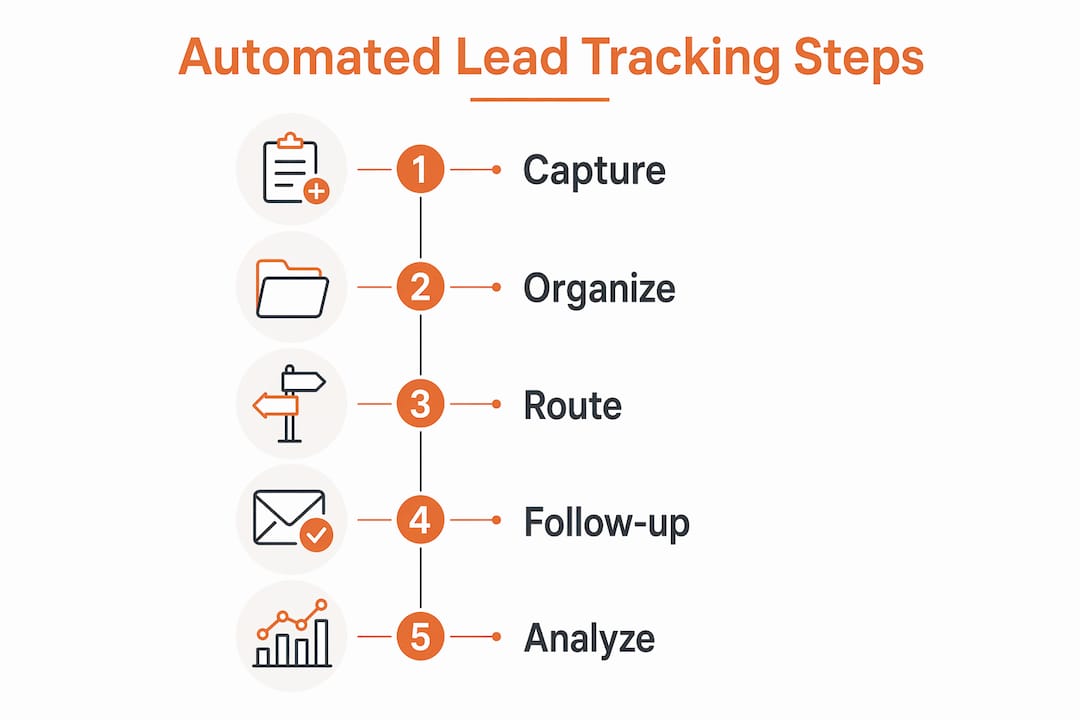
Automated lead tracking captures prospect data the moment someone interacts with your business and pushes that data into a CRM without manual input. The workflow has five distinct steps that happen in sequence, often within seconds of a lead taking action.
- Lead capture. A prospect fills out a contact form on your website, calls your office, or opens a marketing email. Each of these actions triggers a data event.
- Webhook trigger. The form submission fires a webhook, which is a real-time HTTP notification sent to your CRM or integration platform. Tools like Zapier or Make receive this signal and begin processing.
- Create or update logic. Before a new record is created, the system checks your CRM for an existing contact using the lead’s email address. Deduplication by email before CRM record creation prevents duplicate leads and protects data integrity. If the lead exists, the record updates. If a contact exists without a lead record, an activity gets logged. Only truly new prospects generate a new lead record.
- Owner assignment. The CRM applies routing rules to assign the lead to the right salesperson. Rules can be based on geography, project type, or a round-robin rotation across your team.
- Notification delivery. Your assigned rep receives an alert via Slack or email, often within 30 seconds of form submission, so follow-up happens while the lead is still warm.
One technical concept worth knowing is idempotency. Webhook providers sometimes retry failed deliveries, which can send the same lead data twice. Idempotent upsert logic with controlled retries prevents the same lead from being created twice, keeping your pipeline clean and your reporting accurate.
Pro Tip: Set up your CRM’s create-or-update logic before you connect any lead sources. Getting deduplication right from day one saves hours of cleanup later.

Why automated lead management pays off for construction businesses
Speed is the single biggest advantage of automated lead management, and the numbers behind it are striking. Responding to high-intent leads within 5 minutes produces 21 times higher qualification rates compared to waiting 30 minutes. That stat reflects a real behavioral pattern: a homeowner or project manager who just submitted a bid request is actively comparing contractors right now, not tomorrow morning.
The benefits go well beyond speed:
- Consistent follow-up. Automation removes the human tendency to forget. Stage-based follow-up sequences, like a 72-hour quote reminder after a site visit, keep leads moving through your pipeline without relying on anyone’s memory.
- Reduced errors. Manual data entry introduces typos, missed fields, and lost contacts. Automated capture eliminates those gaps entirely.
- Better forecasting. When every lead is logged and every stage transition is recorded, your pipeline data becomes reliable enough to plan crew schedules and material orders weeks in advance.
- More time selling. Your sales reps stop spending time on data entry and spend it on conversations that close jobs.
“The average B2B speed-to-lead response is about 42 hours. Contractors who automate notifications and routing cut that to under five minutes, turning a systemic weakness into a competitive advantage.”
Understanding the benefits of CRM for contractors becomes much clearer once you see how automation removes the friction between a new inquiry and a qualified conversation.
Common challenges when setting up a lead tracking system
Knowing how to track leads automatically is one thing. Getting the system to work reliably in production is another. These are the most common problems contractors run into.
- Duplicate records. Without proper deduplication, a lead who fills out two forms or calls and emails becomes two separate records. Your team ends up working the same prospect twice, or worse, sending conflicting messages. Effective deduplication uses CRM queries by email and other unique identifiers before any record is created.
- Webhook retry duplicates. When a webhook delivery fails and the provider retries, your system may process the same lead twice. Implementing idempotency keys solves this at the technical level.
- Poor field mapping. If your form fields do not map correctly to CRM fields, data gets lost or lands in the wrong place. A phone number stored as a note instead of a contact field means your notification goes out without the number your rep needs to call.
- Spam and invalid leads. Without validation rules, bots and test submissions pollute your pipeline. Add email format validation and honeypot fields to your forms to filter these out before they reach your CRM.
- Notification fatigue. If every minor lead interaction triggers an alert, your team starts ignoring notifications. Score leads first and only notify reps when a lead crosses a meaningful threshold.
Many of these issues trace back to the same root cause: setting up integrations before defining the rules. The CRM pitfalls contractors face most often involve skipping the planning stage and connecting tools before the logic is mapped out.
Pro Tip: Build a simple lead flow diagram on paper before touching any software. Map every source, every rule, and every notification. You will catch problems in five minutes that would otherwise take five weeks to find in production.
How to implement automated lead tracking step by step
Getting your automated sales tracking system running does not require a developer. Most contractors can set this up using a CRM like HubSpot, Highlevelcrm-rconstructionsolutions, or a platform like Leadfeeder for website visitor identification. Follow these steps in order.
- Choose your CRM. Select a platform built for your workflow. Generic CRMs require heavy customization. Construction-specific platforms like Highlevelcrm-rconstructionsolutions include pipeline stages and notification templates already configured for the industry. Review the construction CRM buyer’s checklist before committing to any platform.
- Connect your lead sources. Link your website contact forms, Google Business Profile, and any paid ad landing pages to your CRM using webhooks or native integrations. Each source should feed into the same deduplication logic.
- Configure create-or-update logic. Set your CRM to check for existing records by email before creating anything new. Define what happens for each scenario: new lead, existing lead, and existing contact without a lead record.
- Set owner assignment rules. Decide how leads get distributed. Geography works well for contractors covering multiple service areas. Project type works well if you have specialists for commercial versus residential work.
- Set up notification channels. Route alerts to Slack, email, or SMS based on lead priority. High-intent leads from paid ads warrant immediate SMS alerts. Lower-intent organic leads can go to a daily digest.
- Add lead scoring over time. Once your basic capture and routing works, layer in scoring. Assign points for actions like visiting your pricing page, opening two emails, or requesting a quote. Notify reps only when a score threshold is crossed.
Here is a comparison of three platforms commonly used by contractors:
| Platform | Best for | Construction-specific features |
|---|---|---|
| HubSpot | Mid-size contractors with marketing teams | Pipeline automation, email sequences, reporting |
| Leadfeeder | Identifying anonymous website visitors | Website visitor identification, CRM sync |
| Highlevelcrm-rconstructionsolutions | Contractors needing industry-built workflows | Pre-built construction pipelines, automated follow-ups, custom dashboards |
Automating fundamental tasks like lead capture and timely follow-up first builds the foundation for CRM adoption. Add analytics and scoring only after the basics run without issues.
Key takeaways
Automated lead tracking works because speed, consistency, and clean data together determine which contractor wins the job.
| Point | Details |
|---|---|
| Speed drives qualification | Responding within 5 minutes produces 21x higher qualification rates than waiting 30 minutes. |
| Deduplication is non-negotiable | Check by email before creating any CRM record to keep your pipeline clean and reporting accurate. |
| Automate basics first | Set up capture, routing, and notifications before adding scoring or analytics. |
| Idempotency prevents duplicates | Use idempotency keys to stop webhook retries from creating double records. |
| Construction-specific tools win | Platforms built for contractors reduce setup time and include relevant pipeline stages out of the box. |
What I have learned after watching contractors automate their pipelines
I have seen contractors set up elaborate lead scoring models before they had a single reliable notification firing. The result is always the same: the system looks impressive in a demo and falls apart in week two. The contractors who get real results start with one rule. One source. One notification. They confirm it works, then add the next layer.
The other mistake I see constantly is treating automation as a replacement for relationships. A 30-second Slack notification is not a sales call. It is a prompt to make one. The automation gets your rep to the phone faster. The rep still has to earn the job. Contractors who forget this build pipelines full of leads that never convert because no one actually talked to the customer.
Stage-based task automation is where the real efficiency lives, and most contractors never get there because they burn out on setup before reaching it. A task that fires automatically when a quote goes out, reminding the rep to follow up in 72 hours, is worth more than any lead scoring algorithm. It is simple, it is reliable, and it directly prevents revenue from slipping through the cracks.
Review your automation rules every 90 days. Lead sources change, team structures change, and rules that made sense in January may be routing leads to the wrong person by April. Treat your automation like a job site: inspect it regularly and fix problems before they become expensive.
— Rowena
See how Highlevelcrm-rconstructionsolutions handles this for you
Highlevelcrm-rconstructionsolutions is built specifically for contractors, with over 30 years of construction industry experience baked into every feature. The platform includes pre-configured pipeline stages for construction workflows, automated deduplication, Slack and email notifications, and stage-based follow-up sequences that fire without any manual setup. You do not need to hire a developer or spend weeks configuring a generic CRM to get these results. Explore the full CRM feature set to see exactly how the automation is configured, or visit Highlevelcrm-rconstructionsolutions to see how contractors are using it to improve lead conversion rates today.
FAQ
What is automated lead tracking in simple terms?
Automated lead tracking is the process of using software to capture prospect interactions, log them in a CRM, and route them to the right salesperson without manual data entry. It replaces spreadsheets and sticky notes with a system that works around the clock.
How fast should contractors respond to new leads?
Responding within 5 minutes produces 21 times higher qualification rates compared to a 30-minute response. Automated notifications make sub-5-minute responses achievable even for small teams.
What causes duplicate leads in a CRM?
Duplicate leads occur when a CRM creates a new record instead of updating an existing one, or when webhook retries send the same data twice. Deduplication logic that checks by email address before record creation solves the first problem. Idempotency keys solve the second.
Do I need technical skills to set up automated lead tracking?
Most modern CRM platforms, including HubSpot and Highlevelcrm-rconstructionsolutions, offer no-code workflow builders that handle form connections, routing rules, and notifications without writing any code. Construction-specific platforms reduce setup time further by including pre-built templates.
What is the difference between lead tracking and lead scoring?
Lead tracking records what a prospect does and where they are in your pipeline. Lead scoring assigns a numeric value to those actions to rank leads by purchase intent. Tracking comes first. Scoring is a layer you add once your capture and routing system works reliably.