

Build a Consultant Intake Workflow for Construction
A consultant intake workflow in construction is a structured process that captures, qualifies, and routes client project requests to ensure timely, accurate, and consistent project management. Without it, your team wastes estimator hours on unqualified leads, misses follow-up windows, and loses projects to firms that respond faster. The industry term for this process is “client intake management,” and when you build a consultant intake workflow for construction specifically, you align that management system with the realities of scope complexity, budget gatekeeping, and multi-stakeholder approvals that define construction projects.
What are the essential components to build a consultant intake workflow in construction?
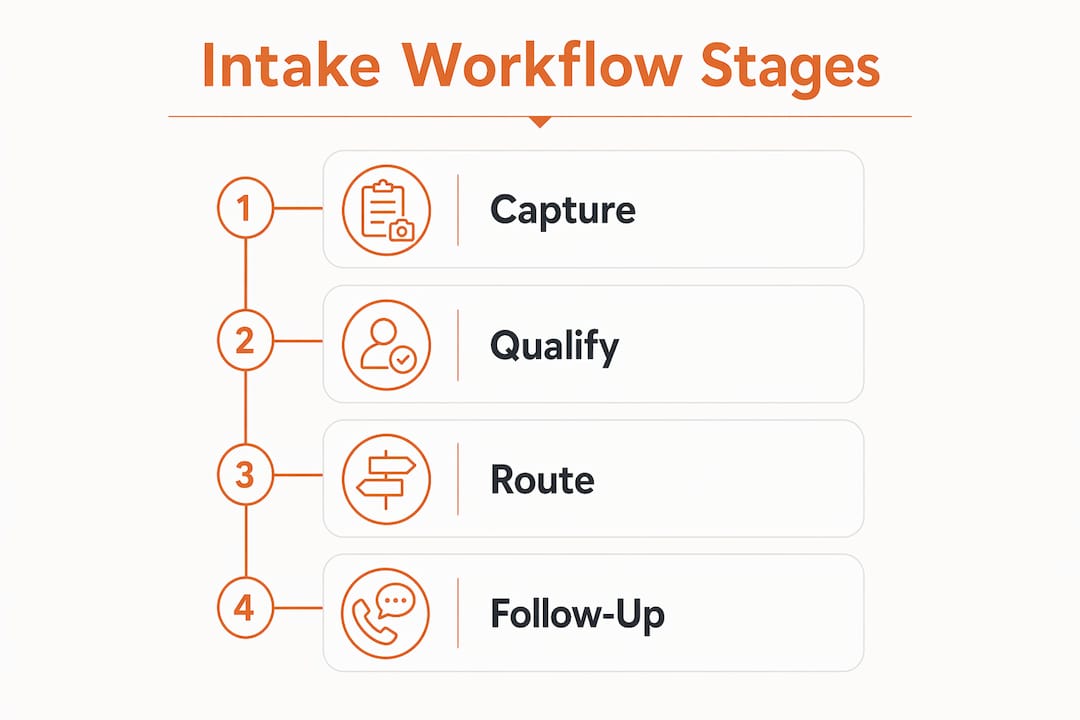
Every effective intake workflow runs through four core stages: capture, qualification, routing, and follow-up. Each stage has a defined trigger, a clear output, and a designated owner. Skipping any stage creates gaps that cost you qualified projects.

Core intake fields for construction projects
Your intake form must collect more than a name and phone number. Construction projects require specific data points to qualify and route correctly:
- Project type (new build, renovation, commercial, residential, infrastructure)
- Estimated budget range and funding source
- Timeline and desired start date
- Decision authority (is the contact the final approver?)
- Site location and zoning status
- Scope description in the client’s own words
A 3-stage vetting form filters out up to 70% of unsuitable project inquiries before estimator time is spent. That number matters because estimator time is your most expensive pre-contract resource.
Technology stack for construction intake
The right tools connect your form to your CRM, your CRM to your calendar, and your calendar to your project management system. Here is how the layers break down:
| Feature category | What it does |
|---|---|
| Intake form builder | Captures structured project data from new leads |
| CRM integration | Stores records, triggers follow-up, and tracks lead status |
| Workflow automation | Routes leads, sends confirmations, and assigns tasks |
| AI-assisted classification | Flags urgent, high-value, or out-of-scope inquiries |
| Calendar scheduling | Books kickoff calls only after intake is complete |
Integrating a CRM with your intake system reduces manual first-contact effort by 80%, freeing your team to focus on high-probability project closes. That reduction comes from automating acknowledgment messages, document requests, and follow-up sequences that would otherwise require staff time.
Pro Tip: Choose a CRM built for construction, not a generic sales tool. Construction-specific platforms handle project-based records, trade categories, and site-level data in ways that generic tools cannot.
How do you design and implement a step-by-step consultant intake workflow?
Implementation works best when you treat the workflow as a repeatable operating system, not a one-time setup. Each stage needs a trigger, defined outputs, and a designated owner to stay consistent at scale.
Step-by-step implementation
- Design your intake form. Use conditional logic so the form only shows relevant fields based on project type. Forms exceeding 10–12 fields on desktop see significant drop-off, so keep it focused.
- Set up automated acknowledgment. The moment a form is submitted, your system sends a confirmation with next steps. This sets expectations and reduces inbound calls asking “did you get my request?”
- Apply qualification scoring. Assign point values to budget range, timeline, and decision authority. Leads above a threshold move forward automatically; those below get a nurture sequence.
- Build routing rules. Route commercial projects to your commercial estimator, residential to your residential team, and flagged urgent leads to a senior reviewer.
- Gate the kickoff call. Intake completion must be a hard gate before scheduling any kickoff meeting. This prevents logistics-only calls that waste everyone’s time.
- Schedule the kickoff with a structured agenda. Effective consulting kickoff meetings run 60–90 minutes and cover introductions, scope recap, intake review, priority alignment, and next steps. Send the agenda at least 8 hours before the call.
- Sync to your CRM and project management tool. Every completed intake record should auto-create a CRM contact, a project folder, and an estimator task.
Common routing criteria for construction intake
| Lead signal | Routing action |
|---|---|
| Budget over $500,000 | Assign to senior estimator, flag for principal review |
| Timeline under 30 days | Mark urgent, trigger same-day human review |
| Out-of-service-area location | Auto-reply with referral message |
| Incomplete scope description | Send follow-up form before routing |
Pro Tip: Map your routing rules on a whiteboard before building them in your CRM. Visual mapping catches logic gaps that are expensive to fix after launch.
Key mistakes to avoid during rollout
Launching without testing your conditional logic is the most common error. Run 10–15 test submissions covering every project type before going live. Also avoid routing all leads to one person. Single-point routing creates bottlenecks and delays that undo the efficiency gains from automation.
How do you optimize a construction intake workflow for better efficiency?
Optimization means reducing friction at every stage without removing the human judgment that protects your reputation. Most construction firms mistakenly try to automate the entire intake process, but AI should collect facts and route leads, not make final decisions on high-value or sensitive inquiries.
Automation opportunities and limits
Automating bid intake, estimate generation, and proposal assembly can reduce proposal turnaround from 3–5 days to 4–8 hours for standard projects. That speed advantage directly affects win rates on competitive bids. However, automation works best on low-judgment tasks. Final responses on complex or urgent leads should always trigger a manual review step.
Here are the highest-value optimization moves for your intake process:
- Add conditional logic to your form. Show only the fields relevant to the selected project type. This cuts form length by 30–40% for most respondents.
- Automate follow-up sequences. If a lead submits a form but does not book a call within 48 hours, trigger a reminder sequence. Automated follow-up keeps warm leads from going cold.
- Build a human review buffer. Flag any lead mentioning tight timelines, large budgets, or unusual scope for manual review before any automated response goes out.
- Sync intake data to your CRM in real time. A well-designed intake workflow creates cleaner CRM records, improves routing accuracy, and speeds up follow-up task creation.
- Review your disqualification rate monthly. If more than 70% of leads are being filtered out, your form may be too restrictive or your marketing is reaching the wrong audience.
Pro Tip: Set a calendar reminder to audit your intake workflow every 90 days. Forms go stale, routing rules break, and CRM fields drift out of sync faster than most teams expect.
For firms working with IT consultants or specialty subcontractors, a structured onboarding approach that mirrors your intake process helps maintain consistency across different trade categories.
What are common challenges when building a construction intake workflow?
The most frequent failure is vague scope submissions. Clients often do not know how to describe their project in the terms your estimators need. Your form must ask specific questions that guide them, not open-ended fields that invite one-sentence answers.
Common failure modes and fixes
- Unqualified leads clogging the pipeline. Fix this by tightening your qualification scoring and adding a minimum budget field. If a project does not meet your minimum, the form should say so immediately.
- Urgent project flags being missed. Build a dedicated routing rule for any submission that mentions a start date within 30 days. That lead should reach a human within two hours, not sit in a queue.
- Intake data not reaching the right CRM fields. Map every form field to a specific CRM property before launch. Unmapped fields create orphaned data that no one acts on.
- Low form completion rates. Structured intake forms with conditional logic reduce drop-off significantly. Forms that show all fields at once overwhelm respondents and drive abandonment.
- Kickoff calls happening before intake is complete. This is a process discipline issue, not a technology issue. Make intake completion a non-negotiable prerequisite in your team’s operating procedures.
Maintaining data integrity requires regular audits. Assign one person to own the intake workflow and review it monthly. Without clear ownership, small errors accumulate into systemic problems.
Pro Tip: Create a shared intake review log where your team notes every time a lead slips through with missing data. Patterns in that log tell you exactly where your form needs to be tightened.
Key Takeaways
A structured consultant intake workflow in construction reduces wasted estimator time, improves lead quality, and creates consistent client experiences when each stage has a clear owner, trigger, and output.
| Point | Details |
|---|---|
| Gate kickoff calls on intake completion | Never schedule a kickoff meeting until the intake form is fully submitted and reviewed. |
| Use a 3-stage qualification form | A structured vetting form filters out unsuitable leads before estimator time is spent. |
| Automate with human review buffers | Let automation handle routing and acknowledgment; keep humans in the loop for high-value leads. |
| Sync intake data to your CRM in real time | Clean CRM records improve routing accuracy and speed up follow-up task creation. |
| Audit your workflow every 90 days | Forms, routing rules, and CRM fields drift out of sync and need regular review to stay effective. |
What I have learned from building intake workflows in construction
The biggest mistake I see construction firms make is treating intake as a form, not a system. A form is a data collection tool. A system is a repeatable process with owners, triggers, and defined outputs at every stage. The difference shows up immediately in how your team handles volume. A form breaks under pressure. A system scales.
The second thing I have learned is that automation earns trust slowly. Your team will resist handing off lead decisions to a workflow they do not understand. The fix is transparency. Show your estimators exactly what the routing rules are and why. When they see that the system filters out the time-wasters and flags the urgent opportunities, they become advocates instead of skeptics.
The construction firms gaining the most ground right now are the ones treating consultant onboarding as a competitive advantage, not an administrative task. When your intake process is faster and cleaner than your competitors’, you win projects before the estimate is even submitted.
— Rowena
How Highlevelcrm-rconstructionsolutions supports your intake workflow
Highlevelcrm-rconstructionsolutions was built with over 30 years of construction industry experience behind it. That background shows up in features that generic CRMs simply do not offer: automated lead tracking tied to project type, custom reporting dashboards that reflect how construction firms actually measure performance, and workflow automation that connects intake forms to estimator queues without manual data entry.
Contractors using Highlevelcrm-rconstructionsolutions report lead conversion rate increases of up to 35%, with significant reductions in project management time and errors. The platform integrates with construction-specific tools and handles the intake-to-kickoff sequence that this article describes. Visit the industries we serve page to see how Highlevelcrm-rconstructionsolutions supports construction firms at every stage of the client intake process.
FAQ
What is a consultant intake workflow in construction?
A consultant intake workflow is a structured process that captures, qualifies, and routes new project inquiries from clients to the right team members. It replaces ad hoc email chains and phone calls with a repeatable system that produces consistent results.
How many stages should a construction intake workflow have?
Most effective construction intake workflows use four stages: capture, qualification, routing, and follow-up. Each stage needs a defined trigger and a designated owner to function reliably.
When should a kickoff call be scheduled after intake?
A kickoff call should only be scheduled after the intake questionnaire is fully completed and reviewed. Scheduling before intake is done produces logistics-only meetings that waste time for both parties.
How does conditional logic improve intake forms?
Conditional logic shows respondents only the fields relevant to their project type, reducing form length and drop-off rates. Forms that display all fields at once see significantly higher abandonment, especially on mobile devices.
What role does a CRM play in a construction intake workflow?
A CRM stores intake records, triggers automated follow-up sequences, and routes leads to the right estimator or team. CRM integration is the connective layer that turns a standalone form into a full intake management system.

