Commercial Construction Software: A Guide for Contractors | High Level CRM - R. Construction
Commercial construction software is a centralized platform that connects every workflow in a commercial building project, from bidding and budgeting to field reports and document control, inside a single system. Contractors and construction managers use it to replace disconnected spreadsheets, email chains, and paper logs with one source of truth. Platforms like Autodesk Construction Cloud, Fieldwire, and ConstructConnect are built specifically for the complexity of commercial work. Understanding what is commercial construction software means understanding how it links your office team to your field crew in real time, and why that connection determines whether a project finishes on time and on budget.
What is commercial construction software and what does it actually do?
Commercial construction software centralizes workflows including project documentation, daily reporting, scheduling, budgeting, checklists, and team collaboration. The industry term for this category is construction management software, though contractors often search for it by its commercial application. It goes well beyond basic task tracking. Its core purpose is to connect data across the entire project lifecycle so that nothing falls through the cracks between the office and the field.
The platform acts as a single up-to-date source for every piece of project information. A project manager in Chicago can review a subcontractor’s daily report the moment it is submitted from a job site in the suburbs. A field supervisor can pull the latest drawing revision on a mobile device without calling the office. That kind of real-time access is what separates purpose-built construction management software from generic tools like spreadsheets or standard project management apps.

Commercial projects involve dozens of trades, thousands of documents, and budgets that shift daily. Generic project management tools were not designed for that environment. Construction management software handles version control across thousands of drawings, tracks RFIs and submittals, and links every field event to a budget line. That specificity is why Chicago construction firms and contractors across the country are moving away from patchwork systems toward integrated platforms.
How does commercial construction software improve project management?
The biggest efficiency gain comes from connecting field data directly to office decisions. Field observations automatically trigger scheduling updates, accountability prompts, and communication flows without manual repeated steps. A weather delay logged in a daily report, for example, can automatically push successor tasks in the schedule and notify the affected subcontractors. That automation alone eliminates hours of manual coordination every week.
Here is what strong commercial construction tools deliver for project management:
- Real-time document access: Field teams always work from the current drawing set. Mobile-first platforms like Fieldwire support offline use so crews are never stuck waiting for a signal to pull up a plan.
- Version-tracked document control: Version control across thousands of drawings prevents costly rework caused by crews building from outdated sheets.
- Automated RFI and submittal tracking: Every request for information is logged, assigned, and tracked to resolution without a separate email thread.
- Budget-linked field data: Change orders, daily reports, and material deliveries connect directly to the project budget so cost overruns surface early.
- Centralized daily reporting: Foremen submit reports from the field, and project managers see labor, equipment, and progress data the same day.
Pro Tip: Set up your daily report template before the project starts. Pre-built fields for weather, crew count, and work completed make field adoption faster and give you cleaner data for budget reconciliation later.
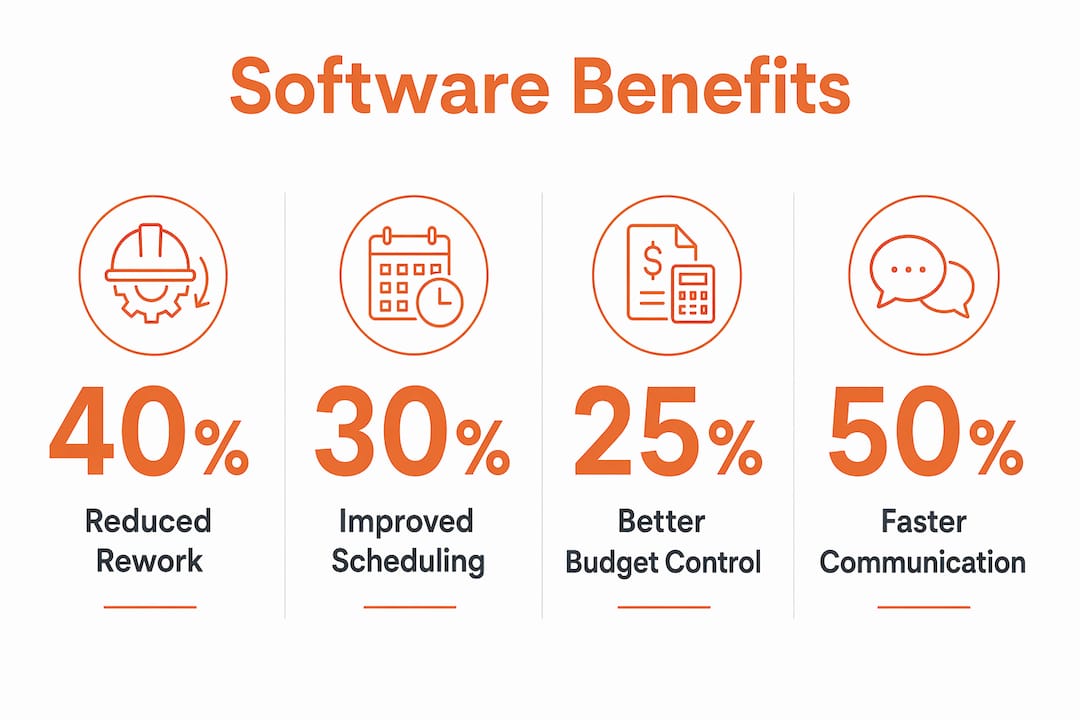
The reduction in rework is the most measurable benefit. When field teams work from current documents and office teams see real-time field data, the gap between what was planned and what was built shrinks significantly.
What role does bidding software play within commercial construction platforms?
Bidding software manages the entire preconstruction workflow inside one platform. Construction bidding software handles finding bid opportunities, reviewing project documents, submitting proposals, and tracking results. Both general contractors and subcontractors use it to manage their pipeline without losing bids in an inbox or a spreadsheet tab.
The practical workflow looks like this for most commercial contractors:
- Find opportunities: The platform surfaces relevant bid invitations based on your trade, geography, and project type. ConstructConnect Project Intelligence, for example, matches opportunities to contractor profiles automatically.
- Review documents: All bid documents, drawings, and addenda live in one place. You never hunt through email attachments for the latest revision.
- Build and submit proposals: Estimating tools inside the platform connect directly to your proposal so pricing errors from manual reentry are eliminated.
- Track bid outcomes: Win rates, bid volume, and follow-up tasks are visible in a dashboard rather than scattered across a project manager’s notes.
- Feed data into execution: When you win a bid, the cost codes and scope data move directly into the job budget without rebuilding them from scratch.
Bidding software replaces spreadsheets and email chains with centralized bid and document management. That shift matters most during busy bid seasons when a general contractor may be tracking 20 or more active opportunities simultaneously. Missing an addendum or submitting a proposal to the wrong contact is the kind of error that costs real money. A centralized platform makes those errors far less likely.
How does commercial construction software connect office and field operations?
The office-to-field connection is where most contractors see the biggest return. Integrating field execution data including RFIs, submittals, and daily reports with office administration including budgets, schedules, and documents reduces rework and eliminates manual reentry. Without that integration, the same data gets entered twice: once in the field and once in the office. Every duplicate entry is a chance for an error.
The table below shows how integrated platforms compare to disconnected tools on key workflow points:
| Workflow | Disconnected tools | Integrated platform |
|---|---|---|
| Drawing updates | Emailed PDFs, version confusion | Version-tracked, mobile access, auto-distributed |
| Change orders | Manual spreadsheet, delayed approval | Linked to budget, tracked to approval in real time |
| Daily reports | Paper or email, office reentry required | Submitted from field, auto-linked to schedule and budget |
| RFI tracking | Email thread, no audit trail | Logged, assigned, tracked to resolution with full history |
| Budget updates | End-of-week reconciliation | Live cost data updated as field events are recorded |
Front-end integration from estimating through execution is the key to maximizing software benefits. When cost codes from your bid flow directly into your job budget, you avoid running parallel cost versions that never quite match. That alignment between what you estimated and what you are tracking in the field is what gives project managers accurate data to make decisions.
Pro Tip: Map your cost codes during preconstruction, before the project starts. If your bid data and your budget use different code structures, you will spend the entire project reconciling two systems instead of managing the work.
What are the key features to look for when choosing construction software?
Choosing the right platform starts with understanding your workflow gaps. The best construction management software for your firm depends on your company size, project complexity, and where your current process breaks down most often.
- Bidding-to-execution integration: Bid and estimating data flowing into job budgeting avoids discrepancies and keeps your cost tracking accurate from day one. If your bidding tool and your project management tool do not talk to each other, you are creating manual work.
- Mobile-first design: Field teams need real-time document access with offline capability. A platform that only works well on a desktop will not get used in the field, which defeats the purpose.
- Data integration across tools: Treating software as a connected data strategy rather than isolated tools produces better outcomes. Buying five disconnected apps that do not share data is not a technology upgrade. It is a more expensive version of the same problem.
- Scalability: Your platform should handle a two-person office and a 50-person field crew equally well. Firms that outgrow their software mid-project face painful migrations.
- Customization: Commercial projects vary widely. Look for platforms that let you configure workflows, report templates, and approval chains to match how your firm actually operates.
The adoption challenge is real and often underestimated. Successful technology adoption requires leadership buy-in and a strategic rollout plan. Firms that buy software without treating the rollout as a change management effort end up with inconsistent usage and none of the efficiency gains they paid for. The platform is only as good as the data your team puts into it. That means training, accountability, and a clear process for how the tool fits into daily work.
You can review construction software alternatives to compare how different platforms handle these features before committing to a purchase.
Key takeaways
Commercial construction software delivers its full value only when it connects bidding, field operations, and office administration inside a single integrated system rather than a collection of separate tools.
| Point | Details |
|---|---|
| Centralized workflows | One platform manages documents, budgets, schedules, RFIs, and field reports without manual reentry. |
| Bidding integration | Bid data and cost codes should flow directly into job budgets to prevent parallel cost versions. |
| Mobile field access | Field teams need offline-capable, mobile-first tools to work from current documents at all times. |
| Adoption requires leadership | Software rollouts fail without a strategic plan and visible commitment from firm leadership. |
| Data strategy over tools | Firms see the best return when they treat software as a connected data strategy, not isolated apps. |
What I have learned after watching firms adopt construction software
Watching contractors adopt construction management software over many years, the pattern that stands out most is this: the firms that get the most out of their platform are the ones that treat it as a process change, not a software purchase. They redesign their workflows around the tool. The firms that struggle buy the software, run a two-hour training session, and then wonder why their field crews are still texting photos of drawings.
The other thing most articles miss is the data lag problem. The real cost of disconnected systems is not the time spent on double entry. It is the decisions made on stale data. A project manager who does not see a cost overrun until Friday’s spreadsheet reconciliation has already lost four days of response time. An integrated platform surfaces that overrun the moment the field event is recorded. That is not a minor efficiency gain. That is the difference between catching a problem and inheriting one.
My honest advice: before you evaluate any platform, write down the three places in your current workflow where information gets lost or delayed. Then evaluate software against those specific gaps. Generic feature lists will not tell you what you need to know. Your own workflow will.
For contractors looking at automated lead tracking as part of a broader operations upgrade, the same principle applies. Fix the workflow first, then find the tool that fits it.
— Rowena
How Highlevelcrm-rconstructionsolutions supports your construction operations
Highlevelcrm-rconstructionsolutions was built with over 30 years of construction industry experience, which means it addresses the specific gaps contractors face rather than adapting a generic CRM to fit construction workflows.
The platform combines automated lead tracking, custom reporting dashboards, and workflow automation designed for how construction firms actually operate. Contractors using Highlevelcrm-rconstructionsolutions report lead conversion rate increases of up to 35%, driven by better follow-up and centralized bid and client management. If you are evaluating your options, the CRM features and FAQs page gives you a detailed breakdown of what the platform covers and how it fits into a commercial construction operation. You can also review the industries served to see how the platform applies to your specific sector.
FAQ
What is commercial construction software used for?
Commercial construction software manages project documentation, budgeting, scheduling, bidding, field reporting, and team collaboration inside one platform. It connects office administration with field execution to reduce manual work and prevent data errors.
How is construction management software different from generic project management tools?
Construction management software handles version-tracked drawings, RFIs, submittals, change orders, and bid management. Generic tools like standard project apps were not built for those workflows and lack the field-specific features commercial contractors need.
What should I look for when choosing construction software for my firm?
Prioritize bidding-to-execution integration, mobile offline access for field teams, and a platform that connects your cost codes from estimating through job budgeting. Leadership buy-in and a clear rollout plan are as important as the features themselves.
Can construction software help with bidding as well as project execution?
Yes. Platforms like ConstructConnect manage the full preconstruction workflow from finding bid opportunities to submitting proposals and tracking outcomes. The best platforms then carry that bid data directly into project budgets when you win the work.
Why do Chicago construction firms specifically benefit from construction management software?
Chicago commercial projects involve complex permitting, multiple trades, and tight schedules that create high coordination demands. Software that centralizes documents, tracks RFIs in real time, and connects field crews to office teams reduces the coordination failures that cause delays and cost overruns on large urban builds.

