CRM for Small Contractors Your Crew Will Use and Lowers Your Costs
The best move for most small contractors right now is a construction-aware CRM built for mobile field use, not a generic sales tool or a spreadsheet stretched past its limits. A platform your crew opens on a phone drives adoption, and adoption is what actually recovers lost leads and rework hours. Purpose-built options address that pairing directly: mobile capture, bid tracking, and automated lead follow-up in one system.
TL;DR:
- Construction-specific CRMs with strong mobile offline support and bid-to-build workflow features are crucial for small contractors to improve lead follow-up and project management.
- Key features to prioritize include mobile data capture with photos and signatures, change-order tracking, crew scheduling with certifications, and real-time accounting integration.
- Pricing typically ranges from $15 to $50 per user monthly for small-business-friendly platforms, with higher costs for all-in-one trade-specific solutions.
- Successful CRM rollout depends on a narrow pilot with clear ownership, simple data entry rules, and integration of lead sources into a single inbox.
- Small firms should consider spreadsheets under five users, off-the-shelf CRMs for five to 30 users, and only opt for custom builds when workflows are highly unique and scalable.
Table of Contents
- How Do You Choose a CRM for Small Contractors?
- Which Features Actually Matter for Contractor Workflows?
- What Does a Contractor CRM Actually Cost?
- How Do You Roll Out a CRM Your Crews Will Actually Use?
- Spreadsheet, Off-the-Shelf CRM, or Custom Build?
- What Results Are Contractors Actually Seeing?
- What a Practitioner’s Eye Sees That Vendor Pitches Miss
- Get Started With a Construction-Built CRM
- Sources
How Do You Choose a CRM for Small Contractors?
Start by naming the job you actually need done. A contractor who only wants to stop losing leads in a text-message pile needs something different than one running a full bid-to-build pipeline with change orders and crew schedules. Picking features before you’ve answered that question is how small firms end up paying for modules nobody opens.
Once you know the job, run your shortlist through a checklist built for how construction actually works, not how a generic sales team sells:
- Mobile app quality. Does it work on a real jobsite connection, not just office WiFi?
- Lead capture sources. Can it pull from your website, phone calls, and referral forms automatically?
- Pipeline stages matching your bid workflow. Generic “lead, contact, deal” stages don’t map to bid, contract, permit, build, punch list.
- Change-order logging. Can changes tie back to the original scope and cost, with a paper trail?
- Crew scheduling. Does it handle certifications, skills, and availability, not just a shared calendar?
- Accounting integration. Does it talk to QuickBooks Online or Xero without a manual export?
- Offline support. What happens when a foreman loses signal mid-inspection?
- User permissions. Can you limit what a subcontractor or new hire sees and edits?
- Data export and ownership. Can you get your leads and job history out if you switch tools later?
Before you sit through a single demo, get specific about size: how many total users, how many of those are mobile-only field users, how many active jobs run at once, and how many other tools need to connect. A five-person residential remodeler and a twenty-person commercial GC need completely different pricing tiers and support levels, even if they’re comparing the same three vendors.
Watch for red flags during trials. Long onboarding timelines (anything stretching past a few weeks for a small team) usually signal a tool built for enterprise IT departments, not job sites. Per-seat pricing that balloons once you add “power user” tiers is common and often buried in fine print. Clunky mobile experiences that make a foreman tap through six screens to log a photo will get abandoned within a month. And export restrictions that lock your data into a proprietary format are a sign the vendor is betting on you never leaving.
Pro Tip: Run your trial with the person who resists new software the most, not your most tech-savvy office manager. If they can log a change order from their truck without calling you for help, the tool has passed the real test.
Small teams should pick the CRM their crew will actually use over the one with the longest feature list, and firm size should shape which features matter most, according to Capsule’s sizing guidance for construction buyers.
Which Features Actually Matter for Contractor Workflows?
Feature lists look identical on paper until you’re standing in a driveway with a client waiting on a change order. Here’s what actually changes daily work:
- Mobile data capture with photos, annotations, and signatures. Speed matters more than polish. A crew member should be able to snap a photo, mark it up, and get a signature in under 30 seconds, not navigate a multi-step wizard.
- Bid and estimate templates with version control and e-signatures. When a client asks “which version did we send them,” you need an answer in seconds, not an email search.
- Change-order tracking tied to original scope and cost. This is the single feature that separates construction CRMs from generic sales tools. Without it, cost creep hides until the final invoice.
- Crew scheduling with rules for certifications, skills, and availability. Assigning an electrician-certified worker to a job that legally requires one shouldn’t rely on a supervisor’s memory.
- Job costing or a real accounting integration. A live connection to QuickBooks Online or Xero beats a “basic reporting” feature that dies at tax time.
- Automated follow-ups and lead-source attribution. Knowing that 40% of your booked jobs came from one referral partner changes where you spend marketing dollars.
Generic CRMs consistently miss the middle three items on that list, which is exactly why they fail contractors once a project moves past the initial quote. A CRM without change-order tracking forces someone into a spreadsheet anyway, which defeats the purpose of buying software at all. Trade-specific fit matters too: what a roofing crew needs differs from what a commercial remodeler needs, so weigh your trade’s actual workflow, not a vendor’s generic case study.
What Does a Contractor CRM Actually Cost?
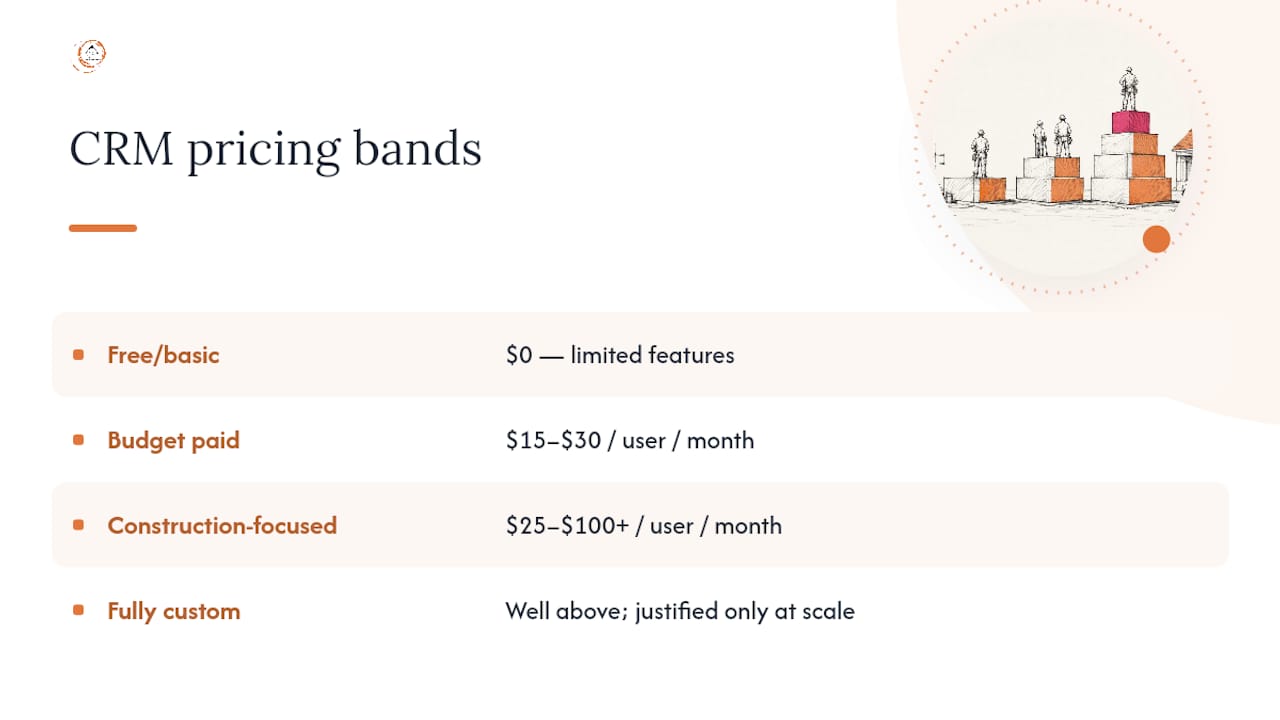
Pricing splits into four rough bands, and knowing which one you’re shopping in prevents sticker shock mid-negotiation.
Free or basic tiers cost nothing but usually cap users, contacts, or automation. Budget paid CRMs run $15 to $30 per user per month and cover core pipeline and contact management without construction-specific extras. Construction-focused, all-in-one platforms run $25 to $100 or more per user per month, but they often replace three or four separate tools (estimating, scheduling, basic accounting sync) at once. Fully custom builds sit well above that, justified only at real scale.
A simple formula covers most cases: (monthly cost per user × number of users × 24 months) + onboarding fee + integration setup + data migration + training time.
Roundups of small-business CRM options confirm the $15 to $50 per user per month range as typical for solid general-purpose tools, with construction-specific all-in-one platforms priced higher because they replace more of your existing stack. The tradeoff with free tiers is real: they cost nothing upfront but usually lack change-order tracking, crew scheduling, or reliable mobile offline support, and migrating off them later costs more time than it saved.
How Do You Roll Out a CRM Your Crews Will Actually Use?
A CRM that works flawlessly in the office and falls apart on a jobsite is worse than no CRM at all, because you’ll pay for it while your team quietly goes back to text messages. Test mobile performance on the actual cellular signal your crews get at real job sites, not the office WiFi you demoed it on. Confirm what happens when connectivity drops. Some tools queue data locally and sync later; others just lose it.
Integration priorities should follow a strict order. Get accounting connected first, since QuickBooks Online integration is the single highest-value link for most small contractors. Calendar and scheduling tools come next, followed by SMS and email so lead responses happen automatically. Estimating tool integrations and anything else can wait until the core three are running smoothly.
- Assign one internal owner responsible for the CRM, not a committee.
- Set simple governance rules: who updates job status, which fields are required, how leads get assigned.
- Pilot with a single crew or one estimator before rolling out company-wide.
- Confirm your data export options before you sign, not after you’ve outgrown the tool.
Pro Tip: Give your pilot crew a one-page cheat sheet with exactly three required actions per job (log arrival photo, update status, flag change orders). Anything more than three steps and adoption drops fast.
Adoption failures trace back to process mismatch and missing ownership far more often than to a vendor’s missing feature, a pattern Capsule’s construction CRM research backs up directly.
Spreadsheet, Off-the-Shelf CRM, or Custom Build?
Matching your tool to your actual size prevents both overpaying and underbuilding.
- A spreadsheet is genuinely fine under roughly five active users and $500,000 in revenue, provided your workflow stays simple and nobody’s chasing leads across three different phones.
- Buy an off-the-shelf CRM if you run 5 to 30 users, need dependable mobile access, and your integrations (accounting, scheduling, basic estimating) are standard rather than custom-built.
- Consider a custom build only past roughly 20 users, with genuinely unique workflows or integration needs, and revenue that justifies the build cost over years, not months.
Before committing either way, run a short internal audit: track how many leads went cold last quarter from slow follow-up, and how many hours your office manager spent reconciling job costs by hand. That number, more than any feature comparison, tells you whether a CRM pays for itself.
What Results Are Contractors Actually Seeing?
Proof matters more than promises when you’re about to move your entire lead pipeline onto new software. This CRM was built from extensive hands-on construction industry experience, not adapted from a generic sales template, which shows up in how its dashboards map directly to bid-to-build stages instead of generic deal stages.
Contractors using a construction-specific CRM with automated lead tracking and workflow automation have reported significant increases in lead conversion, driven largely by reducing the project management time and manual errors that used to eat into follow-up speed.
That kind of gain tracks with the core issue industry-specific CRM adoption is meant to solve: leads that used to sit in a voicemail queue for three days now get automated follow-up within minutes. The platform’s custom reporting dashboards are built around job-specific metrics like bid win rate and crew utilization rather than generic sales funnel counts, which matters when you’re the one reading the report between site visits.
What a Practitioner’s Eye Sees That Vendor Pitches Miss
The sequence that actually works is smaller than most rollout guides suggest: pilot with one crew, assign one owner, measure one or two wins, then scale. Trying to convert your whole company in week one is how CRMs die quietly by month three.
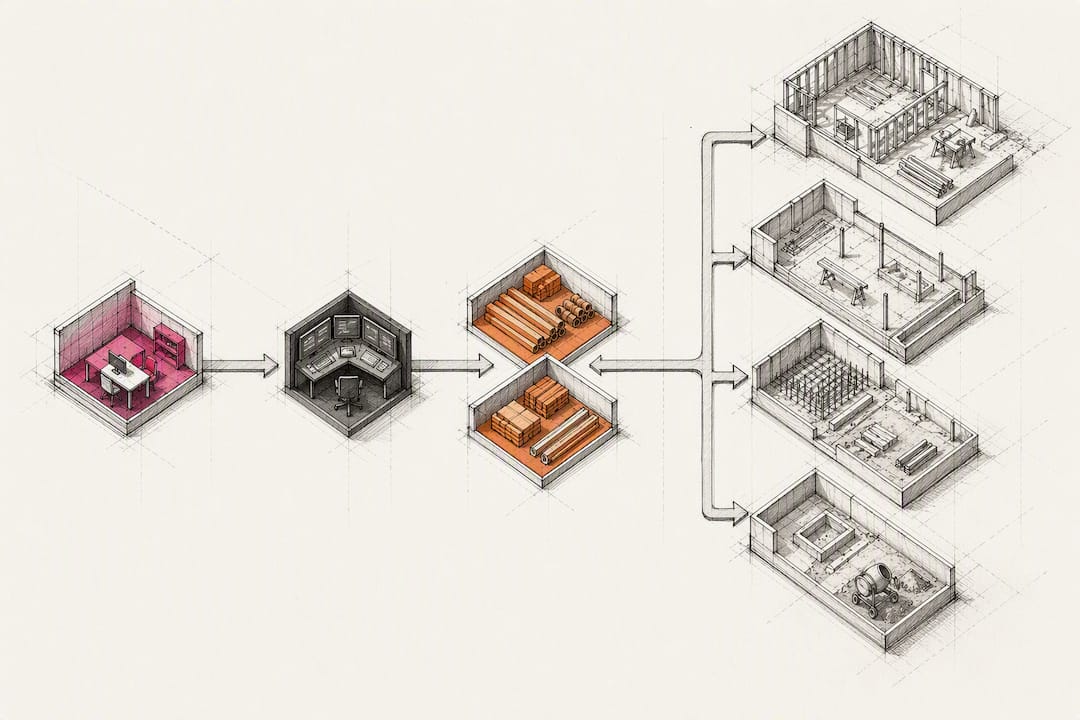
Three fixes solve most adoption problems before they start. Make a handful of fields mandatory so data stays clean without extra nagging. Put the mobile app one tap from the home screen, not buried in a folder. And route every lead source, web form, calls, referrals, into a single inbox so nothing gets triaged twice.
If you’re running a free trial, scope your pilot narrowly: one crew, one job type, two weeks, measured against how many leads got a same-day response before versus after.
— Rowena
Get Started With a Construction-Built CRM
This CRM covers the checklist that matters most for a small contractor: mobile field capture that works from a truck cab, bid and estimate templates with version tracking, built-in supplier and subcontractor communication, and accounting integrations that don’t require a manual export every Friday. Unlike a generic CRM retrofitted with construction labels, it was built around the bid-to-build lifecycle from day one.

If your current setup is a mix of spreadsheets, text threads, and a CRM nobody opens, the fastest next step is a direct look at how the platform maps to your specific trade. Visit the industries we serve page, request a demo, and ask specifically about onboarding timelines and pilot options for a single crew before committing company-wide. A short pilot with your busiest estimator will tell you more in two weeks than any feature comparison chart.
Sources
- Best CRM for Small Construction Business: 7 Picks (2026)
- Choosing the right construction crm
- Why Generic CRMs Fail Contractors | Custom CRM Guide
- Best CRM software for small construction businesses | Blog
Recommended
- Improve Lead Conversion Using Contractor CRM in 2026
- CRM ROI for Construction: What Builders Need to Know
- Benefits of Automated Lead Follow-Up for Contractors
- Real CRM Results for Construction Firms: 8 Proven Outcomes
Signed up, or thinking about it? We build the inside of the account — pipelines, workflows, funnels, nurture, migration. Built for construction. Contact us.
Affiliate disclosure. We’re a GoHighLevel affiliate. Sign up through our link and we may earn a commission at no cost to you, or buy direct. Build-out is billed separately, never a software markup.

