
How to Set Up a CRM for Your Construction Business
A construction CRM is a customer relationship management system configured to mirror the specific stages of a construction sales and project cycle, from first contact through contract award and project handoff. Generic CRM platforms are built for SaaS or retail sales, and default stages like “Discovery Call” simply do not apply to how contractors win and manage work. When you set up a CRM for your construction business correctly, you align the software with your actual workflow, which reduces lead loss, improves bid tracking, and gives your team a system they will actually use. Contractors lose around 30% of leads due to slow follow-ups alone. That number drops sharply when your CRM automates the first response within five minutes of lead capture.
What to do before you set up a CRM for your construction business
The most common reason CRM setups fail is that contractors skip the preparation phase and jump straight into software configuration. Before you touch a single setting, you need a clear picture of your current workflows, your data, and your integration requirements.
Map your sales and project process first. Walk through every step from the moment a lead comes in to the moment a signed contract lands on your desk. Write down who does what, what information changes hands, and where leads currently fall through the cracks. This map becomes your configuration blueprint.

Gather and clean your contact data. Poor data hygiene causes system failure downstream. Duplicate contacts, missing phone numbers, and inconsistent company names will corrupt your pipeline from day one. Deduplicate your spreadsheets, standardize field formats, and remove dead contacts before you import anything.
Here is what to audit before you start:
- Current lead sources: Website forms, referrals, phone calls, and bid boards each need a capture method in your CRM.
- Existing contact records: Clients, subcontractors, suppliers, and prospects often live in separate spreadsheets or email inboxes.
- Active pipeline deals: Any open bids or pending contracts need to transfer cleanly into the new system.
- Integration requirements: Identify which estimating, accounting, and project management tools your team uses daily.
- User roles: Estimators, project managers, and sales staff each need different views and permissions.
Choose the right type of CRM. Generic CRMs without built-in construction terms can require $75,000 to $150,000 in customization costs for enterprise adaptations. A construction-specific platform, or one built with construction workflows in mind, saves that investment and gets your team productive faster. Review the construction CRM buyer’s checklist before committing to any platform.
Pro Tip: Do not evaluate CRM platforms until your workflow map is complete. You need to test whether the software fits your process, not the other way around.
How to configure CRM workflows for construction projects
Once your preparation is done, configuration is where the real work happens. A properly configured construction CRM replaces generic sales stages with the phases your team actually works through.
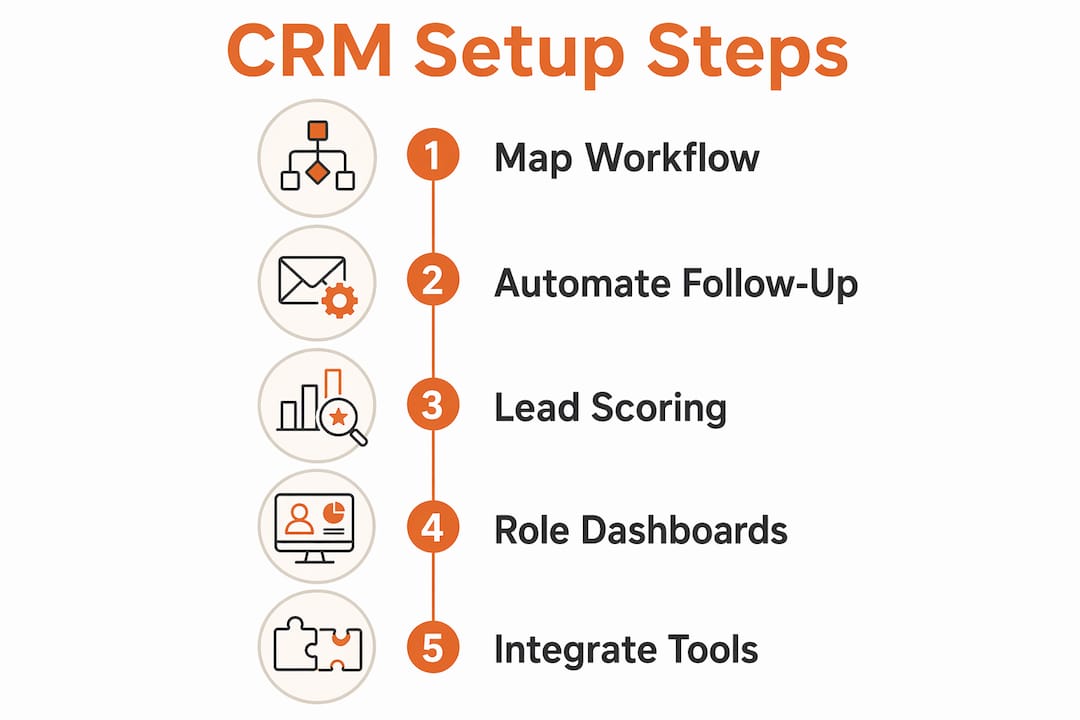
Step 1: Replace generic stages with construction-specific ones
Successful CRM setup aligns with construction phases: Pursuit, Bid, and Award, rather than generic sales stages. Build your pipeline to reflect this reality. A practical stage sequence looks like this:
- Lead Received — the inquiry is logged and assigned.
- Site Visit Scheduled — a walkthrough or discovery meeting is confirmed.
- Estimate in Progress — your estimator is actively building the quote.
- Estimate Sent — the proposal is delivered to the client.
- Follow-Up Active — automated and manual follow-ups are running.
- Contract Signed — the deal is won and ready for handoff.
- Handoff to Production — the project moves to your operations team.
Step 2: Automate follow-up from the first minute
Set your CRM to send an automated acknowledgment within five minutes of every new lead. This single automation addresses the 30% lead loss problem directly. Pair it with a follow-up sequence that sends a check-in at 24 hours and again at 72 hours if no response comes back. Read more about automated lead follow-up to see how contractors apply this in practice.
Step 3: Add go/no-go scoring
Not every lead is worth pursuing. Build a simple scoring field into your pipeline that rates each opportunity on project size, location, client type, and margin potential. Your estimators spend time only on bids that meet your threshold. Less than 6% of general contractors currently track bid-hit ratio, yet doing so closes projects 15 days faster by improving communication and focus.
Step 4: Configure role-based dashboards
Estimators need to see open bids and days since last contact. Sales staff need conversion rates by lead source. Project managers need handoff status and upcoming milestones. Build a separate dashboard view for each role so every person sees only what they need to act on.
| Role | Key dashboard metrics |
|---|---|
| Estimator | Open bids, estimate age, bid-hit ratio |
| Sales | Lead source, conversion rate, follow-up status |
| Project manager | Handoff date, project stage, client contact log |
| Owner | Revenue pipeline, win rate, average deal size |
Pro Tip: Import your cleaned data only after all custom fields and pipeline stages are fully configured. Importing before setup is complete forces a second import and doubles your cleanup work.
How to integrate your CRM with construction management tools
A CRM that sits alone is a contact database. A CRM connected to your other tools becomes a central operating system for your business.
The most valuable integrations for construction businesses fall into three categories:
- Accounting platforms: Bi-directional sync with tools like Sage, NetSuite, or Dynamics 365 keeps your revenue data accurate without manual entry. When a contract is signed in your CRM, the job record should appear in your accounting system automatically.
- Estimating tools: Construction CRM systems must prioritize BOQ-linked quotations and margin analysis rather than generic contact management. Connecting your estimating software to your CRM means your team can see margin data directly inside the deal record.
- Lead capture channels: Integrate your website contact form, bid board accounts, and phone system so every inquiry lands in the CRM automatically. No lead should ever require manual entry from an email inbox.
Test every integration before you go live. Send a test lead through each channel and confirm it appears correctly in the pipeline with all fields populated. Integrated field and office communication can reduce project closeout time by 15 days. That time saving compounds across every project you run in a year.
Pro Tip: Use native integrations wherever possible. Custom API connections require ongoing maintenance and break more often when either platform updates.
What mistakes should you avoid when setting up a construction CRM?
The setup mistakes that hurt contractors most are predictable, and most of them happen before a single deal is entered into the system.
“CRM software is not a problem solver by itself. Success depends on fitting it to existing proven workflows.” — Contractor CRM Setup
Treating your pipeline like a retail funnel. Failure to map CRM stages to actual construction workflows causes teams to abandon the CRM shortly after deployment. If your stages do not match how your estimators and project managers actually work, they will revert to spreadsheets and email within weeks.
Skipping data cleaning. Dirty data is not just an inconvenience. It produces inaccurate pipeline reports, missed follow-ups, and duplicate outreach to the same client. Spend significant time on data cleaning and precise custom field mapping before launch to avoid what integration specialists call “downstream poison.”
Over-customizing a generic platform. The cost risk is real. Enterprise adaptations of generic CRMs regularly reach $75,000 to $150,000. A construction-specific CRM solution removes that risk entirely because the core workflows are already built in.
Rushing the timeline. A professionally configured CRM takes 2 to 4 weeks to implement, including workflow mapping, data import, and team training. Compressing that into a weekend produces a broken system and frustrated users.
Ignoring user adoption. The best configuration fails if your team does not use it. Align every CRM stage with the language your team already uses. Call the stage what your estimators call it, not what the software vendor calls it.
Key takeaways
A construction CRM succeeds when it mirrors your actual workflow, automates follow-up from the first minute, and connects to the tools your team already uses.
| Point | Details |
|---|---|
| Map before you configure | Document your full sales and project process before touching any CRM settings. |
| Use construction-specific stages | Replace generic stages with Pursuit, Bid, and Award phases your team recognizes. |
| Automate follow-up immediately | Trigger a response within 5 minutes of lead capture to prevent 30% lead loss. |
| Clean data before import | Deduplicate and standardize all contact records before the first import to avoid downstream errors. |
| Integrate your core tools | Connect accounting, estimating, and lead capture channels to eliminate manual data entry. |
Why the map always comes before the software
I have seen contractors spend weeks configuring a CRM only to watch their team abandon it by month two. Every single time, the root cause was the same: the software was set up before the workflow was understood.
The contractors who get this right spend more time on paper than on screens in the first week. They draw out their pipeline, argue about what each stage really means, and agree on who owns each step. That conversation is the real setup. The software configuration that follows is almost mechanical.
Automation is where the return on investment becomes obvious. When I talk to contractors who have implemented automated lead tracking, the consistent feedback is that they stopped losing leads they never knew they had. The five-minute follow-up rule sounds simple, but most teams cannot execute it manually at scale. Automation makes it effortless.
My honest advice: do not let perfect be the enemy of functional. A clean pipeline with five well-defined stages and one solid automation beats a 20-stage system with no follow-up. Start simple, get your team using it, and add complexity only when the basics are working.
— Rowena
Highlevelcrm-rconstructionsolutions: built for how contractors actually work
Highlevelcrm-rconstructionsolutions was developed with over 30 years of construction industry experience, which means the pipeline stages, automations, and dashboards reflect how contractors actually win and manage work, not how SaaS companies sell software.
Contractors using Highlevelcrm-rconstructionsolutions report lead conversion increases of up to 35%, driven by automated follow-up sequences and construction-specific pipeline tracking. The platform integrates with industry tools and centralizes lead capture from every channel your business uses. If you are ready to move from spreadsheets and inbox chaos to a system built for your trade, see the solutions built for construction and find the configuration that fits your business.
FAQ
How long does it take to set up a construction CRM?
A professionally configured CRM takes 2 to 4 weeks to implement, including workflow mapping, data import, and team training. Rushing the process produces configuration errors and low adoption.
What CRM stages should a construction business use?
Construction pipelines should follow phases like Lead Received, Site Visit Scheduled, Estimate Sent, Contract Signed, and Handoff to Production, aligned with the Pursuit, Bid, and Award cycle rather than generic sales stages.
Why do contractors lose leads without a CRM?
Contractors lose around 30% of leads due to slow follow-ups. Automated responses triggered within five minutes of lead capture address this directly and improve conversion rates significantly.
Do I need a construction-specific CRM or will a generic one work?
Generic CRMs can work but often require costly customizations, sometimes reaching $75,000 to $150,000 for enterprise adaptations. A construction-specific platform removes that cost and gets your team productive faster.
What integrations does a construction CRM need?
The three most critical integrations are accounting platforms like Sage or NetSuite, estimating tools with BOQ-linked quotation support, and lead capture channels including your website form and bid boards.

