
What Is a Construction-Specific CRM? A Contractor's Guide
A construction-specific CRM is software built from the ground up to manage the bidding, project coordination, and client communication workflows unique to construction businesses. Unlike general-purpose platforms like Salesforce or HubSpot, a construction-focused CRM includes native features for bid tracking, trade-adapted pipeline stages, document management, and field team communication. Contractors who respond to leads within five minutes are 21 times more likely to qualify them. That kind of speed requires a system designed for how construction actually works, not how software sales teams operate.
What is a construction-specific CRM and why does it exist?
A construction-specific CRM, also called a construction management CRM, is a customer relationship management platform purpose-built for contractor workflows. Standard CRM software organizes contacts and tracks sales conversations. A construction-focused version does that and also manages bid documents, project phases, subcontractor coordination, and long-term client relationships that can span years between active jobs.
Generic platforms were designed for businesses with short, repeatable sales cycles. Construction is different. A commercial general contractor might win a job two years after the first site visit. A residential remodeler might juggle 15 active bids while managing three jobs in progress. No off-the-shelf sales tool handles that complexity without significant, expensive customization.
The core functions of a construction management CRM include:
- Bid and estimating management built directly into the pipeline, not bolted on as an afterthought
- Trade-specific pipeline stages such as Lead Received, Site Visit Scheduled, Estimate Sent, and Job Won
- Document storage for plans, specs, addenda, and bid revisions tied to each project record
- Field-accessible mobile interface so project managers and crews can update records on site
- Automated follow-up for leads, bids, and client check-ins without manual effort
This combination of features is what separates a true construction CRM from a generic tool with a construction-themed template applied to it.
What features make a CRM construction-specific?
The features that define a construction-specific CRM are not cosmetic. They reflect the actual sequence of decisions and handoffs that happen on every job, from the first inquiry through final billing.
Bid and document management as native capabilities
Bid management in a true construction CRM means handling specs, plans, addenda, and multi-week revision cycles directly within the system. This is not the same as attaching a PDF to a contact record. When a bid goes through four revisions over six weeks, every version needs to be tracked, dated, and linked to the right project and client. A generic CRM treats documents as attachments. A construction CRM treats them as structured records.

Trade-specific pipeline stages
A contractor’s job lifecycle does not look like a software company’s sales funnel. Your pipeline should reflect stages like Qualification, Site Visit, Estimate Sent, Negotiation, and Contract Signed. When your CRM mirrors your actual process, your team uses it. When it doesn’t, they revert to spreadsheets and sticky notes.
Native messaging integration for field teams
Field crews do not work from desktop computers. Mobile-first CRM design with native SMS and messaging integration is not optional for construction. It is the difference between a system your field team actually uses and one that only gets updated when someone is back in the office on Friday afternoon.
Automated follow-up and lead tracking
Centralizing lead and bid tracking reduces missed follow-ups by up to 23%. That number represents real revenue walking out the door. Automated reminders, scheduled follow-up sequences, and lead status alerts keep your pipeline moving without requiring someone to manually check every open bid every day.
Pro Tip: Map your five most recent won jobs and your five most recent lost bids. Write down every step that happened in each. That list becomes your CRM pipeline stages. Build the system around your real process, not a template.
How does a construction CRM differ from generic CRM systems?
The gap between a construction-specific CRM and a generic platform is not just about features. It is about workflow alignment, terminology, and how the system handles time.
Generic CRM pipelines are designed for SaaS and retail sales cycles that run 30–90 days. Construction involves dormancy-reactivation cycles that can stretch 2–5 years. A commercial client you quoted in 2023 might call you in 2026. A generic CRM will have aged that contact out of your active pipeline long before they are ready to buy.
| Feature | Generic CRM | Construction-specific CRM |
|---|---|---|
| Pipeline stages | Lead, Prospect, Closed | Lead, Site Visit, Estimate, Job Won |
| Document handling | File attachments only | Versioned bid docs, specs, addenda |
| Sales cycle length | 30–90 days assumed | Multi-year dormancy supported |
| Field access | Desktop-first design | Mobile-first with offline capability |
| Bid tracking | Not included | Native feature |
| Terminology | Sales, accounts, deals | Jobs, bids, projects, subcontractors |
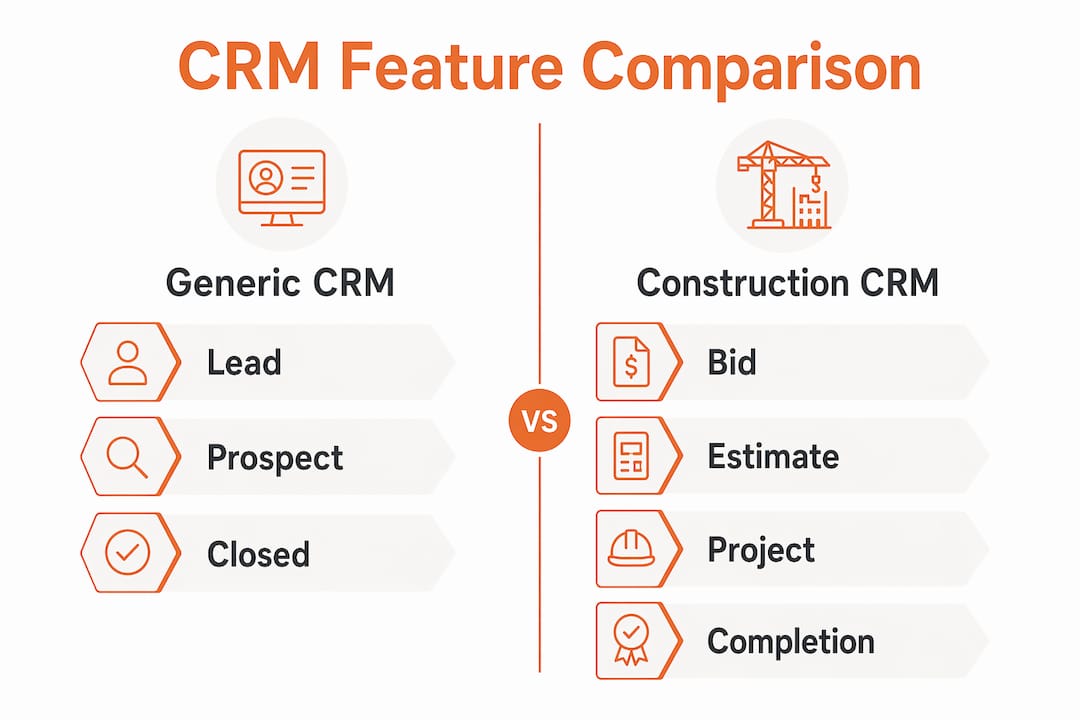
The terminology gap alone kills adoption. When your estimator opens a CRM and sees “Deals” instead of “Bids,” or “Accounts” instead of “Clients and GCs,” the system feels foreign. Contractors using generic CRMs frequently end up running parallel systems, one for CRM and separate tools for bids, scheduling, and documents. That fragmentation creates errors and costs time.
A construction-specific CRM unifies the job lifecycle from first inquiry to project completion in one place. That is the core value proposition.
What are the real benefits of construction CRM software?
The benefits of construction CRM software show up in three places: win rates, project costs, and time spent on administration.
Centralized bid tracking improves win rates by 27% and integrated project management reduces costs by 15–20%. Those are not marginal gains. A contractor doing $2 million in annual revenue who improves their win rate by 27% is adding significant new work without increasing their marketing spend.
Response speed is the other major lever. Contractors who respond to a new lead within 24 hours see a 41% bid win rate. Wait 72 hours and that rate drops to 12%. A construction CRM with automated lead alerts and follow-up sequences makes 24-hour response the default, not the exception.
On the administrative side, automating email logging alone saves 12–18 hours per month per user. For a team of five, that is up to 90 hours per month returned to billable work. The math on CRM adoption becomes straightforward when you account for that kind of time recovery.
Additional benefits contractors report include:
- Fewer missed follow-ups and lost bids due to centralized tracking
- Better subcontractor and vendor coordination through shared project records
- Improved client communication with automated status updates
- Cleaner reporting on lead sources, win rates, and project profitability
You can read more about how CRM drives contractor growth and the specific workflow improvements it enables for construction businesses.
How do you choose and implement a construction CRM?
Choosing the right construction CRM software starts before you look at a single product demo. The selection process works best when you document your current workflow first.
-
Map your job lifecycle. Write down every stage a job goes through from first contact to final invoice. Include the people involved at each stage and the documents that change hands. This becomes your pipeline template.
-
Prioritize mobile access and messaging. If your field team cannot update job records from a phone, your CRM data will always be incomplete. Confirm that any system you evaluate has a fully functional mobile app, not just a mobile-friendly website.
-
Verify bid and document management. Ask vendors specifically how they handle bid revisions, version control, and document linking. If the answer is “you can attach files to records,” that is not construction-grade document management.
-
Plan for fast onboarding. The best construction CRMs can be configured and operational within a day. A system that requires weeks of setup before your team can use it will lose adoption momentum before it starts.
-
Track three metrics from week one. Speed to first response, lead-to-estimate rate, and estimate-to-close rate tell you immediately whether your CRM is working. Set baseline numbers in your first week and review them weekly for the first 90 days.
Subscription costs for contractor CRM platforms typically run $25–$50 per user per month, with professional setup ranging from $5,000 to $16,000 depending on complexity. Budget for both. A well-configured system pays for setup costs within the first few won bids.
Pro Tip: Avoid adopting a generic CRM with the plan to “customize it later.” Customization costs compound quickly, and the result rarely matches a purpose-built construction system. Start with a platform built for contractors and configure it to your specific trade.
Automating your follow-up process is one of the highest-return moves you can make. The 2026 guide to contractor lead follow-up automation covers the specific sequences that convert more bids into signed contracts.
Key Takeaways
A construction-specific CRM improves bid win rates, reduces project costs, and saves significant admin time by aligning software directly with contractor workflows rather than generic sales processes.
| Point | Details |
|---|---|
| Definition matters | A construction CRM manages bids, project phases, and field communication, not just contacts. |
| Response speed drives wins | Responding within 24 hours produces a 41% win rate versus 12% at 72 hours. |
| Generic CRMs fall short | Sales pipelines built for 30–90 day cycles cannot handle multi-year construction relationships. |
| Mobile access is non-negotiable | Field teams need a fully functional mobile app to keep project data current and accurate. |
| Measure from day one | Track speed to first response, lead-to-estimate rate, and estimate-to-close rate immediately. |
What I’ve learned from watching contractors fight the wrong tools
I’ve spent years watching skilled contractors lose bids they should have won. The pattern is almost always the same. They had the capability. They had the relationships. What they didn’t have was a system that kept them organized and responsive at the right moments.
The contractors who struggle most with CRM adoption are usually the ones who tried a generic platform first. They spent weeks setting it up, renamed a few pipeline stages, and then found that their estimators still weren’t using it because it didn’t speak their language. “Deals” and “Accounts” are not construction terms. When the tool feels foreign, people stop using it.
What I’ve seen work consistently is starting with workflow mapping before touching any software. When a contractor sits down and writes out their actual job stages, they almost always discover that their process is more structured than they realized. The CRM just needs to reflect that structure.
The mobile and messaging piece is where I see the biggest gap between what contractors expect and what generic tools deliver. A project manager on a job site at 7 a.m. is not going to log into a desktop CRM to update a lead status. If the app is clunky or requires a full login sequence every time, it won’t get used. Construction CRM success depends on workflow-aligned systems that fit how your team actually operates, not how a software company thinks you should operate.
My honest advice: treat your CRM as a workflow tool, not a database. A database stores information. A workflow tool moves jobs forward. The difference in mindset changes how you configure it, how you train your team, and how much value you actually get out of it.
— Rowena
See how Highlevelcrm-rconstructionsolutions supports your construction workflow
Highlevelcrm-rconstructionsolutions was built with over 30 years of construction industry experience behind it. Every feature reflects how contractors actually manage bids, coordinate with subcontractors, and communicate with clients across long project cycles. Automated lead tracking, trade-specific pipeline stages, and custom reporting dashboards come standard, not as expensive add-ons.
If you are ready to see exactly what a construction-focused CRM includes and how it fits your operation, the CRM features and FAQs page at R. Construction Solutions covers every capability in detail. Setup is fast, support is included, and the system is built to match your workflow from day one.
FAQ
What does a construction-specific CRM do?
A construction-specific CRM manages the full job lifecycle from lead intake through project completion, including bid tracking, document management, pipeline stages aligned to contractor workflows, and automated client communication.
Why can’t contractors just use Salesforce or HubSpot?
Generic CRMs use sales pipelines designed for short 30–90 day cycles and lack native bid management. Construction jobs involve multi-year dormancy cycles and complex document workflows that generic platforms cannot handle without expensive customization.
How much does a contractor CRM cost?
Contractor CRM subscriptions typically cost $25–$50 per user per month, with professional setup ranging from $5,000 to $16,000 depending on the size and complexity of your operation.
How do I know if my CRM is working?
Track three metrics from your first week: speed to first response, lead-to-estimate conversion rate, and estimate-to-close rate. Improvement in all three within 90 days confirms your CRM is driving real results.
What is the most important feature in a construction CRM?
Native bid and document management is the single most critical feature. A system that handles specs, plans, and revision cycles directly within the pipeline keeps your entire team working from the same accurate information.