
Mobile CRM for Contractors: Field-Ready Lead-to-Invoice
High Level CRM is the mobile-first CRM built for contractors who spend more time on the job site than at a desk. It’s the recommended pick because it handles the full lead-to-invoice workflow from a phone, works when the site has no signal, and gives crew leads a single place to log photos, notes, and estimates without driving back to the office.
Three things set it apart for field use:
- Offline capability that syncs the moment you’re back in range, so a dead zone doesn’t cost you a job update.
- Lead-to-estimate-to-invoice in one workflow, cutting the double entry that eats evenings.
- Dispatch and on-site documentation tools that let a supervisor see crew locations and job notes without a phone call.
Book a demo and you’ll see the mobile app, the estimating flow, and live dispatch in action before you commit to anything.
Key Takeaways
A mobile-first CRM works for contractors because it captures leads, estimates, and job documentation at the moment they happen in the field, not hours later at a desk.
| Point | Details |
|---|---|
| Field capture beats memory | Offline-first sync and photo tagging stop leads and job details from getting lost between site and office. |
| Feature parity check | Confirm offline mode, GPS timestamps, and digital signatures before signing with any vendor. |
| Pilot before full rollout | Test with one crew for two to four weeks and measure lead follow-up speed before scaling. |
| Watch hidden costs | Per-user fees and separately priced integrations often inflate the real monthly total. |
| High Level CRM fits contractors | Built on construction-specific templates with mobile lead capture, dispatch, and invoicing designed for field crews. |
Table of Contents
- Why a Mobile CRM Matters for Contractors in the Field
- Key Mobile Features Contractors Must Have
- How High Level CRM Meets Contractors’ Mobile Needs
- Pricing Components, Realistic Costs, and Implementation Timeline
- What Proof to Look for: Case Studies, Testimonials, and Real Outcomes
- Integrations Contractors Commonly Need and Compatibility Checks
- One-Page Vendor Checklist: Questions and Red Flags
- Why the Field, Not the Feature List, Should Decide Your CRM
- Get a Field-Ready CRM Built for Your Trade
- Frequently Asked Questions
- Sources
Why a Mobile CRM Matters for Contractors in the Field
A mobile CRM matters because it captures information the moment it happens, instead of relying on a crew member’s memory at 6 p.m. Contractors lose leads not because they lack skill, but because a callback slips through the cracks between the truck and the office. A mobile-first system closes that gap by putting the entire client record, from first inquiry to final invoice, on the device already in your hand.
The field problems are specific and repeat constantly: a lead comes in while you’re mid-install and gets scribbled on a receipt; a signature gets collected on paper and never makes it to the file; a crew’s location is a guess until someone calls dispatch. Construction and installation work is inherently site-based, which is exactly why the Bureau of Labor Statistics frames these occupations around on-location tasks rather than desk work, as explained in detail by Field Service Management: Optimize & Boost Efficiency - FullyOps. The same holds for installation and repair trades, where the job happens at the customer’s address, not yours.
Pro Tip: Before rolling a mobile CRM out to the whole company, pilot it with one crew for two to four weeks and track one number: how fast leads get a follow-up call. If that number improves, you have your business case for full rollout.
Key Mobile Features Contractors Must Have
Not every CRM app that claims to be “mobile” actually works on a job site. Cell signal drops, hands are dirty, and nobody has time to fight a clunky interface between tasks. These are the features worth insisting on:
- Offline-first sync — the app functions with zero signal and syncs automatically once connectivity returns.
- Photo and video attachments with tagging — link images directly to a job or client record, not a generic camera roll.
- GPS timestamps — proof of when and where work happened, useful for disputes and insurance documentation.
- Digital signatures — capture approval on-site instead of chasing a signed PDF later.
- On-site estimating and quote builder — price a job in front of the client instead of promising a callback.
- Contact and job timelines — a full history of communication, so anyone on the team can pick up where another left off.
- Simple time capture — clock in and out by job, not just by day.
- Materials tracking — log what got used so billing and reordering stay accurate.
- Push notifications and SMS integration — alerts that reach a crew member without requiring them to open an app.
Each feature solves a real scenario. A roofer photographing storm damage needs the GPS timestamp for the insurance claim. An electrician quoting a panel upgrade needs the estimator right there, because a “we’ll email you” quote loses to the competitor who closes on the spot.
Pro Tip: The most overlooked feature isn’t a feature at all. It’s performance on a weak signal. A CRM that freezes or times out on two bars of LTE gets abandoned within a week, no matter how good the feature list looks in the sales demo. This mirrors what Fieldified’s analysis of mobile-first CRMs points to as the deciding factor for contractor adoption: tools built around office use, then retrofitted for mobile, rarely hold up in the field.

How High Level CRM Meets Contractors’ Mobile Needs
High Level CRM works for contractors because it was configured for construction workflows from the start, not adapted from a generic sales tool. Built on the GoHighLevel platform with construction-specific templates, it maps directly to how a contracting business actually runs: lead comes in, someone quotes it, a crew gets dispatched, work gets documented, and an invoice goes out.
The feature set covers the field-to-office pipeline end to end:
- Lead capture forms that work from a phone at the point of first contact
- On-site quoting tied directly to the client record
- Dispatching with crew location visibility for supervisors
- Photo and signature capture attached to the job file
- Automatic invoice generation once work is marked complete
- Sync with accounting software equivalent to QuickBooks
- Custom reporting dashboards built around construction metrics, not generic sales pipelines
Some High Level CRM users report a 35% increase in lead conversion after switching from spreadsheets or generic CRMs, largely from faster follow-up and fewer leads falling through the cracks.
Integrations extend the workflow rather than replacing it. Calendar sync keeps job schedules and crew availability aligned automatically. Payment processor integration lets a homeowner pay an invoice from their phone the same day work finishes, instead of waiting on a mailed check. Accounting sync means a bookkeeper isn’t re-entering every line item by hand.
Onboarding typically starts with a demo call, moves into a setup and customization phase built around your specific trade, and includes training sessions so crews aren’t left guessing how to use the app. From there, most contractors move from pilot to full rollout with support available throughout, not just at signup.
Pricing Components, Realistic Costs, and Implementation Timeline
Budgeting for a mobile CRM means accounting for more than the advertised monthly price. Expect four cost categories: a subscription tier based on team size and features, a one-time setup or customization fee for construction-specific configuration, optional add-ons like advanced estimating modules or extra integrations, and training or ongoing support.
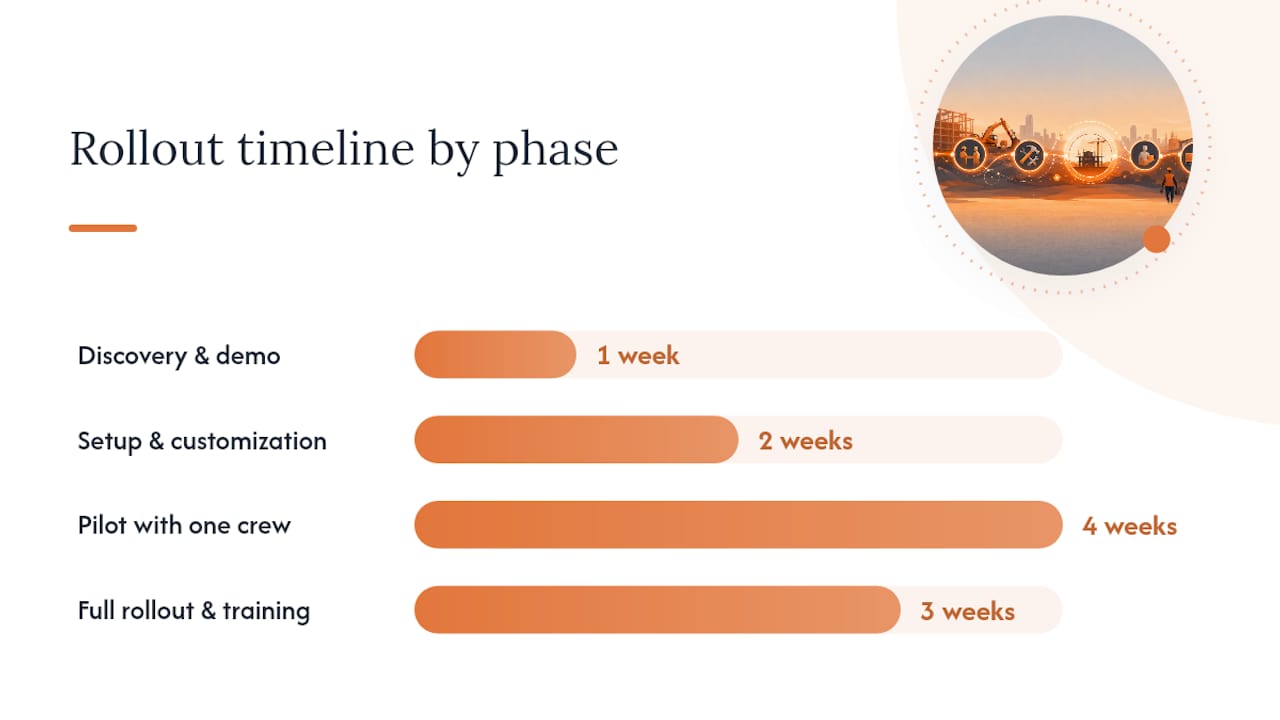
A realistic rollout follows a predictable arc:
- Discovery and demo (week 1) — review your workflow and confirm the CRM fits your trade.
- Setup and customization (weeks 2 to 3) — configure pipelines, templates, and integrations for your business.
- Pilot with one crew (weeks 3 to 6) — test in the field, track adoption, fix friction points.
- Full rollout and training (weeks 6 to 8) — onboard remaining crews with hands-on training sessions.
Watch for cost items that inflate the total quietly:
- Hidden per-user fees that scale badly once you add crew members
- Integrations priced separately per connection rather than bundled
- Multi-month customization agreements with no clear exit point
The SBA’s small-business technology guidance is a useful sanity check here: digital tool adoption should reduce operating costs over time, not just add a new monthly bill.
What Proof to Look for: Case Studies, Testimonials, and Real Outcomes
Credible case studies name a before-and-after metric, a timeframe, and the scope of work involved, not just a vague claim of “improved efficiency.” Ask a vendor for specifics: How many crews were involved? How long until adoption stuck? What changed in lead response time or invoice turnaround?
Useful testimonials focus on three areas: how fast the team actually adopted the app in the field, whether lead conversion moved, and how much administrative time the office saved each week. A testimonial that only says “great support” tells you nothing about field performance.
That’s the core finding behind Velora, and it’s the right lens for reading any vendor’s case study. If the story doesn’t mention what the field crew got out of it immediately, faster invoicing, less paperwork, proof of work on file, be skeptical.
Cross-check vendor claims against independent review platforms like G2’s CRM reviews or Capterra listings, where mobile stability and support responsiveness show up in user comments, not marketing copy.
Integrations Contractors Commonly Need and Compatibility Checks
Before signing anything, confirm the CRM fits your existing tech stack, not the other way around. The integrations that matter most for contractors:
- Accounting sync (QuickBooks or equivalent) to avoid duplicate bookkeeping
- Payment processor integration for faster collections
- Calendar and scheduling sync across office and field
- Estimating templates specific to your trade
- Inventory or materials ordering connections
- SMS gateways for crew alerts that don’t require opening an app
Compatibility checks matter just as much as the feature list. Confirm offline functionality actually works, not just in the demo but on a real job site. Check Android and iOS support, including older devices many crews still carry. Ask about data export and API access so you’re never locked into one platform. And review security basics: password policies, remote wipe if a phone is lost, and role-based access so a subcontractor doesn’t see your full client list.
One-Page Vendor Checklist: Questions and Red Flags
Vendor calls move fast. Bring this checklist so you don’t get talked past the questions that actually matter:
- Does the app work fully offline, and what happens to data entered with no signal?
- Can they demo the actual mobile workflow, not just a desktop screen share?
- What onboarding and training hours come with the subscription?
- Can they provide reference customers in construction, not just general services?
- What does the reporting dashboard show out of the box?
Deal-breaker red flags include no true offline mode, feature paywalls that block core field workflows behind an upsell, and visibly slow performance on a throttled connection during the demo itself.
Negotiate a pilot period with written acceptance criteria before signing a full contract. A short pilot with a single crew and clear success metrics protects you from a multi-month commitment to software that never gets adopted in the field, a pattern documented in analysis of mobile-first field apps replacing office-bound systems.
Why the Field, Not the Feature List, Should Decide Your CRM
Most contractors evaluate CRMs the way they’d evaluate a truck: by the spec sheet. That’s backwards. The spec sheet says nothing about whether a crew member with dirty gloves and one bar of signal will actually open the app on a Tuesday afternoon.
The conventional advice tells contractors to prioritize the longest feature list. The research says otherwise: adoption fails when the person entering data sees no immediate benefit, not when a feature is missing. A CRM with fewer features that a crew actually uses beats a CRM with more features that gets ignored by week three.
Prioritize offline reliability and low-friction field capture first. Everything else, reporting dashboards, advanced automation, custom fields, matters only once the basic habit of logging work from the field actually sticks. Pilot small, measure adoption honestly, and don’t mistake a good sales demo for a good field experience.
Get a Field-Ready CRM Built for Your Trade
Highlevelcrm-rconstructionsolutions gives you a lower-effort path than assembling a generic CRM plus a stack of separate apps for estimating, dispatch, and invoicing. Instead of stitching together tools that weren’t built for construction, you get one mobile-first platform with automated lead tracking, custom reporting dashboards, and workflows already shaped around how contractors bid, schedule, and bill work. It’s built on 30 years of construction experience, not adapted from a generic sales template, which is why setup maps directly to trades like plumbing, electrical, and landscaping instead of forcing your business into someone else’s workflow. If your current setup means chasing leads across texts, spreadsheets, and sticky notes, book a demo to see the mobile app, estimating flow, and dispatch tools in action, and find out what onboarding looks like for a crew your size.
Frequently Asked Questions
What makes a CRM “mobile-first” instead of just having a mobile app? A mobile-first CRM is built around field use from the start, with offline sync and low-bandwidth performance as core architecture decisions, not features bolted onto a desktop product afterward.
How long does it take to implement a mobile CRM for a small contracting business? A realistic timeline runs six to eight weeks from initial demo to full crew rollout, including a pilot phase with one crew before expanding company-wide.
Can a mobile CRM replace QuickBooks for a contractor? No. A well-integrated mobile CRM syncs with accounting software rather than replacing it, so invoices and job costs flow through without duplicate data entry.
What’s the biggest reason contractors abandon a new CRM app? Poor performance in the field, especially on weak signal, and workflows that ask crews for more effort than they get back in saved time.
Does High Level CRM work across different contracting specialties? Yes. It’s configured with templates for trades like plumbing, electrical, and landscaping, so estimating, dispatch, and reporting reflect the way each specialty actually bids and completes work.
Sources
- Construction and Extraction Occupations — Occupational Outlook Handbook
- U.S. Small Business Administration — small-business resources
- Why Mobile-First CRMs Are the Future For Contractors

