
Automate Contractor Lead Follow-Up: 2026 Strategy Guide | High Level CRM - R. Construction Solutions
Automated lead follow-up is the practice of using software to send pre-scheduled, trigger-based messages to prospects after initial contact, without manual effort from you or your team. If you want to automate follow-up for contractor leads, the payoff is immediate: leads waiting more than 5 minutes are 80% less likely to convert, and contractors using AI-powered automation close 2–3x more jobs while saving over 10 hours weekly. Tools like GoHighLevel, ServiceTitan, and Jobber make this possible for contractors at every tech comfort level. This guide walks you through setup, sequencing, integration, and the mistakes that quietly kill conversion rates.
What you need to automate follow-up for contractor leads
Before you build any automation, you need the right foundation. Skipping this step is the most common reason contractors set up workflows that never fire correctly.
The core tools you need:
- A contractor-focused CRM. Platforms like GoHighLevel, Jobber, and ServiceTitan are built with contractor workflows in mind. Generic CRMs often lack the estimate status triggers and field service integrations that make automation practical. Understanding why contractors need a CRM is the starting point for any automation strategy.
- SMS and email capabilities. Your CRM must send both. SMS handles fast, time-sensitive nudges. Email handles longer, detail-rich messages mid-sequence.
- Web form and calendar integration. Every lead form on your website should feed directly into your CRM. Calendar sync lets automation book appointments without your involvement.
- Organized lead data. You need consistent fields: name, phone, email, project type, and estimate status. Messy data breaks triggers.
Before you flip the switch, document your business voice. Write out how you talk to customers, the questions you get most often, and the objections you hear. This content trains your automated messages to sound like you, not a robot.
Pro Tip: Create a simple FAQ document covering your top 10 customer questions. Feed those answers into your CRM’s AI assistant or message templates. Your automated replies will sound far more natural and credible.
The benefits of automated lead tracking compound quickly once your data is clean and your tools are connected. Spend one afternoon organizing your lead fields before you build a single workflow.
How to build a multi-touch follow-up sequence that converts
80% of sales require 5 or more follow-ups, but most contractors stop after one or two attempts. A structured 5-touch sequence recovers 20–35% of non-responsive leads. Here is how to build one.
Step 1: Set the trigger. The sequence starts the moment an estimate is sent. In GoHighLevel or Jobber, set the trigger condition to “estimate status = sent.” Every estimate that leaves your system should automatically start a follow-up sequence. No exceptions.

Step 2: Send Touch 1 within 60 seconds via SMS. This is a short, friendly confirmation. Example: “Hi [Name], just sent over your estimate for [project type]. Let me know if you have any questions. [Your Name], [Company].” Speed matters here more than length.
Step 3: Send Touch 2 on Day 2 via email. This is your value-add message. Include a project photo, a brief FAQ, or a short explanation of your process. Adding value at every touchpoint keeps your brand relevant without feeling pushy.
Step 4: Send Touch 3 on Day 4 via SMS. A brief check-in with a soft call to action. “Still happy to answer any questions about your estimate. Want to grab 10 minutes this week?” Keep it conversational.
Step 5: Send Touch 4 on Day 7 via email. Address the most common objection in your market. If price is the sticking point, explain your warranty or material quality. If timing is the issue, mention your current availability.
Step 6: Send Touch 5 on Day 10–14 via SMS. This is your final nudge. Offer a small incentive if appropriate, such as a free site visit or a limited-time scheduling window. Make it easy to say yes.
| Touch | Day | Channel | Message Type |
|---|---|---|---|
| 1 | Day 0 | SMS | Estimate confirmation |
| 2 | Day 2 | Value-add content | |
| 3 | Day 4 | SMS | Soft check-in |
| 4 | Day 7 | Objection handling | |
| 5 | Day 10–14 | SMS | Final incentive nudge |
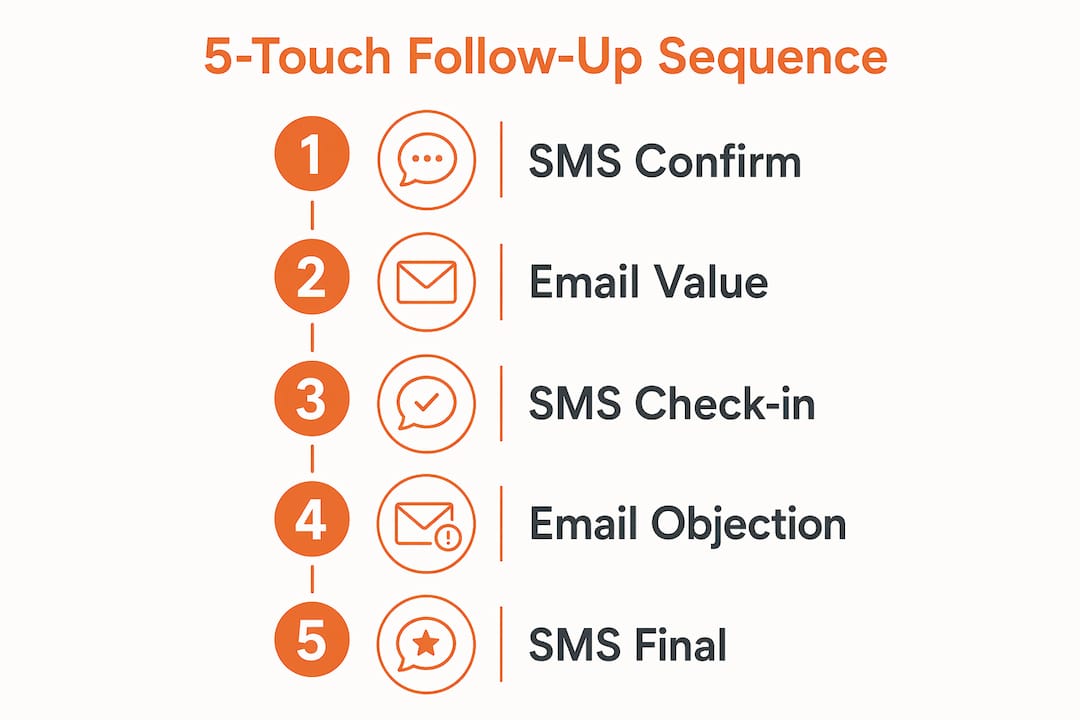
SMS open rates exceed 82%, which is why SMS anchors the early and late touches. Email handles the middle of the sequence where you need more space to build trust and address concerns.
Pro Tip: Most recovered jobs close on the second or third automated touchpoint, not the first. Resist the urge to shorten your sequence. The leads who convert on Day 7 or Day 10 are real revenue you would otherwise leave behind.
How do you integrate AI and CRM to automate lead workflows?
The good news is that most contractors do not need complex coding to get 80% of the value from automation. The key is setting up trigger-based rules inside your existing CRM.
Core integration steps:
- Connect your lead sources. Web forms, Google Local Services Ads, and Facebook Lead Ads should all pipe directly into your CRM. Manual data entry breaks the speed-to-lead advantage.
- Set estimate status triggers. In GoHighLevel, Jobber, or ServiceTitan, create a workflow rule: when estimate status changes to “sent,” enroll the contact in your follow-up sequence. This single rule captures the majority of your automation value.
- Add AI qualification. Platforms like GoHighLevel include AI chat and SMS bots that can answer basic questions, qualify budget and timeline, and book appointments directly into your calendar. This handles inbound leads at 2 a.m. without you lifting a finger.
- Configure stop triggers. This step is non-negotiable. Your CRM must monitor all reply channels and pause the sequence the moment a lead responds. Sending a “just checking in” SMS to someone who already booked a job is a fast way to lose their trust.
Here is a quick comparison of the three most common contractor platforms:
| Platform | Best For | AI Features | Estimate Triggers |
|---|---|---|---|
| GoHighLevel | Full automation, multi-channel | Yes, SMS/email AI bots | Yes |
| Jobber | Field service management | Limited | Yes |
| ServiceTitan | Larger contractor operations | Yes | Yes |
Automated sequences must pause immediately when a lead replies. Configure your CRM to monitor both SMS and email inboxes and stop the sequence on any inbound message. This prevents the awkward experience of a lead receiving a follow-up after they have already hired you.
For contractors in competitive markets, including those looking to automate lead follow-up for Bay Area contractors or similar high-volume regions, the combination of AI qualification and trigger-based sequences is what separates contractors who close consistently from those who rely on luck and timing.
What are the most common mistakes in contractor follow-up automation?
Setting up automation is the easy part. Keeping it effective over time requires avoiding a handful of mistakes that quietly drain your conversion rate.
Mistake 1: Generic, robotic messaging. Personalized messages that reference specific conversations or project details significantly outperform generic check-ins. “Just following up on your estimate” is forgettable. “Following up on the deck estimate for your Riverside property” is not.
Mistake 2: Missing stop triggers. This is the most damaging technical error. A lead who replies and then receives three more automated messages will feel ignored and annoyed. Configure your CRM to halt sequences on any inbound reply, booking confirmation, or status change to “won.”
Mistake 3: Wrong channel at the wrong time. SMS is the right channel for quick, time-sensitive touches. Email is the right channel for detailed information and objection handling. Sending a long proposal recap via SMS or a one-line check-in via email both underperform.
Mistake 4: Skipping appointment reminders. Automated reminders reduce no-shows by 30–50%. A reminder sent 24 hours before and again 1 hour before an appointment is one of the highest-ROI automations you can build. Most contractors skip it entirely.
Mistake 5: Never reviewing your analytics. Your CRM tracks open rates, reply rates, and conversion rates by touchpoint. Review this data monthly. If Touch 3 has a 2% reply rate, rewrite the message. If Touch 5 drives most of your closes, add a sixth touch.
Pro Tip: Run a 30-day test with two versions of your Touch 1 SMS. Change only the opening line. Track which version gets more replies. This single test often improves your sequence-wide conversion rate by a measurable margin.
What metrics show whether your follow-up automation is working?
Tracking the right numbers tells you exactly where your sequence is winning and where it is losing leads. Focus on these four metrics first.
| Metric | What It Measures | Target Benchmark |
|---|---|---|
| Lead response time | Speed from lead in to first message out | Under 60 seconds |
| Sequence conversion rate | Leads who book after entering sequence | 20–35% recovery rate |
| Appointment no-show rate | Missed appointments after booking | Reduce by 30–50% with reminders |
| Google review volume | Post-job review requests sent and received | Increases passively with automation |
Lead response time is the most critical metric to watch first. Responding within 60 seconds dramatically increases the probability of conversion. Every minute beyond that, your odds drop. Automated systems handle this instantly, which is the single biggest advantage over manual follow-up.
Sequence conversion rate tells you whether your messaging is working. A 20–35% recovery rate from non-responsive leads is achievable with a well-built 5-touch sequence. If you are below that range, the issue is usually message content or timing, not the automation itself.
Post-job review requests are an underused automation. Sending a review request via SMS 24 hours after job completion, when satisfaction is highest, builds your Google rating passively. That rating directly influences how many new leads you receive, making it one of the highest-leverage automations in your entire system.
Key takeaways
Automating contractor lead follow-up with a structured 5-touch, multi-channel sequence is the most reliable way to recover non-responsive leads and close more jobs without adding manual work.
| Point | Details |
|---|---|
| Speed to first contact | Respond within 60 seconds using automation to prevent lead drop-off. |
| 5-touch sequence structure | Use SMS for early and late touches, email for mid-sequence objection handling. |
| Stop triggers are mandatory | Configure your CRM to pause sequences the moment a lead replies or books. |
| Personalization drives results | Reference specific project details in every message to outperform generic templates. |
| Track and refine monthly | Review open and reply rates by touchpoint and rewrite underperforming messages. |
What i have learned after years of watching contractors automate follow-up
Contractors often ask me whether they need a complex, multi-platform tech stack to make automation work. My honest answer is no. The contractors I have seen get the best results are the ones who set up a simple, well-written 5-touch sequence inside one CRM and then actually review the data every month.
The biggest mistake I see is treating automation as a set-it-and-forget-it system. Your messages need to sound like you wrote them this morning, not like a template from 2019. Spend real time on your message copy. Read it out loud. If it sounds like a robot, rewrite it.
The other thing I keep coming back to is persistence. Most contractors feel uncomfortable following up five times. But the data is clear: the majority of closed jobs come from the third, fourth, or fifth touch. Automation removes the discomfort because the system does it for you, consistently, without hesitation. That consistency is what separates contractors who fill their schedules from those who wonder why good leads go quiet.
Automation also gives you something more valuable than leads. It gives you time. When your follow-up runs on its own, you can focus on the job site, on your crew, and on delivering work that earns five-star reviews. That is the real return on investment.
— Rowena
See how Highlevelcrm-rconstructionsolutions handles this for you
Highlevelcrm-rconstructionsolutions is built specifically for contractors, with over 30 years of construction industry experience behind every feature. The platform includes SMS and email automation, AI-powered lead qualification, appointment booking, and custom reporting dashboards designed for the way contractors actually work.
You do not need to piece together separate tools or hire a tech consultant. Highlevelcrm-rconstructionsolutions connects your lead sources, estimate workflows, and follow-up sequences in one place. Contractors using the platform report lead conversion increases of up to 35%. Explore the full feature set and get answers to your setup questions on the CRM features and FAQs page, or visit the main platform page to see how it fits your business.
FAQ
How fast should a contractor respond to a new lead?
Respond within 60 seconds. Leads waiting more than 5 minutes are 80% less likely to convert, and automated systems handle this instantly around the clock.
How many follow-up messages should a contractor send?
Send at least 5 touches across 10–14 days. Most recovered leads close on the second or third automated touchpoint, and stopping after one or two attempts leaves significant revenue on the table.
What is the best channel for contractor follow-up automation?
SMS is the best channel for initial and time-sensitive touches because open rates exceed 82%. Use email for mid-sequence messages that require more detail or address common objections.
How do i stop automated messages after a lead replies?
Configure a stop trigger in your CRM, such as GoHighLevel or Jobber, that monitors all inbound SMS and email replies and immediately pauses the active sequence.
Can automation help reduce appointment no-shows for contractors?
Yes. Automated appointment reminders sent 24 hours and 1 hour before a scheduled visit reduce no-shows by 30–50%, making them one of the highest-return automations a contractor can implement.