
Onboarding Checklist Automation Explained for Contractors
Onboarding checklist automation is defined as event-driven workflow automation that triggers sequential tasks across apps and teams without manual handoffs. When a client signs a contract, the system fires automatically. Welcome emails go out, project folders get created, intake forms are sent, and internal approvals start running. No one has to remember to do any of it. For construction business owners managing multiple projects and clients at once, this is the difference between a professional first impression and a chaotic one. Tools like DocuSign, ClickUp, Calendly, and Typeform each play a role in making the automated onboarding process work from day one.
How does onboarding checklist automation work in construction?
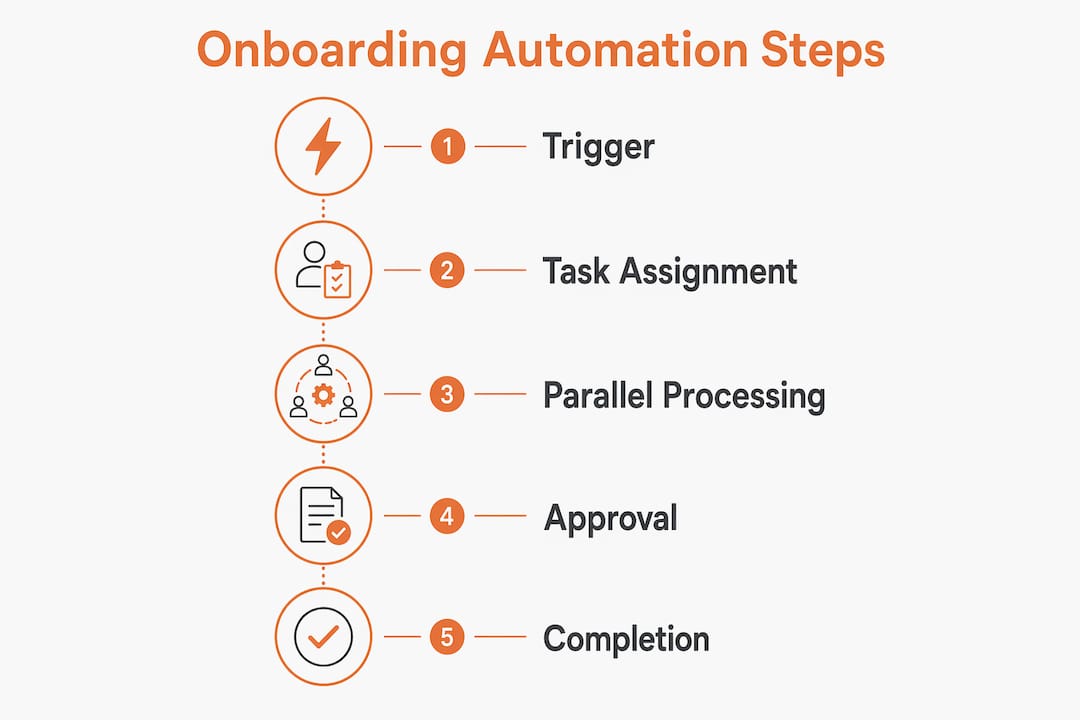
The standard industry term for what most contractors call “onboarding automation” is workflow orchestration. It means connecting multiple tools and task owners into a single, trigger-based sequence. Here is how a practical client onboarding workflow breaks down across five phases, based on a contract-to-kickoff automation model:
- Contract signature trigger. DocuSign or a similar e-signature tool detects a completed contract and fires the first automation. A welcome email reaches the client within minutes, not days.
- Automated project setup. The system creates a project record in ClickUp or Asana, assigns the project manager, and populates standard construction tasks based on project type.
- Client data intake. A Typeform or similar intake form is sent automatically to collect site details, contact preferences, billing information, and scope confirmations.
- Parallel internal approvals. While the client completes intake, internal approvals for permits, subcontractor agreements, and budget sign-offs run simultaneously. Clients never see these delays.
- Kickoff scheduling. Once intake data is received and approvals are cleared, Calendly or a scheduling tool sends the client a link to book the kickoff meeting automatically.
The parallel processing piece is where construction companies gain the most. Internal approvals run alongside client-facing steps so the client never experiences hold-ups caused by internal reviews. Compare that to a manual process where each step waits for the previous one to finish:
| Approach | Client wait time | Error risk | Manager oversight |
|---|---|---|---|
| Manual onboarding | High (days per step) | High (missed tasks) | Low (no dashboard) |
| Automated onboarding | Low (minutes per trigger) | Low (system-driven) | High (real-time alerts) |

The difference is not marginal. A construction firm running five new client onboardings per month can recover dozens of hours each month by removing manual handoffs from this sequence.
What are the key benefits of automating onboarding checklists?
The benefits of onboarding automation go beyond saving time. They affect client satisfaction, risk management, and your ability to scale without adding administrative staff.
- Fewer errors and dropped tasks. Automated chained task sequences prevent idle time between steps. No one forgets to send the intake form or create the project folder because the system handles it.
- Cleaner client data from day one. Structured digital intake replaces scattered emails and phone notes, giving your team reliable information for project planning and billing.
- Faster project start times. When approvals and client tasks run in parallel, projects move to kickoff faster. That speed signals professionalism to clients and protects your schedule.
- Manager visibility without micromanaging. Dashboards and automated reminders flag overdue tasks and show consolidated status across all active onboardings. You see exactly where each client stands without chasing your team for updates.
- Compliance and audit trails. Every automated action is logged with a timestamp. For construction businesses working in regulated environments, this documentation supports permit applications, insurance claims, and contract disputes.
- Personalized workflows by project type. Role-adapted workflows deliver the right tasks and communications for a residential remodel versus a commercial build, rather than forcing every client through the same generic sequence.
Pro Tip: Build a separate onboarding workflow for each major project category you handle. A commercial client needs different intake questions, approval chains, and compliance steps than a residential client. Trying to use one workflow for both creates gaps that defeat the purpose of automation.
Which best practices ensure successful onboarding automation?
Getting the mechanics right matters more than picking the right tool. Most onboarding automation failures come from poor workflow design, not software limitations.
Anchor automation to authoritative event triggers. Automating only front-end communications while keeping backend state changes manual creates inconsistent processes. The trigger must come from your system of record. A contract signed in DocuSign, a deal moved to “Won” in your CRM, or a deposit confirmed in QuickBooks. Calendar reminders are not reliable triggers.
Use a 30/60/90-day integration structure. Multi-stage onboarding timelines with scheduled check-ins drive higher satisfaction and better integration than a single checklist. For construction clients, this means a day-one welcome sequence, a 30-day project progress check, a 60-day communication review, and a 90-day satisfaction survey. Each stage is triggered automatically based on the contract start date.
Measure what matters. The metrics that tell you whether your onboarding automation is working include:
- Time to access: How long does it take a new client to receive their project portal login or first project update?
- Checklist completion rate: What percentage of intake forms are completed within 48 hours of being sent?
- Bottleneck identification: Which step in the workflow consistently takes the longest?
- Client satisfaction score: Collected automatically at the 30-day mark via a short survey.
Measurable checkpoints allow you to tune workflows after launch. Most construction businesses find their biggest bottleneck is the internal approval step, not the client-facing steps. That insight alone justifies the measurement effort.
| Metric | What it tells you |
|---|---|
| Time to access | Speed of first client touchpoint after contract |
| Completion rate | Client engagement with intake process |
| Approval cycle time | Internal efficiency of review processes |
| 30-day satisfaction score | Early signal of client relationship health |
Decide what not to automate. Effective automation requires deciding which steps need human review and escalation. High-value clients, complex commercial projects, and situations involving disputes or scope changes all benefit from a personal call, not an automated email.
How do you integrate onboarding automation with your CRM and project tools?
Integration is where onboarding automation becomes a true operational system rather than a collection of disconnected tools. The goal is a single source of truth where client data flows from the CRM into your project management platform without anyone copying and pasting.
For construction businesses, this typically means connecting your CRM to tools like ClickUp or Asana for project creation, and to communication platforms like Slack for internal notifications. When a deal closes in your CRM, the automation creates the project, assigns the team, and notifies the project manager in Slack. No manual setup required. You can explore how construction CRM integration works across platforms before committing to a specific stack.
The most common mistake is maintaining duplicate records. If your CRM holds the client record and your project management tool holds the task list, any manual data entry between them creates errors. The fix is a direct integration, either native or through a connector like Zapier or Workato, that writes data once and syncs it everywhere.
Pro Tip: Map your current onboarding process on paper before building any automation. Write down every task, who owns it, and what triggers it. This exercise almost always reveals three to five steps that are being done manually out of habit, not necessity. Those are your first automation targets.
Parallel workflow lanes are the most underused feature in construction onboarding. Your automation platform should run a client-facing lane and an internal approval lane at the same time. The client receives intake forms and project updates while your team handles permits, subcontractor agreements, and budget approvals. Both lanes converge at the kickoff meeting. This structure, explained in detail for construction-specific workflows, prevents the most common complaint construction clients have: waiting without knowing why.
Key takeaways
Onboarding checklist automation works best when it is anchored to authoritative event triggers, runs client and internal tasks in parallel, and is measured with specific metrics like time to access and checklist completion rates.
| Point | Details |
|---|---|
| Use event-based triggers | Anchor automation to contract signatures or CRM deal status, not calendar reminders. |
| Run parallel workflow lanes | Process internal approvals alongside client tasks to prevent visible delays. |
| Measure completion and speed | Track time to access and checklist completion rates to find and fix bottlenecks. |
| Apply 30/60/90-day structure | Schedule automated check-ins at 30, 60, and 90 days to maintain client engagement. |
| Integrate CRM with project tools | Connect your CRM to ClickUp or Asana to eliminate manual data entry between systems. |
Why automation alone won’t save your client relationships
I have seen construction businesses invest in onboarding automation and still lose clients in the first 90 days. The automation worked perfectly. Every email went out on time. Every form was sent. Every task was created. The problem was that no one picked up the phone.
The real value of onboarding comes from ongoing coaching, feedback, and engagement, not task completion. Automation handles the logistics. You still have to handle the relationship. For high-value commercial clients especially, a personal call at day 30 carries more weight than any automated survey.
My honest recommendation is to treat automation as the floor, not the ceiling. Use it to make sure nothing falls through the cracks. Then use the time you recover to do the things automation cannot do: build trust, address concerns early, and show clients that your company is organized and attentive. That combination is what drives referrals.
The other mistake I see regularly is over-engineering the workflow before it has been tested. Build the simplest version first. Run it through two or three real client onboardings. Then add complexity based on what actually breaks. Contractors who spend three months designing the perfect workflow before launching it almost always rebuild it after the first real use.
— Rowena
How Highlevelcrm-rconstructionsolutions powers your onboarding automation
Highlevelcrm-rconstructionsolutions is built specifically for construction contractors, with over 30 years of industry experience behind every feature. The platform connects automated lead tracking, client onboarding workflows, and project setup into one system designed for how construction businesses actually operate. You get automated task triggers, parallel approval lanes, and real-time dashboards without needing a separate automation tool to connect everything. Contractors using Highlevelcrm-rconstructionsolutions report lead conversion increases of up to 35%, and the onboarding automation features are a direct contributor to that result. See the full CRM features and onboarding tools or visit Highlevelcrm-rconstructionsolutions to get started.
FAQ
What is onboarding checklist automation?
Onboarding checklist automation is event-driven workflow automation that triggers tasks across tools and teams when a predefined business event occurs, such as a contract being signed. It replaces manual handoffs with automatic actions, reducing errors and delays.
Which tools are used for automated client onboarding?
Common onboarding automation tools include DocuSign for contract triggers, Typeform for digital intake, ClickUp or Asana for project creation, Calendly for kickoff scheduling, and Workato or Zapier for connecting systems. Construction-specific CRMs like Highlevelcrm-rconstructionsolutions integrate these functions natively.
How do you measure onboarding automation success?
The primary metrics are time to access, checklist completion rate, internal approval cycle time, and client satisfaction scores collected at the 30-day mark. Tracking these checkpoints lets you identify bottlenecks and improve the workflow over time.
What is the biggest mistake in onboarding automation?
The most common failure is automating only front-end communications while leaving backend state changes manual. This creates inconsistent processes where the system sends emails but the project record never gets updated. Always anchor automation to your system of record.
How long does it take to set up onboarding automation for a construction business?
A basic automated onboarding workflow covering contract trigger, intake, project setup, and kickoff scheduling can be operational in two to four weeks for most construction businesses. Starting with a simple version and refining it after real use is faster and more effective than building a complex system before launch.