
CRM Software for Certified Electrician Contractors | High Level CRM
For certified electrician contractors managing leads, bids, projects, inventory, and subcontractor crews, the right answer is a construction-specific CRM, not a generic sales tool. R Construction Solutions (High Level CRM) is the recommended platform because it centralizes every operational layer electrician contracting businesses actually use, from automated lead intake through job-level estimating, parts allocation, and subcontractor messaging, in one purpose-built stack. Users report up to 35% improvement in lead conversion, and connecting QuickBooks in week one of rollout eliminates double-entry from day one. EC&M recommends documenting your intake-to-invoice process before touching any software.
Three actions to take right now:
- Book a feature demo focused on lead intake, estimating, and job dispatch
- Export your current client records, open quotes, and active job data
- Schedule a 2-week parallel pilot on one or two crews before full rollout
Table of Contents
- Why does a construction CRM matter for licensed electrician contractors?
- What features does a certified electrician’s CRM need?
- How do you evaluate vendors and what should you ask on a demo?
- Prepare your processes before you buy
- Why does R Construction Solutions fit electrician contractors?
- What drives CRM pricing and when do you see ROI?
- What are your next steps in the next 30–60 days?
- Key Takeaways
- The gap most electrician contractors miss
- See what R Construction Solutions does for your crew
- Useful sources
Why does a construction CRM matter for licensed electrician contractors?
Generic CRMs track contacts and deals. They do not track job-level parts consumption, subcontractor day rates, or bid revisions tied to a specific service address. For a licensed electrical contractor running multiple crews, that gap creates real problems: missed follow-ups on quoted jobs, inventory that walks off site untracked, and subcontractor invoices that don’t reconcile with what was dispatched.
Centralizing dispatch and client communication in one platform removes hours of weekly overhead and keeps job data intact across the full project lifecycle. Integrated accounting stops double-entry and eliminates the bookkeeping errors that compound when estimating, invoicing, and payroll live in separate tools.
Pro Tip: Consolidating scheduling, quoting, and invoicing into a single system is the highest-ROI move for electrician contractors, regardless of company size. Do that first before adding advanced modules.
EC&M is direct on this: software accelerates the process you already have. If your intake-to-invoice flow is undocumented, fix that before you buy anything. The platform will make a good process faster; it cannot fix a broken one.
- Disconnected tools create compounding admin overhead across every job
- Missed follow-ups on quoted work are the most common revenue leak for registered electricians
- Inventory drift (parts consumed but not logged) distorts job-level profit data
- Subcontractor communication gaps delay closeout and hold up final invoicing
What features does a certified electrician’s CRM need?
A trained electrical technician running a contracting business needs more than a contact database. The table below maps each non-negotiable feature to the specific task it solves.
| Feature | Electrician-specific task it enables |
|---|---|
| Lead capture and pipeline tracking | Automated follow-up on service calls, new construction bids, and maintenance contracts |
| Estimating and bid management | Standardized templates with line-item labor and parts pricing by job type |
| Job and project scheduling | Crew dispatch by skill, location, and availability with real-time updates |
| Mobile field app | Technicians log time, parts used, and job status from the site |
| Materials and inventory | Job-level parts allocation and low-stock reorder triggers |
| Subcontractor communication | Scoped work orders, rate cards, and message threads tied to each job |
| Invoicing and payments | Mobile invoice generation at job completion with payment link |
| Reporting and dashboards | Job-level profit by job type, crew utilization, and pipeline value |
| Accounting integration | QuickBooks or similar sync for payroll, job costing, and tax prep |
| Role-based security | Separate access for foremen, estimators, and finance staff |
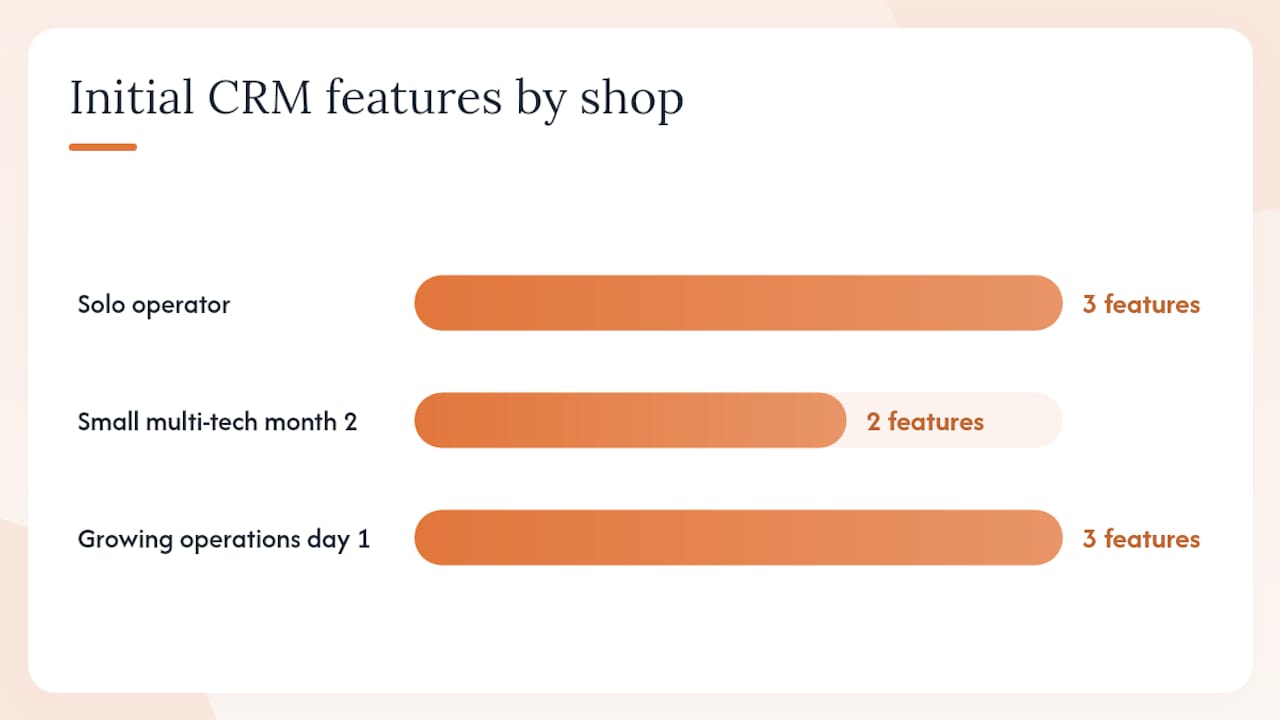
A full-lifecycle CRM for electricians must support pipeline visibility, document automation, and strong third-party integrations. Solo operators can start with lead tracking, estimating, and invoicing. Small multi-tech shops should add mobile job cards and inventory in month two. Growing operations need subcontractor comms, advanced reporting, and accounting sync from day one.
For estimating specifically, see the construction estimating workflow best practices guide for template structure and line-item sequencing that translates directly into CRM bid modules.
How do you evaluate vendors and what should you ask on a demo?
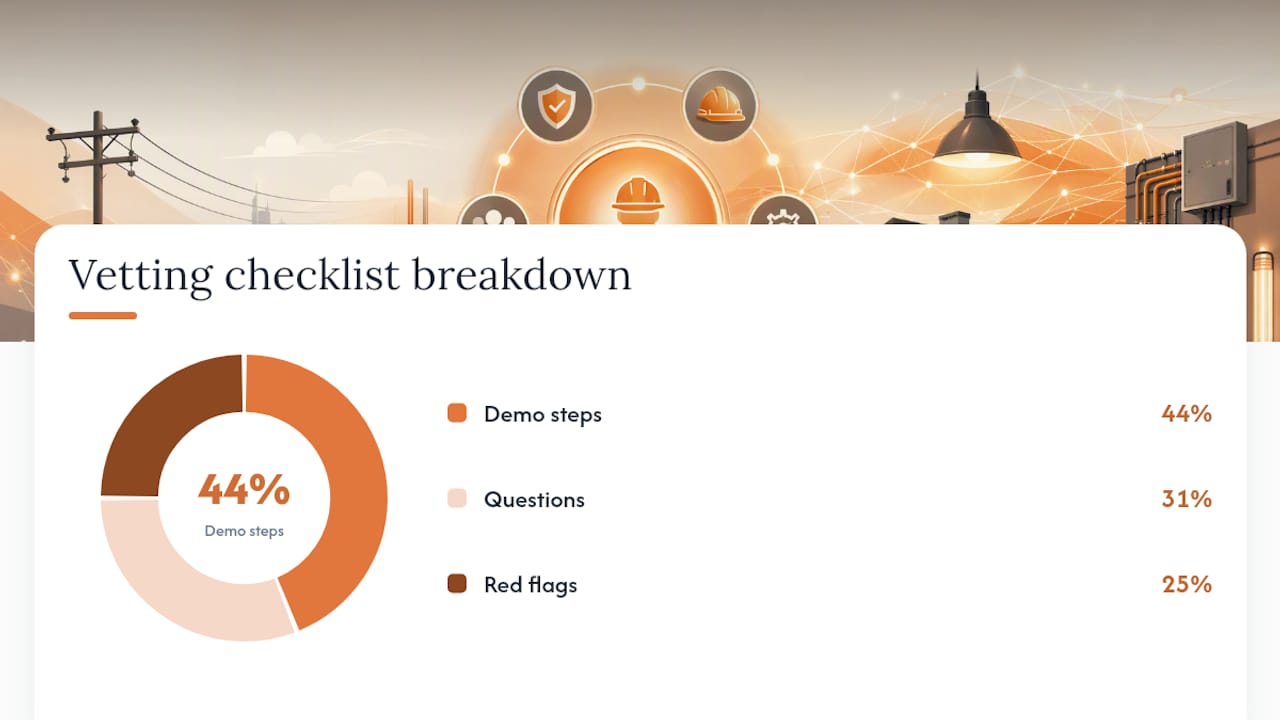
Start every vendor demo with a live walkthrough of this exact sequence: lead intake, estimating, job dispatch, mobile invoicing, inventory update, subcontractor message, accounting sync. If a vendor skips any step or switches to slides, that is a red flag.
Demo checklist (run in this order):
- Enter a new lead and trigger an automated follow-up sequence
- Convert the lead to a quote using a pre-built electrical estimating template
- Dispatch the job to a technician and confirm mobile notification
- Log parts used from the field app and watch inventory update in real time
- Generate and send an invoice from the mobile app at job completion
- Send a scoped work order to a subcontractor and confirm message threading
- Confirm the invoice syncs to QuickBooks (or your accounting tool) without manual entry
Questions to ask the vendor:
- How long does accounting sync take after an invoice is created?
- Can I see job-level profit by job type in the reporting dashboard right now?
- Does the mobile app work offline, and how does it sync when connectivity returns?
- What does your onboarding plan look like for a 6-person electrical crew?
- Can you show me a case study from an electrical or mechanical contractor?
Red flags to watch for:
- Vendor cannot demonstrate job-level profit in the demo environment
- Mobile UX requires more than three taps to log a parts update
- No documented electrician or trade-contractor workflows in their library
- Vague implementation timeline with no assigned onboarding contact
Choosing the wrong CRM costs contractors 6–12 months of lost data and broken follow-up. Use the commercial construction software comparison checklist to score vendors side by side before your final call.
Prepare your processes before you buy
Complete a 3-week readiness sprint before full rollout. This is not optional prep work; it is what separates a smooth go-live from a six-month cleanup project.
Readiness steps:
- Map your current intake-to-invoice flow on paper, including every handoff between office and field
- Define your job types, standard price lists, and labor rates by skill level
- Export client contacts, active quotes, open jobs, and parts inventory from your current tools
- Set up a test project in the new platform and add two mobile users from your crew
- Run parallel operations for 2 weeks: log every job in both systems and compare outputs
Data migration checklist:
- Active client contacts and service addresses
- Open quotes and pending bids
- In-progress jobs with current status and assigned crew
- Parts inventory with quantities and supplier links
- Vendor and supplier contact records
- Subcontractor contacts, trade categories, and rate cards
Migrate active jobs immediately, not eventually. Waiting creates data gaps that are painful to reconstruct after go-live.
Statistic callout: Automation and AI operating systems reduce administrative time by 20–30% and typically deliver ROI in 3–6 months when implemented against documented processes.
Training plan: Train office staff and estimators in week one on lead intake, quoting, and reporting. Bring field technicians onto the mobile app in week two with a 30-minute hands-on session covering job check-in, parts logging, and invoice generation. Finance staff should complete accounting integration training before the pilot ends.
Why does R Construction Solutions fit electrician contractors?
Highlevelcrm-rconstructionsolutions is built specifically for construction contractor businesses, not adapted from a generic sales CRM. That distinction matters in practice because the platform’s default workflows already reflect how electrical contracting jobs move from lead to closeout.
Feature-to-need match for registered electricians:
- Automated lead tracking captures inbound service requests and new construction inquiries without manual entry
- Estimating templates include line-item labor and parts fields structured for electrical bid formats
- Job-level profit reporting shows margin by job type so you know which work is worth bidding
- Mobile job cards let technicians update status, log parts, and collect signatures on site
- Parts allocation ties inventory consumption to specific jobs, not just a general stock count
- Subcontractor messaging threads are scoped to each job, keeping communication organized by work order
- Onboarding and training services cover setup, customization, and crew training as part of the engagement
Statistic callout: Users of R Construction Solutions report up to 35% improvement in lead conversion and faster invoice close times after adopting the platform’s automated follow-up and mobile invoicing features.
The platform is developed with over 30 years of construction industry experience, which shows in the default configuration. You are not building electrical workflows from scratch inside a generic tool.
What drives CRM pricing and when do you see ROI?
Primary pricing drivers for construction CRM platforms are the number of mobile users, the integrations you activate (accounting, estimating, payment processing), and the onboarding and customization services included at setup.
Typical cost components:
- Per-user monthly fee for field technicians and office staff
- One-time setup and data migration fee
- Add-on modules: advanced inventory, subcontractor portal, custom reporting
- Ongoing support and training tier
Simple ROI calculation for a 5-person electrical crew:
Recover 8 hours per week in admin time (scheduling, invoicing, follow-up) at a fully loaded rate, add the revenue recovered from leads that previously fell through the cracks, and factor in faster invoice collection from mobile payment links. For many electrical contractors, that math closes within 3–6 months. Deferred implementation carries its own cost: every week without automated follow-up is quoted work that goes cold.
Connect accounting in week one. Retrofitting QuickBooks after jobs are already logged creates a reconciliation problem that takes weeks to untangle.
For a broader look at why contractors benefit from CRM adoption, including revenue and efficiency benchmarks, that resource covers the full business case.
What are your next steps in the next 30–60 days?
Demo checklist (prioritized):
- Confirm estimating templates match your electrical bid format
- Verify mobile app works offline and syncs on reconnect
- Watch a live accounting sync from invoice creation to QuickBooks
- Ask for a case study from an electrical or trade contractor
Pilot plan (2 weeks, 1–2 crews):
- Migrate one active job and two client records as a data test
- Assign two field technicians to use mobile job cards exclusively
- Run all new quotes through the CRM estimating module
- Measure: lead-to-quote conversion rate, days from invoice to payment, scheduling accuracy
- Compare pilot results against your pre-CRM baseline before committing to full rollout
Decision criteria:
- Must-have integrations are live and tested (QuickBooks, estimating tool)
- Mobile adoption rate among field techs exceeds 80% by end of week two
- Time-to-invoice drops measurably from job completion
- Vendor support response time meets your SLA requirement
For guidance on selecting software across multiple active projects, that resource covers evaluation criteria for contractors running concurrent jobs.
Key Takeaways
Construction-specific CRM is the right choice for certified electrician contractors because it maps directly to estimating, job dispatch, inventory, and subcontractor workflows that generic tools cannot support natively.
| Point | Details |
|---|---|
| Document processes first | Map your intake-to-invoice flow before selecting or configuring any CRM platform. |
| Consolidate core functions | Scheduling, quoting, and invoicing in one system delivers the highest early ROI. |
| Connect accounting in week one | QuickBooks integration from day one prevents a painful data reconciliation later. |
| Run a 2-week pilot | Test on 1–2 crews with real jobs before committing to full rollout. |
| Highlevelcrm-rconstructionsolutions | Built on 30+ years of construction experience; users report up to 35% lead conversion improvement. |
The gap most electrician contractors miss
Most electrician contracting businesses I see struggle not with the CRM decision itself but with what comes before it. They buy a platform, skip the process documentation step, and then spend months trying to configure software around a workflow nobody has written down. The result is a tool that gets used for contact storage and nothing else.
The EC&M guidance from Dr. Heather Moore and Jennifer Daneshgari is worth taking seriously: software accelerates the process already in place. If your estimating process is three people texting each other, a CRM will automate three people texting each other. The 3-week readiness sprint in this guide is not overhead; it is the work that makes the platform pay off.
Highlevelcrm-rconstructionsolutions stands out because the default configuration already reflects electrical and construction contractor workflows. That shortens the gap between purchase and productive use considerably, which is where most implementations fail.
See what R Construction Solutions does for your crew
Highlevelcrm-rconstructionsolutions gives certified electrician contractors a concrete advantage over running leads, bids, and jobs across disconnected tools: one platform that handles automated lead follow-up, electrical estimating templates, mobile job cards, parts-level inventory, and subcontractor messaging from day one.
The pilot offer includes data migration support, two hours of customization for your electrical job types and bid templates, and hands-on mobile training for your field technicians. You leave the pilot with real job data in the system and a clear read on conversion rate lift and invoice cycle time.
See the CRM features and start your pilot to book your demo and get your crew set up within two weeks.
Useful sources
- The Complete Guide to Electrical Business Management 2026 — Axionis.io
- Electrical CRM Software Comparison 2026: Honest Comparison Guide — Axionis.io
- How Electrical Contractors Can Use Software to Enable Processes | EC&M
- AI Operating System vs Manual Processes in Electrical Contractors: A Full Comparison | OS For Your Business
- Best Electrician CRM Guide
- Why Contractors Need Construction-Specific Tools

