
Selecting Software for Multi-Project Contractors | High Level CRM - R. Construction Solutions
The right software for multi-project contractors is defined by its ability to manage construction-specific financial workflows, project tracking, and lead management inside a single platform. Generic tools built for general business use fall short the moment you add a second or third active job site. Contractors running simultaneous projects need purpose-built contractor software solutions that handle AIA billing, retainage, prevailing wage compliance, and real-time job costing without requiring bolt-on apps. This guide walks you through the features, integration requirements, and selection process that separate effective multi-project management software from tools that create more work than they save.
What are the essential features to look for in software for multi-project contractors?
Construction-specific project management software must handle the financial and operational complexity that generic tools cannot. AIA billing, retainage, and prevailing wage compliance are non-negotiable requirements. Attempting to manage these in a spreadsheet or a general business tool creates audit risk and financial exposure that no contractor can afford.
The core features you need fall into several clear categories:
- Project tracking and scheduling: The platform must support multiple simultaneous jobs with shared resource visibility. You need to see which crews are assigned where, which deadlines are at risk, and which jobs are running over budget, all from one screen.
- Bid management and lead tracking: Tailored bid management and lead tracking built for construction workflows reduce the time between first contact and signed contract. Generic CRM pipelines do not map to how contractors win work.
- Document management with revision control: Centralizing RFIs, submittals, and daily logs with permissioned distribution reduces rework and keeps multi-project teams aligned. Without revision control, the wrong drawing ends up in the field.
- Financial integration: Job costing, payroll, and billing must connect directly to project workflows. Disconnected accounting creates lag between what is happening on site and what your numbers show.
- Mobile and field communication: Field crews need to log progress, flag issues, and access documents from a phone or tablet. Field-to-office communication gaps are one of the leading causes of rework on multi-project operations.
- Compliance tracking: Prevailing wage calculations, certified payroll, and lien waivers must be built in, not added later.
Pro Tip: Prioritize platforms that consolidate your core workflows. Every time a team member switches between apps to complete one task, you lose time and introduce the risk of a data error.
Highlevelcrm-rconstructionsolutions was built with over 30 years of construction experience behind it, which is why its feature set maps directly to these requirements rather than forcing contractors to adapt a generic tool.

How to assess software tools for ease of implementation and ROI
Implementation speed and measurable return on investment are the two factors contractors most often underestimate when evaluating contractor project tracking tools. A platform with every feature you need still fails if your team cannot adopt it within a reasonable timeframe.
Follow these steps to assess any platform before you commit:
- Confirm the go-live timeline. Guided implementation of construction project management software typically allows firms to go live within 2–4 weeks. Ask vendors exactly what that process includes and who leads it.
- Ask about construction-specific onboarding. Vendors who understand construction workflows get your team productive faster. Generic onboarding built for any industry adds weeks of configuration time.
- Calculate your ROI baseline. Track three numbers before you start: hours spent on administrative tasks per week, your current bid win rate, and your average cost overrun per project. These become your comparison points.
- Set a realistic ROI window. Return on investment is often achieved within 3–6 months when implementation follows industry standards. That timeline assumes consistent use and proper training.
- Identify governance requirements early. Advanced workflows require consistent governance across multiple projects and users. If your team does not follow the same process in the platform, your data becomes unreliable.
- Plan for change management. The biggest delay to ROI is not the software. It is the team not using it correctly. Budget time for training, not just setup.
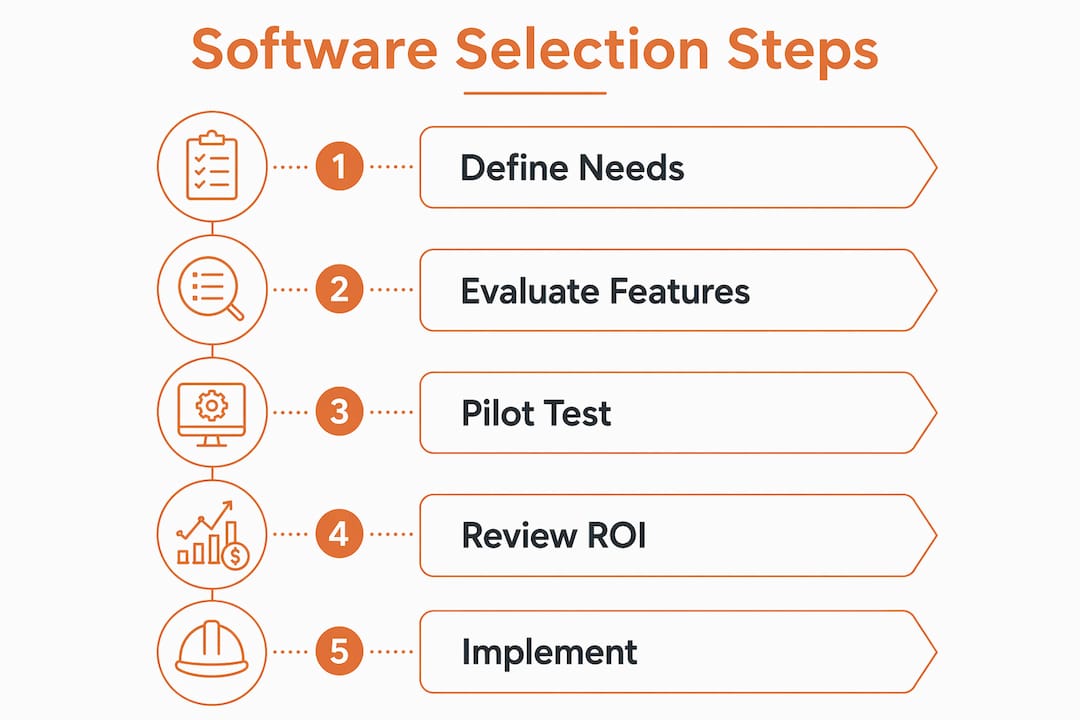
Pro Tip: Run a 30-day pilot on one active project before full rollout. You will surface adoption issues early, when they are still easy to fix.
What integration capabilities matter most for multi-project contractors?
Integration is where most contractor software decisions go wrong. A platform that handles project tracking but cannot connect to your accounting system forces your office manager to enter the same data twice. That doubles the chance of an error and eliminates the time savings you bought the software to achieve.
Generic project management tools lack construction-native features such as daily logs, RFI tracking, retainage, and prevailing wage calculations. Contractors who start with these tools end up adding secondary apps to fill the gaps. Each additional app is another login, another data sync to manage, and another point of failure.
The integrations that matter most for managing multiple projects are:
- Scheduling connected to job costing: When a schedule change triggers a cost impact, your project manager and accountant need to see it at the same time.
- Estimating linked to change order management: Approved change orders must flow directly into the job cost budget without manual re-entry.
- Document control tied to compliance and billing: Submittals and RFIs affect both project timelines and payment applications. Keeping these in separate systems creates billing delays.
- Payroll connected to certified payroll reporting: For prevailing wage jobs, payroll data must feed compliance reports automatically.
“Selecting software that connects documents, scheduling, estimating, change orders, and job costing into one workflow reduces rework and saves time. Connected workflows improve collaboration and financial accuracy across every active project.”
Understanding why construction-specific tools outperform general platforms comes down to this: every feature in a purpose-built platform was designed with construction compliance and financial accuracy in mind from day one.
What are best practices for selecting and implementing contractor software?
A structured selection process protects you from choosing a platform that looks good in a demo but fails in daily use. The contractors who get the most from their software are the ones who evaluated it against their actual workflows, not a vendor’s feature checklist.
Follow this process to make a confident decision:
- Define your operational requirements. List the workflows that currently cause the most delays or errors. Your software must solve those first. Project scale and complexity determine which features are non-negotiable versus nice to have.
- Engage your team early. The project managers, estimators, and field supervisors who will use the platform daily have the clearest view of what is broken. Their input prevents you from buying a tool that solves the wrong problem.
- Test key workflows during the trial period. Run a real bid through the bid management module. Log a real RFI. Pull a job cost report. Effective project management in construction depends on tools that work under real conditions, not demo conditions.
- Evaluate vendor support and training resources. A vendor who disappears after the sale creates long-term adoption problems. Ask for references from contractors of similar size and project complexity.
- Plan your transition timeline. Switching platforms mid-project creates risk. Identify a natural break point, such as the start of a new project phase, to begin the rollout.
- Monitor metrics in the first 90 days. Track the same numbers you measured before implementation. If bid win rates, cost overruns, or administrative hours are not moving in the right direction, identify why before the problem compounds.
Pro Tip: Document your evaluation criteria and score each platform against them before any demos. Vendors are skilled at showing their strengths. Your scorecard keeps the evaluation objective.
Highlevelcrm-rconstructionsolutions users report lead conversion rate increases of up to 35% after adopting its automated lead tracking and custom reporting dashboards. That result comes from a platform built specifically for commercial construction software needs, not a general tool adapted after the fact.
Key Takeaways
Contractors who select purpose-built, construction-native software with integrated financial workflows, document control, and bid management consistently outperform those who rely on generic tools patched together with bolt-on apps.
| Point | Details |
|---|---|
| Construction-native features are required | AIA billing, retainage, and prevailing wage compliance must be built in, not added later. |
| Implementation takes 2–4 weeks with guidance | Guided onboarding gets firms live faster; ROI typically follows within 3–6 months. |
| Integration eliminates double entry | Connecting scheduling, job costing, and payroll in one platform reduces errors and saves time. |
| Team involvement drives adoption | Engaging project managers and field supervisors early prevents selecting the wrong tool. |
| Governance determines data quality | Standardized workflows across all users keep multi-project data accurate and audit-ready. |
What I have learned about software selection after years in construction
By Rowena
The contractors I see struggle most with software selection share one pattern: they evaluate platforms based on feature lists instead of workflows. A feature list tells you what a tool can do. A workflow test tells you whether your team will actually use it.
The second mistake is underestimating governance. When you manage three or four active projects, every user entering data differently creates a reporting mess within weeks. The platform is not the problem. The lack of standardized process is. Software selection and process design have to happen together, or neither works.
I am also skeptical of the “we will integrate later” approach. Contractors who launch with a project management tool and plan to connect it to accounting in phase two almost never complete phase two. The workarounds become permanent. The data stays siloed. The time savings never materialize.
My honest recommendation: choose one platform that handles the full workflow, even if it means accepting a slightly less polished interface in one area. A single source of truth across your projects is worth more than best-in-class tools that do not talk to each other. Reassess your platform every two years as your project volume and complexity grow. The right tool at 10 projects per year may not be the right tool at 30.
— Rowena
Highlevelcrm-rconstructionsolutions: built for contractors managing multiple projects
Highlevelcrm-rconstructionsolutions was developed with over 30 years of construction industry experience behind every feature. It gives contractors automated lead tracking, custom reporting dashboards, and workflows designed specifically for the construction sector, not adapted from a generic business tool.

Contractors using Highlevelcrm-rconstructionsolutions report lead conversion rate increases of up to 35%, with measurable reductions in project management time and administrative errors. The platform connects project tracking, bidding, compliance, and lead management in one place, so your team spends less time switching between tools and more time closing jobs. Visit the Industries We Serve page to see how Highlevelcrm-rconstructionsolutions supports contractors across construction sectors.
FAQ
What features are most critical for multi-project contractor software?
Project tracking, bid management, and compliance features built for construction are the most critical. AIA billing, retainage, and prevailing wage support must be included natively, not added through third-party apps.
How long does it take to implement construction project management software?
Guided implementation typically takes 2–4 weeks for construction firms. Return on investment follows within 3–6 months when the team adopts standardized workflows from the start.
Why do generic project management tools fall short for contractors?
Generic tools lack construction-native features like RFI tracking, daily logs, retainage, and certified payroll. Contractors end up adding bolt-on apps that fragment workflows and increase the risk of errors.
How do I calculate ROI from contractor software?
Track administrative hours, bid win rates, and cost overruns before implementation, then measure the same numbers at 90 days. Improvements in those three areas represent the direct financial return from your software investment.
What is the biggest risk when selecting software for multiple projects?
The biggest risk is choosing a platform based on a demo rather than testing it against your real workflows. Engage your project managers and field supervisors in the evaluation, and run a live pilot on one active project before full rollout.

