
Construction CRM Implementation: A Practical Rollout Playbook
Start by defining three measurable CRM goals, choosing a construction-focused system (or tailoring a general one to your bid-to-build pipeline), and running a pilot migration on 10% of your data before you touch full rollout. That sequence, in that order, is what separates a CRM that gets used from one that becomes expensive shelfware. Skip the goal-setting step and you’ll configure a system nobody asked for. Skip the pilot and you’ll discover your data problems in front of your whole sales team.
Track these numbers in your first 90 days:
- Lead response time — how fast a new inquiry gets a first touch
- Pipeline coverage — dollar value of active opportunities versus your revenue target
- Active user rate — percentage of licensed seats logging in weekly
- Data completeness — percentage of required fields filled on new records
- Follow-up task completion — percentage of scheduled tasks closed on time
Contractors who implement construction-specific platforms like Highlevelcrm-rconstructionsolutions report lead conversion increases of up to 35%, largely because automated tracking closes the gap between a bid submission and a follow-up call. That’s the kind of metric worth building your 90-day scorecard around.
Key Takeaways
A successful construction CRM implementation depends on defining measurable goals first, piloting a small data set, and enforcing role-based adoption checkpoints before expanding company-wide.
| Point | Details |
|---|---|
| Set goals before selecting software | Define 3 to 5 measurable goals, like lead response time or pipeline coverage, before evaluating vendors. |
| Keep the data model lean | Limit core records to 8 to 10 essential fields so field teams don’t skip data entry. |
| Pilot before full rollout | Migrate roughly 10% of data into a sandbox and validate with real users before go-live. |
| Track adoption weekly for 90 days | Monitor active user rate, field completion, and follow-up task closure, not just at launch. |
| Choose construction-specific tools | Highlevelcrm-rconstructionsolutions models the bid-to-build pipeline directly, with reported lead conversion gains up to 35%. |
Table of Contents
- Construction CRM Implementation: A Prioritized Best-Practices Checklist
- How Do You Roll Out a Construction CRM Step by Step?
- What Should a Data Migration Checklist Include?
- How Do You Train Teams and Drive CRM Adoption?
- What Does High Level CRM Deliver for a Construction Business?
- How Should You Customize a CRM for Estimators, PMs, and Field Teams?
- What Security and Privacy Steps Matter Most in a Construction CRM?
- What Contractors Consistently Get Wrong About CRM Rollouts
- Get Started With a Construction-Built CRM
- Frequently Asked Questions
- Sources
Construction CRM Implementation: A Prioritized Best-Practices Checklist
Most construction CRM implementations don’t fail because the software is bad. They fail because the rollout ignores how field and office teams actually work. The checklist below reflects the order that matters most, not just a list of nice-to-haves.
- Define 3 to 5 primary goals before you select software. Faster bid turnaround, better subcontractor communication, or tighter pipeline visibility, whatever it is, write it down and attach a number. A goal like “improve lead conversion” is useless without a target percentage and a deadline.
- Keep the data model small. Eight to ten essential fields per opportunity is the ceiling for a healthy pilot: project name, stage, estimated value, close date, primary contact, source, and assigned rep cover most bid pipelines. Every extra required field is a reason for a superintendent to skip entering data from the truck.
- Require mobile-first design with offline capability. If adding a lead or a job-site photo takes longer than about 60 seconds on a phone, field adoption drops fast. Confirm integrations with your accounting platform and scheduling tools before you sign anything.
- Build automations for time savings, not complexity. Automated follow-up reminders and stage-change notifications earn their keep in week one. Heavy automation chains, the kind that trigger five actions off one field update, tend to confuse new users and should wait until adoption is solid.
- Establish governance early. Assign a leadership sponsor, an implementation lead, a trainer, and a data auditor. Someone needs to own housekeeping: merging duplicates, archiving dead deals, and enforcing the required-field rules every week.
- Pilot first, expand by function, not by feature. Roll out to one estimating team or one region before turning on every module for the whole company.
Contractors frequently have strong relationships and a full pipeline of past clients, but no structured way to prove it. The AGC’s CRM playbook makes the point plainly: a CRM converts tribal knowledge, the stuff that lives in one estimator’s head, into company knowledge everyone can act on, but only when leadership agrees on a short list of metrics and actually enforces them.
Pro Tip: Resist the urge to migrate every historical record on day one. Bring in active opportunities and the last 12 to 18 months of closed deals first. You can archive-import older history later, once your team trusts the system with the data that matters right now.
A short list of what to avoid during initial rollout:
- Requiring more than 10 fields on any core record type
- Turning on multi-step automation before your team has used the basics for 30 days
- Letting two people own data governance with no clear final decision-maker
- Rolling every department out simultaneously instead of piloting one team first
How Do You Roll Out a Construction CRM Step by Step?
A construction CRM implementation runs cleanest as a five-stage project, not a single “go-live” event. Each stage has a deliverable, so nobody is guessing whether it’s time to move forward.
- Write a requirements document. List your stakeholders (estimating, project management, BD, accounting), the workflows you need modeled (bid-to-build stages, change order tracking, subcontractor communication), your success metrics, and every system you need to integrate, from accounting software to scheduling tools.
- Score your CRM options against a selection checklist. Field and mobile workflow quality, offline functionality, integration depth, and the vendor’s onboarding and support services should all carry weight in a go/no-go decision. A platform built specifically for construction, like Highlevelcrm-rconstructionsolutions, starts ahead here because the bid-to-build pipeline is already modeled, rather than bolted on.
- Design a pilot. Choose a sample of real data, a small group of users from one team, and clear evaluation criteria. Run the data import in a sandbox environment first, never directly into production.
- Confirm go-live readiness. Write test cases for your top five workflows, verify migrated data against the source system, and have a documented backup and rollback plan in case something breaks on launch day.
- Set a post-launch review cadence. Schedule formal check-ins at 30, 60, and 90 days, each one reviewing adoption KPIs and producing a prioritized backlog of fixes and enhancements rather than an open-ended wish list.
Timelines vary a lot by scope. A step-by-step construction CRM guide estimates simple deployments might take a few weeks, mid-market rollouts with real data migration take several weeks to a few months, and enterprise custom builds can take multiple months. Return on investment commonly appears within the first year or so for systems implemented with this kind of staged approach. Our own guide on setting up a CRM for your construction business walks through the setup checklist stage by stage if you want the detail behind each step.
What Should a Data Migration Checklist Include?
Bad data is the single most underestimated risk in any construction CRM implementation. Poor-quality data has cost the global construction industry an estimated $1.8 trillion, and contractors who invest time cleansing records before migration report far fewer post-launch headaches.
Work through this sequence before you migrate anything:
- Inventory every data source and assign an owner to each: accounts, contacts, deals, activities, attachments.
- Deduplicate records, standardize phone and address formats, and archive stale or dead opportunities.
- Build a field-mapping spreadsheet: source field, destination field, and the transformation rule that connects them.
- Run a pilot import covering roughly 10% of your data in a sandbox, then have target users validate it before anything goes live.
- Set the legacy system to read-only during the final import, and keep automations switched off in the new system until the data checks out.
- Schedule reconciliation and recurring housekeeping tasks once migration is complete.
Rushing this stage is one of the most common CRM implementation mistakes contractors make, right alongside underestimating migration complexity and treating go-live as the finish line instead of the starting point.
Pro Tip: Assign one person to “own” data quality for 90 days after go-live. Migrations rarely fail on day one; they fail three weeks later when nobody’s watching for duplicate records creeping back in.
How Do You Train Teams and Drive CRM Adoption?
Software adoption in construction lives or dies on role clarity. Define five roles before training begins: an executive sponsor who protects the budget and priority, an implementation lead who owns the project plan, a trainer, a data auditor, and a handful of power users who become the first point of contact for questions.
- Build short, role-specific training modules. Field teams need a five-minute job-aid on logging a site visit from their phone. Business development needs a session on pipeline stages and required fields. Nobody needs a two-hour walkthrough of every feature in the system.
- Lean on internal champions. People trust a coworker who’s already using the tool more than they trust a corporate memo. Champions surface friction points fast, before they turn into company-wide complaints.
- Measure adoption weekly, not quarterly. Track active user percentage, completion rates on key fields, and how often follow-up tasks actually get closed.
- Recognize rainmakers and coach laggards individually. A public shoutout for a rep hitting 100% data completeness does more for adoption than a policy memo ever will.
Change management research on CRM projects backs this up directly: appointing champions and checking adoption weekly during the first 90 days measurably increases the odds of long-term success.
Pro Tip: Give your data auditor explicit authority to flag and fix bad entries in week one. Waiting until month three to enforce data hygiene means bad habits are already locked in.
What Does High Level CRM Deliver for a Construction Business?
Highlevelcrm-rconstructionsolutions was built around the bid-to-build pipeline rather than adapted from a generic sales tool. Core features include:
- Automated lead tracking from first inquiry through signed contract
- Workflow automation for follow-ups, stage changes, and subcontractor communication
- Custom reporting dashboards built around construction metrics, not generic sales funnels
- Integrations with estimating tools, accounting platforms, and scheduling software
- Onboarding and training services included as part of implementation
Contractors using the platform report lead conversion gains of up to 35%, largely tied to faster, automated follow-up on bids that used to sit in someone’s inbox. A typical mid-market rollout includes structured onboarding, role-based training, and a go-live timeline measured in weeks rather than months. Our outcomes page that walks through specific results contractors have reported after implementation.
How Should You Customize a CRM for Estimators, PMs, and Field Teams?
A single CRM view rarely fits three different jobs. Estimators need fast access to bid history, takeoff data, and win/loss patterns by project type, so their dashboard should surface pipeline value and close rate by category first. Project managers care about schedule milestones, change orders, and subcontractor communication threads, which means their view should default to active job status rather than new lead volume.

Field teams have the narrowest, most urgent need: a mobile interface that lets them log a site visit, snap a photo, or update a task in under a minute without hunting through menus. That’s not a nice-to-have. Adoption research on contractor CRMs shows that when a mobile action takes longer than roughly 60 seconds, field usage drops sharply, and once the field stops logging data, the whole system loses its value as a single source of truth.
The fix isn’t building three separate systems. It’s configuring role-based permissions and dashboards inside one platform, so an estimator opens a bid-focused screen, a PM opens a job-focused screen, and a superintendent opens a stripped-down mobile view with three buttons and nothing else. Integration with construction task management tools, like the workflow guidance in Buildberry’s guide to construction task management, can help extend that role clarity into daily task handoffs between office and field.
What Security and Privacy Steps Matter Most in a Construction CRM?
Construction CRMs hold more sensitive data than most contractors realize: bid pricing, subcontractor rates, client financial details, and sometimes site access codes or security protocols for commercial clients. Treating that data casually creates real liability, not just an IT inconvenience.
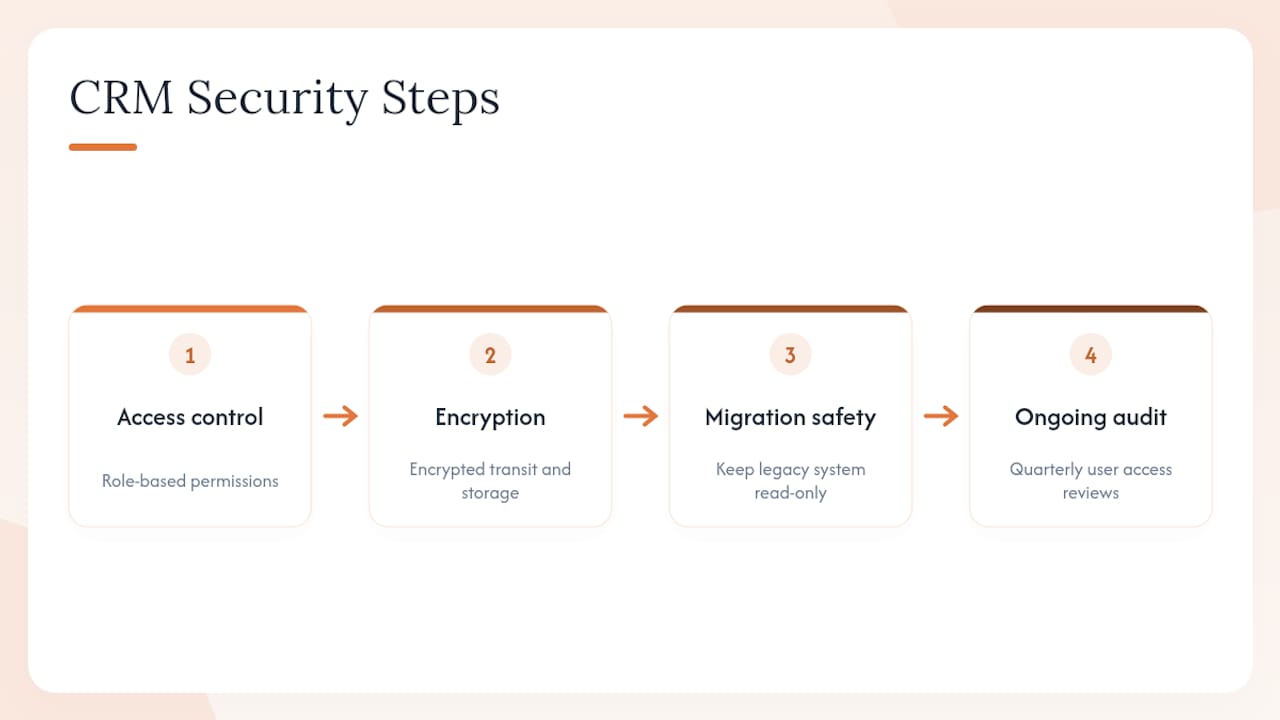
Start with access control. Role-based permissions should limit who sees pricing data, who can export contact lists, and who can edit closed-deal records. A field crew member logging site photos doesn’t need visibility into your margin calculations on a competing bid.
Confirm your CRM vendor supports encrypted data transmission and storage, and ask directly how backups are handled and how often. During migration, keep your legacy system in read-only mode until the new system is validated, which limits the window where data exists in two unsecured places at once. After go-live, review user access quarterly. Employees change roles, subcontractors rotate off jobs, and unused accounts with old permissions are a common, avoidable security gap. Building this review into your existing 90-day adoption checkpoints keeps it from becoming a forgotten task.
What Contractors Consistently Get Wrong About CRM Rollouts
The biggest misconception in construction CRM implementation is that completeness beats speed. Teams spend weeks configuring every field and automation before a single user logs in, and by the time it launches, momentum is gone and the system feels like homework.
What actually works is the opposite: get one team using a stripped-down version fast, let a small win, faster bid follow-up, a cleaner pipeline view, build its own case for the next team. Adoption research on CRM projects consistently finds that rushing requirements or over-building before testing with real users is a leading cause of failure, not underinvestment in features.
Get Started With a Construction-Built CRM
Generic CRMs force contractors to bend their bid-to-build process into a sales pipeline built for software companies. Highlevelcrm-rconstructionsolutions works the other way around: the pipeline stages, mobile field tools, and reporting dashboards are modeled on construction workflows from the start, so your estimators, PMs, and field crews aren’t stuck customizing a system built for someone else’s industry.
Onboarding includes role-based training and setup support, so the phased rollout and 90-day KPI tracking covered above aren’t something you build alone. If you’re evaluating whether a construction-specific platform fits your current workflows, the CRM features and FAQ page walks through the setup process, integrations, and what to expect from a demo call.
Frequently Asked Questions
How long does a construction CRM implementation typically take? Simple deployments run two to four weeks, mid-market rollouts with data migration take four to twelve weeks, and enterprise custom builds often take three to nine months.
What’s the biggest mistake contractors make during CRM rollout? Rushing requirements and underestimating data migration complexity are the two most common pitfalls, along with skipping role-specific training and treating go-live as the finish line.
How do you choose the best CRM for contractors? Score options against field and mobile usability, offline capability, integration depth with accounting and scheduling tools, and the quality of onboarding support, not just feature count.
What KPIs should you track after implementing a construction CRM? Lead response time, pipeline coverage, active user rate, and data completeness are the core metrics to review at 30, 60, and 90 days.
Do small contractors need a different CRM approach than large firms? The core principles, defined goals, a lean data model, and phased rollout, apply at any size, but small firms typically complete implementation in weeks while enterprise rollouts take months due to custom integrations.
Sources
- CRM playbook for any size contractor (AGC)
- Implementing a construction company CRM: Step-by-step guide

