
Construction Workflow Software in Santa Cruz | High Level CRM - R. Construction Solutions
Construction workflow software is a cloud-based solution that centralizes, automates, and connects core construction processes, giving Santa Cruz contractors real-time control over project execution from bid to closeout. Platforms like Procore and Fieldwire have redefined what Santa Cruz construction management looks like in practice, replacing scattered spreadsheets and email chains with structured digital workflows. The industry term for this category is construction project management software, though “workflow software” accurately describes its primary function: organizing the sequence of tasks, approvals, and data exchanges that keep a project moving. For contractors in Santa Cruz managing coastal renovations, commercial builds, or residential developments, the right platform directly affects profitability, communication, and field accuracy.
What workflows does construction software actually manage?
Construction workflow software manages the repeatable, process-driven tasks that consume the most time and create the most risk when handled manually. Understanding these workflows is the foundation of any smart software decision.
The core workflows covered by leading platforms include:
- RFIs (Requests for Information): Field crews submit questions about design or specifications. Software routes these to the right person, tracks response time, and logs the answer for future reference. Untracked RFIs are a leading cause of rework and disputes.
- Submittals: Contractors submit product data, shop drawings, and material samples for architect or engineer approval. Software creates an auditable trail that protects all parties.
- Change orders: Any scope change must be documented, priced, and approved before work proceeds. Change order workflows benefit from measurement as an auditable funnel with a greater than 95% capture rate target to prevent revenue loss.
- Invoicing and pay applications: AIA billing requires precise reconciliation between forms G702 and G703, including retainage calculations. AIA pay application workflows enforced by software prevent disputes but require correct configuration to avoid errors.
- Field data capture: Daily reports, safety logs, time tracking, and photo documentation feed directly into job costing and forecasting. When supervisors log this data accurately, automated reports become reliable. When they don’t, the entire system breaks down.
Procore connects all project stakeholders with workflows for documents, RFIs, submittals, change orders, and field operations via web and mobile apps with offline capability. That connectivity is what separates modern platforms from legacy software or manual processes.
How do Procore and Fieldwire serve different Santa Cruz contractors?

Not every platform fits every contractor. The right choice depends on your crew size, project complexity, and how your field teams actually work on site.
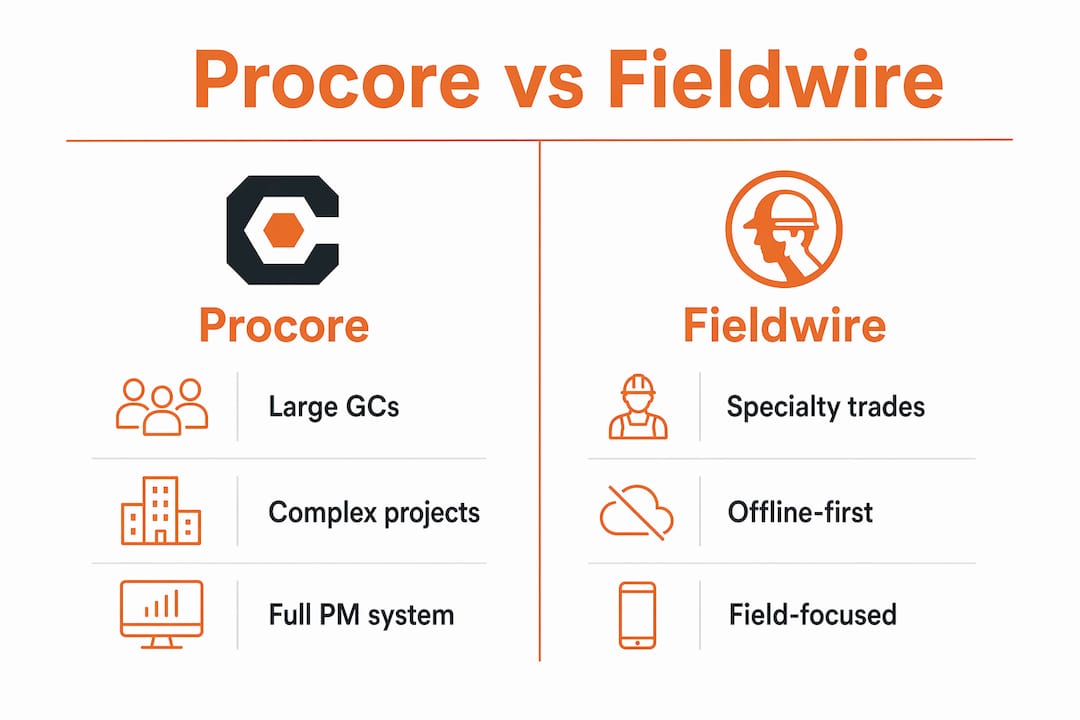
| Feature | Procore | Fieldwire |
|---|---|---|
| Best for | Large GCs and complex multi-trade projects | Specialty subs and field-heavy crews |
| Pricing model | Annual contract, project or company-based | Starts at $39/user/month (Pro plan) |
| Field usability | Strong mobile app with offline mode | Tablet-first, optimized for plan markup |
| Integrations | QuickBooks, Sage, BIM tools, broad API | Limited integration ecosystem |
| AI features | Reporting and analytics | AI-powered workflow intelligence |
| Offline capability | Yes | Yes, offline-first architecture |
Procore suits general contractors managing multiple subcontractors, large document volumes, and complex financial workflows. Its QuickBooks integration syncs vendors, invoices, payments, and job costing via API, reducing manual re-entry. Misconfiguration causes reconciliation issues, so setup requires careful attention.
Fieldwire takes a different approach. Its offline-first architecture is one of the top reasons field crews choose it, with 87% of surveyed users citing offline reliability as a key factor. For Santa Cruz contractors working in areas with spotty connectivity, that matters. The app syncs automatically when reconnected, so no data is lost between the field and the office.
Pro Tip: Before committing to any platform, ask your foreman which app they would actually open on a tablet every morning. Field-operations adoption drives software success more than any feature list.
The platform comparison between Procore and Fieldwire comes down to this: Procore is a full project management system built for the office and field together, while Fieldwire is purpose-built for the crew doing the work. Many Santa Cruz contractors use both, with Procore managing contracts and financials and Fieldwire handling daily field execution.
Why does workflow automation directly affect your profit margin?
The financial case for automation is not theoretical. Contractors lose 14.2% of revenue annually to inefficient workflows. That figure represents missed change orders, billing delays, rework from poor documentation, and time spent on manual data entry instead of productive work.
“Contractors using integrated workflows report margin increases of 4.7 percentage points, translating to substantial profit gains on every project.”
Automation also produces measurable dispute reduction. Contractors using structured workflow tools report 31% fewer change order disputes and average $47,000 in recoveries per year. For a mid-size Santa Cruz contractor running $3 to $5 million in annual revenue, that recovery alone justifies the software investment.
To capture this ROI, prioritize workflows in this sequence:
- Invoicing and pay applications. Cash flow is the lifeblood of any construction business. Automating AIA billing and retainage tracking gets money moving faster and reduces disputes with owners.
- Change orders. Every undocumented change is revenue left on the table. Automate the capture, pricing, and approval process before anything else in the field.
- Estimating. Connecting estimate data to actual job costs creates a feedback loop that improves future bids and protects margins.
- RFIs and submittals. These workflows protect you legally and keep projects on schedule. Automating routing and response tracking reduces delays.
- Field reporting. Daily logs, safety records, and time data feed job costing and forecasting. Accurate field data makes every other automated workflow more reliable.
This sequencing is not arbitrary. A 90-day sprint model that prioritizes the highest-impact workflows achieves three times higher adoption rates than attempting a full system cutover. Trying to automate everything at once leads to failure. Sequencing by impact with measurable goals improves both adoption and return on investment.
What are best practices for software adoption among Santa Cruz contractors?
Successful software adoption in Santa Cruz construction follows a clear pattern. The contractors who get the most from their platforms share three habits: they start with the workflows that hurt most, they train the right people first, and they measure results before expanding.
Start with your highest-pain workflow. If change order disputes are costing you money every quarter, that is where you begin. If billing delays are straining cash flow, invoicing automation comes first. Picking the right starting point creates early wins that build momentum across the team.
Train field supervisors before anyone else. Inconsistent field data leads to inaccurate job costing and failed automation outcomes. The foreman’s daily log is the raw material for every automated report, forecast, and invoice. If that data is incomplete or wrong, the software produces unreliable outputs regardless of how well it is configured. Supervisor training is not optional. It is the foundation.
Best practices for a successful rollout include:
- Run the new system in parallel with your existing process for the first 30 days. This reduces risk and gives your team time to build confidence.
- Set specific day-90 success metrics before you start. Examples include a 95% change order capture rate, a reduction in invoice processing time from 10 days to 3 days, or zero missed RFI deadlines in a 60-day window.
- Assign a single internal champion who owns the rollout. This person answers questions, tracks adoption, and escalates issues before they become habits.
- Avoid adding new workflows until the first one is running reliably. Scope creep in software adoption is as damaging as scope creep on a job site.
Pro Tip: Connect your automated lead tracking to your workflow software from day one. Leads that convert to projects should carry their history into the project management system automatically, eliminating re-entry and reducing errors at handoff.
Common pitfalls include skipping the parallel-run phase, training only office staff, and choosing a platform based on features rather than field usability. The CRM buyer’s checklist for construction companies includes 25 questions that help you evaluate any platform against your actual operational needs before you commit.
Key takeaways
Construction workflow software pays for itself fastest when you automate invoicing and change orders first, train field supervisors before office staff, and measure results in 90-day sprints rather than attempting a full system overhaul at once.
| Point | Details |
|---|---|
| Start with high-impact workflows | Automate invoicing and change orders first to recover revenue and improve cash flow immediately. |
| Train supervisors before office staff | Accurate field data from supervisors is the foundation of reliable job costing and forecasting. |
| Use a 90-day sprint model | Phased adoption achieves three times higher adoption rates than full system cutover. |
| Match platform to crew type | Procore suits large GCs; Fieldwire suits field-heavy specialty subs with tablet-first workflows. |
| Measure before expanding | Set specific day-90 metrics and hit them before adding new workflows to the system. |
What I’ve learned watching Santa Cruz contractors adopt workflow software
I’ve spent years working alongside contractors who were skeptical that software would survive contact with their job sites. The ones who succeeded shared one trait: they stopped asking “which platform has the most features?” and started asking “which app will my foreman actually use?”
The biggest mistake I see is treating software adoption as an IT project instead of a field operations project. You can configure Procore perfectly and still fail if the crew on site doesn’t trust the tool or understand why their daily log matters. The technology is not the hard part. The behavior change is.
Santa Cruz presents specific challenges. Coastal projects deal with permit complexity, environmental compliance documentation, and supply chain delays that require precise workflow tracking. The contractors I’ve seen thrive here are the ones who use their software to create an auditable record of every decision, not just a digital version of their old paper process.
My honest recommendation: start with one workflow, make it work perfectly, and let the results sell the next phase to your team. The ROI of automation becomes visible within 90 days when you focus on the right starting point. Don’t let the breadth of available features distract you from the discipline of doing one thing well first.
— Rowena
How Highlevelcrm-rconstructionsolutions supports Santa Cruz contractors
Highlevelcrm-rconstructionsolutions is built specifically for contractors who need more than a generic project management tool. Developed with over 30 years of construction experience, it combines automated lead tracking, custom reporting dashboards, and workflow automation in a single platform designed for how construction businesses actually operate.
Unlike off-the-shelf CRMs, Highlevelcrm-rconstructionsolutions integrates with industry-specific tools and gives you the reporting visibility to make faster, better-informed decisions on every project. Some users report lead conversion increases of 35% after implementation. If you’re ready to see how it fits your Santa Cruz operation, explore the CRM features and FAQs or visit the full platform overview to schedule a demo.
FAQ
What is construction workflow software?
Construction workflow software is a cloud-based platform that centralizes and automates repeatable construction processes including RFIs, submittals, change orders, invoicing, and field reporting. It connects office and field teams in real time to reduce errors and improve project execution.
How does Procore differ from Fieldwire for Santa Cruz contractors?
Procore is a full-scale platform suited for general contractors managing complex financials and multi-trade projects, while Fieldwire is a tablet-first tool optimized for field crews and specialty subcontractors. Fieldwire pricing starts at $39/user/month and offers an offline-first architecture ideal for sites with poor connectivity.
What is the financial impact of automating construction workflows?
Contractors lose an average of 14.2% of annual revenue to inefficient workflows. Automation reduces change order disputes by 31% and generates an average of $47,000 in annual recoveries, with integrated workflow users reporting margin increases of 4.7 percentage points.
Why should field supervisors be trained first during software rollout?
Field supervisors generate the raw data that feeds job costing, forecasting, and change order tracking. Inconsistent data entry at the field level makes automated reports unreliable, so supervisor training is the highest-priority step in any successful software adoption.
How long does it take to see ROI from construction workflow software?
A 90-day sprint model focused on the highest-impact workflows, typically invoicing and change orders, achieves three times higher adoption rates than full cutover and produces measurable financial results within the first quarter of implementation.