Fire Protection Installation Software for Contractors
For fire protection installation contractors, the right software setup is a construction-specific CRM paired with an inspection-capable field-service platform, one system that runs leads, quotes, inspections, deficiency tracking, and recurring billing without manual re-entry.
Start your vendor trials with these three platform classes:
- High Level CRM (R Construction Solutions) — construction-specific CRM for lead-to-quote and project workflows, with pre-built contractor templates and estimating integrations
- Inspection-led NFPA platforms — built around NFPA inspection forms, device-level evidence capture, and recurring compliance scheduling
- Broad commercial FSM / field-ops platforms — full-service field-service and ERP-capable systems for multi-trade contractors who need dispatch, service agreements, and accounting in one place
Why this stack? Fire protection work is compliance-driven. NFPA-aligned inspection templates, device-level capture, and deficiency tracking are table-stakes requirements, not nice-to-haves. The commercial payoff sits in converting those deficiencies into repair quotes — and that workflow is where most firms leave money on the table.
Pro Tip: Before you demo any platform, map your current deficiency-to-quote time. That single metric tells you exactly how much revenue you’re losing between inspection and repair approval.
Key Takeaways
The strongest software setup for a fire protection installation contractor combines a construction-specific CRM with an inspection-capable field platform, prioritizing deficiency-to-quote workflow and two-way accounting sync above all other features.
| Point | Details |
|---|---|
| Lead with deficiency conversion | Best-in-class contractors convert 40–60% of deficiencies into paid repairs, adding $200–$800 per inspection visit. |
| Demand live demos, not slides | Ask vendors to show a deficiency-to-quote workflow in the product before you commit to any trial. |
| Plan for 3 months | Full rollout including training typically takes 3 months; budget time and cost accordingly. |
| Pilot before company-wide rollout | Run a two-week pilot with one crew and one site to validate offline capture and invoice flow. |
| Highlevelcrm-rconstructionsolutions for the commercial side | High Level CRM covers lead tracking, estimating, scheduling, and reporting with construction-specific templates and hands-on onboarding. |
Next steps:
- Assemble your requirements list: inspection form standards, accounting platform, crew size, and current deficiency conversion rate
- Prioritize two or three pilot sites that cover both alarm and suppression work
- Run side-by-side demos with your shortlisted platforms, using the five-point checklist above
- Verify integrations and confirm the data migration plan before signing
- Set 90-day success metrics: quote turnaround time, deficiency conversion rate, inspection on-time rate, lead response time, and user adoption rate
Pro Tip: Track deficiency conversion rate and recurring contract growth as your primary 90-day KPIs — not inspection count. Those two numbers tell you whether the software is actually moving revenue.
Table of Contents
- What’s the best software for fire protection installation contractors?
- What fire protection contractors say about these platforms
- What actually matters in the first 90 days of deployment
- High Level CRM (R Construction Solutions) is built for contractors like you
- Sources
What’s the best software for fire protection installation contractors?
According to industry practitioners, best-in-class fire protection contractors convert a substantial portion of identified deficiencies into paid repair work, adding significant incremental revenue per inspection visit. That figure alone justifies making deficiency-to-quote workflow your primary evaluation criterion when comparing platforms.
Vendors typically quote custom pricing after demos, and full rollouts commonly take several months including training. Budget for that timeline and ask every vendor for a two-week pilot before committing.
Pro Tip: Ask vendors to demonstrate a live deficiency-to-quote workflow during the demo — not a slide deck. If they can’t show it in the product, that feature isn’t ready.
What fire protection contractors say about these platforms
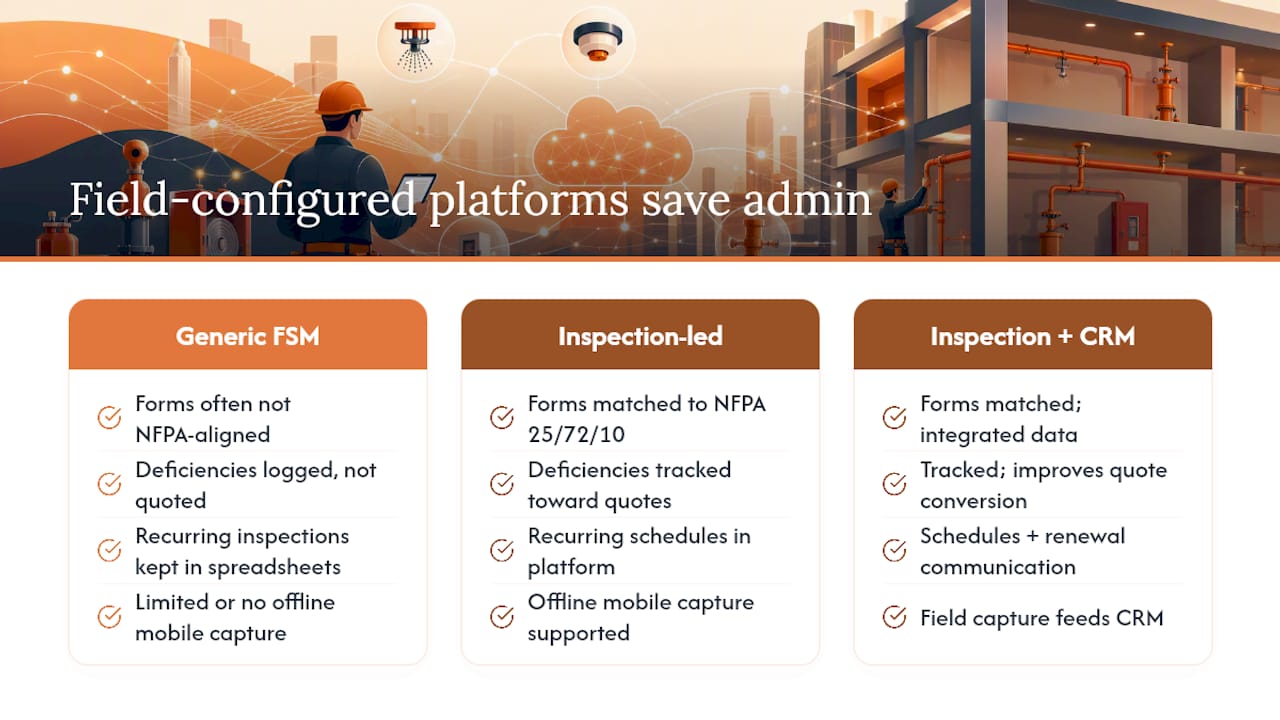
Contractors evaluating software for fire protection in buildings consistently flag the same friction points: inspection forms that don’t match NFPA 25, 72, or 10 requirements; deficiencies that get logged but never converted to quotes; and recurring inspection schedules that live in spreadsheets instead of the platform.
Firms that move to inspection-led platforms report that consolidating tools into a single system designed for field realities — offline mobile capture, scheduling, and billing — saves hours per week and reduces costly scheduling and billing errors. The pattern is consistent: the admin savings are real, but they only materialize when the platform is configured for how field crews actually work, not how a generic FSM assumes they work.
Contractors using construction-specific CRMs alongside their inspection tools report faster lead response times and better visibility into which jobs are stalled at the quote stage. A CRM built for construction fills the gaps that inspection tools typically leave: lead capture, sales pipeline, quote and contract tracking, and customer communication around renewal cycles.
The contractors who see the fastest ROI share one habit: they measure deficiency conversion rate and recurring contract growth, not just inspection volume.
What actually matters in the first 90 days of deployment
The bottom line from working with contractors through software rollouts: user adoption decides everything. A platform with every feature you need fails if your field crew ignores it after week two.
The most common pitfalls are predictable. Mobile offline capability sounds standard until a technician is in a mechanical room with no signal and the app won’t save. NFPA form fidelity looks fine in a demo but breaks down when a field tech tries to capture device-level evidence for a suppression system. And deficiency conversion workflows that require three screens and a manual email never get used consistently.
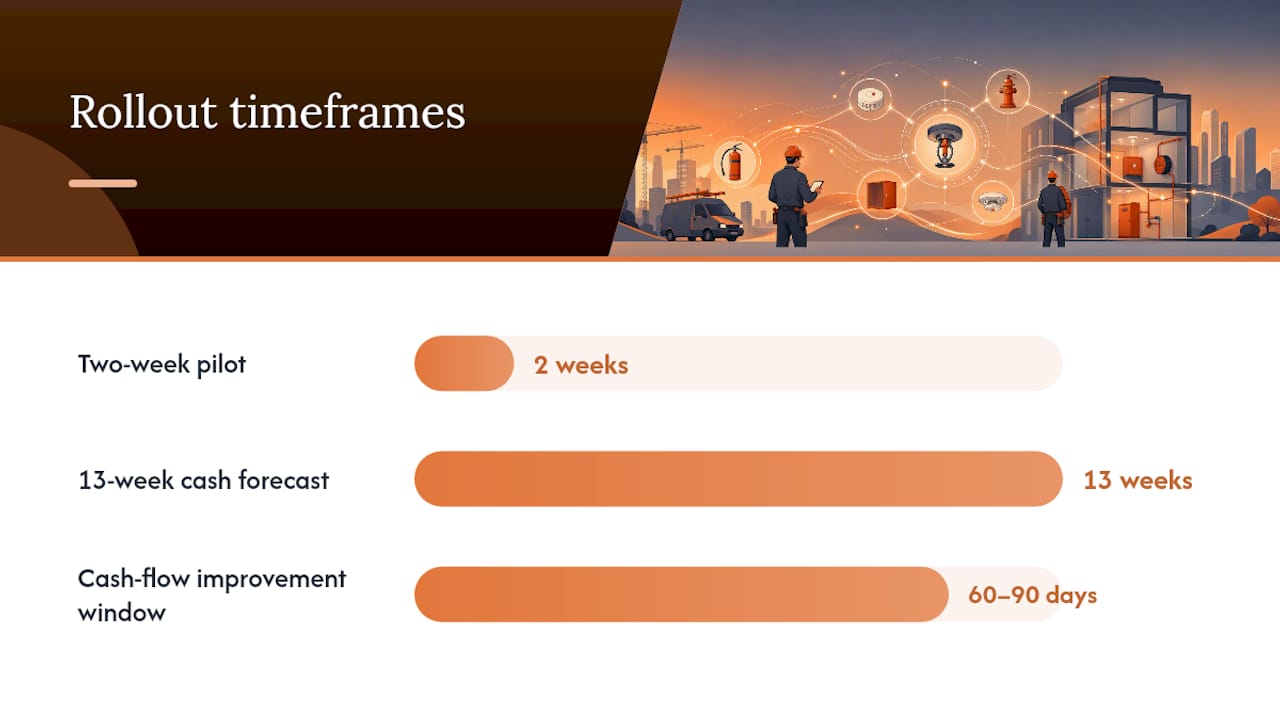
Pro Tip: Run a two-week pilot with a single crew and one site before any company-wide rollout. Validate offline capture, deficiency-to-quote time, and invoice flow in real conditions — not demo conditions.
When you’re in a demo, demand these five things:
- NFPA-aligned inspection forms (25, 72, and 10 where relevant to your work)
- Device-level evidence capture with photo and GPS tagging
- Recurring schedule automation with technician assignment
- One-click or near-instant quote generation from a logged deficiency
- Two-way accounting sync with your existing accounting platform
Stitching sales, scheduling, inspection-deficiency capture, billing, and accounting into one revenue picture with bidirectional sync is what separates a system that saves time from one that creates new data-entry work. If a vendor can’t show you that sync working live, keep looking.
Cash flow is the other variable most contractors underestimate. A 13-week cash forecast, SOV restructuring, and AR collections focus typically show meaningful improvement within 60–90 days of software adoption — but only when the platform feeds accurate, real-time billing data into your financial picture.
High Level CRM (R Construction Solutions) is built for contractors like you
Fire protection installation firms need more than a generic CRM. Highlevelcrm-rconstructionsolutions was built with over 30 years of construction experience and addresses the exact gaps that cost fire protection contractors revenue: slow lead follow-up, stalled quotes, and no visibility into which jobs are moving.
Here’s what Highlevelcrm-rconstructionsolutions brings to your operation:
- Automated lead tracking — every inquiry captured and assigned, no leads falling through
- Estimating templates built for faster, repeatable quoting
- Scheduling and dispatch with multi-job management across crews
- Mobile field capabilities for technicians in the field
- Accounting and estimating integrations for real-time billing visibility
- Custom reporting dashboards that show lead conversion, quote turnaround, and job status at a glance
- Hands-on onboarding with industry-specific templates and dedicated training
Setup follows a structured onboarding process with a clear timeline so your team isn’t guessing. See the full CRM features and FAQs and book a demo to get a custom quote for your firm’s size and workflow.
Sources
- How to architect revenue operations for a… | Pulse News
- What Fire Contractors Keep Getting Wrong About Growth - Riproar

