
ServiceTitan Onboarding Process Explained for Contractors
What does the ServiceTitan onboarding process actually cover?

The ServiceTitan onboarding process guides construction contractors through five core workflows before anything else: booking, dispatching, estimates, payments, and accounting. Everything beyond those five gets layered in after go-live. That sequencing is deliberate. ServiceTitan wants your team solid on the fundamentals before complexity enters the picture.
Here is the general sequence you will follow:
- Booking: Configure how customer calls become scheduled jobs
- Dispatching: Set up your dispatch board so jobs move from booked to assigned
- Estimates: Build your pricebook and estimate templates
- Payments: Connect merchant services and configure invoicing
- Accounting: Select and integrate your accounting software
Table of Contents
- How each core workflow gets configured during setup
- Which accounting software works best with ServiceTitan?
- Common challenges contractors run into during onboarding
- What does the onboarding timeline actually look like?
- What needs to be complete before you unlock advanced features?
- What training and support does ServiceTitan provide during onboarding?
- How can you customize ServiceTitan during onboarding?
- Which metrics tell you whether onboarding is working?
- Who on your team is responsible for what during onboarding?
- Highlevelcrm-rconstructionsolutions gives construction contractors a CRM built for the field
- Key Takeaways
How each core workflow gets configured during setup
Getting these five workflows right during your ServiceTitan setup process is where most of the real work happens. Each one builds on the previous, so skipping ahead creates problems downstream.
- Booking: You configure job types, business units, call reasons, and customer notification settings. CSRs need to know exactly what fields to capture when a customer calls.
- Dispatching: Your dispatch board needs technician profiles, zones, skills, and capacity rules before anyone goes live. Dispatchers should be able to see every job at a glance.
- Estimates: A complete pricebook is the foundation. Services, materials, and equipment all link together so technicians can build accurate estimates in the field without guessing.
- Payments: Sign up for ServiceTitan Payments early. Without the built-in merchant services, every credit card transaction requires manual reconciliation. Membership billing, refunds, and deposits all get harder.
- Accounting: Choose your accounting platform before onboarding starts. The integration setup happens during the final week, but your selection affects every financial decision before that.
For contractors building out their construction estimating workflow, getting the pricebook right during this phase pays off immediately after go-live.
Which accounting software works best with ServiceTitan?
Accounting integration is one area where your choice of software has a direct impact on how much manual work your team carries after go-live. The goal is touchless journal entry integration, where transactions sync automatically without anyone manually entering data.
“Contractors must prepare accounting integrations proactively and choose the right systems for automated syncing to maximize onboarding success.” — Richard Kohberger, industry expert
Two platforms support that touchless journal entry integration natively:
- QuickBooks Online: The right fit for small to midsize construction businesses. Most contractors migrating from QuickBooks Desktop will find the transition familiar, and ServiceTitan already has established data-pull processes for it.
- Sage Intacct: Built for enterprise-level operations with more complex financial structures, multiple entities, or higher transaction volumes.
If you skip ServiceTitan’s built-in payment processing, manual reconciliation becomes a daily burden. Credit card payments won’t auto-match with bank deposits, and refunds or deposits require extra steps every time. That workload adds up fast on a busy job site.
Common challenges contractors run into during onboarding
Most onboarding problems are predictable. Knowing where contractors typically get stuck lets you prepare before those issues slow your launch.
- Incomplete pricebook: Pricebook readiness is the single biggest blocker to a successful go-live. Contractors who lock in their pricebook before launch have smooth starts. Those who don’t spend weeks scrambling.
- Trying to add advanced features too early: ServiceTitan restricts access to advanced features before go-live to protect system stability. Work within that structure rather than around it.
- Manual payment reconciliation: Skipping the built-in merchant services creates ongoing reconciliation headaches that compound over time.
- Undertrained teams: Staff who haven’t practiced in the training environment before go-live make more errors on real jobs.
- Messy data migration: Customer records, job history, and AR balances all need to be clean before the data team imports them. Dirty data going in means dirty data coming out.
Reducing manual onboarding steps before launch is one of the most practical things a contractor can do to protect their go-live timeline.
What does the onboarding timeline actually look like?
Your timeline depends on where you are starting from. Contractors migrating from a supported platform like QuickBooks Online typically complete a condensed one-week program. Multi-trade companies, commercial operations, and anyone with a complex data situation should plan for three to four weeks.
Here is how the weeks break down:
- Week 1: Foundation setup including business units, technician profiles, and payment configuration
- Week 2: Pricebook build and dispatch board configuration
- Week 3: Call booking workflows, job types, and optional adaptive capacity rules
- Week 4: Go-live preparation, team training, and data handoff
Go-live week itself follows a structured daily schedule. Monday covers a full system review and data handoff. Tuesday and Wednesday are reserved for data import. Thursday is go-live day, with a hypercare call hosted by your onboarder. Friday brings a second check-in to review how day one went. The following Monday or Tuesday, you run an accounting export call to confirm your financial sync is working.
A full data reset happens during go-live. Your system settings, pricebook, job types, and technician profiles stay intact. Historical job and customer data gets wiped and replaced with your clean imported records. You will lose access for roughly 15–45 minutes during the reset.
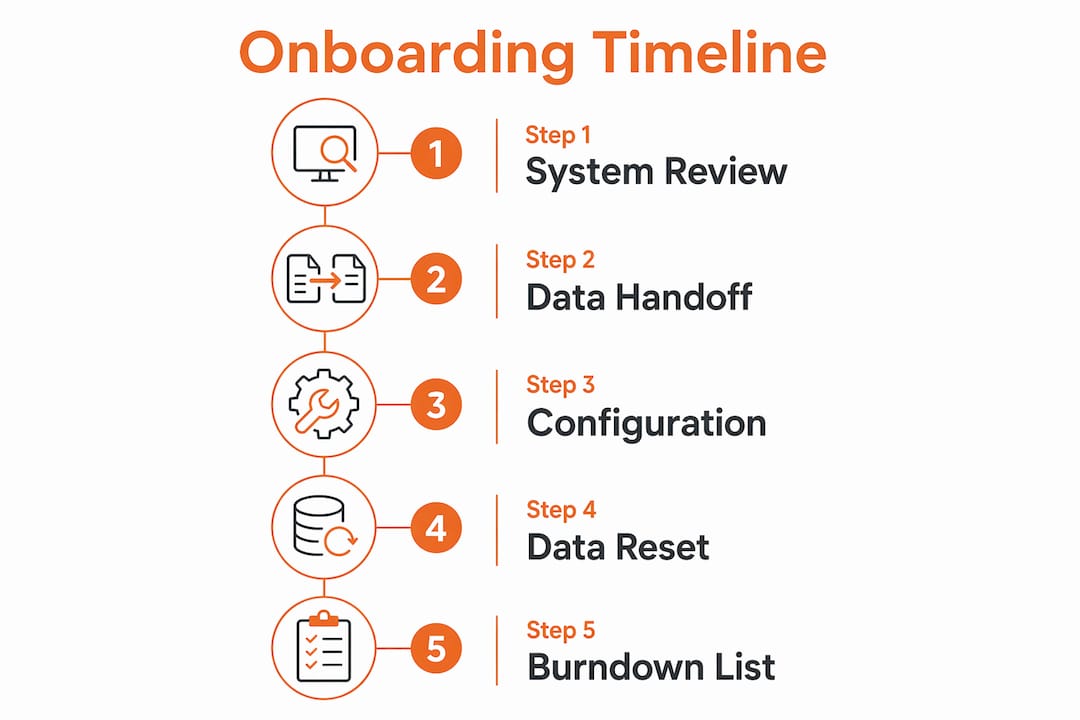
Pro Tip: Start your burndown list on go-live Thursday. The burndown list is a live document where you log every question and configuration issue as it surfaces. Your onboarder reviews it on Friday’s hypercare call, and it keeps problems from falling through the cracks during the busiest week of your implementation.
What needs to be complete before you unlock advanced features?
ServiceTitan holds advanced features back until your core workflows are stable. That is not a limitation. It is protection against the most common implementation failure: adding complexity before the foundation is solid.
Before advanced features become available, you need to complete:
- All five core workflows configured and tested in the practice environment
- Pricebook finalized with services, materials, and equipment linked correctly
- Go-live data reset completed with clean customer and AR records imported
- At least one successful accounting export confirming your financial sync
- Final data signoff from your onboarding team
Only after those steps does ServiceTitan transition your account from onboarding to the “run” phase, where your Customer Success Manager takes over ongoing support.
What training and support does ServiceTitan provide during onboarding?
Team training in a practice environment is built into the onboarding structure. Every role gets at least one focused session before anyone touches the live system. CSRs practice booking calls. Dispatchers move jobs around the board. Technicians run through a complete job in the mobile app from dispatch to payment collection.
After go-live, the support structure looks like this:
- Days 1–30: Weekly 30-minute check-ins with your success team
- Days 60–90: Bi-weekly calls as your team grows more confident
- After 90 days: Monthly calls with a dedicated Customer Success Manager
The transition from onboarding to ongoing support only happens after your final data signoff is complete and you are actively exporting transactions to your accounting system.
How can you customize ServiceTitan during onboarding?
ServiceTitan gives contractors meaningful configuration options during the onboarding window. You are not just turning the system on. You are shaping how it fits your specific operation.
Key customization areas include job type settings (skills required, default duration, business unit assignment), dispatch board rules, notification preferences for customers and technicians, estimate and invoice templates, and form configurations for field technicians. Adaptive capacity rules, which control how your dispatch board fills based on job type and technician availability, can also be set up during onboarding if your team has the bandwidth. Contractors who invest time in these configurations during setup spend far less time adjusting them after go-live.
Which metrics tell you whether onboarding is working?
Onboarding success is measurable. Track these indicators in the weeks after go-live:
- Booking rate: Are CSRs converting calls to scheduled jobs at the rate you expected?
- Dispatch efficiency: How quickly are jobs moving from booked to dispatched to completed?
- Pricebook usage: Are technicians selecting services from the pricebook or creating manual line items?
- Payment collection rate: What percentage of invoices are being collected at the job site?
- Accounting sync accuracy: Are transactions exporting to QuickBooks Online or Sage Intacct without errors?
Contractors who track these metrics from day one can identify gaps in training or configuration before they become habits. A CRM workflow built for lead conversion also helps you see where jobs are falling out of the pipeline post-onboarding.
Who on your team is responsible for what during onboarding?
Onboarding works best when every role has a defined lane. Confusion about who owns what is one of the quieter reasons implementations stall.
| Role | Primary Responsibility |
|---|---|
| Owner / Operations Lead | Final decisions on job types, business units, and pricebook structure |
| Office Manager | Data cleanup, customer record accuracy, and AR balance verification |
| Dispatcher | Dispatch board configuration review and adaptive capacity rule input |
| CSRs | Practice environment training and booking workflow feedback |
| Field Technicians | Mobile app training and pricebook familiarity before go-live |
| Accounting Contact | Accounting software selection and export call participation |
Your onboarding team at ServiceTitan coordinates across all of these roles, but someone on your side needs to own the project internally. Without a clear internal lead, decisions stall and timelines slip.
Highlevelcrm-rconstructionsolutions gives construction contractors a CRM built for the field

ServiceTitan is a powerful platform, and getting through onboarding correctly sets you up for real operational gains. But some contractors need a CRM that fits the construction industry from day one, without the complexity of a multi-week implementation. Highlevelcrm-rconstructionsolutions was built with over 30 years of construction experience behind it. Automated lead tracking, custom reporting dashboards, and construction-specific workflows are already configured for how contractors actually work. Users report lead conversion improvements, and the system integrates with the tools your business already depends on. If you want a CRM that works the way your crews do, see the industries we serve and find out whether Highlevelcrm-rconstructionsolutions fits your operation.
Key Takeaways
Successful ServiceTitan onboarding requires completing all five core workflows, clean data migration, and role-based team training before go-live, with accounting integration selected and configured from the start.
| Point | Details |
|---|---|
| Five workflows first | Booking, dispatching, estimates, payments, and accounting must be solid before advanced features unlock. |
| Pricebook is the critical path | Incomplete pricebook setup is the top cause of delayed go-live for construction contractors. |
| Timeline varies by complexity | Simple migrations take one week; multi-trade or commercial operations need three to four weeks. |
| Post-go-live support is structured | Weekly check-ins for 30 days, bi-weekly through 90 days, then monthly with a dedicated CSM. |
| Highlevelcrm-rconstructionsolutions | Built on 30+ years of construction experience, with automated workflows and reported lead conversion improvements. |

