Migrate 24 Months of Job History Safely in Construction CRM Migration
The safest way to handle construction CRM data migration is a phased, tested process built around field mapping, sample validation, and a parallel run of your old and new systems. Plan on several weeks for a single-CRM migration and a period running both platforms side by side before you retire the old one. Skip the parallel run and you’re gambling with job history you can’t rebuild.
TL;DR:
- Conduct a multi-week parallel run of both old and new CRMs, logging activity daily and verifying data consistency before fully switching systems.
- Prioritize cleaning legacy data before export, merging duplicates and standardizing formats to reduce post-migration errors and improve system trust.
- Limit migration scope to the last 24 months of job history, archiving older records to manage workload without losing critical active relationships.
- Use construction-specific migration tools and expertise to preserve complex relationships like job cost history, subcontractor links, and project documents.
- Implement tailored integration solutions with ongoing monitoring, and adopt a consistent folder structure and retention policy for job photos and files to ensure data integrity.
Table of Contents
- What Is Construction CRM Data Migration?
- What Data Challenges Are Unique to Construction?
- How Do You Audit Systems Before a Migration?
- How Do You Map Fields for a Construction CRM Migration?
- Should You Clean Data Before or After Export?
- How Do You Test Import Before a Full Migration?
- Should You Run Old and New CRMs in Parallel?
- How Long Does a Construction CRM Migration Take and Cost?
- When Should You Use Connectors vs. Custom API Integrations?
- How Do You Preserve Job Photos and Documents During Migration?
- Why Construction-Specific Migration Expertise Matters
- How Highlevelcrm-rconstructionsolutions Supports a Smooth Migration
- A Publisher’s Perspective on What Actually Breaks Migrations
- Sources
What Is Construction CRM Data Migration?
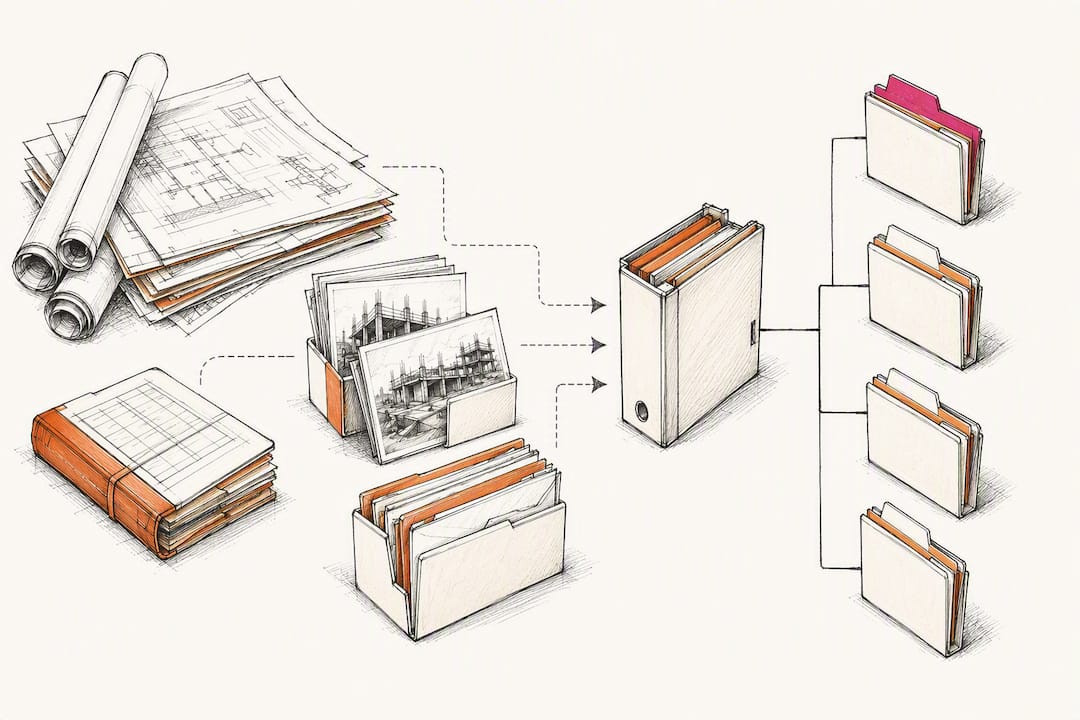
Migration and implementation are not the same project. Implementation configures a new CRM from scratch. Migration moves your existing contacts, jobs, invoices, and documents into that new structure without breaking the relationships between them.
For contractors, the typical migration touches four record types: customer and subcontractor contacts, job records with their associated cost codes, invoice and payment history, and file attachments tied to specific projects. Not every byte needs to make the trip. A useful rule of thumb: migrating the last 24 months of job history covers roughly 95% of active customer relationships for most contracting businesses. Older records can move to a searchable archive instead of the live CRM, which cuts your migration workload substantially without sacrificing anything your sales or project teams actually use day to day.
What Data Challenges Are Unique to Construction?
Construction CRM data is messier than a typical sales pipeline because it lives in more places. A single job might have contact details in the CRM, cost detail in accounting software, change orders in email threads, and photos on a superintendent’s phone. None of that syncs automatically, which is exactly why construction migrations must preserve job cost transactions, schedules, RFIs, and document history rather than treating them as optional extras.
Job cost detail matters because it’s the record your estimators and PMs trust to bid the next job accurately. Lose transaction-level history and you lose the pattern data that makes future bids competitive.
Before you migrate anything, expect to find:
- Duplicate contact and company records are a common issue in your total database
- Notes fields with truncated or garbled text from prior system exports
- Subcontractor records duplicated across jobs with inconsistent naming
- Attachments linked to a job number that no longer matches your new numbering scheme
- Custom fields your old CRM never fully utilized, now sitting empty
How Do You Audit Systems Before a Migration?
Before you touch the export button, build a complete inventory of every system holding data relevant to a job or customer relationship. Most contractors underestimate this step, then discover mid-migration that a critical field lives in a spreadsheet nobody remembered.
- List every source of truth. CRM, accounting platform, estimating software, shared drives, and any spreadsheet a PM uses to track change orders.
- Capture field-level detail for each source. Record type, field names, format, and approximate record count.
- Decide archival vs. active migration for each dataset. Anything tied to a closed job older than 24 months is typically an archival candidate.
- Assign an owner per data source. Someone accountable for confirming that source’s data is accurate before export.
- Set retention rules up front. Document how long archived records stay accessible and who can pull them.
This inventory becomes your scope document. It’s also the single best predictor of whether your migration timeline holds. Teams that skip it almost always discover new data sources midway through, which pushes the schedule and the budget.
How Do You Map Fields for a Construction CRM Migration?
Design the destination first, migrate second. Configuring the destination CRM’s objects, pipelines, and properties before importing data prevents orphaned records and broken associations, which are the most common source of post migration frustration.
Build a mapping document that pairs every legacy field with its destination field, and flag anything that doesn’t have an obvious home yet.
- Map contacts and companies first, since jobs and invoices depend on those relationships existing.
- Map jobs and job phases as linked records, not flat text fields, so reporting can roll up by phase later.
- Map subcontractor relationships as their own object type rather than tags, since one sub often works multiple jobs simultaneously.
- Document transformation rules for any field that changes format (a status field with five legacy values collapsing into three new ones, for instance).
- Reserve custom objects for relationships the standard contact and job models genuinely can’t represent, like equipment assignments or inspection logs. Overusing custom objects adds complexity your team will curse you for later.
A solid mapping document takes real time to build, but it’s the difference between a migration that goes smoothly and one that requires weeks of manual cleanup after the fact.
Should You Clean Data Before or After Export?
Before. Every time. Feeding a new CRM messy legacy data just moves your cleanup problem into a system your team hasn’t learned to trust yet.
Start by defining merge rules for duplicates: which record wins when a contact appears twice, and what happens to the losing record’s activity history. Most teams designate the record with the most recent activity as canonical, then merge notes and attachments from the duplicate before deleting it.
- Standardize phone number and address formats across all sources before export, since inconsistent formatting is what breaks automated matching during import.
- Normalize cost codes to a single naming convention if your legacy system allowed free-text entry.
- Filter out records with no activity in the past 24 to 36 months rather than importing dead weight.
- Budget real time for this step. Cleaning a database with meaningful duplicate rates typically takes longer than most schedules assume, especially for contractors with more than a few thousand contact records.
Pro Tip: Assign one person, not a committee, to make final merge decisions on duplicate records. Split ownership across multiple team members almost always produces inconsistent judgment calls that surface as data errors months later.
How Do You Test Import Before a Full Migration?
Never import your full database in one pass. Export a manageable sample, run it through the new system, and check the results before committing to everything else.
- Back up your export files to two separate locations before you do anything else with them.
- Test import 50 to 100 records and check formatting on dates, phone numbers, and notes fields for truncation.
- Review failed records individually rather than assuming a batch error means the whole file is bad.
- Fix the mapping issue that caused the failure, then re-run the same sample before scaling up.
This step matters more than most schedules give it credit for. Contractors who run parallel systems during a 2 to 4 week window report data integrity above 90%, compared with roughly 65% for teams that cold-switch without validation. That gap is almost entirely explained by catching mapping errors in a small sample instead of discovering them across an entire database.
Should You Run Old and New CRMs in Parallel?
Yes, and the duration matters. A two to four week parallel run gives your team time to catch discrepancies while the old system still exists as a safety net. Cutting straight over the weekend you go live is how 40% of contractors end up losing some customer history they can’t recover.
During the parallel window:
- Enter new activity in both systems daily, not just at week’s end.
- Assign one team member to spot-check records weekly against the legacy system for mismatches.
- Compare job counts, invoice totals, and open opportunity counts between both systems before canceling anything.
- Confirm every user can log in, find their assigned jobs, and pull a report correctly in the new system.
- Only retire the old CRM once your verification checklist passes for two consecutive weeks, not one.
How Long Does a Construction CRM Migration Take and Cost?
Budget four to eight weeks for a single-CRM migration, and six to twelve or more weeks if you’re consolidating data from multiple systems (separate accounting, estimating, and legacy CRM platforms feeding one destination). Direct migration costs commonly range from $500 to $3,000, though multi-system consolidations with heavy custom mapping can push past that range.
| Factor | Typical impact |
|---|---|
| Single CRM | 4 weeks, lower end of cost range |
| Multi-system consolidation | 6–12+ weeks, higher cost due to mapping complexity |
| Custom object requirements | Adds implementation time and vendor fees |
| Internal staff availability | Reduces external vendor cost, extends internal timeline |
| Document volume to migrate | Adds time proportional to file count, not database size |
The biggest cost driver isn’t the software, it’s mapping complexity. A contractor migrating clean, single-source data spends far less than one untangling job cost history spread across three disconnected systems.
When Should You Use Connectors vs. Custom API Integrations?
Not every integration needs the same architecture. Choosing between native connectors, iPaaS tools, and custom API integrations comes down to four factors: data volume, field complexity, sync frequency, and how much error handling you actually need.
- Native connectors work well for straightforward, low-volume syncs where both systems already support common field types.
- iPaaS platforms (integration-as-a-service tools) suit moderate complexity, giving you visual field mapping without full custom development.
- Custom API integrations make sense when you need high-volume, near-real-time bi-directional sync, or field relationships too specific for a connector to model.
After go-live, don’t just set integrations and walk away. Build basic monitoring and alerting so a broken sync surfaces in hours, not weeks, when someone notices a job never made it to accounting. This is also where an established CRM implementation playbook helps, since integration monitoring is easy to overlook once the migration itself feels finished.
How Do You Preserve Job Photos and Documents During Migration?
You have three options for every document: import it directly into the new CRM, link to it in its current storage location, or archive it separately. Direct import works best for active job files your team references often. Linking preserves access without duplicating storage, which matters when you’re dealing with thousands of site photos.
- Adopt one folder structure and naming convention before you migrate, not after (job number, then phase, then document type, works well for most contractors).
- Keep permission levels consistent with your old system so subcontractors don’t suddenly gain or lose access to files.
- Set a retention policy for closed-job documents so your CRM doesn’t become an unmanageable file dump within a year.
Losing the paper trail on a completed job creates real exposure if a warranty claim or dispute surfaces later, so treat document migration with the same rigor as financial data.
Why Construction-Specific Migration Expertise Matters
Generic CRM migration advice misses the parts that actually break: job cost associations, subcontractor relationship webs, and document trails tied to specific project phases. High Level CRM was built on more than 30 years of hands-on construction experience, which shapes how its migration and onboarding process is structured around those exact risks rather than a generic contact database.
That construction-first approach shows up in results. For more on the author’s background, see Rowena’s author page.
How Highlevelcrm-rconstructionsolutions Supports a Smooth Migration
Highlevelcrm-rconstructionsolutions gives contractors a construction-specific migration path instead of a generic CRM import wizard that treats a subcontractor relationship the same as a random sales lead. Because the platform was customized for contracting workflows from the start, field mapping for jobs, cost codes, and document trails is already built around how construction businesses actually structure their data.

That means less time spent building mapping documents from scratch and fewer surprises during your test import cycle. The onboarding and training services that come with the platform walk your team through the parallel run and verification checklist step by step, so nobody is guessing what “done” looks like before you cancel your old system. If you’re weighing a migration and want a clearer picture of what it involves for your specific trade, request a migration audit or a demo through the industries we serve page and get a realistic timeline before you commit to anything.
A Publisher’s Perspective on What Actually Breaks Migrations
Most migration failures I’ve analyzed trace back to one thing: skipping the parallel run because it feels slow. It isn’t slow, it’s insurance. If you take one non-negotiable from this whole process, make it this: don’t cancel the old system until your verification checklist passes twice in a row.
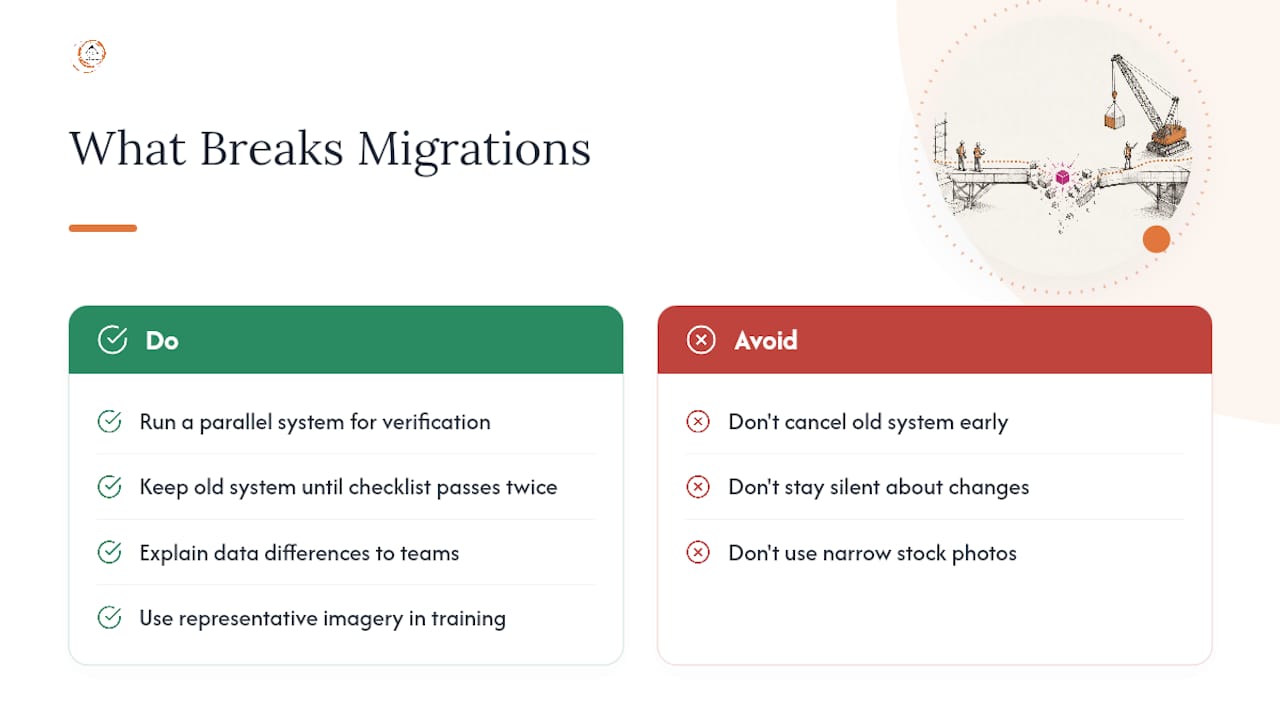
The second biggest failure point is silence. Crews and office staff who don’t understand why data looks different during the transition lose trust fast, and that trust is hard to rebuild once someone stops entering data correctly.
One more note, this one about how the industry presents itself: construction is far more diverse than the stock photography suggests. If you’re producing training materials or case studies around your own migration, use imagery that reflects the actual makeup of your crews and office teams, not a narrow slice of who’s usually pictured running the software.
— Rowena
Sources
- CRM Migration Without Losing Your Data: A Step-by-Step Guide
- How to Migrate Construction Data Without Losing History - DC Tech Group
Recommended
- Best CRM Benefits for Construction Businesses in 2026
- How to Set Up a CRM for Your Construction Business
- Construction CRM Integrations: What to Connect First
Signed up, or thinking about it? We build the inside of the account — pipelines, workflows, funnels, nurture, migration. Built for construction. Contact us.
Affiliate disclosure. We’re a GoHighLevel affiliate. Sign up through our link and we may earn a commission at no cost to you, or buy direct. Build-out is billed separately, never a software markup.

