
Improve Lead Conversion Using Contractor CRM in 2026
A contractor CRM is defined as a customer relationship management system built specifically for the construction sales cycle, from first inquiry through signed contract. Contractors using automated 3–5 step follow-up sequences achieve lead conversion rates of 28%–42%, compared to just 12%–18% for first-contact-only approaches. That gap represents real revenue sitting on the table. To improve lead conversion using a contractor CRM, you need three things working together: automated follow-up, a pipeline mapped to your actual job lifecycle, and response times measured in seconds, not days. This article breaks down exactly how to build that system.
What CRM features are essential to boost lead conversion?
The most impactful CRM features for contractors are not the flashiest ones. They are the ones that eliminate the gaps where leads fall through.
Here are the features that directly drive higher conversion rates:
- Automated multi-step follow-up sequences. A 3–5 step sequence sends texts, emails, and call reminders automatically after a lead comes in. This removes the burden of manual follow-up from your team entirely.
- Smart lead routing by job type. When a roofing inquiry arrives, it goes to your roofing estimator, not a general inbox. Routing by job type cuts response time and puts the right person on the call.
- Integrated communication channels. Calls, texts, and emails managed inside one platform mean no missed messages and a full conversation history attached to every lead record.
- Real-time pipeline dashboards. A visual pipeline shows you exactly where every lead sits, from initial contact to proposal sent. You stop guessing and start managing.
- Lead scoring and prioritization. Live scoring using real-time intent data helps your team focus on buyers most likely to sign, not just the most recent inquiry.
- Data enrichment on lead profiles. Pulling in job address, project type, and budget range automatically gives your estimators context before the first call.
Pro Tip: Set up your CRM to tag every incoming lead by job type and budget range on entry. This single step cuts the time your team spends qualifying leads by hand.
Highlevelcrm-rconstructionsolutions includes all of these features, built specifically around the construction sales process. The platform’s automated lead tracking keeps every lead visible from first contact to close, so nothing slips through.
How do you design a CRM workflow that fits your contracting business?
Generic CRM templates are built for software companies and retail sales teams. They do not match how a contractor actually sells. Mapping real job lifecycle stages into your CRM pipeline is the single most important setup decision you will make.
A contractor pipeline should reflect stages like these:
- Lead Received. The lead enters the system from your website, referral, or ad platform. An automatic acknowledgment goes out within 60 seconds.
- Qualification Call Scheduled. A team member confirms the project scope and budget. The CRM logs the call outcome and moves the lead forward.
- Site Visit Scheduled. The estimator gets an automatic calendar invite. The lead record updates with the visit date and address.
- Proposal Sent. The CRM triggers a follow-up reminder if no response arrives within 48 hours.
- Contract Negotiation. This stage flags the lead for human attention. Automation steps back, and your estimator takes over.
- Won or Lost. The outcome is logged with a reason code. This data feeds your reporting and helps you refine future follow-up timing.
Contractors who avoid generic templates and map their real process into the CRM see dramatically better adoption and fewer leads lost to confusion. When your team recognizes the stages on screen, they actually use the system.
Pro Tip: Import your existing spreadsheet data and email history into the CRM before going live. Starting with clean, complete records prevents the “this system is empty” problem that kills adoption in the first two weeks.

Automating sales workflows also frees your team from repetitive data entry, so they spend time on site visits and proposals instead of updating spreadsheets.
How do you set up automation for faster lead follow-up?
Speed is the single biggest variable in lead conversion. Responding to inbound leads within 5 minutes doubles your chances of entering the sales process. Most contractors respond in hours, not minutes. That gap is where competitors win.
Here is a step-by-step process to set up fast, consistent follow-up:
- Set an immediate acknowledgment trigger. The moment a lead submits a form or calls your number, the CRM sends an automatic text: “Thanks for reaching out. We will call you within the hour.” This sets expectations and keeps the lead warm.
- Route the lead to the right rep within 60 seconds. Immediate text follow-up within 60 seconds after lead entry outperforms complex dashboards or scoring systems for revenue impact. Set routing rules by zip code, job type, or lead source.
- Build a 3–5 step follow-up sequence. Step one is the immediate text. Step two is a personal email at hour two. Step three is a call reminder at hour 24. Steps four and five are spaced over the following week. Each message references the specific project type the lead inquired about.
- Personalize each message with lead data. Use the lead’s name, project type, and location in every automated message. Generic messages get ignored. Specific ones get responses.
- Monitor response rates by step. Your CRM dashboard shows which step in the sequence generates the most replies. Move that step earlier in future sequences.
- Keep humans in the loop for complex conversations. Automation handles the first three touches. When a lead replies with detailed questions or price objections, a flag routes the conversation to your estimator immediately.
Pro Tip: Never automate a message that sounds automated. Write your follow-up texts in the same tone your best estimator uses on the phone. The lead should feel like a person reached out, not a system.
The benefits of automated follow-up go beyond speed. Consistent sequences mean every lead gets the same quality of attention, regardless of how busy your team is on any given day.
Common mistakes contractors make with CRM lead management
Most CRM failures in contracting come down to the same handful of mistakes. Recognizing them early saves you months of wasted effort.
- Abandoning leads after 1–2 contact attempts. Most business requires 5–7 touches to convert. Contractors who stop at two touches leave the majority of their potential revenue unclaimed.
- Using a generic CRM template without customization. A template built for a retail business does not have a “Site Visit Scheduled” stage. Forcing your team to use stages that do not match their work creates frustration and data abandonment.
- Relying on manual data entry. Every manual step introduces delay and error. A lead that sits in an inbox waiting to be entered into the system is a lead that is cooling off.
- Skipping lead source attribution. If you do not track where each lead came from, you cannot calculate which marketing channels deliver the best return. You end up spending money on sources that do not convert.
- Ignoring pipeline visibility. A CRM with no one checking the dashboard is just an expensive contact list. Weekly pipeline reviews catch stale leads before they go cold permanently.
- Over-automating without human judgment. Automation works for the first three to five touches. Contract negotiations, pricing discussions, and problem-solving require a real person. Hybrid human-in-the-loop automation produces the best outcomes.
“Conversion is a relationship-building process. Persistent, systematic follow-up is the key factor separating contractors who close consistently from those who rely on luck.”
Average contractors lose about 30% of potential leads due to slow or missing follow-ups. Fixing that single problem, through automation and clear routing rules, delivers a measurable return before you change anything else.
How do you measure and improve CRM lead conversion performance?
Tracking the right numbers tells you exactly where your pipeline leaks. The goal is not more data. It is the right data, reviewed consistently.
The table below shows the key metrics every contractor should monitor weekly:
| Metric | What it measures | Target benchmark |
|---|---|---|
| Lead-to-proposal rate | Percentage of leads that reach proposal stage | Above 60% |
| Response time | Minutes from lead entry to first contact | Under 5 minutes |
| Follow-up completion rate | Percentage of leads receiving all sequence steps | Above 90% |
| Lead source ROI | Revenue closed per marketing channel | Track by channel |
| Pipeline velocity | Average days from lead to close | Reduce quarter over quarter |
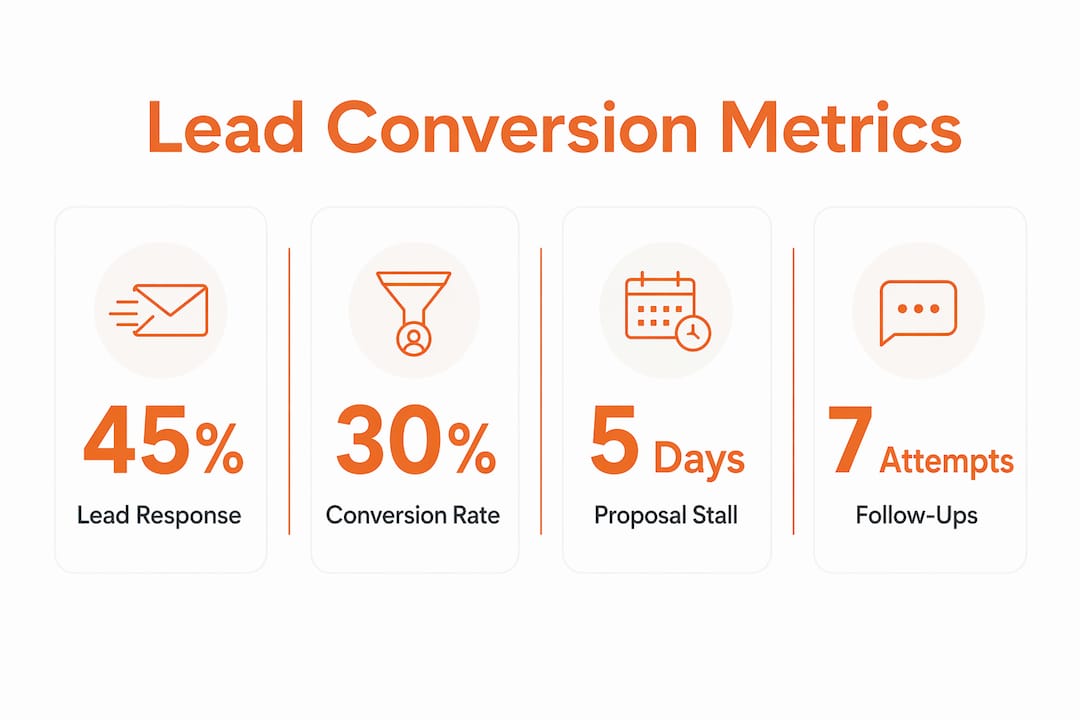
Custom reporting dashboards inside your CRM generate these numbers automatically. You do not need to pull data manually or build spreadsheets. The dashboard shows you which rep has the fastest response time, which lead source closes at the highest rate, and which pipeline stage has the longest average dwell time.
Use that data to refine your sequences. If leads at the “Proposal Sent” stage stall for more than five days, add an automated follow-up at day three. If one lead source converts at twice the rate of others, shift budget toward it.
Pro Tip: Run a monthly pipeline review with your estimators using CRM data. Show them their individual response times and follow-up completion rates. Reps who see their own numbers improve faster than those who receive only general feedback.
Highlevelcrm-rconstructionsolutions provides real CRM results through custom dashboards built for construction workflows, not generic sales teams. The reporting is designed to surface the decisions that matter most to contractors.
Key takeaways
A contractor CRM improves lead conversion by combining automated follow-up sequences, custom pipeline stages, and real-time reporting into one system built around how construction businesses actually sell.
| Point | Details |
|---|---|
| Automate follow-up sequences | Use 3–5 step sequences to reach conversion rates of 28%–42% versus 12%–18% for single-touch approaches. |
| Respond within 5 minutes | Responding to leads within 5 minutes doubles your chance of entering the sales process. |
| Map your real pipeline stages | Build stages like “Site Visit Scheduled” to match your job lifecycle and improve team adoption. |
| Track lead source attribution | Measure which channels close at the highest rate and shift budget accordingly. |
| Keep humans in complex conversations | Automate the first 3–5 touches, then route to a person for negotiations and detailed questions. |
What I have learned about automation and the personal touch
By Rowena
After working with contractors across dozens of markets, the pattern I see most often is this: contractors either automate everything and sound like robots, or they automate nothing and lose leads to competitors who respond faster. Neither extreme works.
The contractors who convert at the highest rates treat their CRM like a support system, not a replacement for their sales instincts. They automate the parts of follow-up that are genuinely repetitive, the acknowledgment text, the 24-hour check-in, the proposal reminder. Then they show up personally for the conversations that actually require judgment.
What surprises most contractors is how much time automation frees up for relationship building. When your system handles the first three touches automatically, your estimator walks into a site visit with a warm lead who has already heard from you twice. That changes the dynamic of the conversation entirely.
The other thing I have seen kill CRM adoption is skipping the customization step. Contractors who buy a generic platform and try to force their team to use it as-is almost always abandon it within 90 days. The ones who spend two weeks mapping their real stages into the system, and training their team on why each stage matters, see adoption stick. Customization is not optional. It is the foundation everything else builds on.
— Rowena
Highlevelcrm-rconstructionsolutions: built for contractor lead conversion
Highlevelcrm-rconstructionsolutions was developed with over 30 years of construction industry experience. The platform includes automated lead tracking, custom pipeline stages, and reporting dashboards built specifically for contractors, not generic sales teams. Users report lead conversion increases of 35% after implementing the system’s automated follow-up and workflow tools. The platform integrates with the communication channels and project management tools contractors already use, so your team spends less time switching between apps and more time closing jobs. Explore the full CRM features and FAQs to see exactly how each tool supports your sales process, or review the industries we serve to find solutions matched to your specific trade.
FAQ
What is a contractor CRM and how does it help convert leads?
A contractor CRM is a sales management platform built around the construction job lifecycle. It automates follow-up, tracks lead status, and routes inquiries to the right team member, which directly increases the percentage of leads that reach the proposal stage.
How many follow-up attempts should a contractor make before dropping a lead?
Most business requires 5–7 contact attempts before a lead converts. Contractors who stop at 1–2 touches miss the majority of potential revenue that a structured follow-up sequence would have captured.
How fast should contractors respond to new leads?
Responding within 5 minutes doubles the probability of entering the sales process. An automated acknowledgment text sent within 60 seconds of lead entry is the highest-impact single tactic for improving conversion rates.
What pipeline stages should a contractor CRM include?
Effective contractor pipelines include stages like Lead Received, Qualification Call Scheduled, Site Visit Scheduled, Proposal Sent, Contract Negotiation, and Won or Lost. Stages should match your actual job lifecycle, not a generic sales template.
How do you measure CRM performance for lead conversion?
Track five metrics weekly: lead-to-proposal rate, average response time, follow-up completion rate, lead source ROI, and pipeline velocity. These numbers show exactly where leads stall and which changes will have the most impact on your close rate.

