Cut Schedule Risk in 6–12 Weeks: Predictive Analytics for Contractors
Yes, predictive analytics is worth it when you point it at one measurable problem, and no, you do not need a data science team to start. The highest-value entry points are schedule risk, estimate accuracy, and safety flags. Pick one, run a small pilot on a live project, and expect early warnings and tighter estimates within a few months if your field data is clean enough to feed a model.
TL;DR:
- Only a handful of data fields, including activity dates, percent complete, and inspection results, carry meaningful predictive weight, requiring consistent entry and governance.
- Models should be validated on three to five past projects with known outcomes before deployment, and thresholds must be tuned to prevent alert fatigue.
- Starting with off-the-shelf tools and a construction-specific CRM ensures faster setup, cleaner data, and more reliable predictions from the outset.
- Contractors need at least three comparable projects annually and proper data organization to gain measurable benefits from predictive analytics.
Table of Contents
- What Predictive Analytics Means for Construction Projects
- What Are the Real Benefits for Contractors?
- How Do You Start a Predictive Analytics Pilot?
- Which Data Fields Actually Matter?
- Which Model Type Fits Your Problem?
- What Goes Wrong and How Do You Prevent It?
- How Connected Data Capture Improves Model Accuracy
- When Should a Contractor Actually Invest in This?
- Centralize Your Data Before You Build Your First Model
- Sources
- FAQ
What Predictive Analytics Means for Construction Projects
Predictive analytics contractors use historical and live project data, combined with statistical models and machine learning, to forecast outcomes like schedule delays, cost overruns, and safety incidents before they happen. It is not a crystal ball. It is pattern recognition applied to the paperwork and sensor data your crews already generate every day, according to Autodesk’s construction guidance.
The raw material comes from places most contractors already have: daily field reports, master schedules, cost code entries, RFIs, punch lists, and QA/QC inspection logs. The problem is that this data usually lives in five different systems, three spreadsheets, and someone’s inbox, which makes it hard to feed a model anything consistent.
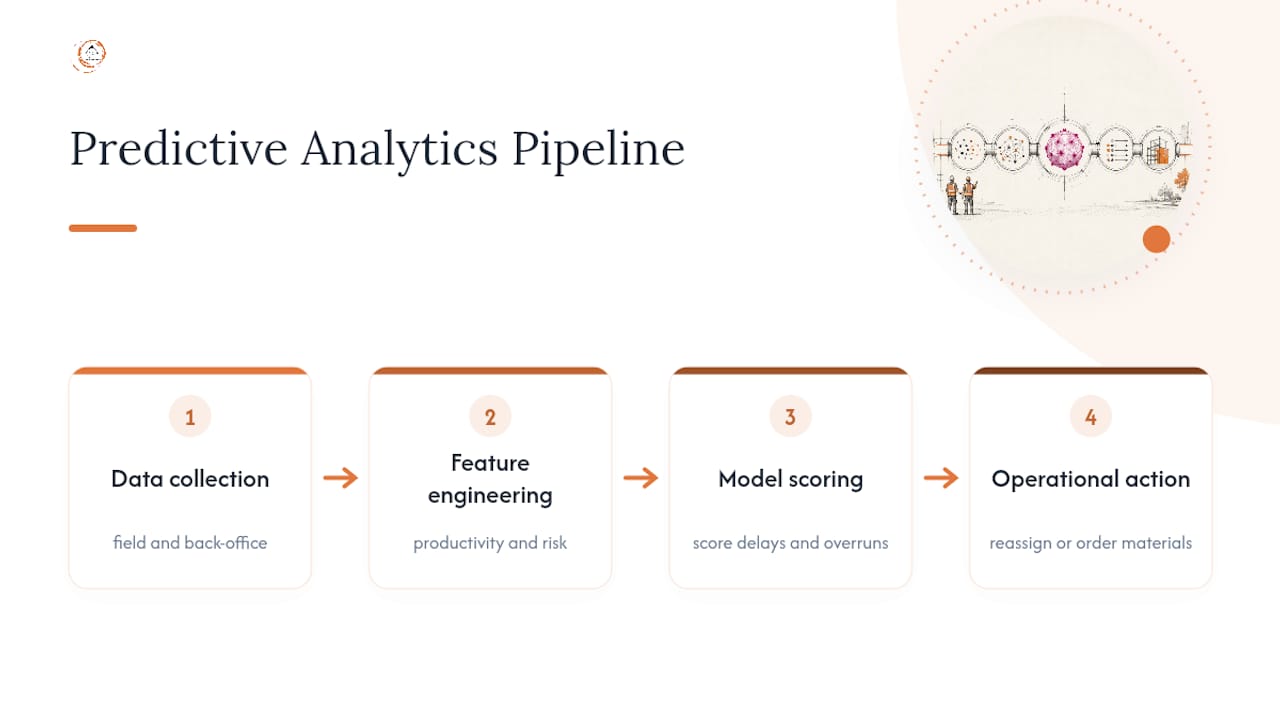
The pipeline itself follows a simple logic. Data gets collected from the field and back office, then engineered into features a model can actually use (crew productivity rates, weather exposure days, change order frequency, inspection failure rates). A model then scores the project against patterns from past jobs and produces a prediction, like a high chance of a two-week slip on the framing package. The last step, and the one contractors skip most often, is turning that prediction into an action, like reassigning a superintendent or ordering long lead materials early. Analytics without an action loop is just a dashboard nobody checks.
What Are the Real Benefits for Contractors?
The clearest gains show up in four areas, and none of them require enterprise software to start.
- Schedule forecasting: Machine learning and statistical models can flag lagging crew productivity or slipping trade sequencing weeks before a superintendent would notice it manually, giving enough lead time to reallocate labor or adjust logistics, per industry guidance on predictive analytics in construction.
- Estimating and preconstruction: Instead of a single number bid, predictive models output a probability range, so you know a concrete package is likely to land between $340,000 and $410,000 rather than pretending $362,000 is exact.
- Safety and QA/QC: Leading indicators like near-miss reports, inspection failure clustering, and overtime spikes can flag risk before an incident occurs.
- Resource forecasting: Crew and equipment needs get projected against the actual pace of work instead of the pace in the original schedule.
One vendor case study cited by Autodesk found that adopting an analytics tool led to a 20% improvement in on-site quality and 25% more staff time redirected toward high-risk issues, which is the kind of result a focused pilot is designed to test for on a smaller scale.
How Do You Start a Predictive Analytics Pilot?
A six to twelve week pilot is realistic if you keep the scope narrow. Trying to model everything at once is the fastest way to produce a project nobody trusts.
- Pick one use case. Preconstruction and estimating tend to deliver outsized returns because correcting a bad assumption before ground breaks protects margin that is otherwise gone once the crew mobilizes.
- Define the metric before you build anything. If you are targeting schedule risk, decide now whether success means “flagged two weeks earlier” or “reduced float consumption by 15%.”
- Pull the minimum dataset. For most contractors this means twelve to twenty-four months of schedule data, cost code actuals, and daily field logs from comparable project types.
- Choose your tooling approach. Off-the-shelf analytics built into project management software gets you moving faster and cheaper; custom models cost more and take longer but fit unusual project types better, a trade-off worth weighing honestly before committing budget, as noted in this construction analytics guide.
- Assign three roles. A data owner who keeps the inputs clean, a model steward who monitors performance, and an intervention owner, typically a PM or superintendent, who actually acts on the alerts.
- Run it against a validation sample. Compare predictions on three to five past projects with known outcomes before trusting the model on a live job.
Pro Tip: Run your first pilot on a project type you have built at least a dozen times before. Novel project types don’t have enough historical pattern for a model to learn from, no matter how good the tool is.
Which Data Fields Actually Matter?
Models are only as good as what goes into them, and construction data has a well-earned reputation for being messy. The fields that carry real predictive weight are narrower than most contractors expect:
- Start and finish dates by activity, not just the master schedule milestones
- Percent complete entries logged consistently, ideally weekly
- Crew IDs tied to productivity and cost code entries
- Inspection results, including failure reasons in structured categories rather than free text
- Delivery and material timestamps for long lead items
The most common failures are missing timestamps, cost codes that mean different things on different jobs, and superintendents writing free-text notes that a model cannot parse. The fix is rarely more software. It’s usually a template that forces consistent entry at the field level, which is exactly the gap a construction-specific CRM is built to close. Disconnected spreadsheets are consistently cited as the main obstacle to reliable predictions, according to Vitruvi Software’s analysis, because inconsistent field practices break the pattern a model needs to learn from. Set a simple governance rule: five to seven fields are mandatory on every daily log, someone owns checking them weekly, and no exceptions get made for “just this one job.”
Which Model Type Fits Your Problem?
You don’t need to become a data scientist to pick the right approach, but knowing the vocabulary helps you evaluate a contractor or vendor’s proposal.
Simple statistical models and regression work fine when you have a clear, linear relationship and a modest dataset, like estimating labor hours from square footage and crew size. Time-series models and LSTM neural networks fit schedule forecasting, where the pattern unfolds over sequential weeks. Tree-based machine learning classifiers work well for rare-event problems like safety incidents, because they can weigh dozens of small signals (weather, overtime, crew turnover) without needing enormous data volumes. Monte Carlo simulation remains the standard for schedule and cost risk ranges, especially paired with CPM scheduling tools.
The trade-off across all of these is interpretability versus accuracy. A recent hybrid framework combining BIM data, TabNet, Bayesian networks, LSTM, and Monte Carlo simulation reached notably high classification accuracy across a 1,300-project dataset, but that kind of stacked model needs far more data and technical oversight than a single-project pilot usually has available.
What Goes Wrong and How Do You Prevent It?
Models fail quietly, not loudly, which is what makes them dangerous if nobody is watching.
- Overfitting and stale models: A model trained on one project type or one region starts producing confident, wrong predictions the moment conditions change. Watch for prediction accuracy that quietly drifts down over consecutive projects.
- No human review: Treating model output as a verdict instead of an input leads teams astray. Human-in-the-loop review, where a PM or estimator checks the recommendation against site reality, catches errors a model has no way to see.
- No retraining cadence: Set a schedule, quarterly or after every major scope change, to retrain and re-validate. A model steward should own tracking drift and version history.
- Alert fatigue: If a schedule risk model flags every activity as “at risk,” nobody reads it. Tune thresholds until alerts hit the top 10% to 15% of genuine risk, not every yellow flag.
Pro Tip: If your model’s alerts start feeling routine within the first month, your thresholds are too loose. A useful alert should feel like it earned your attention.
How Connected Data Capture Improves Model Accuracy
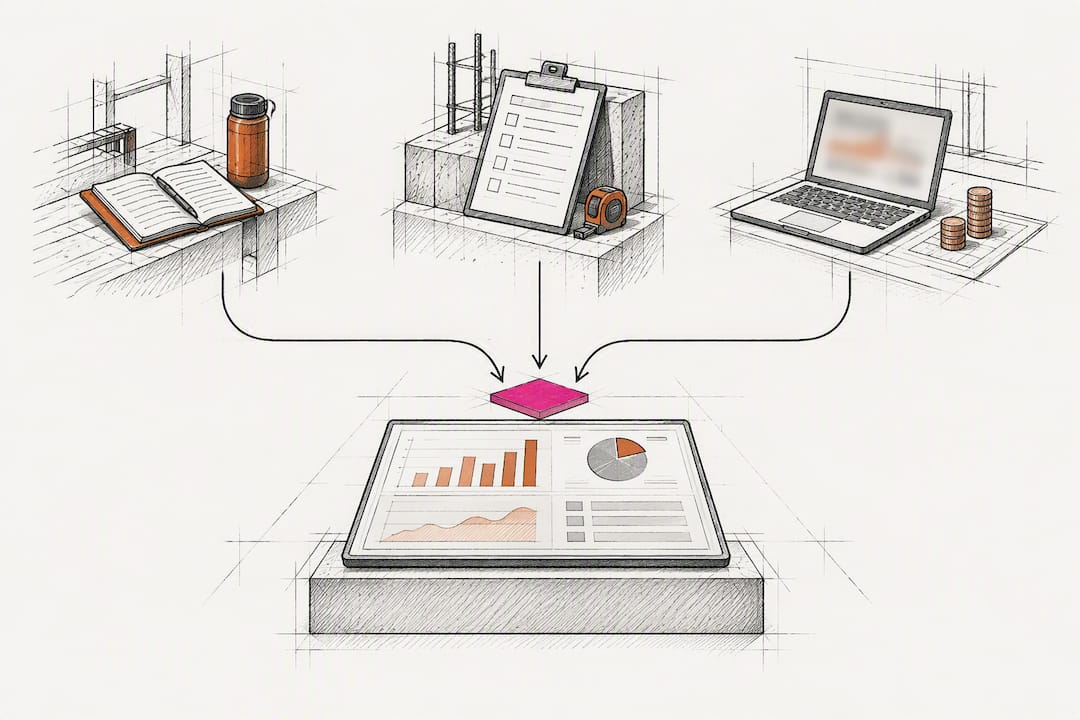
Predictive models are only as reliable as the data feeding them, and that data has to arrive consistently, not sporadically. A construction-specific CRM that enforces field templates, timestamps entries automatically, and routes daily logs, inspection results, and cost updates into one dashboard removes the lag between an event happening on-site and a model detecting it. Connected platforms that pull live field data deliver more actionable predictive signals precisely because they shrink that detection lag, a pattern documented across construction technology analysis. Once data capture improves, contractors typically see faster model validation, fewer manual data cleanup cycles, and predictions that reflect what’s actually happening on-site rather than what was happening two weeks ago.
When Should a Contractor Actually Invest in This?
Predictive analytics earns its keep once you’re running enough comparable projects, three or four similar builds a year is a reasonable floor, to give a model a real pattern to learn from. Below that volume, spend the budget on cleaning up field data capture first. Building internal capability, even one person who owns the data pipeline, matters more than which vendor you pick.
— Rowena
Centralize Your Data Before You Build Your First Model
A construction-specific CRM gives contractors a faster route to a clean, model-ready dataset than trying to stitch spreadsheets and disconnected apps together yourself. Because such platforms enforce field templates, automate lead and workflow tracking, and centralize cost, schedule, and communication data in one system, they remove a major bottleneck standing between contractors and a working predictive analytics pilot: inconsistent data.

Setup typically involves configuring workflows, connecting estimating and reporting integrations, and onboarding field teams so daily entries land in one place automatically instead of multiple. This CRM was developed with extensive construction industry experience behind it, with features and integrations tailored specifically to contractors, suppliers, and consultants rather than adapted from a generic sales CRM. Setup fees apply, and current pricing details are available on the client’s website. If you’re planning a predictive analytics pilot this year and your data currently lives in scattered spreadsheets, start by exploring the High Level CRM platform and booking a walkthrough of how CRM migration fits your current systems.
Sources
- Getting Started with Predictive Analytics in Construction
- HCIF‑Net: a hybrid construction intelligence framework for risk management (Nature Scientific Reports)
- Predictive Analytics in Construction: 2026 Guide
FAQ
What Does Predictive Analytics Actually Do on a Job Site?
It analyzes historical and live project data to forecast outcomes like schedule delays, cost overruns, and safety risks before they fully develop. The goal is giving project managers enough lead time to act, whether that means reallocating crews or adjusting a bid range.
Can AI Actually Do Predictive Analytics for Construction?
Yes. Machine learning models, including time-series forecasting, tree-based classifiers, and hybrid frameworks combining BIM data with neural networks, are already producing measurable accuracy gains on large project datasets, including one academic framework tested across 1,300 projects.
What Are Common Predictive Analytics Models Used in Construction?
Five approaches show up most often: statistical regression, time-series models, LSTM neural networks for sequential schedule data, tree-based machine learning classifiers for rare-event risks like safety incidents, and Monte Carlo simulation for cost and schedule risk ranges.
Who Are Some Well-Known Predictive Analytics Providers?
The space includes large platform vendors, specialized construction analytics firms, and academic-adjacent research groups publishing hybrid modeling frameworks. Rather than naming specific vendors, evaluate any provider on whether they can demonstrate a validated case study on a project type similar to yours.
How Do I Vet a Predictive Analytics Contractor Before Hiring One?
Ask for a validation sample: results run against three to five of your past projects with known outcomes, not just a sales demo on generic data. A contractor worth hiring will also ask about your data quality before promising accuracy, since clean, centralized field data is the real prerequisite for reliable predictions.
Recommended
- Commercial Construction Software Comparison Checklist 2026
- Build Faster Estimate Templates: A Contractor’s Guide
- Manual Data Calculations Contractors Should Automate Now
- Construction Estimating Workflow Best Practices for 2026
Signed up, or thinking about it? We build the inside of the account — pipelines, workflows, funnels, nurture, migration. Built for construction. Contact us.
Affiliate disclosure. We’re a GoHighLevel affiliate. Sign up through our link and we may earn a commission at no cost to you, or buy direct. Build-out is billed separately, never a software markup.

