
Service Dispatching Software: A Field Manager's Guide | High Level CRM - R. Construction Solutions
Service dispatching is the real-time process of matching the right technician, with the right parts and information, to the right job at the right moment. The fastest path to fewer wasted drive hours and a higher first-time-fix rate is pairing clear dispatch rules with purpose-built dispatch management software. If you’re still running jobs off a whiteboard or group texts, manual dispatching creates compounding coordination failures once your crew exceeds a handful of technicians.
Here’s where to start this week:
- Audit your dispatch pain points. Log every “where is my tech?” call and every same-day schedule change for five business days.
- Set three target KPIs. Pick travel time percentage, first-time-fix rate, and schedule adherence as your baseline metrics.
- Pilot one tool on one crew. Run a 30-day test before committing to a full rollout.
Pro Tip: In week one, count how many times a job gets rescheduled after it’s been assigned. That single number, tracked against your SLA windows, is the clearest early signal of dispatch ROI.
Key Takeaways
Effective service dispatching requires clear rules, the right software, and a consistent KPI discipline — not just better tools.
| Point | Details |
|---|---|
| Move off manual systems early | Manual dispatching creates compounding errors past four or five technicians; pilot software on one crew first. For crews under four or five technicians, manual methods may still be manageable, but beyond that threshold, errors and hidden costs multiply quickly. |
| Match features to KPIs | Route optimization cuts travel time %; parts linkage drives first-time-fix rate above 80%. |
| Define rules before deploying AI | Automated scheduling only works when emergency, scheduled, and recurring job categories are already defined. |
| Track five core KPIs | Schedule adherence, travel time %, first-time-fix rate, callback rate, and jobs per tech per day reveal the biggest fixes. |
| Highlevelcrm-rconstructionsolutions adds lead-to-job continuity | A construction-specific CRM connects bid tracking, inventory, and automated workflows to your dispatch layer for full job lifecycle visibility. |
Table of Contents
- What is service dispatching and how does it work?
- Which dispatch software features actually move your KPIs?
- What are the real benefits and where do operations break down?
- How do leading dispatch software categories compare?
- How do you choose the right dispatch software for your operation?
- How do you roll out dispatch software and measure success?
- What does dispatch software actually cost?
- Why does CRM and dispatch integration matter for contractors?
- What actually works in the field, day to day
- How Highlevelcrm-rconstructionsolutions complements your dispatch setup
- Sources
What is service dispatching and how does it work?
Field service dispatching is the operational discipline of assigning and routing technicians to customer locations in real time, coordinating skills, parts, and job information so work gets completed right the first time. It sits inside the broader field service management (FSM) framework, but it’s distinct from scheduling. Scheduling builds the plan; dispatching executes it, adapts to changes, and keeps every moving piece connected.
The five-stage dispatch workflow looks like this:
- Call intake — a service request enters the system (phone, portal, or automated trigger).
- Scheduling — the job is slotted based on priority, SLA window, and technician availability.
- Assignment — the right tech is matched to the job by skill, certification, location, and parts on hand.
- Field execution — the technician receives job details on a mobile device, completes the work, and updates status in real time.
- Completion — the work order closes, triggers invoicing, and feeds back into the CRM and inventory records.
The people in this workflow include dispatchers, field technicians, customer service reps, parts and inventory coordinators, and operations managers. Each role touches the job at a different stage, which is why the information handoff is where most dispatch failures happen.
The information that must travel with every job: customer name and contact, site address, SLA window, required parts and their location, photos or prior job notes, and the technician’s certifications. Miss any one of these and you’ve set up a callback before the truck even leaves the yard.
Dispatching also sits at the intersection of your CRM (customer history, SLA terms), ERP (billing, inventory), parts management, and mobile apps. When those systems don’t talk to each other, dispatchers fill the gap manually — and that’s where errors multiply.
Which dispatch software features actually move your KPIs?
Not every feature in a vendor demo translates to measurable field improvement. Focus your evaluation on the clusters that directly affect the numbers you track.
Core feature clusters to prioritize:
- Real-time technician tracking — GPS-based visibility so dispatchers know where every tech is without a phone call.
- Automated technician assignment — matches skills, certifications, and proximity to job requirements automatically.
- Drag-and-drop scheduling calendar — lets dispatchers reassign jobs in seconds when a tech calls out or a priority job lands.
- Route optimization — calculates the most efficient sequence of stops, cutting travel time percentage directly.
- Mobile work orders — techs receive full job packets on their phones, including parts lists, photos, and customer notes.
- Parts and inventory linkage — confirms parts availability before dispatch, which is the primary driver of first-time-fix rate.
- Customer notifications and ETAs — automated texts or emails reduce inbound “where is my tech?” calls.
- Offline mobile capability — jobs in basements, rural areas, or poor-signal zones still update when connectivity returns.
- CRM, ERP, and accounting integrations — eliminates double-entry and keeps billing, job history, and SLA data synchronized.
- Reporting and dashboards — surfaces schedule adherence, travel %, utilization, and callback rate in one view.
| Feature | Why it matters | What to test in a demo |
|---|---|---|
| Route optimization | Cuts travel time %; reduces fuel and overtime | Enter your actual service territory and run a 10-job sequence |
| Parts/inventory linkage | Improves first-time-fix rate | Add a job requiring a specific part and confirm the system flags availability |
| Offline mobile | Prevents data loss in low-signal areas | Disconnect the demo device and complete a work order |
| Automated assignment | Reduces dispatcher cognitive load | Filter by certification and see if the system surfaces the right tech |
| Customer notifications | Reduces inbound calls; improves satisfaction scores | Trigger a status change and confirm the customer message fires correctly |
The technology behind these features includes GPS telemetry, routing engines, machine learning-assisted scheduling, mobile SDKs with offline sync, and open APIs for CRM and ERP connections.
Pro Tip: Ask the vendor to run their route optimization using a ZIP code from your actual service area, not a demo dataset. A routing engine trained on dense urban grids often performs poorly in suburban or rural construction zones.
What are the real benefits and where do operations break down?
Good dispatch management produces measurable gains across the metrics that matter most to field service operations.
Benefits you can expect from disciplined dispatching:
- Reduced drive time per job, which converts directly into additional jobs per tech per day.
- Higher first-time-fix rates when parts and skills are matched before the truck rolls.
- Better technician utilization — fewer idle gaps between jobs.
- Faster response times, especially for SLA-governed service contracts.
- Fewer callbacks and return trips, which are among the highest-cost events in field service.
- Improved customer satisfaction and contract renewal rates.
Dispatch rules directly affect utilization, travel time, SLA performance, and gross margin. A small dashboard tracking schedule adherence, travel time percentage, utilization, first-time-fix rate, and callback rate reveals the biggest fixes faster than any vendor assessment.
Statistic to track: According to industry operational guidance, a moderate improvement in first-time-fix rate compounds into materially higher profitable capacity — because each return trip carries full labor and fuel cost with zero additional revenue.
Operational red flags that signal dispatch is costing you margin:
- Dispatchers spend more than 20% of their day on the phone locating technicians.
- More than one job per tech per week requires a return visit for parts.
- SLA breaches are discovered after the fact rather than flagged in real time.
- Schedule changes happen verbally, with no system record.
- Technicians arrive without the correct parts or without knowing the job history.
- Overtime spikes on days with high job volume because routing is inefficient.
Common challenges that block the benefits:
- Skill mismatch: assigning a tech without the right certification to a specialized job.
- Parts shortages: dispatching without confirming inventory, guaranteeing a callback.
- Cancellations and no-shows: no automated process to backfill the slot.
- Traffic and geography: static schedules that don’t adapt to real-world conditions.
- SLA conflicts: no priority logic to front-load critical contracts.
- Dispatcher overload: one person managing too many jobs without decision-support tools.
How do leading dispatch software categories compare?
Before you book demos, filter vendors into the category that fits your size and complexity. The right category match matters more than any individual feature.
How to filter by category:
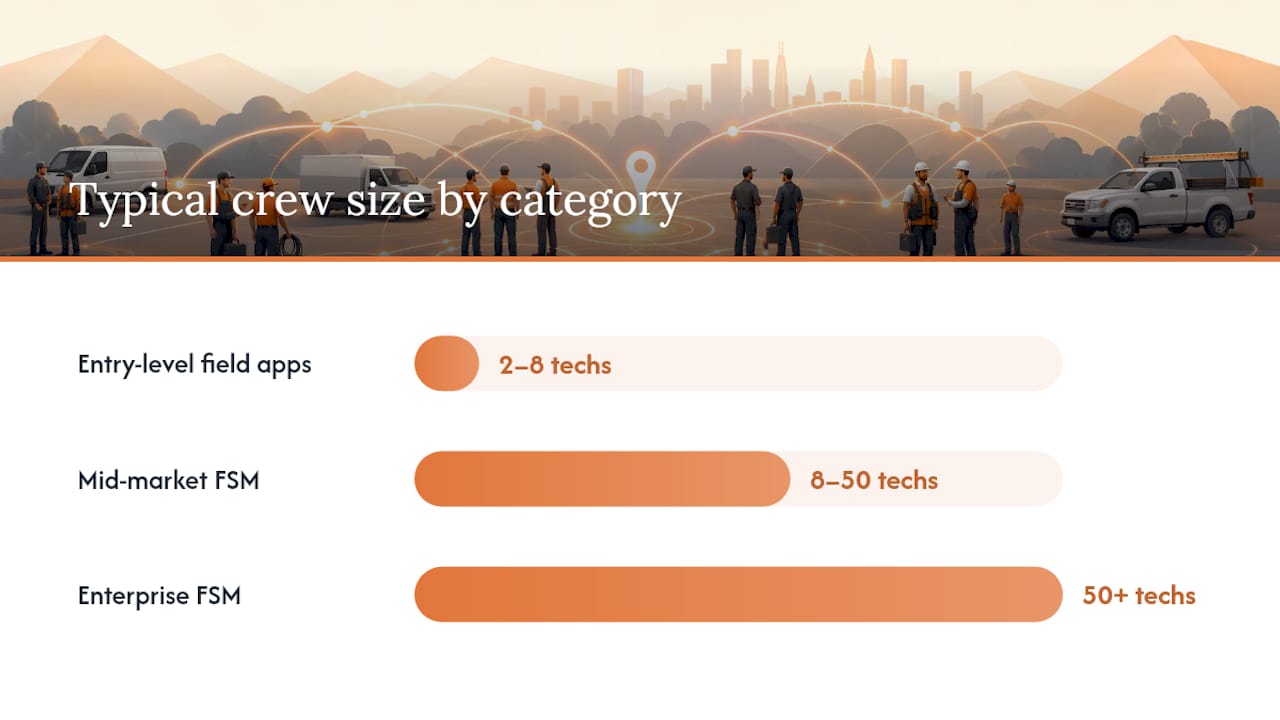
- Entry-level field apps suit crews of 2–8 technicians with simple scheduling needs, low job complexity, and no ERP requirement.
- Mid-market FSM platforms fit teams of 8–50 technicians with route optimization, mobile work orders, and basic CRM integration needs.
- Enterprise FSM platforms serve operations with 50+ technicians, multi-region coverage, complex SLAs, and deep ERP integration requirements.
- Construction-specialist FSM addresses multi-site contractors who need estimating integration, supplier workflows, inventory tracking, and project-level reporting alongside dispatch.
| Category | Best for | Core features | Integrations | Automation/AI | Pricing model |
|---|---|---|---|---|---|
| Entry-level field apps | 2–8 techs, simple jobs | Basic scheduling, mobile app, work orders | Limited; often QuickBooks only | Minimal; manual assignment | Per-user/month; low setup cost |
| Mid-market FSM | 8–50 techs, multi-zone | Drag-and-drop calendar, route optimization, GPS tracking, parts linkage | CRM, accounting, some ERP | Rule-based auto-assignment; basic routing | Per-tech/month; moderate setup |
| Enterprise FSM | 50+ techs, multi-region | Full FSM suite, advanced routing, SLA management, custom reporting | Deep ERP, CRM, custom API | ML-assisted scheduling, predictive maintenance | Contract-based; significant setup |
| Construction-specialist FSM | Contractors, multi-site | Dispatch + estimating + supplier + inventory + project reporting | ERP, estimating tools, supplier portals | Workflow automation; bid-to-job triggers | Per-user or project-based |
Vendor profiles by category:
Entry-level tools are the right starting point for a single-crew operation that needs to stop using group texts. They’re fast to set up and low-risk to pilot. The tradeoff is limited reporting and no real integration depth.
Mid-market platforms are where most growing field service teams land. They offer the route optimization and mobile work order features that move KPIs, with enough integration flexibility to connect to your existing accounting software. Review platforms like Capterra and G2 are practical triage tools here — read user reviews specifically for mobile reliability and offline behavior before shortlisting.
Enterprise platforms like ServiceTrade and NetSuite’s FSM module address multi-region operations with complex SLA portfolios. ServiceTrade is built for commercial service contractors and handles recurring service agreements well. NetSuite’s construction field service management module integrates dispatch with its broader ERP, which suits contractors already on the NetSuite platform. Dispatch, the platform, focuses on real-time technician tracking and customer communication for service-heavy operations.
Construction-specialist tools add the estimating, supplier, and project-level layers that generic FSM platforms lack.
Demo filtering tip by category: For entry-level tools, test the mobile work order flow on a real device. For mid-market and above, test route recalculation when a job is added mid-day to an existing schedule.
How do you choose the right dispatch software for your operation?
A structured evaluation process prevents you from buying on demo polish rather than operational fit.
Selection criteria checklist:
- Technical fit: cloud-based or on-premise; mobile OS support (iOS and Android); offline capability.
- Functional fit: does it handle your job types, SLA structures, and technician certification tracking?
- Integrations: native connectors to your CRM, ERP, and accounting platform, or open API.
- Security: Security standards like SOC 2 compliance are recommended to protect data and ensure privacy. compliance, role-based access control, data encryption at rest and in transit.
- Support SLA: response time guarantees, dedicated onboarding, and North American support hours.
- Total cost of ownership: subscription plus setup, integration, training, and ongoing customization.
- Vendor stability: years in market, customer retention rate, and product roadmap transparency.
Questions to ask every vendor in the demo:
- Who owns the data if we cancel, and how do we export it?
- Does your API support bidirectional sync with our ERP, or is it read-only?
- What happens to a work order if the tech loses connectivity mid-job?
- How does the route engine recalculate when a priority job is added at 10 AM?
- How does the system handle parts that are on a truck versus in a warehouse?
- How long does it take to add or remove a technician from the system?
- What does onboarding look like for a 15-person crew, and who leads it?
- How often do you release updates, and how are customers notified?
Red flags to watch for:
- The demo runs on pre-loaded data only; the vendor won’t connect to a live environment.
- Integration is described as “available via Zapier” for every system connection.
- Offline behavior is vague or untested in the demo.
- Pricing changes significantly after the initial quote when you add integrations.
- There is no structured training plan beyond a help center link.
Decision steps after demos:
- Score each vendor on your selection criteria using a 1–5 scale.
- Shortlist the top two and run a 30-day pilot on one crew.
- Measure pilot KPIs against your baseline from week one.
- Negotiate contract terms: include a pilot-to-production pricing lock, a data portability clause, and a defined support SLA.
How do you roll out dispatch software and measure success?
A phased rollout reduces risk and surfaces data problems before they affect your full operation.
90-day rollout phases:
- Discovery and rules design (weeks 1–2): Document your current dispatch rules, job types, SLA tiers, and technician skills matrix. Define emergency vs. scheduled vs. recurring job categories before touching the software.
- Pilot (weeks 3–6): Deploy on one or two crews. Migrate only the data needed for that crew: customer records, parts catalog subset, technician profiles, and territory boundaries.
- Iterate and train (weeks 7–9): Fix data gaps, refine notification templates, and run structured training sessions for dispatchers and technicians separately.
- Scale and integrate (weeks 10–12): Expand to full crew, activate CRM and ERP integrations, and switch on automated reporting.
Implementation checklist:
- Clean and import customer and site data.
- Build the parts catalog with current inventory counts.
- Load the technician skills and certification matrix.
- Define territory boundaries and routing zones.
- Configure SLA rules and priority tiers.
- Set up customer notification templates (appointment confirmed, tech en route, job complete).
- Provision mobile devices and test offline sync.
KPI targets for strong operations:
Monitoring cadence: Run a daily dispatch check-in (open jobs, at-risk SLAs, parts shortages). Review KPIs weekly. Conduct a monthly ROI review comparing travel time and callback rate against your pre-software baseline.

Pro Tip: During the pilot, intentionally include one job type with messy or incomplete data — a customer with multiple sites, or a job requiring a specialty part. These edge cases expose data clean-up needs in week three instead of week ten.
What does dispatch software actually cost?
Pricing models vary widely, and the subscription line item is rarely the largest cost driver.
Common pricing structures:
- Per-user or per-tech monthly subscription — the most common model; scales with headcount.
- Per-job pricing — charges per completed work order; works well for variable-volume operations.
- Tiered feature packs — base scheduling plus add-ons for route optimization, inventory, or advanced reporting.
- Setup and onboarding fees — often $1,000–$5,000+ for mid-market platforms; sometimes waived in annual contracts.
- Integration and customization fees — billed separately for ERP connectors, custom API work, or branded customer notifications.
Hidden cost drivers most buyers miss:
- Data cleanup before migration (often 20–40 hours of internal staff time).
- Parts catalog build-out if inventory isn’t already digitized.
- Mobile device procurement or MDM licensing for field techs.
- Change management: dispatcher retraining and technician adoption time.
- Offline licensing fees on some enterprise platforms.
Quick ROI example: If route optimization removes 30 minutes of wasted drive time per technician per day across a crew of ten, that’s five technician-hours recovered daily. At a fully loaded labor rate of $65/hour, that’s $325/day or roughly $80,000/year in recovered capacity — before accounting for reduced fuel and overtime.
Negotiation pointers: Lock in pilot-to-production pricing before the pilot starts. Ask for a staged rollout discount if you’re expanding from one crew to three over 90 days. Include a support SLA clause that specifies response time for critical dispatch outages during business hours.
Why does CRM and dispatch integration matter for contractors?
For contractors, the gap between winning a job and executing it cleanly is where margin leaks. When your CRM and dispatch system share data, that gap closes.
Integration checklist for contractors:
- Job and contact sync — new jobs created in the CRM automatically appear in the dispatch queue with customer history attached.
- Parts and inventory linkage — the dispatch system confirms parts availability against the inventory record before assigning the job.
- Contract and SLA sync — SLA terms from the CRM flow into dispatch priority rules automatically.
- Invoicing handoff — completed work orders trigger invoice creation in the accounting system without manual re-entry.
- Project history shared with field techs — technicians see prior visit notes, photos, and customer preferences on their mobile device before arrival.
When these integrations are active, first-time-fix rates improve because techs arrive with the right parts and full context. Billing velocity improves because invoices generate the same day the job closes. Optimizing equipment and parts planning reduces unnecessary truck rolls and supports tighter scheduling density — a direct benefit for contractors managing multiple active sites.
The integration that produces the fastest field benefit: automatically pushing the confirmed parts list to the job’s mobile view the moment a tech is assigned. Techs who see their parts list before leaving the yard make fewer mid-job calls to the office and complete more jobs without a return trip.
A construction-specific CRM adds layers that generic FSM platforms don’t address: bid-to-job workflow triggers, supplier communication threads, subcontractor scheduling, and project-level reporting that ties dispatch activity to contract profitability. Understanding what a construction-specific CRM does differently from a generic platform is the starting point for evaluating whether your dispatch setup needs a CRM upgrade alongside it.
Pro Tip: The smallest CRM workflow change with the biggest field impact: configure your CRM to automatically attach the last three job notes to every new dispatch assignment for that customer. Techs arrive informed; customers notice immediately.
What actually works in the field, day to day
The gap between a vendor demo and a Tuesday morning dispatch board is wider than most software sales cycles suggest.
Operational truths dispatchers actually live with:
- AI-assisted scheduling only works when your dispatch rules are already defined. Software optimizes rules; it doesn’t create them. Build your emergency vs. scheduled vs. recurring job categories first.
- The drag-and-drop calendar is only as useful as the data behind it. Stale technician skill records and incomplete parts catalogs make even the best UI useless.
- Customer notification features reduce inbound call volume fast — often within the first two weeks of activation.
- Route optimization needs a two-week learning period in your actual territory before it produces reliable sequences.
- Dispatcher adoption is the real implementation risk, not technician adoption. Dispatchers who feel the software is monitoring them rather than supporting them will work around it.
Process fixes that complement software:
- Define a hard rule for emergency job insertion: who approves it, which scheduled job gets bumped, and how the displaced customer is notified.
- Require all schedule changes to be logged in the system, not communicated by text. This creates the audit trail that makes your weekly KPI review meaningful.
- Set a parts-confirmation step as a dispatch gate: no assignment goes out until parts availability is confirmed.
Pro Tip: Run a 10-minute morning huddle with your dispatch team focused on three things only: jobs at risk of SLA breach today, parts that haven’t been confirmed, and any tech availability changes. That single habit reduces mid-day chaos more reliably than any software feature.
How Highlevelcrm-rconstructionsolutions complements your dispatch setup
Dispatch software handles the real-time field execution layer. What it typically doesn’t handle is the full lead-to-job lifecycle that contractors live in: tracking a prospect from first contact through estimate, contract, active job, and repeat service. That’s where a construction-specific CRM changes outcomes.
Highlevelcrm-rconstructionsolutions is built on 30 years of construction industry experience and designed specifically for contractors, suppliers, and consultants who need more than a generic workflow tool. It connects automated lead tracking, bid and inventory management, supplier communication, and custom reporting dashboards into one platform that feeds directly into your dispatch and field execution workflow. Some users report lead conversion rate increases of 35% after connecting their CRM to their job and dispatch workflows.
The features that align most directly with dispatch needs:
- Automated lead tracking — every new service request enters a tracked workflow, so nothing falls through between sales and scheduling.
- Workflow automation — job creation, parts requests, and subcontractor notifications trigger automatically at defined stages.
- Inventory and bid tracking — parts availability and bid status are visible before dispatch assignments are made.
- Onboarding and training support — structured onboarding means your team is using the system correctly from day one, not six months in.
To see how the CRM features and integrations work alongside your dispatch setup, book a demo and bring your current dispatch workflow to the call. The conversation is most useful when it starts with your actual job types and SLA structure.
Sources
These sources informed the guidance in this article and are worth bookmarking for ongoing reference:
- The Hidden Operational Cost of Manual Dispatching | Contractor Magazine
- Scheduling and Dispatch Discipline for Field Service and Route-Based Businesses | Glacier Lake Partners
- Connecteam on Capterra
- Connecteam reviews | G2
- How to optimize construction equipment usage | Conquest MFG USA

