
What's Missing in JobTread Platform: A Contractor's Guide
JobTread covers the core job management loop well, but contractors consistently report several gaps that affect real work: catalog edits don’t auto-update existing cost groups, accounting integration stops at QuickBooks, payroll providers like ADP, Paychex, and Paycor aren’t natively connected, reporting and custom dashboards are limited, mobile editing is constrained, and takeoff measurement precision falls short for complex bids. If your operation runs straightforward residential projects with a small team, JobTread may fit. If you need burdened labor costing, AIA billing, or multi-user access without per-seat friction, run the trial tests below before committing.
- Catalog updates don’t propagate to existing cost groups
- QuickBooks is the only native accounting sync
- No native payroll integrations (ADP, Paychex, Paycor)
- Reporting flagged as the weakest module by multiple reviewers
- Mobile app limits field editing and offline access
- Per-user pricing creates access friction for larger crews
Pro Tip: Before your trial ends, edit one catalog item and check whether every open estimate reflects the change automatically. That single test reveals more about JobTread’s fit for your workflow than any demo.
Key Takeaways
JobTread’s most reported gaps are catalog propagation, QuickBooks-only integration, weak reporting, and mobile editing limits. Contractors who identify these gaps early and test them during a trial avoid costly surprises after implementation.
| Point | Details |
|---|---|
| Catalog sync gap | Catalog edits don’t update existing cost groups; manual reconciliation is required across open estimates. |
| Integration ceiling | QuickBooks is the only native accounting sync; burdened labor costs require middleware or manual export. |
| Reporting limits | Custom dashboards and advanced profitability views are not available natively; export to spreadsheets is the workaround. |
| Trial test priority | Test catalog propagation, mobile editing, and QuickBooks sync during the first week before committing to the platform. |
| Highlevelcrm-rconstructionsolutions | Covers reporting, workflow automation, and multi-user access gaps that JobTread users most commonly report. |
Table of Contents
- What features are missing or limited in JobTread?
- How do these gaps show up in daily project work?
- Practical workarounds to reduce risk while using JobTread
- How to evaluate JobTread during a trial
- What does JobTread’s roadmap say about these gaps?
- What contractors actually need from construction software
- High Level CRM closes the gaps JobTread users report
- Sources
What features are missing or limited in JobTread?
User reviews on Software Advice repeatedly surface the same categories of missing features in JobTread. Here’s what contractors actually report, item by item.
Catalog and cost-group sync. When you update a unit price or material cost in JobTread’s catalog, that change doesn’t retroactively push to existing cost groups already embedded in open estimates. The result: manual edits across every active job, which is a real time sink on multi-project operations.
Takeoff and measurement precision. Plan measurement and takeoff tools in JobTread work for basic quantity pulls, but users report alignment mismatches that introduce estimate variance on more complex bids.
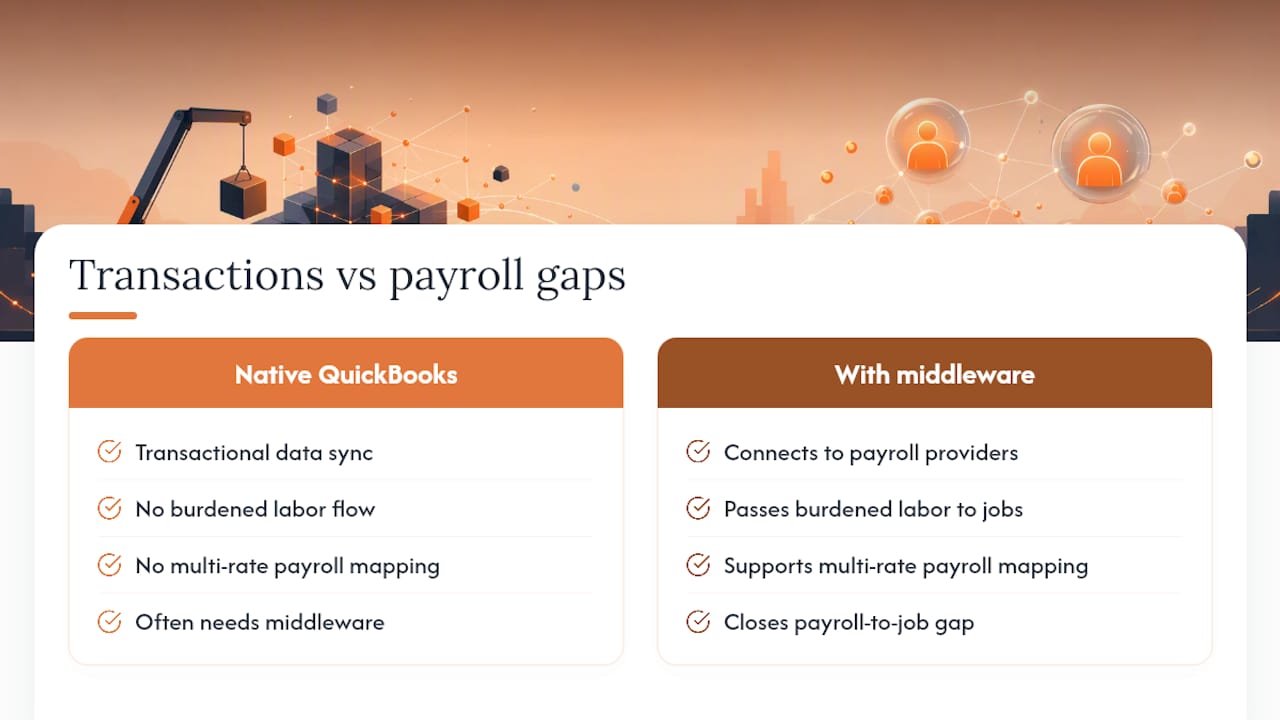
Integration coverage. JobTread integrates only with QuickBooks for accounting. There’s no native connection to payroll providers, so burdened labor costs (taxes, benefits, workers’ comp) don’t flow automatically to job-level cost reports. According to integration specialists at Dapt, the native QuickBooks sync handles transactional data well but doesn’t allocate fully burdened labor or multi-rate payroll mapping to individual jobs. Middleware is often required to close that gap.
Reporting and analytics. EstimatorSuite’s 2026 review labels reporting as JobTread’s weakest module. Custom dashboards are limited, advanced profitability views aren’t available natively, and data visualization options are basic. For project managers who need margin-by-job-type or cost-code-level variance reports, this is a genuine constraint.
Mobile app and offline access. Field editing on the mobile app is restricted. Crews can view data but making estimate edits or approving change orders from the site requires workarounds. Offline access is limited, which matters on job sites with poor connectivity.
For teams with larger numbers of users, per-user costs increase significantly and may limit platform access for field staff.
Workflow orchestration. A 2026 breakdown comparing construction platforms notes that pre-sale CRM hand-off, payment-triggered sequences, and overdue-invoice follow-ups typically require manual processes or a separate workflow layer. JobTread is a job platform, not a full sales CRM.
How do these gaps show up in daily project work?
Missing features in JobTread don’t stay abstract. They show up as concrete operational friction.
- Estimate drift: When material prices change and catalog updates don’t propagate, project managers must manually touch every open estimate. On a 15-job pipeline, that’s hours of reconciliation per price cycle.
- Payroll reconciliation gaps: Without burdened labor flowing to job costs, your job cost report understates true labor expense. That gap can make a marginally profitable job look healthy until the payroll run hits.
- Bid variance from takeoff mismatches: A measurement misalignment on a roofing or framing takeoff can shift your bid by hundreds or thousands of dollars. Field-to-estimate precision matters most on competitive bids.
- Field delays on change orders: When a site super can’t approve or edit a change order from the mobile app, the decision waits until someone is back at a desk. That delay costs schedule time and sometimes client trust.
- Double entry for office staff: Without native payroll integration, someone manually exports time data, maps it to payroll categories, and re-enters burdened costs. That’s a process that construction task management guides consistently identify as a top source of error and admin overhead.
Pro Tip: Track how many manual edits your team makes in the first two weeks of a JobTread trial. If that number is above five per week, you’re looking at a recurring admin cost, not a one-time setup task.
Practical workarounds to reduce risk while using JobTread
These fixes won’t replace missing features, but they reduce operational risk while you evaluate or use the platform.
- Catalog update protocol. When you change a catalog item price, immediately run a saved search for all open estimates using that item. Batch-edit cost groups before any estimate goes to a client. Build this into your weekly pricing review.
- QuickBooks sync discipline. Sync invoices and payments daily, not weekly. Reconcile your QuickBooks job cost report against JobTread’s budget view at the end of each billing cycle to catch transactional gaps early.
- Burdened labor workaround. Export time entries weekly to a spreadsheet. Apply your burden rate manually (or via a formula), then import the adjusted cost back to QuickBooks job records. Middleware tools can automate this step if volume justifies the setup cost.
- Reporting via export. Export job cost data to Excel or Google Sheets weekly. Use a faster estimate template to standardize your margin formulas and catch variance before it compounds.
- Mobile/field process rule. Set a clear policy: estimate edits and change order approvals happen at the office or via a designated tablet with reliable connectivity. Field staff use the app for photos, notes, and time entry only.
- For AIA billing or certified payroll, use a dedicated billing tool alongside JobTread rather than trying to force the platform to handle it natively.
- For offline data capture, use a standardized paper or PDF form on-site and enter data at end of day.
Pro Tip: *Validate your margin formula by running one completed job through your export template and comparing the result to your actual bank deposit.
How to evaluate JobTread during a trial
Use this checklist during your proof-of-concept period to validate fit before you commit.
- Edit one catalog item and check whether all open estimates update automatically.
- Add five internal users and confirm per-user costs match your budget at scale.
- Run a full QuickBooks sync cycle: create an invoice in JobTread, mark it paid, and verify it appears correctly in QuickBooks.
- Export a time entry report and map it to a payroll run. Measure how many manual steps the process requires.
- Attempt to edit an estimate and approve a change order from the mobile app on a real job site.
- Build a custom profitability report. Note whether the data you need is available without an export.
- Ask sales: What’s the roadmap for payroll provider integrations?
- Ask support: What’s the SLA for bug fixes affecting estimate data?
- Ask about onboarding costs and whether implementation support is included in the base price.
- Measure: How many manual edits did your team make per week during the trial?
What does JobTread’s roadmap say about these gaps?
JobTread’s public communications position the platform as actively developing its feature set, particularly around integrations and reporting. The platform has added capabilities over time, and the team does respond to user feedback through its community forums. That said, no confirmed public timeline exists for native payroll provider integrations or advanced custom dashboards as of 2026.
For contractors who need AIA billing, certified payroll, or deep CRM functionality today, JobTread’s own guidance typically points to third-party tools or middleware. Comparing JobTread to alternatives shows that neither JobTread nor most comparable platforms handle pre-sale lead nurturing or specialized billing without additional tooling. If those gaps are critical to your operation now, waiting on a roadmap carries real risk. The practical path is either a middleware layer or a platform that covers those workflows natively.
What contractors actually need from construction software
The gaps in JobTread aren’t unique to one platform. They reflect a broader pattern: most job management tools are built around the estimate-to-invoice cycle and treat everything outside that loop as someone else’s problem. That’s a reasonable product decision, but it leaves contractors absorbing the cost of the gaps.
What actually matters for a profitable construction operation is accurate job cost at every stage, field-to-office data that doesn’t require manual reconciliation, and automation that removes the repetitive admin that eats into margin. When reporting is weak and catalog updates require manual intervention, the cost isn’t just time. It’s confidence in your numbers, and that affects every bid decision you make. The next section shows how Highlevelcrm-rconstructionsolutions addresses these exact gaps.

High Level CRM closes the gaps JobTread users report
Contractors who’ve identified JobTread’s limitations often need more than a workaround. They need a platform built specifically for how construction businesses operate.
Highlevelcrm-rconstructionsolutions is built on over 30 years of construction experience and addresses the specific gaps contractors report. Where JobTread’s reporting is limited, High Level CRM provides custom reporting dashboards with job-level profitability views. Where JobTread’s workflow automation stops at the job, High Level CRM covers the full cycle: automated lead tracking, payment-triggered sequences, and overdue follow-up without manual intervention. Multi-user access is structured for construction teams, not priced to restrict field access. And integrations extend beyond QuickBooks to connect the tools contractors actually use.
See which industries High Level CRM serves and book a demo to map your specific gaps to the platform’s features. That’s the kind of outcome that starts with closing the right gaps.
Sources
- JobTread Review 2026: Pricing, Pros & Cons – EstimatorSuite
- JobTread Integrations: What They Do and Where They Fall Short
- JobTread profile — user reviews
- JobTread Reviews 2026: G2 Rating Explained (Honest Verdict)
- JobTread vs Knowify for Construction Firms: 2026 Breakdown

