
Contractors: 3 Pilot Metrics That Prove AI in Construction CRM Works
AI in a construction CRM speeds lead response, automates estimates, and keeps your pipeline working so field teams win more jobs. It does this by answering leads instantly, scoring them against past profitability, and drafting proposal line items from plans. The catch: none of it works without clean, connected data behind the CRM. What follows covers the features, the risks, and the checklist to get there.
TL;DR:
- Effective AI in construction CRMs requires clean, connected data, with native integration to ensure the AI can analyze actual project and client information.
- Rapid lead response powered by AI can significantly boost conversion rates, especially when response times are reduced to under 24 hours and stalled deals are flagged early.
- AI automates estimate drafts and proposal generation, but all estimates should be reviewed and signed off by a licensed estimator before client delivery.
- Data security and privacy are critical, particularly for sensitive bid and profit margin information, and firms must verify encryption, access controls, and data ownership before implementation.
- Successful AI adoption depends on fixing existing workflows and data quality first, then gradually expanding features with clear pilot metrics and dedicated internal ownership.
Table of Contents
- What AI Features You Will Find in Construction CRMs
- AI for Lead Management and Qualification
- AI for Estimating, Proposals, and Preconstruction
- Integration, Data Readiness, and Adoption Risks
- A Practical Vendor-Evaluation Checklist for Construction Teams
- Data Privacy and Security in AI Construction CRM
- How Construction Firms Are Actually Using AI CRM Today
- Where AI in Construction CRM Is Headed Next
- Getting Your Team to Actually Use It
- Leading AI Adoption Without Losing the Relationship
- How High Level CRM Helps Contractors Adopt AI Responsibly
- Sources
- FAQ
What AI Features You Will Find in Construction CRMs
AI-enabled construction CRMs generally offer a handful of core capabilities, though the depth varies a lot between vendors. The most useful ones map directly to tasks that eat estimator and business development time every week.
- Lead-capture agents that answer web and phone inquiries instantly and log details automatically
- Auto-response and follow-up sequencing that keeps a lead warm until a human can take over
- Lead scoring that ranks new opportunities against historical job profitability
- Proposal drafting that fills templates with scope language and pricing structure
- Document ingestion (RAG) that reads plans and specs to pull out scope items
- Schedule and dispatch optimization that flags conflicts before they become field problems
- Proactive alerts for stalled deals, overdue follow-ups, or budget drift
The distinction that matters is embedded versus bolt-on AI. A bolt-on chatbot answers generic questions but has no access to your live project data. Embedded AI sits inside the CRM itself, reading your actual pipeline, your actual job costs, and your actual client history, which is the only way it can give an estimator a real answer instead of a canned one.
AI for Lead Management and Qualification
Lead management is where AI construction CRM tools earn their keep fastest. Speed is the entire game here. A lead that waits six hours for a callback is a lead a competitor already scheduled a walkthrough with.
AI agents built into a CRM can capture a new inquiry the moment it comes in, ask qualifying questions (project type, budget range, timeline), and book a site visit without a human touching the exchange. That alone recovers jobs that would otherwise die in a voicemail queue, and case examples of AI-powered CRM automation show firms converting more inquiries into scheduled estimates once instant response replaced next-day callbacks.
Run a pilot around three numbers:
- Response time from inquiry to first contact
- Percent of leads followed up within 24 hours
- Number of stalled deals revived after the AI flagged them
Pro Tip: Track “time to first human contact” separately from “time to first AI contact.” If your team still takes two days to close the loop after the bot responds, you have moved the bottleneck, not removed it.
Lead scoring adds a second layer: filtering new opportunities against the profit margins of similar past jobs helps estimators spend their hours on the pursuits most likely to pay off, instead of treating every inbound lead equally.
AI for Estimating, Proposals, and Preconstruction
Estimating is usually the most time-starved role in a construction business, and it’s where AI-driven CRM automation shows up as hours saved rather than just leads answered.
Document ingestion lets the CRM read a PDF plan set or spec book and pull out scope items automatically, instead of an estimator retyping quantities line by line. From there, the AI populates estimate templates with suggested line items, applies your markup rules, and produces a proposal draft a human reviews and adjusts rather than builds from scratch.
- Plan and spec reading that extracts scope and material callouts
- Automated line-item suggestions matched to your cost database
- Template population with your standard markup logic intact
- Draft proposal language ready for estimator review, not client delivery
Some platforms extend this into win-probability scoring, comparing a new bid’s characteristics against jobs you’ve won and lost before. That’s useful for flagging pursuits worth walking away from, though it works only as well as the job history feeding it.
Pro Tip: Never let an AI-generated estimate go to a client without a licensed estimator’s sign-off. Treat the draft as a fast first pass, not a final number.
Tools focused specifically on preconstruction matching also claim gains in subcontractor engagement and more complete bid packages, though those results come from vendor summaries rather than independent audits, so weigh them as directional rather than guaranteed.
Integration, Data Readiness, and Adoption Risks
Here’s the uncomfortable part: most construction data never gets used at all. Industry research found that most project data captured in construction goes unused, and a minority of AEC firms currently use AI in any form, with trust in these tools declining recently as infrastructure problems surfaced. Messy, siloed data is the reason AI pilots stall before they start.
Most AI project failures trace back to the same handful of causes: an unclear problem definition, bad data, bolt-on architecture instead of native integration, and no human checking the output before it reaches a client.
That pattern comes straight from analysis of why construction AI projects fail, and it’s worth treating as a checklist rather than a warning label.
Before rolling out AI in your CRM, confirm:
- One unified data model, not three spreadsheets and a whiteboard
- Real API and webhook connections to estimating, accounting, and project management tools
- A defined data standard (what “clean” means, who enters it, who owns it)
- A human reviewing AI output before it reaches a client or a bid
- One person assigned to own the rollout and train the team
A Practical Vendor-Evaluation Checklist for Construction Teams
Most demos are staged. Your job is to break the stage and see what’s underneath.
- Ask the vendor to run the AI on your live data, not a sample project built for the pitch.
- Confirm it can write back, not just read, into your scheduling and estimating tools.
- Watch a real workflow end to end, lead capture through proposal draft, not isolated feature clips.
- Verify API access to your estimating software, accounting platform, and project management system.
- Ask about mobile and offline support for field teams without reliable signal.
- Get their security documentation before you get their pricing sheet.
Pro Tip: If a sales rep can’t answer “what happens when the internet drops on a job site” in one sentence, that’s your answer about how field-ready the tool actually is.
Before signing anything, require the vendor to agree on pilot metrics up front: response time reduction, percent of leads followed up within 24 hours, and estimator hours saved per bid. If your bid volume includes trade partners, the same evaluation logic applies to how you level subcontractor bids fairly, since inconsistent scope comparisons undercut AI scoring just as badly as bad CRM data does.
Data Privacy and Security in AI Construction CRM
An AI construction CRM touches client contact information, project financials, bid pricing, and sometimes subcontractor rate sheets. That’s a broader data footprint than most standalone estimating tools, which raises the stakes on how the vendor secures it.
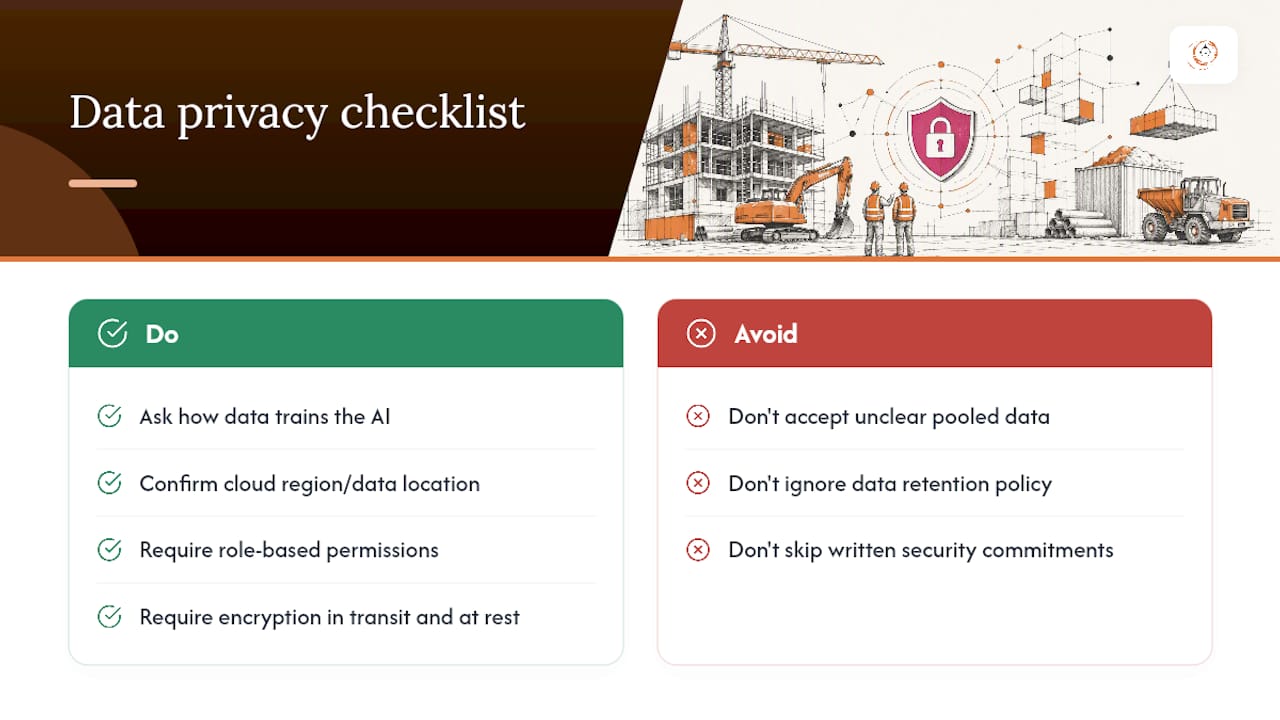
Ask specifically how client and project data trains the AI model. Some platforms use your data only within your own account; others pool anonymized data across customers to improve model performance industry-wide. Neither approach is automatically wrong, but you should know which one you’re getting before you sign, especially if your contracts include confidentiality clauses with commercial clients.
Confirm where data lives (cloud region matters for some government and institutional clients), who has admin access internally, and whether the platform supports role-based permissions so a junior estimator can’t see every client’s margin history. Ask about encryption in transit and at rest, and get a straight answer on data retention: what happens to your project records if you cancel.
Bid pricing and profit margins are competitively sensitive in construction in a way that goes beyond typical CRM data. A breach that exposes your markup logic to a competitor does more damage than a typical customer-data leak. Treat security questions with the same weight you’d give a bonding company reviewing your financials, and put the answers in writing before rollout, not after an incident.
How Construction Firms Are Actually Using AI CRM Today
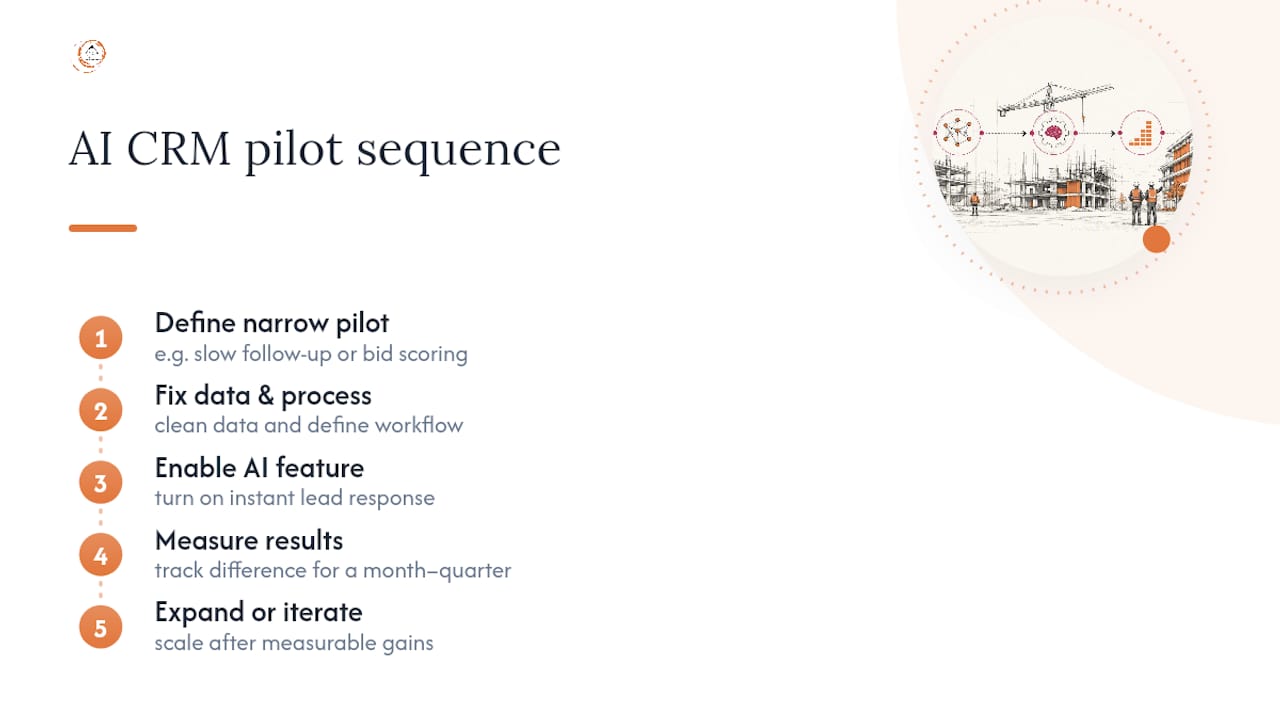
Adoption right now looks less like a full digital transformation and more like firms fixing one specific leak at a time. The pattern that shows up most often: a contractor turns on instant lead response first, measures the difference for a month, then expands from there.
That sequencing matters more than the technology itself. Firms that define a narrow pilot problem, whether that’s slow follow-up or inconsistent bid scoring, and fix their underlying data and process before layering on AI tend to see measurable gains within the first quarter after launch, according to analysis of CRM adoption patterns. Firms that skip that step and expect the software to fix a broken process usually end up disappointed in the AI, when the real issue was the workflow underneath it.
Established construction platforms are embedding AI features directly into their products, adding client update automation, copilot-style search, and dispatch agents. Accounts with disciplined data entry and defined workflows report faster follow-up and fewer missed opportunities. Accounts that adopted the same features without fixing their data first saw far less benefit, which tracks with the broader industry pattern of low trust in AI tools tied directly to infrastructure gaps rather than the AI itself.
The lesson holds across firm size: the software is rarely the bottleneck. The process feeding it is.
Where AI in Construction CRM Is Headed Next
The next wave of construction AI moves earlier in the sales cycle. Rather than waiting for a project to hit a public bid board, AI tools increasingly aggregate permits, planning documents, and meeting minutes to flag opportunities months before they’re formally available, according to industry analysis on AI-driven construction sales. That shifts business development from reactive bidding to proactive positioning, which is a meaningful change in how pipeline gets built.
Expect deeper write-back integration too. Today’s tools mostly read data and summarize it. The next generation increasingly updates schedules, adjusts estimates, and triggers subcontractor outreach without a person manually pushing each change through.
Voice capture is likely to expand as well, letting field supervisors dictate site notes that flow directly into the CRM and update client-facing status without anyone typing a report at the end of a twelve-hour day. Combine that with schedule optimization that flags labor or material conflicts before they cause a delay, and the CRM starts functioning less like a database and more like an operations partner.
None of this replaces judgment. It compresses the time between information showing up somewhere and a person acting on it, which is the actual bottleneck in most construction businesses today.
Getting Your Team to Actually Use It
The best AI features in the world do nothing if your estimator ignores the auto-generated draft and builds the proposal from scratch anyway out of habit. Adoption, not capability, is usually the real failure point.
Start training before launch day, not after. Show the team exactly what the AI will and won’t do, and be honest that early outputs need review. Field and office staff trust a tool faster when they see a human checking its work in the first weeks, rather than being told to “trust the system.”
Assign one internal champion, ideally someone respected by both the office and the field, who owns questions and feedback during rollout. Change management in construction tends to succeed or fail based on whether crews see a peer using the tool successfully, not on a memo from leadership.
Keep the first rollout narrow. Turn on instant lead response before you turn on AI-drafted proposals. One visible win, like a lead that got a same-hour callback instead of a next-day one, builds the internal case for expanding further. Trying to launch every AI feature simultaneously usually produces confusion instead of adoption, and a structured CRM implementation approach that phases features in tends to stick better than an all-at-once rollout.
Leading AI Adoption Without Losing the Relationship
AI should free your business development people to spend more time on relationships, not replace those relationships with automation. The contractors who get real value start by fixing one operational leak, usually lead response, and measure it before touching anything else.
Estimating drafts and lead scoring only work when the process and training behind them are solid. Skip that groundwork and expect the software to carry it, and you’ll blame the AI for a problem your SOPs created.
— Rowena
How High Level CRM Helps Contractors Adopt AI Responsibly
High Level CRM is purpose-built for construction, not retrofitted from a generic sales tool, which is the gap that trips up a lot of contractors trying to bolt AI onto software that was never built for job costing, bid cycles, or subcontractor coordination in the first place.

High Level CRM combines automated lead tracking, workflow automation, and custom reporting dashboards with estimating integrations and supplier and subcontractor communication tools in one place. The onboarding process includes CRM customization and training services to help your team use new features effectively. If you’re migrating from a spreadsheet or a generic CRM, the CRM Migration path is built specifically for that transition. Setup fees apply and details are available upon inquiry. Book a demo through High Level CRM to see how it handles your actual lead and estimating workflow, not a staged one.
Sources
- FMI / industry report excerpt (forconstructionpros)
- AI in construction sales — Construction Leaders Network (2026)
- Why AI projects fail — Construction AI
FAQ
What Does AI Actually Do Inside a Construction CRM?
AI in a construction CRM automates first response to leads, scores opportunities against past job profitability, reads plans to draft estimates, and flags stalled deals before they go cold. It works only as well as the data feeding it, which is why unified, clean project data matters more than the AI model itself.
Is AI in Construction CRM Worth It for a Small Contractor?
It can be, especially for lead response, since a same-hour callback often beats a next-day one regardless of company size. Start with one narrow use case, like automated follow-up, and measure results with a tool like High Level CRM’s automated follow-up guide before expanding to estimating features.
How Much Does an AI-Enabled Construction CRM Cost?
Pricing depends on the platform and the features you add, and High Level CRM’s current pricing is available directly through its website rather than a flat published rate. Setup fees typically apply on top of a monthly subscription, and costs vary based on customization and integration needs.
Why Do Most AI CRM Pilots Fail in Construction?
Most failures trace back to bad data, bolt-on tools with no real integration, and no human reviewing AI output before it reaches a client, according to analysis of failed AI construction projects. Fixing your data standards and starting with one narrow pilot avoids most of these failure points.
Can AI Replace My Estimator or Business Development Team?
No. AI drafts estimates and qualifies leads faster, but a licensed estimator still needs to review every draft before it reaches a client, and relationship-driven sales still closes most construction deals. Treat AI as the tool that clears busywork so your team spends more time on the parts of the job that actually require judgment.
Recommended
- Real CRM Results for Construction Firms: 8 Proven Outcomes
- Automate Follow-Up for Contractor Leads: 2026 Guide
- Client Onboarding Automation Best Practices for Contractors
- Reduce Marketing Costs with CRM Automation for Contractors
Signed up, or thinking about it? We build the inside of the account — pipelines, workflows, funnels, nurture, migration. Built for construction. Contact us.
Affiliate disclosure. We’re a GoHighLevel affiliate. Sign up through our link and we may earn a commission at no cost to you, or buy direct. Build-out is billed separately, never a software markup.

