A Preventive Maintenance Procedure That Actually Gets Followed
A preventive maintenance procedure is a documented, technician-level set of tasks, tools, frequencies, and acceptance criteria that keeps equipment running before it fails, rather than fixing it after. Its job is singular: prevent unplanned downtime and extend the useful life of the asset. If you manage facilities or maintenance teams, the highest-leverage move you can make this week is not writing a company-wide policy. It’s picking five critical assets and building a pilot around them.
Here’s the fast-action plan:
- Identify five critical assets where failure would stop production, create a safety hazard, or trigger a compliance violation.
- Write technician-level PM tasks for each one, specific enough that two different technicians would get the same result.
- Schedule pilot PMs in your CMMS and run them for 90 days before you touch anything else.
Every solid PM procedure, regardless of asset type, needs the same core components:
- A defined task with numbered steps
- A frequency (calendar, runtime, or condition-based)
- A list of tools and parts required
- Acceptance criteria the technician checks against, not just “inspect and note”
- Safety requirements, including lockout/tagout where applicable
Pro Tip: Don’t roll out a full PM program on day one. Run a focused 90‑day pilot on your five most critical assets, get the workflow right, then scale. Programs that try to do everything at once usually stall by month two.
Key Takeaways
A working preventive maintenance procedure combines technician-level task wording, criticality-based scheduling, and CMMS-driven tracking to cut unplanned downtime and control reactive spending.
| Point | Details |
|---|---|
| Start with five critical assets | Register them, rank criticality, and write technician-level PM tasks before scaling further. |
| Write auditable tasks | Every step needs a measurable pass/fail outcome, not a vague instruction like “inspect.” |
| Run a 90-day pilot | Tighten one planning, one execution, and one review process before a full rollout. |
| Track six core KPIs | Monitor completion rate, reactive ratio, MTBF, MTTR, cost per order, and stockouts weekly and monthly. |
| Use a hybrid model | Reserve PM for high-cost critical assets; let corrective maintenance handle low-impact items. |
30/60/90 roadmap: In the first 30 days, register your critical assets and write three technician-level SOPs. By day 60, configure your CMMS for automated PM generation and stage spare parts for pilot assets. By day 90, review pilot completion data and decide which tasks graduate to condition-based monitoring. Involve your maintenance planner, a lead technician, and your supervisor from week one. Success at the end of week one looks like five assets registered, three SOPs drafted, and one pilot PM scheduled in the CMMS.
If your team is still coordinating supplier communication and subcontractor scheduling around maintenance work through spreadsheets and phone calls, a platform built for construction operations closes that gap. Highlevelcrm-rconstructionsolutions centralizes reporting, workflow automation, and supplier communication so your maintenance data doesn’t live in a silo separate from the rest of your project operations. Explore the industries served to see how contractors and construction suppliers use it to connect field operations with office reporting.
Table of Contents
- What Counts as a Preventive Maintenance Procedure?
- How Do You Build a Preventive Maintenance Program Step by Step?
- What Should a PM Procedure Template Include?
- How Often Should You Schedule Preventive Maintenance Tasks?
- Which CMMS Features Actually Matter for a PM Program?
- Who Should Own Each Step of the PM Procedure?
- What KPIs Prove Your Maintenance Program Is Working?
- What Does a Preventive Maintenance Program Cost to Run?
- Why the 90-Day Pilot Beats a Full Rollout
- How to Write a PM SOP a Technician Can Actually Follow
- When Should You Bring in Vendors or Contractors for PM Work?
- How Do You Manage Change When Scaling a PM Program?
- How Do You Handle Emergencies Without Breaking the PM Schedule?
- How Do You Get Stakeholder Buy-In for a PM Program?
- How Do Predictive Tools Fit Into a Preventive Maintenance Program?
- What Field Teams Get Wrong About PM Programs
- Where to Go for Templates and Standards
- Frequently Asked Questions
- Sources
What Counts as a Preventive Maintenance Procedure?
A preventive maintenance procedure is scheduled, planned work performed on a fixed interval or usage trigger to prevent failure, as opposed to work performed after something already broke. That distinction sounds obvious until you look at how facilities actually spend their time. Teams without a structured system routinely spend 60 to 80% of their maintenance budget reacting to failures instead of preventing them.
Three approaches compete for your team’s time, and knowing when to use each one matters more than picking a favorite:
- Preventive maintenance: scheduled tasks performed on a calendar or usage interval, regardless of current condition (lubricate bearings every 90 days).
- Corrective maintenance: repair work performed after a failure or defect is found, often unplanned and expensive.
- Predictive maintenance: condition-based work triggered by sensor data or trend analysis, timed to intervene just before failure.
PM is the right call for safety-critical systems (fire suppression, electrical panels, life-safety equipment), assets with regulatory inspection requirements, and equipment where failure costs far exceed the cost of scheduled service. It’s a poor fit for cheap, easily replaceable components where run-to-failure is genuinely more economical. That’s not a cop-out. It’s math.
For a PM procedure to hold up under audit, it needs defined scope (which assets and systems it covers), explicit exclusions (what it does not cover, so nobody assumes coverage that doesn’t exist), and a record-keeping method tied to each completed task. Loose verbal understanding of “who checks the boiler” does not survive an insurance audit or an OSHA inspection.
The auditable-task rule: if a task can’t be written so a new hire could complete it correctly from the instructions alone, with a pass/fail outcome you could point to later, it isn’t ready for your CMMS yet. Vague language like “check compressor” and “inspect motor” fails this test every time.
How Do You Build a Preventive Maintenance Program Step by Step?
Building a working program follows a seven-step sequence that mirrors what most maintenance leaders actually use in the field: asset inventory, criticality ranking, PM task development, scheduling method selection, CMMS configuration, assignment and execution, then review and continuous improvement. Skip a step and the whole thing tends to wobble later, usually right when you can least afford it.
- Build the asset inventory. List every piece of equipment with an asset ID, location, manufacturer, model, and install date. If it isn’t in the register, it doesn’t get maintained.
- Rank criticality. Score each asset by consequence of failure: safety risk, production impact, repair cost, and lead time on replacement parts. High scores go into your pilot first.
- Develop PM tasks. Write technician-level steps for each critical asset, pulled from OEM manuals where available and adjusted for your actual operating conditions.
- Select a scheduling method. Decide calendar, meter/usage, or condition-based triggers per asset. Not every asset gets the same logic.
- Configure the CMMS. Load asset records, PM templates, and recurring work orders so the system generates tasks automatically instead of relying on someone’s memory.
- Assign and execute. Route work orders to the right technician or contractor, with parts and tools staged before the job starts.
- Review and improve. Track completion rates and failure history, then adjust intervals based on what the data actually shows.
Each step needs a deliverable, not just an activity. Planners produce the asset register and PM task templates. Supervisors produce the spare parts list and technician assignments. Technicians produce completed work orders with readings, photos, and signatures. Nobody’s job is “generally handle maintenance.”
| Role | Owner Of | Reviews | Frequency |
|---|---|---|---|
| Maintenance planner | Asset register, PM task library, scheduling logic | Interval accuracy, task wording | Monthly |
| Supervisor | Work order assignment, parts staging | Technician completion, overdue PMs | Weekly |
| Technician | Task execution, readings, photos | Nothing (executes and records) | Per work order |
| Maintenance manager | Program KPIs, budget, escalations | Quarterly interval optimization | Quarterly |
Deliverables checklist for the rollout: a completed asset register, PM task templates per critical asset, a starter spare parts list tied to those assets, and standardized work order templates in your CMMS. Miss the spare parts list and you’ll find out the hard way, mid-repair, that the belt you need is on back order.
Watch for signals that a PM task should graduate to condition-based or predictive monitoring: repeated PM visits that find nothing wrong, a failure mode with a known early-warning indicator (vibration, temperature, current draw), or a critical asset where unplanned downtime cost dwarfs the price of a sensor. If a task on your schedule hasn’t caught a real problem in over a year of visits, that’s worth a second look, not blind faith in the calendar.
What Should a PM Procedure Template Include?
A reusable SOP template needs metadata fields, technician-level steps, and system-specific checklists that adapt across HVAC, electrical, plumbing, fire protection, roofing, and fleet assets. Get the template right once and every future PM task becomes faster to write and easier to audit.
Header fields every SOP needs:
- Procedure ID and revision number
- Asset ID and asset class
- Skill level required (general technician vs. licensed trade)
- Safety and lockout/tagout (LOTO) requirements
- Tools and parts list with part numbers
- Estimated time to complete
Steps should read like instructions, not summaries. Compare “check motor” against a real technician-level task: “Verify motor current is between 8 and 10 amps at full load; if reading exceeds 10 amps, tag the unit for vibration analysis and notify the supervisor.” That level of specificity is what makes a PM task auditable and useful for interval optimization later, and it’s the difference between a checklist and a real procedure.
System-level examples, with rationale for the frequency chosen:
- HVAC: filter replacement monthly (reduces static pressure and coil fouling), belt inspection quarterly, full coil cleaning annually.
- Electrical: thermal imaging of panels annually (catches loose connections before they arc), breaker testing per NFPA schedule.
- Plumbing: backflow preventer testing annually (often mandated by local code), water heater anode inspection every 2 years.
- Fire protection: sprinkler head inspection quarterly, fire pump run test monthly, full system certification annually.
- Roofing: visual inspection semiannually, drain clearing quarterly, membrane inspection annually before winter.
- Fleet: oil change by mileage trigger, brake inspection quarterly, DOT inspection annually.
| Frequency Band | Trigger Type | Example Task |
|---|---|---|
| Daily | Condition/visual | Check boiler pressure gauge is in normal range |
| Weekly | Calendar | Inspect fire extinguisher tags and pressure |
| Monthly | Calendar or runtime | Replace HVAC air filters |
| Quarterly | Calendar | Test emergency generator under load |
| Annual | Calendar | Full electrical panel thermal scan |
| Usage-based | Runtime hours | Change forklift hydraulic fluid every 500 hours |
Every completed task should generate a CMMS record with a photo, the numeric reading taken, any part number consumed, and the technician’s signature. That record is what turns a filing cabinet of paper checklists into a searchable failure history, and it’s the raw material every future interval decision depends on.
How Often Should You Schedule Preventive Maintenance Tasks?
The right frequency depends on the trigger type, and matching the wrong trigger to an asset is one of the most common scheduling mistakes facility teams make. Calendar-based scheduling fits assets that degrade with time regardless of use, like rubber seals and roofing membranes. Meter or usage-based scheduling fits assets that wear based on operation, like vehicle mileage or compressor runtime hours. Condition-based scheduling fits assets where a measurable indicator, like vibration or oil analysis, predicts failure better than either time or usage alone.
Frequency bands, with the kind of task that typically belongs in each:
- Daily: visual checks, gauge readings, safety walk-throughs
- Weekly: fire extinguisher checks, filter visual inspection
- Monthly: filter replacement, lubrication points, small motor checks
- Quarterly: belt inspection, generator load tests, panel checks
- Semiannual: roof inspection, larger HVAC servicing
- Annual: full system certification, code-mandated testing, major overhauls
Start with OEM-recommended intervals. They’re a reasonable default, not gospel. After 12 to 18 months of CMMS failure history, you’ll have enough data to refine intervals based on what actually fails on your equipment, in your conditions, under your usage pattern. That’s when the schedule stops being a guess and starts being an actual model of your assets.
Pro Tip: If a PM task hasn’t caught a defect in a year of visits and can’t be tied to a specific failure mode, it’s a candidate for removal, not automatic renewal. Cutting low-value legacy PMs frees up technician hours for the tasks that actually prevent failures.
Which CMMS Features Actually Matter for a PM Program?
The features that matter are the ones that turn scheduling from a spreadsheet exercise into an automated, trackable workflow: a searchable asset register, automated work-order generation, mobile checklists technicians can complete on-site, a parts library tied to work orders, and KPI dashboards that don’t require a data analyst to interpret.
Non-negotiables when evaluating a CMMS for a PM program:
- Asset register with searchable history per unit, not just a flat spreadsheet import
- Work-order automation that generates PM tasks on schedule without manual triggering
- Mobile access so technicians complete checklists on the floor, not on paper they transcribe later
- Parts library linked to work orders so stockouts get flagged before a job starts
- Reporting and KPI dashboards built for completion rate, MTBF, and cost tracking
- Offline mode for facilities with dead zones, tunnels, or basements where connectivity drops
Integrations decide how much manual work disappears. ERP integration ties maintenance spend to the broader budget. IoT sensor integration lets condition data trigger a work order automatically instead of waiting for a technician’s next scheduled visit. Procurement integration means a low parts count on a work order can kick off a reorder without a separate email chain.
Vendor options generally fall into three tiers: entry-level field apps built for small teams that need basic checklists and scheduling without heavy configuration; mid-market CMMS platforms with fuller asset history, reporting, and integration options; and enterprise platforms designed for multi-site portfolios with complex compliance and procurement needs. Tools like LLumin, BuildOps, AkitaBox, and SafetyCulture (iAuditor) each represent different points on that spectrum, from mobile-first inspection apps to full asset-management suites, and picking the right tier matters more than picking the flashiest feature list.
Deployment realistically takes four to eight weeks for a single-site facility with 200 to 500 assets to get data flowing cleanly. Prioritize data cleanup before go-live: dedupe your asset list, standardize naming conventions, and confirm every critical asset has a current manufacturer manual attached. A construction-specific software comparison checklist is worth reviewing before you commit to a platform, since integration needs vary a lot between a single building and a multi-site portfolio.
Who Should Own Each Step of the PM Procedure?
Every effective PM program assigns clear ownership: a planner who builds and maintains the task library, a scheduler who manages the calendar and work order queue, technicians who execute and document, a supervisor who verifies completion, and contractors who cover specialized or licensed work. Blurred ownership is where PM programs quietly fall apart, usually without anyone noticing until a critical inspection gets missed.
Government facility contracts set a useful bar here. GSA’s National Operations & Maintenance Specification requires contractor personnel to complete roughly six hours of new-user CMMS training covering navigation, work order tracking, asset management, preventive maintenance, and reporting, on top of contract-administration training. That’s not bureaucratic overkill. It’s a recognition that a technician who doesn’t understand the CMMS will generate bad data even while doing good physical work.
A practical training curriculum for most facilities includes:
- CMMS basics for every new hire, before they touch a live work order
- Site induction covering hazards specific to that facility
- Confined space and specialized equipment training for anyone touching those systems
- Refresher training on an annual cycle, not a one-time event
| Role | Core Responsibility | Minimum Training |
|---|---|---|
| Planner | Task library accuracy, interval logic | CMMS admin training, FMEA basics |
| Scheduler | Work order queue, technician assignment | CMMS scheduling module |
| Technician | Task execution, data capture | CMMS mobile app, site induction, equipment-specific certification |
| Supervisor | Completion verification, escalation | CMMS reporting, supervisory sign-off procedures |
| Contractor | Specialized/licensed tasks | Site induction, trade licensing, CMMS basics per contract spec |
Document competency directly in the asset record: who is certified on which equipment, when their last training occurred, and any licensing that expires. Before authorizing work on a high-risk asset, a manager should be able to answer, in under a minute, whether the assigned technician is actually qualified for that task. If that takes a phone call to HR, the documentation gap is the problem, not the technician.
What KPIs Prove Your Maintenance Program Is Working?
Six metrics tell you almost everything you need to know about program health: PM completion rate, the ratio of reactive to planned work, mean time between failures (MTBF) by asset class, mean time to repair (MTTR), cost per work order, and spare-parts stockout frequency. Track these consistently and you’ll know within a quarter whether the program is improving or drifting.
PM completion rate is scheduled PMs completed divided by scheduled PMs due, pulled directly from CMMS work order status. Best-in-class programs hit above 85%; a rate below 70% signals scheduling overload, technicians pulled onto reactive work too often, or genuine buy-in problems on the floor.
Reactive versus planned ratio compares emergency and corrective work orders against scheduled PM work orders over the same period. A rising reactive share, even while PM completion looks fine on paper, often means your PM tasks aren’t catching the failures that actually matter.
MTBF by asset class averages the time between failures for a given equipment category, calculated from failure timestamps in asset history. MTTR averages time from work order creation to close for repair jobs. Cost per work order divides total labor and parts cost by work orders completed, split between PM and corrective categories so you can see where the money actually goes. Stockout frequency tracks how often a work order stalls waiting on a part that should have been staged.
Review cadence matters as much as the metrics themselves:
- Daily: overdue PMs and emergency work orders, so nothing critical slips unnoticed
- Monthly: PM completion rate and any repeat-failure patterns showing up in the data
- Quarterly: interval optimization, using the accumulated failure history to adjust schedules
When a KPI slips, the fix is usually one of a few things: re-balance the schedule if technicians are overloaded, retrain if execution quality is inconsistent, revise the task itself if it’s not written clearly enough to complete correctly, or shift vendor coverage if a contractor is missing appointments.
What Does a Preventive Maintenance Program Cost to Run?
Budget for a PM program breaks into predictable buckets: internal labor, parts and consumables, tools, contractor services for specialized work, CMMS licensing and integrations, training, and the initial data cleanup effort most teams underestimate. Get a realistic number on each before you pitch a budget upward, because vague estimates get cut first.
On the savings side, the case rests on avoided costs rather than new revenue: downtime avoided by catching a failure before it happens, emergency contractor premiums avoided by scheduling work instead of calling for a rush job, and extended asset life that pushes replacement capital spending further out.
If PM catches issues before they become emergency calls, and emergency labor typically runs at a premium over scheduled labor, even a modest reduction in emergency incidents can offset the cost of CMMS licensing and added planned labor hours within the first year. Build your own version of this model with your actual reactive spend. It’s the number your finance team will actually believe, because it’s yours, not an industry average pulled from a vendor’s brochure.
Funding for a PM program typically gets signed off by a facilities director or operations VP, sometimes alongside finance if the ask includes new CMMS licensing. Frame the ask around avoided reactive spend and asset life extension rather than “modernizing operations,” since specific dollar avoidance is what gets budget approved.
Why the 90-Day Pilot Beats a Full Rollout
The research on this is consistent: facilities that try to overhaul their entire maintenance operation at once stall, while facilities that tighten one planning process, one execution process, and one review process over 90 days build the early wins that carry a program forward. That’s not caution for its own sake. It’s a recognition that execution failure, not bad policy, is what actually sinks most PM programs.
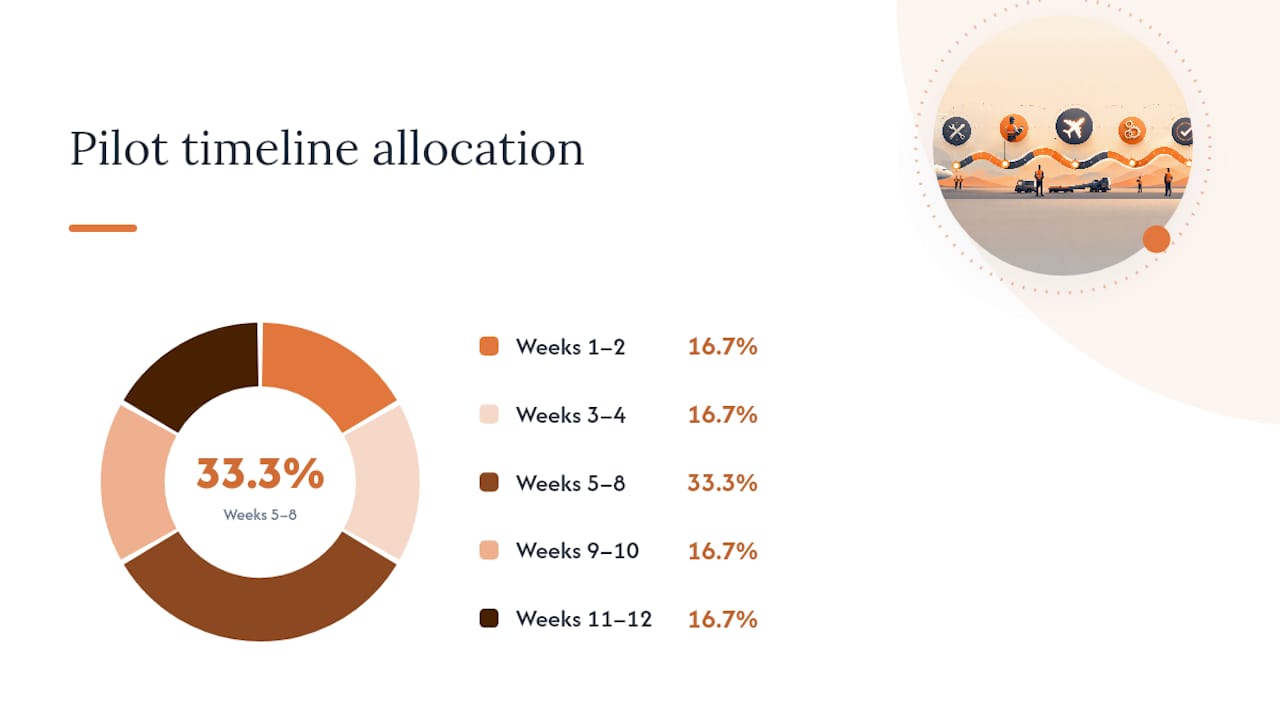
A practical 90-day timeline:
- Weeks 1 to 2: Finalize your five to ten critical assets, confirm criticality scoring, and load them into the CMMS asset register.
- Weeks 3 to 4: Write technician-level PM tasks for each asset, with acceptance criteria and required tools/parts.
- Weeks 5 to 8: Run the pilot PMs, capturing every completion, reading, and exception in the CMMS.
- Weeks 9 to 10: Review completion rate and any missed or incomplete tasks; fix task wording that caused confusion.
- Weeks 11 to 12: Assess whether any pilot assets should shift toward condition-based monitoring, based on what the data showed.
Select pilot assets using the same criticality logic from your program build: high consequence of failure, meaningful repair cost, and enough transaction volume that 90 days actually generates usable data. Success metrics should be concrete going in: target PM completion rate above 85%, zero unplanned failures on pilot assets during the window, and a documented set of task revisions based on real technician feedback.
The strongest research-backed guidance here is to run a hybrid model rather than trying to PM everything. High-cost, high-consequence assets belong on a preventive schedule; low-impact, cheap-to-replace items are often better served by corrective maintenance. Trying to PM every single asset in a facility spreads technician time thin and buries the critical work under low-value checklist tasks.
Pro Tip: Minimum viable CMMS configuration for a pilot: asset records for your critical assets, PM task templates with acceptance criteria, and a mobile checklist app technicians can actually use standing next to the equipment. Pilot acceptance criteria should include a completion rate target, zero missed critical inspections, and at least one documented task revision based on technician feedback.
How to Write a PM SOP a Technician Can Actually Follow
A finished SOP is only as good as its weakest field, and the fastest way to produce consistent SOPs is a short authoring checklist you run through every time.
- Header metadata: procedure ID, revision number, asset ID, and skill level required.
- Safety requirements: LOTO steps, PPE, and any permit requirements specific to the task.
- Tools and parts: exact tools and part numbers, so nobody discovers a missing wrench mid-job.
- Stepwise execution: numbered steps written at technician level, no ambiguous verbs like “check” without a defined outcome.
- Measurements and pass/fail criteria: numeric ranges or clear binary outcomes for every inspection point.
- Estimated time: realistic duration, used for scheduling and workload planning.
- Closeout fields: signature, date, photo requirement, and any follow-up action triggers.
A useful acceptance test for a maintenance manager reviewing a new SOP: could a technician who has never seen this specific asset before complete the task correctly using only the written steps, and would two different technicians record the same pass/fail result? If either answer is no, send it back for revision before it goes live in the CMMS.
Version control matters more once a program scales past a handful of SOPs. Every revision should carry a new version number, a change log entry noting what changed and why, and a review sign-off from whoever owns that asset class. When OEM guidance updates or a failure investigation reveals a task was inadequate, that change needs to propagate to every technician using the old version, not just live quietly in a single supervisor’s inbox.
When Should You Bring in Vendors or Contractors for PM Work?
Bring in outside help when a task requires licensing your internal team doesn’t hold, when specialized equipment needs manufacturer-certified service to preserve a warranty, or when internal capacity simply can’t cover the PM volume without sacrificing quality. Fire suppression certification, elevator servicing, and certain electrical work almost always fall into this category by code requirement alone.
Managing contractors well starts with the same standard you hold internal technicians to: a written scope tied to specific PM tasks, not a vague service agreement. Specify frequency, acceptance criteria, and documentation requirements in the contract itself, and require photo or reading evidence uploaded to your CMMS just like internal work orders. A contractor who shows up, signs a paper log, and leaves gives you nothing to audit six months later when a failure investigation asks what was actually checked.
Vet contractors on their own CMMS familiarity where possible. A contractor who can log directly into your system and close a work order with proper documentation saves your team the transcription work and keeps the asset history complete. Where that’s not feasible, build a simple intake process so contractor paperwork gets entered promptly, not batched into the system weeks later when someone finally has time.
Set a review cadence for contractor performance the same way you would for internal KPIs: completion rate against scheduled visits, documentation quality, and responsiveness on emergency calls. A contractor who consistently reschedules or provides thin documentation is a program risk, even if their actual repair work is fine.
How Do You Manage Change When Scaling a PM Program?
Scaling a PM program from a five-asset pilot to a facility-wide operation, or updating existing procedures after a failure investigation, requires the same discipline you’d apply to any operational change: communicate before you implement, pilot the change on a small group first, and give technicians a channel to flag problems before they become silent workarounds.
The most common failure point isn’t resistance to the new procedure itself. It’s rolling out a change to twenty technicians simultaneously with no feedback loop, then discovering three weeks later that half of them interpreted a step differently. Stagger changes across a small group first, even when scaling from a successful pilot. What worked for five critical assets under close supervision doesn’t always survive contact with fifty assets and a full crew.
Document every SOP revision with a clear rationale, not just a redlined document. Technicians who understand why a step changed, whether it was a near-miss, a new OEM bulletin, or a KPI trend, comply more consistently than technicians who just get handed a new checklist with no context. Set a standard review trigger: any SOP with three or more technician-reported issues in a month gets pulled for revision rather than left to accumulate workaround habits on the floor.
How Do You Handle Emergencies Without Breaking the PM Schedule?
Unplanned maintenance is never going away, and a PM program that pretends otherwise gets its schedule wrecked the first time a chiller fails on a July afternoon. The fix isn’t eliminating reactive work. It’s protecting planned PM time so emergencies don’t quietly cannibalize your entire schedule every month.
Build a defined emergency response path that runs parallel to your PM workflow: a clear escalation chain, a designated on-call technician rotation, and a rule for how emergency work gets logged in the same CMMS as your scheduled PMs. That last part matters more than it sounds. Emergency work orders feed your reactive-versus-planned ratio, and if they’re tracked in a separate spreadsheet or not tracked at all, your KPIs will lie to you about how the program is actually performing.
Stage a reserve of technician hours each week specifically for reactive demand, based on your historical emergency volume, rather than assuming PM work will simply absorb whatever’s left over. Facilities that skip this step tend to see PM completion rates crater during a bad month, not because the PM tasks got harder, but because every technician hour got pulled into firefighting.
How Do You Get Stakeholder Buy-In for a PM Program?
Buy-in fails when a PM program gets announced instead of explained, and it succeeds when the people doing the work understand what’s in it for them specifically. Technicians want fewer emergency calls at 2 a.m. Supervisors want predictable schedules they can staff around. Finance wants a number they can defend upward. Speak to each of those, not one generic pitch to the whole building.
A short communication plan works better than a long one. Before rollout, hold a brief session with technicians walking through two or three sample PM tasks, not the entire program philosophy. Show supervisors the KPI dashboard they’ll actually be checking weekly. Give leadership the budget and avoided-cost framing from your business case, since that’s the version they’ll repeat to their own bosses.
Ongoing engagement matters more than the launch. Share completion rate and near-miss catches monthly, in plain terms, so the team sees the program catching real problems, not just generating paperwork. A technician who sees their vibration reading catch a bearing failure before it seized the motor becomes your best advocate for the next SOP revision. That kind of visible win does more for buy-in than any kickoff meeting.
How Do Predictive Tools Fit Into a Preventive Maintenance Program?
Predictive maintenance doesn’t replace preventive maintenance. It refines where PM effort goes, shifting fixed-interval tasks toward condition-triggered ones once you have the data and the stakes justify the sensor cost. Think of PM as the baseline discipline and predictive tools as the upgrade path for your highest-value assets.
The natural progression: run a PM task on a calendar interval, accumulate enough failure history to see a pattern, then evaluate whether a measurable indicator (vibration signature, oil particulate count, thermal signature, current draw) predicts that failure earlier and more reliably than the calendar does. If an FMEA-driven review shows a PM task can’t be tied to a specific failure mode or risk score, that’s often the same task worth automating with a sensor instead of a technician visit.
Not every asset justifies the investment. Sensor and monitoring costs make sense on high-consequence equipment where unplanned downtime is expensive and failure patterns are measurable. For lower-tier assets, a well-written PM task on a sensible interval remains the more cost-effective choice. The goal isn’t maximizing sensor coverage. It’s spending monitoring budget where it actually changes an outcome.
What Field Teams Get Wrong About PM Programs
Most PM programs don’t fail because the concept is flawed. They fail because of a handful of avoidable execution mistakes that show up in almost every underperforming program I’ve reviewed.
Vague task wording is the most common one. “Inspect unit” tells a technician nothing about what a pass or fail looks like, so two technicians produce two different outcomes, and the CMMS fills up with data nobody can trust. The fix is tedious but simple: rewrite every task with a measurable check and a defined action if that check fails.
Missing parts at the point of work is the second most common failure. A technician who arrives to change a filter and finds the wrong size staged loses the visit entirely, and that missed PM often doesn’t get rescheduled until the next cycle. Tie your spare parts list directly to the inventory tracking system you already use for job materials, so PM parts get the same reorder-point discipline as project supplies.
Overloaded schedules kill completion rates quietly. A team that schedules more PM hours than it has technician capacity for will always show a declining completion rate, and the usual response, adding more tasks to “catch up,” makes it worse. The fix is capacity planning before task assignment, not after the numbers start slipping.
On the reactive-versus-planned trade-off, staging technician hours for expected emergency volume protects your PM schedule better than any policy memo. And when staffing turns over or a busy season hits, keep the program alive by protecting a short list of non-negotiables: the highest-criticality asset PMs stay on schedule no matter what, new hires get CMMS basics before their first solo work order, and completion rate gets reviewed weekly, not quarterly, until things stabilize. Momentum is easier to maintain than to rebuild.
Where to Go for Templates and Standards
Building your own procedures faster means knowing which resource answers which specific question. Use the GSA National O&M Specification when you need the compliance bar for contractor CMMS training and reporting on government or institutional facilities. Reference DASNY’s Operation and Maintenance Manual guidance when structuring what belongs in your SOP and O&M documentation, from spare parts lists to scheduled maintenance tables. The AssetLab program guide lays out the seven-step build sequence in more detail if you want a deeper walkthrough of asset inventory and criticality ranking. For digital checklist formatting and mobile execution, SafetyCulture’s preventive maintenance plan resource offers a practical starting template.
For construction-specific operational context, a comparison checklist for evaluating construction software helps when your PM technology decision overlaps with broader project management and reporting needs. And if onboarding new technicians onto CMMS workflows is a recurring bottleneck, reducing manual onboarding steps is worth a read before your next hiring wave.
Frequently Asked Questions
What is included in a preventive maintenance checklist? A complete PM checklist includes the asset ID, task steps written at technician level, required tools and parts, acceptance criteria or pass/fail ranges, safety and LOTO requirements, and fields for recording readings, photos, and a technician signature.
How long does it take to implement a preventive maintenance program? A focused pilot on critical assets typically runs 90 days from planning through initial review. Full CMMS data implementation for a single site with 200 to 500 assets generally takes four to eight weeks to get clean data flowing, with interval optimization requiring 12 to 18 months of accumulated history.
What’s the difference between a maintenance schedule and a preventive maintenance procedure? A maintenance schedule is the calendar or trigger logic that says when a task runs. The procedure is the actual documented steps, tools, and acceptance criteria a technician follows once that task is triggered. You need both, and they should live in the same CMMS record.
How do you decide which assets get preventive maintenance versus corrective maintenance? Rank assets by criticality: safety risk, production impact, repair cost, and replacement lead time. High-consequence, high-cost assets belong on a preventive schedule. Low-impact, cheap-to-replace items are often better handled with corrective maintenance once they fail, following the hybrid approach most maintenance research supports.
What KPI best indicates whether a PM program is actually working? PM completion rate is the fastest signal, with best-in-class programs sitting above 85%. But pair it with the reactive-versus-planned work ratio, since a facility can hit a high completion rate on paper while still fighting frequent emergency calls if the PM tasks themselves aren’t catching the right failure modes.
Sources
- 10 Maintenance Best Practices for Facility Managers – Facility Management Insights
- National Operations & Maintenance Specification
- Section 017823 - Operation and Maintenance Manuals (DASNY)
- Preventive Maintenance Best Practices: A Comprehensive Framework for Facilities
- How to Build a Preventive Maintenance Program: Complete Guide with Checklists (2026) | AssetLab

