
Commercial Project Lifecycle Software Explained for Contractors
Commercial project lifecycle software is a single platform that connects every phase of a commercial building project, from initial tender through planning, procurement, construction, and handover, giving contractors real-time visibility across their entire portfolio. If you’re juggling multiple concurrent jobs, managing frequent change orders, or facing audit and closeout complexity, this is the category of tool you need.
The core value proposition: A purpose-built lifecycle platform replaces fragmented spreadsheets and disconnected apps with one source of truth, so your team spends less time chasing data and more time building.
The practical trigger for adoption is straightforward. When your project count grows past two or three active commercial sites, manual tracking creates duplicate effort, missed approvals, and billing disputes. Audit-readiness, a concept central to dispute defense and final account settlement, becomes nearly impossible without an immutable log of every change order and approval decision. Platforms built for commercial contractors address exactly that gap.
Table of Contents
- What phases does the commercial project lifecycle actually cover?
- What core features should you expect from lifecycle software?
- Why does lifecycle software matter? The problems it actually solves
- How do you evaluate and implement lifecycle software step by step?
- What can AI and analytics realistically do for your projects right now?
- What red flags should you watch for when choosing or deploying lifecycle software?
- Contractor-specific platform vs. generic CRM: how do you decide?
- Key Takeaways
- What separates a successful rollout from an expensive lesson
- How Highlevelcrm-rconstructionsolutions supports your commercial project lifecycle
- Useful sources for contractors going deeper
What phases does the commercial project lifecycle actually cover?
The construction project lifecycle for commercial work spans nine primary stages, each with a distinct owner and a distinct software use case.
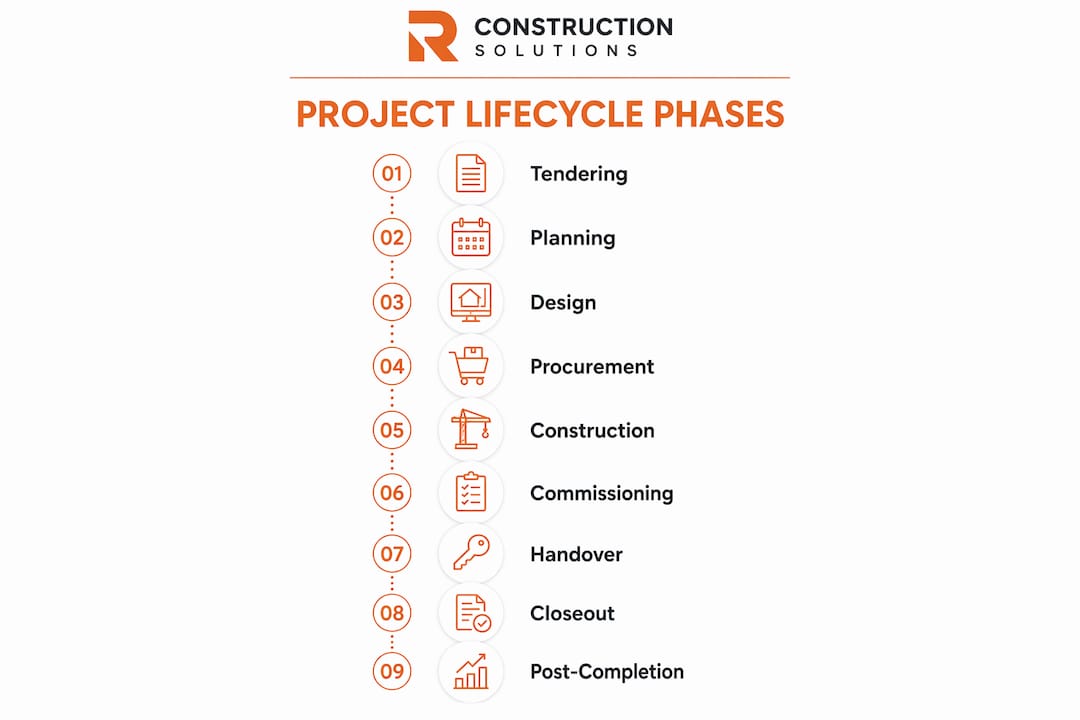
| Phase | Primary Owner | Key Software Use Case |
|---|---|---|
| Tendering | Estimator | Bid assembly, scope comparison, subcontractor pricing |
| Estimation | Estimator / PM | BIM-based quantity extraction, AI-assisted takeoff |
| Planning | Project Manager | Schedule build, critical-path logic, resource allocation |
| Procurement | Procurement Lead | Submittal pipelines, vendor approvals, purchase order tracking |
| Execution | Site Superintendent | RFI capture, daily reports, drawing version control |
| QA/QC | QA Lead | Inspection checklists, punch lists, defect tracking |
| Billing | Project Accountant | Progress billing, cost-to-complete forecasting |
| Handover | PM / Owner | Asset data delivery, O&M documentation, closeout package |
| Operations & Maintenance | Facilities Ops | CMMS integration, warranty tracking, asset performance |
Portfolio visibility matters most at the planning and execution phases. Leadership needs rolled-up dashboards to make resource and funding decisions across active sites, not just project-level reports. For rollout programs, such as a retail chain opening 20 locations simultaneously, asset-centric handover, where equipment data, warranties, and O&M documents are collected during construction rather than assembled at closeout, is the difference between a smooth day-one operation and weeks of scrambling.
What core features should you expect from lifecycle software?
The capability set that actually moves the needle for commercial contractors breaks into two groups: project controls and field operations.
Project controls features:
- Document control and versioning: Every drawing, spec, and submittal carries a version number with a full revision history. No more “which PDF is current” conversations on the jobsite.
- RFI and submittal tracking: Automated routing sends requests to the right reviewer, logs response times, and flags overdue items before they delay the schedule.
- Change-order and claims workflow: Each change is tied to a cost code, an approval gate, and an immutable audit trail so you can defend every dollar in a dispute.
- Cost control and commitment management: Committed costs, pending changes, and forecast-at-completion update in real time against the approved budget.
- Critical-path scheduling: Logic-tied schedules with baseline comparison show float consumption and flag slippage before it compounds.
Field operations and portfolio features:
- Mobile field access: Crews capture RFIs, daily logs, and punch-list items from any device, including offline, so data reaches the office the same day.
- Resource and field coordination: Labor and equipment assignments are visible across projects, preventing double-booking and idle time.
- Portfolio dashboards: Rolled-up views show cost, schedule, and risk status across every active project so leadership can act on exceptions, not reports.
- Integration points: BIM models feed quantity data into estimates; ERP and accounting systems sync committed costs; CMMS and EAM platforms receive asset data at handover.
Audit trails run through every one of these features. A platform without immutable logging of who approved what and when is a liability, not an asset.
Why does lifecycle software matter? The problems it actually solves
The clearest way to see the value is to map the problem directly to the outcome.

| Contractor Problem | What Software Fixes | Measurable Signal |
|---|---|---|
| Data fragmentation across spreadsheets | Single source of truth, one login | Faster handover package assembly |
| Missed approval deadlines | Automated gates with escalation alerts | Fewer rework days per project |
| Untracked change orders | Audit-logged change workflow | Defensible claims, fewer billing disputes |
| Poor forecast accuracy | Real-time cost-to-complete | Reduced forecast variance |
| Siloed field and office data | Mobile capture synced to project record | Fewer RFI response delays |
Post-rollout, the metrics contractors track most closely include:
- Reduction in change-order cycle time
- Faster project closeout and handover
- Fewer billing disputes per project
- Improvement in forecast accuracy versus actual cost at completion
None of these gains happen automatically. The software amplifies your existing processes, so if those processes are broken, the platform will automate the inefficiency. Define and standardize your workflows before you buy.
How do you evaluate and implement lifecycle software step by step?
A structured rollout prevents the most common failure modes. Follow this sequence:
- Define required workflows. Map your current process for RFIs, change orders, submittals, and billing. Identify every approval step and every data handoff.
- Map integrations. List the accounting system, BIM authoring tool, and any CMMS or ERP the platform must connect to. Confirm API availability before shortlisting vendors.
- Identify audit and compliance requirements. Require vendors to demonstrate an immutable audit trail during the RFP, showing who changed a committed cost line and when, and how to export that record.
- Estimate data migration scope. Lock a minimum dataset with standardized naming conventions and required fields before migration. Without this, you create a digital landfill of unusable records.
- Run a scoped pilot. Select one representative project type for the pilot to validate integrations, user adoption, and data quality before enterprise rollout.
- Full rollout and stabilization. Expand to all projects with a cross-functional steering group managing governance and training cadence.
A realistic implementation timeline for a mid-size commercial contractor runs roughly 8–16 weeks from vendor selection to stabilization. Budget a portion of total implementation effort for change management, including training, governance setup, and rework of existing processes.
Pro Tip: Track time-to-handover and billing dispute count as your first two ROI metrics. Both are measurable within 90 days of go-live and give you a defensible business case for continued investment. For a deeper look at ROI signals, see CRM ROI for construction.
What can AI and analytics realistically do for your projects right now?
AI in construction lifecycle software is genuinely useful in specific, well-defined areas. It is not a replacement for experienced judgment or agreed workflows.
Mature use cases you can rely on today:
- Predictive risk signals: The platform flags schedule or cost anomalies based on historical patterns, giving you early warning before a delay compounds.
- AI-assisted takeoff and estimate suggestions: BIM-based quantity extraction reduces manual measurement errors and speeds up bid preparation.
- Deliverable templates and look-ahead suggestions: AI generates phase-appropriate task lists and look-ahead schedules from your historical project data.
- Anomaly detection in cost vs. budget: Automated alerts surface cost lines that are tracking outside expected ranges before they become overruns.
The honest limit: AI output quality depends entirely on the cleanliness of your historical data. A platform trained on inconsistent records will produce inconsistent predictions.
Pro Tip: After go-live, assign one person to govern data quality for the first 90 days. Consistent naming conventions, status codes, and update cadences are what turn AI signals from noise into decisions.
What red flags should you watch for when choosing or deploying lifecycle software?
Vendor red flags:
- No immutable audit trail or the ability to export it for dispute resolution
- Limited mobile or offline support for field crews
- Poor integration with your accounting system or BIM authoring tool
- Over-customization that locks you into a version the vendor can’t upgrade
Change-management pitfalls are just as dangerous. Departmental data ownership, where one team guards its spreadsheets rather than feeding the shared platform, is one of the biggest organizational costs during any digital transition. Insufficient training cadence and missing naming conventions compound the problem quickly.
Field reality: Standardized data entry protocols, including consistent naming conventions and minimum required fields, are a primary failure point. Without them, project data becomes fragmented and unusable within weeks of go-live.
Practical avoidance tactics: lock down minimum data standards before migration, enforce a weekly status-update cadence from day one, and pilot governance with a cross-functional steering group that includes field, office, and finance representation.
Contractor-specific platform vs. generic CRM: how do you decide?
The decision comes down to five criteria: portfolio size and complexity, asset-centric handover requirements, audit obligations, integration depth, and field mobility needs.
| Category | Best For | Key Tradeoff |
|---|---|---|
| Entry-level field apps | Small crews, single-site jobs | Limited cost control and portfolio visibility |
| Generic CRM or project tools | Sales pipeline and basic task tracking | No construction-specific workflows or audit trails |
| Contractor-specific lifecycle platforms | Multi-site commercial work, audit-heavy projects | Higher setup investment, stronger long-term ROI |
A hybrid approach makes sense when you need a contractor-specific core for project controls and a best-of-breed tool for a niche task, such as a specialized BIM viewer or a dedicated safety inspection app. The key is ensuring the core platform owns the audit trail and the single source of truth. For guidance on selecting multi-project software, the decision criteria around integration depth and portfolio visibility are the most important filters to apply first.
Document your project scoping and acceptance criteria before you evaluate any vendor. Contractors who skip this step routinely buy the wrong category of tool.
Key Takeaways
Commercial project lifecycle software delivers its strongest ROI when contractors standardize workflows before rollout and track time-to-handover and billing disputes as the first two post-go-live metrics.
| Point | Details |
|---|---|
| Define workflows first | Map every approval step and data handoff before evaluating any vendor. |
| Require an audit trail | Demand a live demo of immutable change-order logging during the RFP process. |
| Pilot before full rollout | Run one representative project type to validate integrations and user adoption. |
| Budget for change management | Allocate 10–20% of implementation effort to training, governance, and process rework. |
| Highlevelcrm-rconstructionsolutions | Built on 30+ years of construction experience, featuring portfolio dashboards, audit-ready change control, and user-reported 35% lead-conversion gains. |
What separates a successful rollout from an expensive lesson
Most contractors who struggle with lifecycle software implementations share one thing in common: they bought the platform before they fixed the process. The software becomes a mirror. If your change-order workflow is chaotic, the platform will make that chaos faster and more visible, not organized.
The contractors who get real results, faster closeouts, fewer disputes, cleaner handovers, are the ones who treat the software purchase as the last step of a process redesign, not the first. They lock naming conventions, assign data ownership, and run a real pilot before they go enterprise-wide. That discipline is unglamorous, but it’s what separates a tool that pays for itself from one that collects dust.
The 35% lead-conversion increase reported by High Level CRM users reflects what happens when a platform built from 30+ years of construction experience meets a team that has done the process work first.
How Highlevelcrm-rconstructionsolutions supports your commercial project lifecycle
Contractors managing commercial portfolios need more than a generic project tool. Highlevelcrm-rconstructionsolutions was built specifically for the construction industry, drawing on over 30 years of hands-on construction experience, and it shows in the feature set: portfolio dashboards that give leadership rolled-up cost and schedule visibility, audit-ready change-order workflows, mobile field access for onsite teams, and integrations with accounting and BIM platforms your crews already use.

Users report a 35% increase in lead conversion after adopting the platform, a signal of what happens when sales, project, and field workflows connect in one place. The configurable reporting dashboards mean you’re not adapting your process to the software; the software adapts to how you run commercial work.
The clearest next step is a scoped pilot on one active project. See the CRM features and FAQs to understand exactly what’s included, or visit the industries we serve page to see how commercial contractors are using the platform today. Request a demo and run it against a real project, with your data, your workflows, and your integrations.
Useful sources for contractors going deeper
- The Complete Construction Project Lifecycle Explained — ConstructionPlacements’ nine-stage lifecycle breakdown; the clearest reference for phase definitions and responsible roles on commercial jobs.
- ProjectTeam audit-readiness guidance — Practical advice on audit trails, immutable approvals, and dispute defense; use this when building your RFP requirements.
- Project Planning for Contractors: A Proven Step-by-Step Guide — Partner resource covering pilot scoping, implementation timelines, and change-management budgeting.
- Construction Estimating Workflow Best Practices — Internal guide on BIM-based quantity extraction and estimation data standards; relevant to the planning and procurement phases.
- Construction Supplier Workflow Explained — Covers procurement pipelines and vendor approval workflows; useful when configuring submittal and purchase-order tracking.

