
80/20 Hands On Playbook: Role Based Construction CRM Training
The fastest way to make a construction CRM stick is role-specific, hands-on training run as a phased pilot with power users. Start by picking 3 to 5 field or office staff who already influence how others work, scope a 4-week pilot around one workflow like bid tracking, and expand only after that group shows measurable time savings. A construction-specific CRM is one option built around this exact approach.
TL;DR:
- Role-specific, hands-on training with a small pilot group significantly boosts CRM adoption rates, often exceeding 70%, compared to generic training’s 47%.
- Focusing training on bid workflows and mobile field updates delivers quick, measurable improvements within weeks, making them ideal starting points.
- Implementing a phased rollout over 12 weeks, including data cleanup and pilot testing, prevents overload and encourages sustained long-term adoption.
- Maintaining ongoing support through varied formats like microvideos, quick guides, and weekly office hours ensures continued engagement beyond initial training.
- Failure to plan for proper data migration, leadership modeling, and post-launch training is the main reason many construction CRM projects stall or underperform.
Table of Contents
- What Makes Construction CRM Training Actually Work?
- What Should Construction CRM Training Cover?
- How Long Does a Construction CRM Rollout Take?
- How Do You Train Different Roles on a Construction CRM?
- What Training Formats Keep a CRM Rollout Alive?
- How Do You Measure CRM Adoption and ROI?
- What Goes Wrong With CRM Training (and How Do You Fix It)?
- How High Level CRM Supports Training and Long-Term Adoption
- A Straight Answer on Where to Start
- Get Started With Construction-Specific CRM Training
- Sources
- FAQ
What Makes Construction CRM Training Actually Work?
Generic CRM training fails in construction because construction isn’t a person-to-person sales business. It’s a project business, with multiple stakeholders, shifting timelines, and handoffs between estimators, project managers, and field crews. Training that treats a CRM rollout like teaching a sales team to log calls misses all of that.
The numbers back this up. Generic CRM training produces adoption rates around 47%, according to the Associated General Contractors of America. Role-specific training, where each session is built around what a particular job actually does in the system, pushes adoption to somewhere between 70% and 90%.
The adoption gap: Generic training: 47% adoption. Role-specific training: 70%–90% adoption. That’s not a marginal improvement. That’s the difference between a CRM your team tolerates and one your team actually runs the business on.
The reason is straightforward. A superintendent doesn’t care how the CRM tracks marketing campaigns. A project manager doesn’t need to know how bid templates get built from scratch. Each role needs a narrow, relevant slice of the system, taught in the context of a workflow they already recognize. When you scope training that way, you get faster bid turnarounds, fewer dropped follow-ups, and, over time, a measurably higher win rate on the deals your team actually pursues.
What Should Construction CRM Training Cover?
A construction CRM curriculum should follow the shape of how work actually moves through your company, not how a generic software vendor organizes its help center. Build your training around six core modules, in this order of priority:
- Data hygiene fundamentals. How leads, contacts, and job records get entered, tagged, and kept clean. Skip this and every other module inherits the mess.
- Bid and opportunity workflows. Moving a lead from first contact through estimate, proposal, and award. This is where most firms see the fastest return.
- Mobile field updates. How crews log daily progress, photos, and status changes from a job site, not a desk.
- Reporting and dashboards. Reading pipeline health, job profitability signals, and win/loss trends without waiting on the office.
- Integrations. Connecting the CRM to accounting, estimating, and project management tools already in use.
- Automation basics. Triggered follow-ups, task assignments, and notifications, taught after the manual process is understood.
For a pilot, prioritize bid and opportunity workflows and mobile field updates first. Both produce visible wins inside weeks, which builds the internal momentum needed for everything else.
Delivery format matters as much as content. A few practical guidelines:
- Keep initial sessions to 45 to 60 minutes; longer sessions lose the room, especially for field staff pulled off a job site.
- Run mobile-update training on actual phones and tablets, not a projector screen.
- Record every live session for later reference. New hires shouldn’t have to wait for the next scheduled workshop.
- Follow every module with a short, ungraded quiz or walkthrough task to confirm the concept landed.
How Long Does a Construction CRM Rollout Take?
A phased rollout beats a single go-live date every time. The recommended sequence runs through discovery, data cleanup, a pilot with power users, expanded training, and ongoing optimization, according to iRecruit’s implementation guide. Skipping any of these phases is where most rollouts stall.
Here’s what that looks like stretched across a 12-week window:
| Weeks | Phase | Key deliverables |
|---|---|---|
| 1–2 | Discovery | Map current workflows, identify pilot group, define success metrics |
| 3–4 | Data cleanup | Archive stale records, dedupe contacts, set field standards |
| 5–8 | Pilot | Power users run bid and mobile-update workflows live, daily check-ins |
| 9–10 | Expansion | Roll training out to remaining roles, adjust based on pilot feedback |
| 11–12 | Optimization | Review reporting accuracy, refine automations, set refresher schedule |
A few operational details separate a smooth migration from a chaotic one:
- Disable automations during the initial data import. A bulk upload of thousands of old contacts can trigger a wave of automated emails or notifications nobody wants sent.
- Archive records older than two years rather than migrating them wholesale; stale leads clutter dashboards and slow adoption.
- Run legacy systems in read-only mode during the transition window so nobody enters new data in two places at once.
- Assign one person as the single point of accountability for the migration. Shared ownership usually means no ownership.
Firms that follow this sequence, rather than trying to flip every user over on day one, tend to see meaningful operational gains inside three to six months.
How Do You Train Different Roles on a Construction CRM?
Role-specific training only works if the exercises mirror what each person does on a real project. Generic click-through tutorials don’t transfer. Practice on scenarios pulled from your own pipeline does.
- BD and sales staff: Walk through a live bid template end to end, from initial lead entry through proposal generation. Have them build one real bid in the system during the session, not a demo record.
- Project managers: Practice a full opportunity handoff, moving a won bid into an active job record with budget, schedule, and subcontractor assignments already attached.
- Field crews: Run a mobile check-in scenario on their own devices, logging a daily progress update and photo from an actual job site address.
- Admins: Practice data cleanup tasks directly, merging duplicate contacts and correcting mistagged records from your own database.
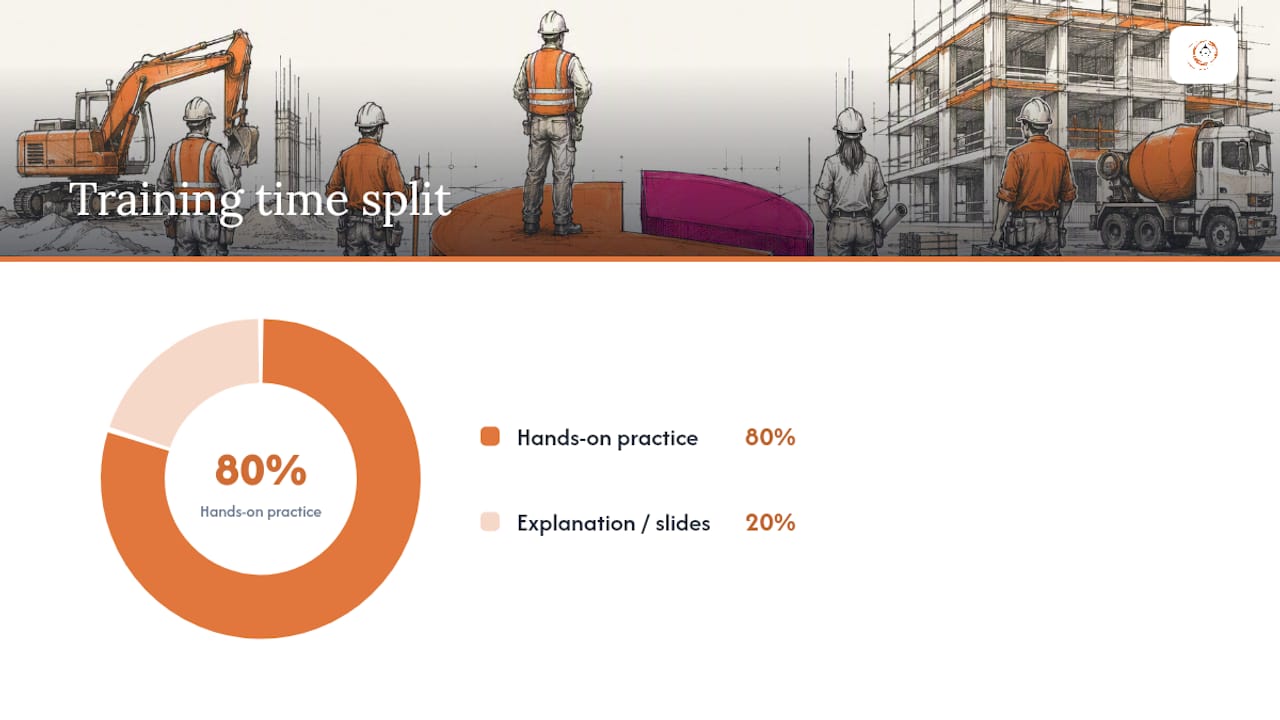
The 80/20 rule applies here: spend roughly 20% of session time on explanation and 80% on hands-on practice using real project data. A slide deck explaining what a field costs nothing if nobody has touched the mobile app by the end of the hour.
Pro Tip: Recruit your power users before you build the training plan, not after. Ask supervisors who the person coworkers already go to with tech questions is, then build your pilot group around those names.
Power users become internal champions almost automatically once they’ve documented a real time savings. Let them present their own results in the expansion phase instead of having a trainer repeat the pitch. Peer proof lands harder than vendor promises.
What Training Formats Keep a CRM Rollout Alive?
The rollout doesn’t end at the pilot. Sustained adoption depends on how training gets delivered after the initial excitement fades, and that means mixing formats rather than relying on one big kickoff event.
- Live workshops for anything that touches a new workflow or major feature release.
- Short microlearning videos, two to five minutes, for single-task refreshers like “how to log a change order.”
- One-page quick reference guides that live in the field truck or on a job trailer wall, not buried in an email.
- Weekly office hours for the first 90 days, then biweekly, where anyone can bring a real question.
Stagger feature releases so they don’t collide with training cadence. Rolling out reporting dashboards the same week as a new automation module guarantees half of it gets ignored. Space major features by at least two to three weeks, each with its own short training touchpoint.
Support has to outlast the launch date. A champion network, the power users identified during the pilot, should be reachable for quick questions without routing every problem through a formal ticket. Regular check-ins, even five minutes at a weekly team meeting, catch small confusions before they turn into workarounds that quietly break your data.
How Do You Measure CRM Adoption and ROI?
Adoption is measurable, and you should measure it weekly at first. Track five numbers: daily active users, task completion rates, data completeness (how many required fields are actually filled in), pipeline velocity, and bid win rate.
Reporting cadence: Weekly during the first 90 days, when problems are cheap to fix. Monthly after that, once usage patterns stabilize.
Set targets that reflect your starting point, not an industry average pulled from a webinar. Firms that phase feature rollout and lean on internal champions tend to see measurable operational improvements within three to six months, which is a reasonable window to set as your first checkpoint with leadership.
When presenting results upward, pair the adoption numbers with a concrete example: one bid that moved faster, one lead that didn’t get dropped, one report that surfaced a margin problem early. Leadership remembers stories attached to numbers far longer than the numbers alone.
What Goes Wrong With CRM Training (and How Do You Fix It)?
Most CRM rollouts don’t fail because the software is bad. They fail because of predictable, avoidable process mistakes. The AGC’s own playbook points to rushed requirements, underestimated data migration work, and weak leadership follow-through as the most common culprits.
- Rushed requirements: Teams skip discovery and jump straight to configuration, then discover the system doesn’t match how bids actually flow.
- Messy data migration: Importing years of duplicate, outdated contacts poisons dashboards before anyone’s logged in for the first time.
- Treating go-live as the finish line: Training stops the week the system launches, right when questions are at their peak.
- Weak leadership modeling: If a project manager sees their own boss still working from a spreadsheet, they’ll do the same.
The fixes are just as concrete. Pause and iterate rather than pushing through a broken pilot. Assign a data auditor to spot-check records weekly for the first month. Gamify early adoption with a simple leaderboard for logged bids or completed field updates. And when internal bandwidth runs thin, call in vendor migration support rather than letting the data cleanup phase drag for months.
Pro Tip: If adoption stalls past week six of a pilot, don’t add more features. Cut the training back down to the single workflow that mattered most and rebuild trust before expanding again.
How High Level CRM Supports Training and Long-Term Adoption
For firms that want an experienced hand guiding the rollout rather than building the training plan from scratch, one solution offers a construction-specific path with services including CRM customization for specific workflows, role-based training around bid management, field updates, and reporting, full migration support for legacy data, and ongoing support after launch rather than a one-time handoff.
Some contractors have reported lead conversion increases of roughly 35% after CRM adoption, attributed to better follow-up consistency and cleaner pipeline visibility, though results vary.
If you’re evaluating any vendor training engagement, construction-specific or general, ask these questions during the demo:
- Does training separate sessions by role, or is everyone sitting through the same generic walkthrough?
- What does the data migration process actually involve, and who owns cleanup?
- Is ongoing support included, or does it end after the first 30 days?
- Can they show a sample training plan before you sign anything?
A Straight Answer on Where to Start
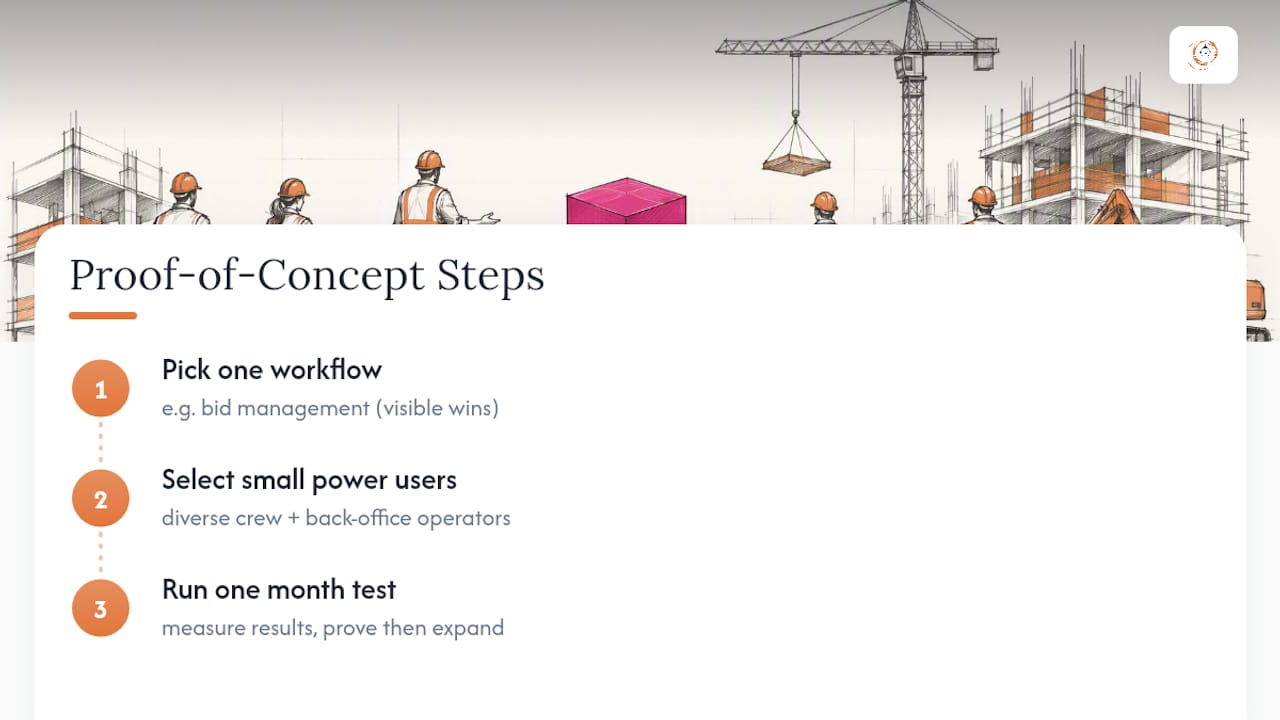
If you take one thing from this playbook, take this: pick one workflow, one small group of power users, and one month, and prove the concept before you touch anything else. Bid management is usually the right first workflow because the win is visible fast.
Leadership has to model the new system publicly, not just approve the budget for it. And on a practical note tied to how this content gets used across the industry: training materials and marketing imagery for construction CRM adoption should reflect who’s actually running job sites and back offices today, which is a far more diverse group than a single archetype. That’s not a cosmetic choice. It affects whether the training feels like it was built for your crew or borrowed from somebody else’s.
Start small. Prove it works. Then expand with confidence instead of hope.
— Rowena
Get Started With Construction-Specific CRM Training
The training and rollout approach described here addresses the issue that generic CRM training doesn’t work for project-based construction teams, favoring role-specific, hands-on sessions. This approach focuses on bid tracking, field updates, and subcontractor communication from the ground up, rather than adapting a sales-funnel template.

If you’re ready to pilot a workflow instead of guessing at one, Highlevelcrm-rconstructionsolutions offers CRM customization, role-based training and ongoing support, and full CRM migration services to move your existing data over cleanly. Before committing, review the CRM features and FAQ page to see what a demo will actually cover. Setup fees apply and current pricing is available on the site. Request a demo, scope your own 4-week pilot, and ask for a sample training plan built around your bid process before you commit to anything larger.
Sources
- CRM Playbook for Any Size Contractor | Associated General Contractors of America
- Implementing construction company CRM: step-by-step guide (iRecruit)
- Construction CRM in 2026: A Buyer Guide for Mid-Firms | Dan Cumberland Labs
FAQ
What Is the Best CRM for Construction?
The best construction CRM is one built specifically for project-based workflows like bid tracking, subcontractor communication, and field updates rather than a generic sales CRM retrofitted for the industry. High Level CRM is one option designed specifically around these construction workflows, with role-based training included as part of onboarding.
How Much Does CRM Training Cost?
Training costs vary widely depending on whether it’s included in a vendor’s onboarding package or purchased separately from a consultant. Training and ongoing support may be included as part of some service offerings, with current pricing available directly on vendors’ sites.
What Is a CRM for Construction?
A construction CRM is software built to manage leads, bids, subcontractor relationships, and project pipelines specifically for contractors, suppliers, and construction consultants, rather than generic sales contacts. It typically includes features like bid tracking, mobile field updates, and reporting dashboards tailored to how construction projects actually move.
Can I Learn CRM for Free?
Many CRM vendors offer free introductory resources, help documentation, or recorded walkthroughs, but role-specific training tied to your actual workflows almost always requires either internal effort or a paid vendor engagement. Free general tutorials rarely cover construction-specific processes like bid management or mobile field check-ins, which is where role-specific training makes the biggest difference in adoption.
Recommended
- Construction CRM Implementation: A Practical Rollout Playbook
- Reduce Manual Onboarding Steps at Your Construction Firm
- Client Onboarding Automation Best Practices for Contractors
- How to Set Up a CRM for Your Construction Business
Signed up, or thinking about it? We build the inside of the account — pipelines, workflows, funnels, nurture, migration. Built for construction. Contact us.
Affiliate disclosure. We’re a GoHighLevel affiliate. Sign up through our link and we may earn a commission at no cost to you, or buy direct. Build-out is billed separately, never a software markup.

