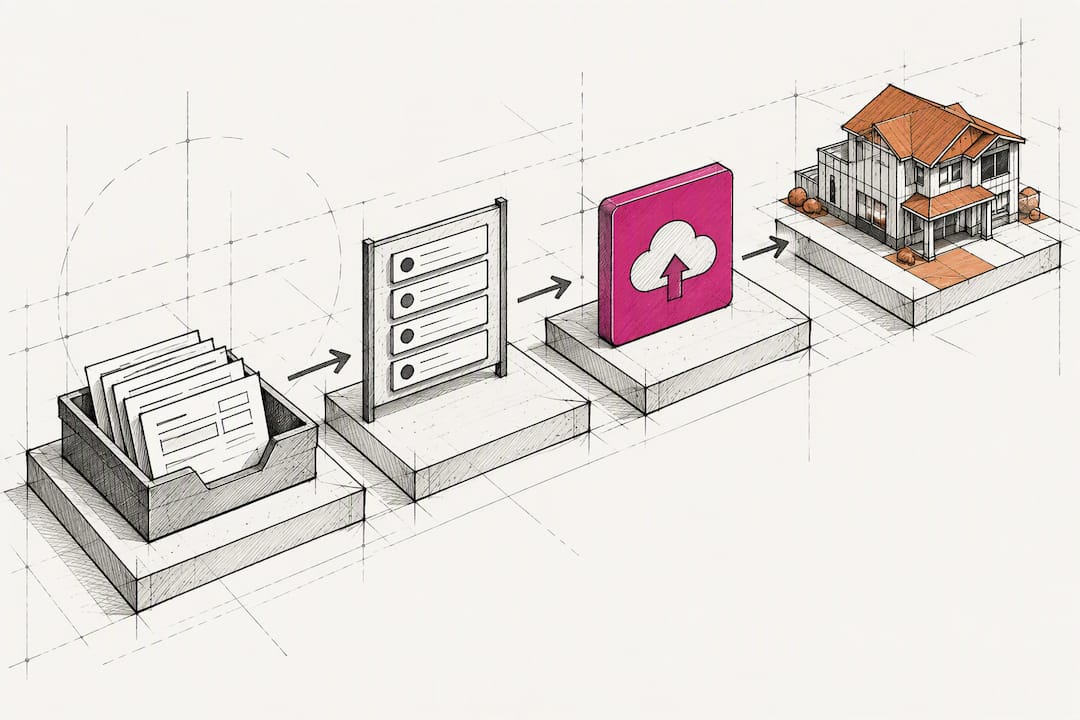
Wire Intake to CRM in 90 Days: Lead Tracking for Contractors
Start by making every lead persistent in your CRM with campaign identifiers, whether that’s a UTM string, a call tracking ID, or a GCLID, so every booked job ties back to a source. The three building blocks are UTMs, call tracking, and CRM-recorded closed jobs with offline uploads. Get those wired correctly, and you’ll see clearer marketing ROI within a single campaign cycle.
TL;DR:
- Tracking systems should record source, medium, and campaign data at every lead intake to maintain a clear attribution trail from first contact to closed job.
- Using dynamic UTM parameters, GCLID capture, and campaign-specific call tracking ensure campaign data survives through all customer interactions.
- Persisting accurate identifiers into CRM fields and automating offline conversion uploads with APIs or tools like Zapier are essential for reliable attribution.
- Most contractors benefit from the Lead Creation attribution model, which assigns credit to the last touch that converted a prospect into a lead, especially for service-based sales.
- Regularly monitoring cost per booked job, conversion rates, and average job value by source helps identify underperforming channels and optimize marketing spend effectively.
Table of Contents
- What Good Lead Source Tracking for Contractors Actually Looks Like
- UTMs, Call Tracking, and Form Fields: The Core Tracking Components
- How to Wire Intake, CRM, and Offline Conversion Uploads
- Which Attribution Model Should Contractors Actually Use?
- Common Lead-Tracking Failures That Break Attribution
- A 30/60/90-Day Plan to Get Lead Tracking Running
- Why a Construction-Focused CRM Speeds Up Adoption
- What I’ve Learned Watching Contractors Adopt Lead Tracking
- Get Your Lead Tracking Wired Right the First Time
- Implementation Documentation Worth Bookmarking
- Sources
- FAQ
What Good Lead Source Tracking for Contractors Actually Looks Like
A working system does one thing above all else: it ties every booked job back to the marketing touch that started it, without you having to guess or reconstruct it later. That sounds simple. In practice, most contractors have some version of tracking that captures the click but loses the thread the moment a lead picks up the phone or walks a form submission into a sales conversation.
The standard to aim for is a single source of truth. Every lead record in your CRM should carry the campaign data from the moment of first contact, whether that’s a Google Ads click, a Facebook form, a jobsite yard sign, or a referral, straight through to job value and close status. If a lead calls after seeing a truck wrap, that gets recorded as deliberately as a paid search click.
Here’s what that looks like in the CRM once it’s running correctly:
- Every lead record shows source, medium, and campaign at intake, not just “website” or “phone.”
- Closed jobs carry a dollar value tied back to that same source.
- Weekly reporting surfaces cost per booked job, not just cost per lead, by channel.
- Conversion rate from lead to booked job is visible by source, not blended across all channels.
- Average job value by source is tracked, since a referral lead is often worth more than a paid search click.
Watch those five numbers weekly and you’ll catch a dying channel or a rising one long before your annual budget review would. Contractors who wait for quarterly numbers to make marketing decisions are always working from stale data. Because attribution only captures a lead accurately once it becomes a known, trackable contact, the moment of first contact is the one you can’t afford to fumble.
UTMs, Call Tracking, and Form Fields: The Core Tracking Components
Every piece of this system exists to solve one problem: preserving campaign context past the first click. Here’s how the four core components work together, and where contractors typically leave gaps.
UTM parameters are tags appended to a URL that tell Google Analytics where a visitor came from. The parameters that matter most are utm_source, utm_medium, utm_campaign, utm_id, and utm_source_platform. Skip any of these consistently and you’ll see a growing pile of traffic labeled “(not set)” in your reports, which is Analytics’ way of admitting it has no idea where that visitor originated. Google’s own documentation on collecting campaign data with custom URLs is explicit that missing parameters produce exactly this blind spot.
- Standardize your naming convention first. Decide on lowercase, no spaces, and a consistent campaign naming pattern (e.g.,
spring_kitchen_promonotSpring Kitchen Promo!) before you build a single link. - Use dynamic UTM insertion where your ad platform supports it, rather than hand-building URLs for every ad group. Manual tagging works, but it’s the first thing that breaks when someone’s in a hurry.
- Pass UTM values into hidden form fields on your website so that when someone fills out a contact form, those values travel with the submission into your CRM instead of dying on the landing page.
- Capture the GCLID (Google’s click identifier) in that same hidden field setup whenever the visitor arrived via a Google Ads click, since that’s what later powers offline conversion imports.
- Route call tracking numbers by campaign, not by page, using dynamic number insertion so a visitor who arrived from a Facebook ad sees a different tracking number than one who arrived from organic search, even on the identical page.
Auto-tagging versus manual UTMs is worth understanding rather than debating endlessly. Google Ads auto-tagging appends a GCLID automatically and tends to be more reliable for paid search, since there’s no human typing involved. Manual UTMs remain necessary for everything outside Google’s own ad ecosystem: social ads, email campaigns, print ads with QR codes, or a supplier’s referral link. The failure case for manual tagging is almost always inconsistency, not the concept itself.
Pro Tip: Build one master spreadsheet with every live campaign’s UTM string and GCLID handling, then require your marketing vendor or in-house person to pull links from that sheet, never generate them fresh. This single habit eliminates most of the “(not set)” problem before it starts.
On privacy: if you’re storing phone numbers or email addresses for offline attribution matching, hash them before they leave your system, and only retain what you need for the reporting window you actually use. This matters both for enhanced conversions matching (which requires hashed identifiers by design) and for staying inside data protection expectations under regulations like the CCPA and GDPR, which govern how personal identifiers such as phone numbers and emails may be stored and used for marketing purposes.

How to Wire Intake, CRM, and Offline Conversion Uploads
The wiring flow has four stages: capture, persist, close, and upload. Miss a stage and the whole chain breaks downstream, usually invisibly, which is why so many contractors don’t notice until someone asks why the marketing spend “isn’t working” despite a full pipeline.
Capture starts at intake, whether that’s a phone call or a form. Whoever answers the phone needs a script that asks (and logs) how the caller found you, even when call tracking is already running, because that human answer becomes a backup when the technical trail has gaps. For web forms, hidden fields should silently pass UTM values and GCLID into the submission without the visitor seeing anything extra.
Once captured, values need to persist into specific CRM fields, not a generic notes box where they’ll never get pulled into a report:
- Campaign ID and UTM source/medium/campaign fields
- GCLID or call tracking ID, whichever applies
- Date of first contact
- Lead status (new, quoted, booked, lost)
- Final job value once work is completed
Closing the loop means getting that job value back to the ad platform. You have three realistic paths. A manual CSV upload works for a low volume of jobs and is fine as a starting point, but it introduces delays that hurt bidding performance. A Zapier-style automation connecting your CRM to your ad platform closes that gap without custom development. The path Google is steering advertisers toward for both current and future uploads is the Data Manager API, which keeps conversion data fresh enough for Smart Bidding to actually use it, rather than importing week-old close data that’s already lost its bidding relevance.
Pro Tip: Run a full test cycle before trusting the system with real budget: click a tracked ad, fill the form, confirm the CRM record shows the right UTM and GCLID, manually mark that test lead as “closed” with a job value, then verify it appears as an offline conversion in your ad platform within 24 to 48 hours. If any step drops the identifier, you’ve found your leak before it costs you real attribution data.
Which Attribution Model Should Contractors Actually Use?
Most contractors should use the Lead Creation model, sometimes blended with a simple 50/50 split when a second touch clearly influenced the decision. Lead Creation credits the last touchpoint before a prospect becomes a known, contactable lead, which is exactly the moment that matters most for a business built on quoted jobs rather than instant online purchases. CallRail’s attribution guidance frames this model as particularly suited to service businesses focused on which channel actually triggers engagement.
A few models worth knowing, briefly:
- Lead Creation credits whichever touch turned an anonymous visitor into a known lead. Best default for most contractors.
- First Touch credits the very first interaction, even weeks before the lead converted. Useful for understanding brand awareness, less useful for budget decisions.
- 50/50 splits credit between first touch and lead creation, a reasonable middle ground if you run longer sales cycles with multiple ad exposures.
- W-shaped distributes credit across three or more touchpoints. It’s more accurate in theory but requires more data volume than most contractor lead flows generate to be statistically meaningful.
Whichever model you pick, the reporting that matters comes down to five numbers: cost per lead, cost per booked job, lead-to-job conversion rate, average job value by source, and ROI by source. Cost per lead alone is close to useless on its own, since a channel producing cheap leads that never book jobs is worse than one producing expensive leads that close reliably.
Put these five metrics on a single weekly dashboard, broken out by source, and review it in the same meeting where you review job costs. That habit alone catches a failing channel faster than any quarterly marketing report ever will.
Common Lead-Tracking Failures That Break Attribution
Most attribution problems trace back to one of four repeatable mistakes, and each has a fix that takes less than a day to implement.
- Missing or inconsistent UTMs. Fix it by enforcing a shared link template for every campaign, and by using dynamic UTM insertion wherever your ad platform allows it, since manual link-building is where most gaps start.
- Phone leads with no attribution at all. Fix it by adopting call tracking with campaign-specific dynamic numbers, and by giving front-desk staff a short script that asks how the caller found you, as a backup layer.
- Closed jobs missing GCLID or UTM data in the CRM. Fix it by making those fields mandatory in your job-close workflow, so a job literally can’t be marked complete without them.
- Duplicate leads inflating or muddying source data. Fix it by running a weekly dedupe audit and setting matching rules on phone number and email before new leads get created.
Test each fix the same way: run one tracked click through the whole funnel, confirm the identifier survives every handoff, and only then trust the dashboard built on top of it.
A 30/60/90-Day Plan to Get Lead Tracking Running
Trying to fix everything simultaneously is how most tracking projects stall. A phased rollout gets you usable data fast, then improves it.
- Days 1 to 30: Standardize your UTM naming convention across every active campaign, install call tracking with dynamic numbers, and add hidden UTM fields to every web form. One person, usually your office manager or marketing contact, should own this.
- Days 31 to 60: Start feeding closed-job outcomes back into the CRM consistently, and begin either manual CSV uploads or enhanced conversions for leads if your ad spend justifies the setup work. This is where sales and marketing need to coordinate, since job value has to come from whoever closes the deal.
- Days 61 to 90: Build the weekly dashboard, pick and apply your attribution model, and run one deliberate test, like shifting budget toward the highest-converting source, to confirm the data is actually actionable.
Ninety days is enough to know if a channel is worth the money. Most contractors who skip this structure and try to track everything from day one end up abandoning it within a month.
Why a Construction-Focused CRM Speeds Up Adoption
Generic CRMs weren’t built with campaign IDs, GCLID fields, or offline conversion exports in mind, which is exactly why so many contractors abandon tracking projects halfway through. Highlevelcrm-rconstructionsolutions was built on more than 30 years of construction industry experience, with automated lead tracking already mapped to the fields this article describes. Look for these capabilities in any CRM you evaluate:
- Native fields for UTM parameters and GCLID, not workarounds in a notes box
- Built-in call tracking integration rather than a bolt-on
- Offline conversion export paths that match what your ad platform actually accepts
- Training included, since the biggest adoption risk isn’t the software, it’s the staff habits around it
Rising CRM adoption across the construction industry reflects exactly this shift toward measuring which leads are worth chasing.
What I’ve Learned Watching Contractors Adopt Lead Tracking
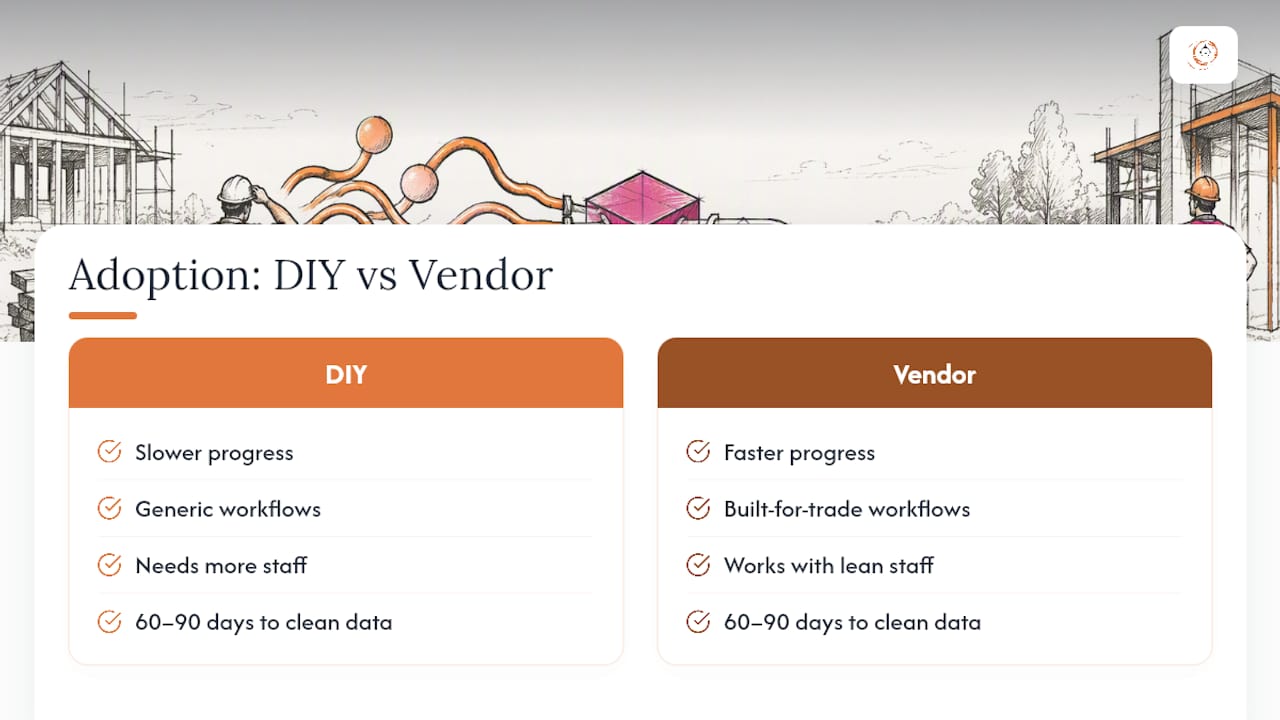
The resistance is never really about the technology. It’s about staff who’ve spent years writing “referral” in a notes field and don’t see why a UTM string matters more than getting to the next call. The fix isn’t more training slides, it’s tying the data entry directly to something the crew already cares about, like which jobs actually pay the bills.
Expect 60 to 90 days before the numbers are clean enough to act on, not sooner. And the DIY versus vendor-supported choice usually isn’t really a choice: contractors with lean office staff get further, faster, with a system built for this trade specifically, because the fields and workflows already match how construction leads actually move.
— Rowena
Get Your Lead Tracking Wired Right the First Time
Some construction-focused CRMs shorten the 30/60/90 rollout most contractors try to build alone, because they come with campaign fields, call tracking hooks, and offline conversion structure as described, rather than requiring bolt-ons to generic sales tools.

Setup fees apply and current pricing details are available on the provider’s website. If you’re migrating from spreadsheets or a CRM that was never built for construction, the CRM Migration service handles the field mapping this article describes, and CRM Customization plus Training and Ongoing Support cover the adoption side that trips up most DIY rollouts. Check the full feature list on the CRM Features & FAQs page, then request a demo through the High Level CRM site to see your specific lead flow mapped out before you commit to anything.
Implementation Documentation Worth Bookmarking
For hands-on setup, keep these close: Google’s UTM builder documentation, the enhanced conversions for leads guide, and CallRail’s attribution modeling reference. For field-level operational tracking, Subascent’s guide to crew productivity tracking is a useful companion.
Sources
- URL builders: Collect campaign data with custom URLs - Analytics Help
- Attribution modeling – CallRail Help Center
FAQ
How Much Do Contractors Typically Pay for Leads?
Cost per lead varies widely by trade and region, and it isn’t a figure that holds steady across channels, since a roofing lead from paid search costs differently than a referral. What matters more than the raw number is tracking cost per booked job by source, since a cheap lead that never closes costs you more than an expensive one that does.
What Is the Best Lead App for Contractors?
The best option is whichever tool captures campaign data at intake and persists it through to job close without manual re-entry, rather than a generic lead form app that loses attribution the moment someone picks up the phone. A construction-specific CRM like Highlevelcrm-rconstructionsolutions is built around that exact workflow, with native fields for UTMs, GCLID, and call tracking IDs.
What Is the Best Software for Lead Source Tracking Contractors Rely On?
The strongest setup combines call tracking, UTM-tagged forms, and a CRM that can export closed-job data to your ad platform for offline or enhanced conversions. Software matters less than whether campaign identifiers actually survive from first click to closed job, which is the core wiring problem this article addresses.
What Is the Best Way for a Contractor to Get More Leads?
There’s no single best channel; the more reliable path is running multiple channels simultaneously while tracking cost per booked job and conversion rate by source, then shifting budget toward whichever one performs. Treating each campaign as a measurable experiment, rather than a one-time spend, is what separates contractors who grow their lead volume from those who guess at it year after year.
Which Attribution Model Should Most Contractors Use?
Lead Creation, which credits the touch that turned an anonymous visitor into a known, contactable lead, works best for most contractors because it matches how quoted, service-based sales actually happen. A 50/50 split between first touch and lead creation is a reasonable alternative for businesses with longer sales cycles and multiple ad exposures before booking.
Recommended
- Automated Lead Tracking Explained for Contractors
- Benefits of Automated Lead Follow-Up for Contractors
- Improve Lead Conversion Using Contractor CRM in 2026
- Automate Follow-Up for Contractor Leads: 2026 Guide
Signed up, or thinking about it? We build the inside of the account — pipelines, workflows, funnels, nurture, migration. Built for construction. Contact us.
Affiliate disclosure. We’re a GoHighLevel affiliate. Sign up through our link and we may earn a commission at no cost to you, or buy direct. Build-out is billed separately, never a software markup.

