
Avoid $500–$1,500 Per Text: TCPA SMS and 10DLC for US Contractors
Yes, contractors can legally text customers, but marketing texts require documented prior express written consent, while appointment reminders and other transactional messages face a lower bar. Three non-negotiables cut your legal risk immediately: capture and store proof of consent, register your business through A2P 10DLC, and process opt-outs the moment they arrive. Skip any one of these and you’re exposed to statutory damages of $500 to $1,500 per text.
TL;DR:
- Contractors must maintain detailed, timestamped records of consent language, collection method, and source to defend against TCPA violations.
- Sending promotional texts requires prior express written consent, while transactional messages like appointment reminders do not.
- Immediate processing and synchronization of opt-out requests across all campaigns are critical to avoid legal and reputational risks.
- Registering A2P 10DLC campaigns with accurate business info and proof of opt-in prevents carrier rejections and legal issues.
- Building consent collection into initial lead forms or yard signs helps ensure legal compliance from the first contact.
Table of Contents
- What Counts as Consent Under TCPA and How to Capture It
- Classifying Promotional vs Transactional Texts
- Handling Opt-Outs and Revocation Requests
- A2P 10DLC Registration and Carrier Vetting
- Quiet Hours and State Rules That Override the Federal Baseline
- Recordkeeping That Holds Up in a Complaint or Carrier Review
- A Launch and Daily Operations Checklist for Contractors
- Templates You Can Adapt Today
- The Mistakes That Trigger Complaints, and the Damages Math Behind Them
- Real Fixes Contractors Are Already Using
- How Highlevelcrm-rconstructionsolutions Keeps Your Text Program Audit-Ready
- Sources
What Counts as Consent Under TCPA and How to Capture It
Prior express written consent means the customer agreed, in writing, to receive marketing texts from your specific business, and you can prove it. Transactional messages, like a reminder that your crew arrives Tuesday at 8 a.m., don’t need this same written consent standard, but marketing texts, promotions, and seasonal offers absolutely do. The FCC’s TCPA rules spell out this distinction, and it’s the foundation every contractor’s SMS program has to rest on.
Capturing consent defensibly isn’t complicated, but it has to be deliberate. Here’s what actually holds up:
- A web form checkbox with explicit wording like “I agree to receive marketing texts from [Business Name] at the number provided.”
- A text-to-join keyword campaign (customer texts “JOIN” to your business number).
- A signed estimate or contract that includes a standalone consent line, separate from the general terms.
- A screenshot or logged URL of the exact form the customer submitted, timestamped.
What you log matters as much as how you collect it. Save the exact consent language shown to the customer, the date and time they agreed, and where the consent happened (which form, which page, which keyword). The FCC’s FAQ on prior express written consent confirms this documentation standard remains the safest posture even as court rulings shift around consent rules.
Pro Tip: Store consent records separately from your general CRM notes field. A dedicated, timestamped consent log is what turns a lawsuit threat into a five-minute email reply.
Classifying Promotional vs Transactional Texts
Not every text you send carries the same legal weight. A promotional text pushing a spring roofing discount needs documented consent. A text confirming “Your inspection is scheduled for Thursday at 2 p.m.” is transactional and doesn’t carry that same requirement.
Keep the two message types operationally separate:
- Run marketing campaigns and transactional alerts as distinct campaigns in your SMS platform, not blended threads.
- Register each as a different A2P campaign type with your carrier, since transactional and promotional traffic get evaluated differently during vetting.
- Mixing the two in one campaign is a common trigger for carrier rejection, and it muddies your legal position if a customer complains.
Contractors who separate these early avoid the headache of explaining to a carrier, or a plaintiff’s attorney, why a promotional offer rode along with a service reminder.
Handling Opt-Outs and Revocation Requests
The FCC’s 2025 revocation rule requires businesses to honor opt-out requests made through any reasonable method, and to process that revocation promptly, with best practice being immediate suppression upon receipt. Best practice, though, is immediate suppression the moment the request lands, not waiting until day nine.
Here’s how to operationalize it:
- Configure automatic keyword handling for STOP, UNSUBSCRIBE, CANCEL, and END so your platform suppresses the number instantly.
- Train office staff to log non-keyword opt-outs too. Customers who say “please stop texting me” during a phone call or say it in person on a job site count just as much as a text reply.
- Sync your suppression list across every campaign daily, so a customer who opts out of one message thread doesn’t keep getting texts from another.
- Audit your suppression list weekly to confirm no suppressed number slipped back into an active campaign.
This 2025 requirement is detailed in a contractor-focused breakdown of current SMS rules, which walks through the exact processing window and common implementation mistakes.
Pro Tip: Treat every opt-out as total, not campaign-specific. Suppressing a number across your entire system, rather than just the thread they replied to, is what industry practice now recommends regardless of ongoing legal debate over consent scope.
A2P 10DLC Registration and Carrier Vetting
Carriers block unregistered bulk SMS traffic outright, no matter how airtight your consent records are. A2P 10DLC registration through The Campaign Registry (TCR) is what tells carriers your business and your messaging campaigns are legitimate, and it’s a separate hurdle from TCPA legal compliance.
Registration requires:
- Your legal business name and EIN, matching exactly across every document you submit.
- Sample messages showing your opt-out language and sender identification.
- Proof of opt-in collection methods for the campaign you’re registering.
- A privacy policy or terms page that explicitly discloses SMS marketing practices.
The most common rejection causes aren’t legal violations. They’re mismatched business details between your brand registration and campaign materials, missing sample messages, or a privacy page that never mentions texting at all.
Registration fees and vetting typically run as one-time brand and campaign charges, with approval taking anywhere from a few days to a couple of weeks depending on carrier review load, according to contractor SMS compliance guidance. Register well before you plan to launch a campaign, not the week you want it live. A legally compliant campaign that hasn’t cleared TCR still won’t send, as Holland & Knight’s analysis of CTIA messaging principles makes clear: carrier vetting is a practical gatekeeper that operates independently of your legal standing.
Quiet Hours and State Rules That Override the Federal Baseline
Federal TCPA rules restrict marketing texts during daytime hours, with an approximate safe window from morning to evening in the recipient’s local time zone. Several states impose stricter limits ending earlier in the evening, and some laws allow customers to sue directly. Contractors working across multiple states should adopt a conservative national sending window honoring the earliest and latest limits, such as sending only during standard business hours. Ensure your SMS platform correctly adjusts sending times to the recipient’s local time zone.
- Confirm your SMS platform can detect recipient time zone from area code or address on file, not just assume your local time.
- Review state-specific rules annually since state legislatures amend these windows more often than Congress touches the federal rule.
A contractor working jobs in Tampa and Seattle on the same day can’t rely on one blanket schedule. Building the tighter window into your platform settings once removes the guesswork every single send afterward.
Recordkeeping That Holds Up in a Complaint or Carrier Review
When a complaint lands, whether from a regulator, a plaintiff’s attorney, or a carrier audit, your response time depends entirely on how organized your records already are. The items worth saving without exception:
- The exact consent text the customer saw and agreed to, word for word.
- A timestamp and the specific capture point, whether that’s a URL, a paper form, or a keyword campaign.
- Full message history for that contact, including every send and every reply.
- Opt-out records showing when and how the request came in.
- Campaign IDs tying each message to a registered A2P campaign.
- Periodic reassigned-number checks, since a number you have consent for can get reassigned to someone new who never agreed to anything.
Keep these in immutable logs inside a single consent repository rather than scattered across spreadsheets, email threads, and sticky notes. When a complaint arrives, you want to assemble a “record pack” in minutes, not days.
Pro Tip: Run a reassigned-number check quarterly. A phone number that was your customer’s six months ago might belong to a stranger today, and texting that stranger with old consent on file is exactly the kind of mistake that draws a lawsuit.
A Launch and Daily Operations Checklist for Contractors
Before you send a single marketing text, work through this pre-launch sequence:
- Update every web form and paper estimate to include explicit SMS consent language.
- Publish or update your privacy policy and terms page to disclose SMS marketing practices.
- Register your brand and campaign through A2P 10DLC before your launch date, not the week of.
- Attach opt-in proof documentation to your campaign registration.
Once you’re live, daily and weekly operations matter just as much as the launch:
- Process opt-outs the instant they arrive, never batching them for later.
- Sync your suppression list across every campaign at least daily.
- Run reassigned-number checks on a recurring schedule.
- Monitor delivery rates and complaint flags for early signs a carrier is filtering your traffic.
If you work with a vendor or subcontractor sending texts on your behalf, ask them directly whether their platform handles STOP requests automatically and whether they’ve filed your business under their 10DLC registration or expect you to file separately. Automating this follow-up loop, rather than relying on manual tracking, is exactly what automated lead follow-up systems are built to handle.
Templates You Can Adapt Today
A defensible opt-in checkbox for your estimate or web form should read something like: “I agree to receive marketing text messages from [Business Name] about promotions and offers. Message and data rates may apply. Reply STOP to unsubscribe. See our [Privacy Policy] link.”
For a marketing message itself, keep it short and complete:
- Marketing sample: “[Business Name]: Spring roof inspection special, $50 off through March. Reply STOP to opt out. Privacy: [link]”
- Transactional sample: “[Business Name]: Reminder, your technician arrives tomorrow between 9-11 a.m. Reply with questions.”
Label transactional messages internally as a separate campaign type so nobody on your team accidentally reuses that thread for a promotional push later.
The Mistakes That Trigger Complaints, and the Damages Math Behind Them
Bought contact lists, vague “partner opted them in somewhere” consent, late-night sends, and ignored opt-out requests are the leading triggers behind TCPA complaints. None of these require malice. Most come from a contractor moving fast and skipping the paperwork.
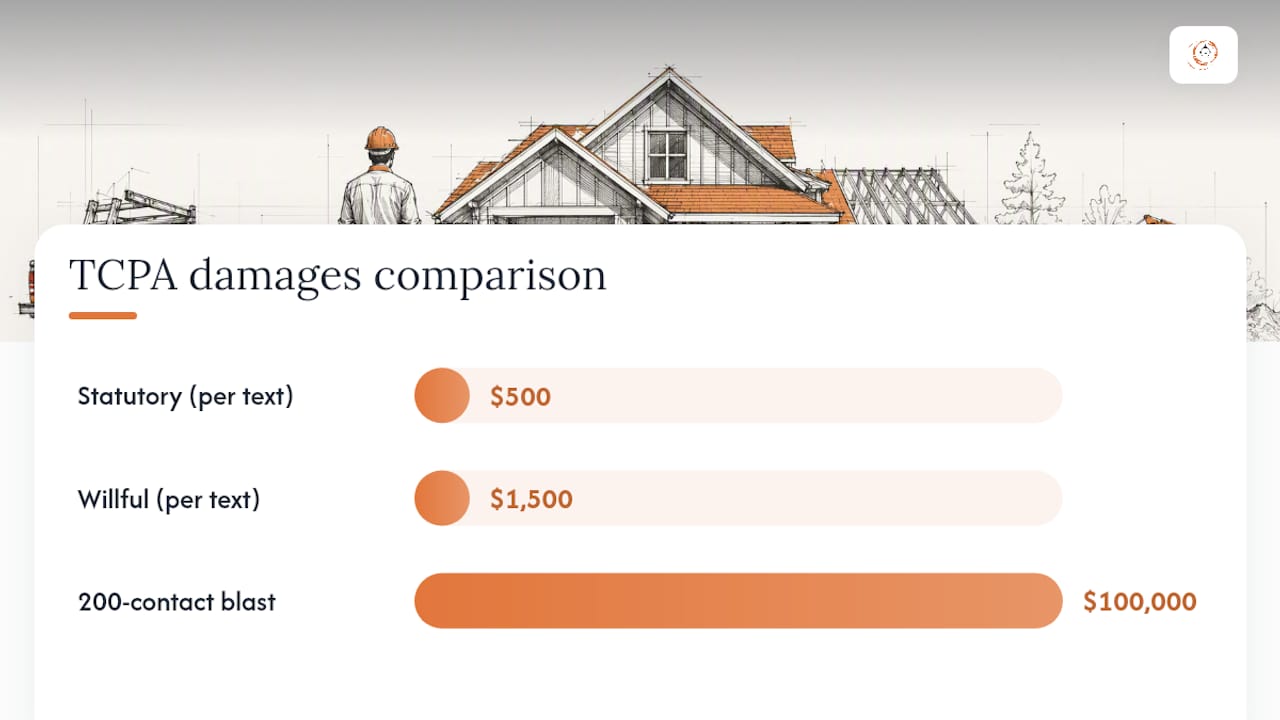
The financial exposure escalates faster than most business owners expect. Statutory damages run $500 per violating text, or $1,500 for willful violations, with no aggregate cap and no discount for volume. Send one non-compliant promotional blast to 200 old contacts pulled from a purchased list, and you’re looking at $100,000 in exposure at the standard rate, before a single attorney fee.
Beyond the lawsuit itself, carriers respond to complaint patterns by filtering your traffic and dropping your trust score, which quietly kills delivery rates on every message you send afterward, marketing or not.
Real Fixes Contractors Are Already Using
The contractors who get SMS compliance right usually make one structural change: they stop treating consent as an afterthought and build it into the moment a lead first appears. Adding a consent checkbox to a bid request form, rather than bolting it on later, catches every new lead at the one point they’re already paying attention.
A surprising number of contractors also use their truck wraps and yard signs as opt-in tools now, printing a simple “Text QUOTE to [number]” line that doubles as a lead magnet and a documented, keyword-based consent record. It’s low cost and it solves two problems with one line of vinyl.
Centralizing suppression is where most DIY systems break down. A contractor running texts through three different tools for marketing, scheduling, and dispatch has three separate places a customer can opt out, and no reliable way to make sure all three respect that request. A CRM built to centralize consent records, like the tools contractors use to manage lead conversion follow-up, solves this by keeping one suppression list that every campaign checks against automatically.
— Rowena
How Highlevelcrm-rconstructionsolutions Keeps Your Text Program Audit-Ready
A dedicated SMS tool is an alternative to juggling three disconnected SMS tools and hoping your suppression lists stay in sync. The platform centralizes consent records, opt-out suppression, and message scheduling in one system instead of scattered spreadsheets and separate platforms that don’t talk to each other.

The platform’s consent repository logs the exact opt-in text, timestamp, and source for every contact, so a complaint or carrier review doesn’t send you digging through old emails. Automated STOP processing suppresses a number the moment it opts out, across every active campaign at once, not just the one thread they replied to. Scheduled sends respect recipient time zones automatically, which matters if your crews work jobs across state lines with different quiet-hours rules. And when you need to prove compliance, exportable audit packs pull the full record together in minutes.
If your current setup can’t answer “show me proof of consent for this contact” in under five minutes, it’s worth a closer look. Visit the CRM features page to see how the consent and suppression tools work, or request a demo to walk through your specific setup.
Sources
This article is general information, not a substitute for advice from a qualified lawyer. Consult a qualified legal professional about your own circumstances before acting on anything here.
Recommended
- Mobile CRM for Contractors: Field-Ready Lead-to-Invoice
- Benefits of Automated Lead Follow-Up for Contractors
- Manual Data Calculations Contractors Should Automate Now
- Affordable Lead Generation for Your Construction Business
Signed up, or thinking about it? We build the inside of the account — pipelines, workflows, funnels, nurture, migration. Built for construction. Contact us.
Affiliate disclosure. We’re a GoHighLevel affiliate. Sign up through our link and we may earn a commission at no cost to you, or buy direct. Build-out is billed separately, never a software markup.

