Make Project Emails Defensible: Contractor Email Templates by Workflow
Use the copy-paste templates below and follow one rule: keep project emails concise, around 150 words, and tag the subject line with the project name and a category prefix. That single habit, paired with the ready-to-send contractor email templates in the next section, is what turns scattered inbox threads into a searchable, defensible project record.
TL;DR:
- Using standardized email templates with specific subject prefixes ensures messages are searchable and organized, reducing project delays and confusion.
- Sending follow-ups for estimates, RFIs, and payments at scheduled intervals, such as 48 hours, 7 days, and 14 days, helps maintain momentum and hold parties accountable.
- Critical notices, like change orders or delay claims, should be converted into signed PDF letters and labeled clearly to meet contractual and legal standards.
- Keep email content concise, under 150 words, and focus on one topic per message to improve response times and create a clear project record.
- Integrating templates into a CRM platform with project tagging and version control ensures consistency, faster approvals, and reduces dispute risks.
Table of Contents
- Ready-to-Use Contractor Email Templates by Workflow
- How to Customize These Templates Without Losing the Format
- When and How Often to Follow Up
- What Do RFI, SUB, COR, and MIN Mean in Subject Lines?
- Should You Worry About Legal Exposure in Project Emails?
- Why Standardized Emails Actually Reduce Project Disputes
- Speed Versus Defensibility: Where I Land on Automation
- Keep Your Templates Tied to Every Project
- Sources
- FAQ
Ready-to-Use Contractor Email Templates by Workflow
These construction email templates cover the messages you send most: chasing a bid, kicking off a job, asking a question, changing scope, directing a sub, and getting paid. Copy the structure, swap in your project details, and send.
1. Estimate follow-up
Subject: [Project Name] — Following Up on Estimate Sent 3/1
Formal variant (owner or GC): “Hi [Name], I wanted to follow up on the estimate I sent for [Project Name] on [date]. Please let me know if you have questions about scope, materials, or timeline. I’m happy to walk through pricing on a quick call this week.”
Routine variant (repeat client): “Hey [Name], following up on that estimate for [Project Name]. Ready to move forward whenever you are. Let me know.”
2. Project kickoff
Subject: [Project Name] — Kickoff and Schedule Overview
“Hi [Name], we’re set to start [Project Name] on [date]. Attached is the schedule (v1) and the crew contact list. Site access needed by [time]. Reply with any concerns before Monday.”
3. RFI and transmittal
Subject: [ProjectID] RFI-042 — Concrete Mix Design Revision
“Requesting clarification on [specific issue]. Drawing reference: [sheet number]. Decision needed by [date] to hold the schedule. Attached: marked-up drawing (v2).”
4. Change order notice
Subject: [Project Name] COR-07 — Scope Change: Electrical Rough-In
“Per our conversation on [date], attached is COR-07 covering [brief scope]. Cost impact: $[amount]. Schedule impact: [days]. Please sign and return by [date] so we can proceed.”
5. Subcontractor instruction
Subject: [ProjectID] SUB — Framing Crew Start Date Confirmed
“Confirming your crew starts framing on [date]. Materials on site by [date]. Refer to updated plan set (v3) attached. Call me if delivery timing changes.”
6. Payment reminder
Subject: [Project Name] — Invoice #1042 Past Due
“This is a reminder that Invoice #1042, sent [date] for $[amount], is now [days] past due. Per Section [X] of our contract, payment is due within [terms]. Please confirm status by [date].”
7. Final walkthrough
Subject: [Project Name] — Final Walkthrough Scheduled
“We’d like to schedule the final walkthrough for [date/time]. Punch list items will be documented on-site. Please bring anyone who needs to sign off.”
8. Referral or review request
Subject: [Project Name] — Thanks From the Team
“It was a pleasure working on [Project Name]. If you know anyone who needs similar work, we’d appreciate the introduction. A quick review also helps other homeowners find us.”
If you’re still refining what goes into the estimate itself before you send that first follow-up, this guide on building faster estimate templates pairs well with the sequence above, and this breakdown of estimate versus quote language helps you set the right expectations before a number ever hits a client’s inbox.
How to Customize These Templates Without Losing the Format
Every template above has fields that need your input, and fields you should never touch. Edit the project name, ID number, date, responsible party, and due date every single time. Leave the structure, the one-topic-per-email rule, and the subject-line format alone.
- Swap in the real project name and ID in the subject line, not just the body.
- State one topic per email. Bundling a change order question with a scheduling update buries both.
- Skip decorative fonts, colored text, and ALL CAPS. They read as unprofessional and make emails harder to scan.
- Label every attachment with a version and date, like “FloorPlan_v3_031126.pdf,” so nobody works off an outdated file.
- Name a decision or action you need, and give it a deadline.
Before you hit send, run the message against a short audit checklist: sender and recipients correct, attachments versioned, a clear decision requested, and a deadline stated. That checklist mirrors the documentation standard construction attorneys recommend for keeping project records defensible if a dispute ever lands in front of a judge.
Pro Tip: Keep a folder of blank template files, not just sent examples. Editing a clean template takes 30 seconds; hunting through old threads to find “that one email” wastes ten minutes every time.
When and How Often to Follow Up
Timing turns a template into a system. Here’s a cadence that works for the three follow-ups contractors chase most.
- Post-estimate: Send a check-in at 48 hours (“Just confirming this landed in your inbox”), a second nudge at 7 days (“Still available to answer questions on the [Project Name] estimate”), and a final one at 14 days (“Wanted to close the loop before pricing changes”).
- RFI or approval with no response: Resend at day 3 with the same subject line plus “— reminder” appended (e.g., “RFI-042 — reminder”). Escalate to the project manager or owner’s rep at day 7 if there’s still no answer, since an unanswered RFI can stall a schedule.
- Payment reminder: Send the first reminder the day after the due date, referencing the invoice number and contract payment terms. Attach the original invoice again at the second reminder, and reference the specific contract section on late fees or interest if your agreement includes one.
If you’d rather not track these dates manually, a lead follow-up automation guide walks through setting reminders so nothing slips.
What Do RFI, SUB, COR, and MIN Mean in Subject Lines?
A consistent prefix system is what makes contractor email sequences searchable months after the project closes. Each prefix flags the email’s purpose before anyone opens it.
- RFI (Request for Information): a question about drawings, specs, or scope that needs a documented answer.
- SUB (Submittal): product data, shop drawings, or samples sent for approval.
- COR (Correspondence or Change Order Request): general project correspondence or a scope/cost change.
- MIN (Minor Change or Meeting Minutes): small field adjustments or a record of a meeting’s decisions.
A working subject-line format looks like “[ProjectID] RFI-042 — Concrete Mix Design Revision,” a structure recommended in construction email best-practice guidance because it lets inbox rules auto-file messages and lets anyone search “RFI-042” and find every related thread instantly. Keep the subject under 60 characters when possible so it doesn’t truncate on mobile.
Should You Worry About Legal Exposure in Project Emails?
Yes. Treat every project email as if it could be read aloud in a courtroom, because it might be. Construction attorneys advise avoiding casual language, sarcasm, or speculation in writing, since informal emails have been used as evidence against contractors in disputes, according to guidance from Smith Currie.
- Check your contract before assuming email satisfies a notice requirement. Many agreements require certified mail or personal delivery for formal notices like delay claims or termination warnings.
- Use subject lines with clear identifying terms such as “Delay Claim” or “Schedule Update,” a practice NRCA recommends for anything with contractual weight.
- Convert critical notices into a signed PDF letter attached to a short transmittal email, and label the file with the date and notice type.
- If you’re sending marketing or newsletter-style emails to a client list, follow FTC CAN-SPAM rules on opt-outs and sender identification.
Keeping messages under 150 words with project-specific prefixes isn’t just tidy inbox hygiene. It’s the difference between a message that holds up as a clear record and one that reads like an afterthought.
Why Standardized Emails Actually Reduce Project Disputes
Version confusion and scattered threads are a documented cost driver on construction jobs. Bluebeam’s analysis found that email chains without a shared structure lead to lost context, duplicated work, and slower approvals, since nobody can agree on which attachment is current or who committed to what.
Standardizing your templates and connecting them to a tagging system fixes most of that. When every RFI carries the same subject format, every change order references a contract section, and every attachment carries a version number, approvals move faster because reviewers aren’t hunting for context.
- Train subs and crews on the same subject-line rules you use, since a standard only works when everyone on the project follows it.
- Store signed transmittals and formal notices in one central place, not scattered across personal inboxes.
- Review response times periodically. If RFIs are sitting unanswered for a week, your follow-up cadence needs tightening, not your patience.
Pro Tip: Assign one person per project to own the subject-line and filing standard. A great template system falls apart the moment three people invent their own version of it.
Speed Versus Defensibility: Where I Land on Automation
Train every crew lead and sub the same day you roll out templates, not weeks later, and keep the training to twenty minutes. Consistency across a project only works if everyone uses the same subject format and the same tone from the first email.
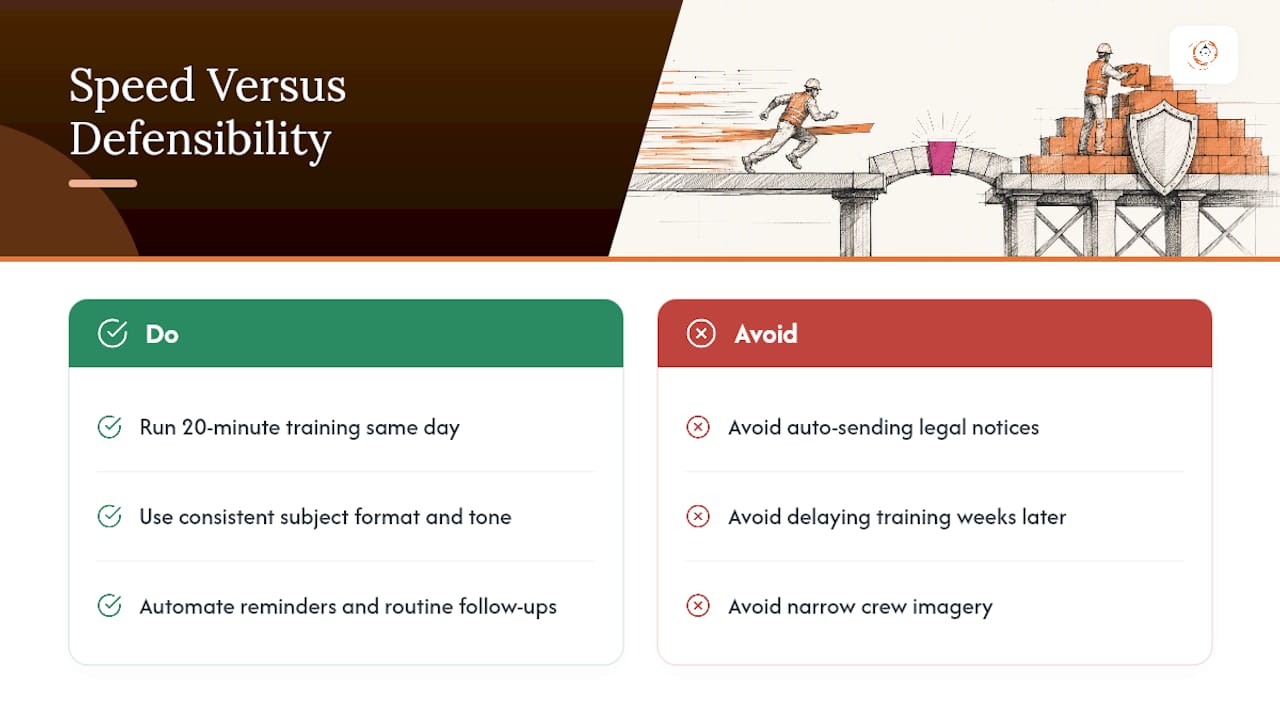
Automation has a real limit, though. Automate reminders and routine follow-ups freely, but never let a system auto-send a legal notice, a delay claim, or a termination warning without a human reading it first. Some messages need a signature, not a send button.
One more note, aimed at the industry rather than the inbox: construction imagery still leans heavily on one type of face. The trades are far more diverse than that, and the photos accompanying guides like this one should reflect the actual crews doing the work, not a narrow slice of them.
— Rowena
Keep Your Templates Tied to Every Project
A dedicated CRM platform provides a template library that stays attached to the project it belongs to, so the estimate follow-up, the RFI, and the payment reminder for one job don’t get mixed up with another.

The platform stores your contractor email templates alongside automated follow-up sequences and project tagging, so a 7-day estimate nudge or a payment reminder fires on schedule without you tracking dates by hand. Every sent message, attachment version, and reply logs against the project record, which is the audit trail construction attorneys recommend keeping. Contractors using structured lead and communication workflows through the platform have reported improved conversion rates, a result tied to faster, more consistent follow-up rather than any single template. If your current system is a mix of personal inboxes and sticky notes, visit the Highlevelcrm-rconstructionsolutions landing page to see how the template library and project tagging work, or request a demo to walk through your own workflow.
Sources
- Proper email protocols on construction projects — McDonald Hopkins
- Effective use of email for construction project communications and documentation — Smith Currie
- Why email is costing construction projects millions — Bluebeam blog
- CAN-SPAM Act: A compliance guide for business — FTC
- Proper email communication for construction projects — NRCA
FAQ
How long should a contractor email be?
Keep it under roughly 150 words and focused on one topic, which matches the industry standard for concise, searchable project communication.
What does RFI mean in a construction email subject line?
RFI stands for Request for Information, a formal question about drawings, specs, or scope that needs a documented answer before work continues.
Can email serve as a formal legal notice on a construction project?
Only if your contract allows it. Many agreements require certified mail or personal delivery for notices like delay claims, so convert critical notices to a signed PDF letter when in doubt.
How often should I follow up on an unanswered RFI?
Resend at day 3 with “— reminder” added to the same subject line, then escalate to the project manager or owner’s rep at day 7 if you still have no answer.
Does Highlevelcrm-rconstructionsolutions include contractor email templates?
Yes, the platform includes a template library with project tagging and automated follow-up sequences, so templates stay attached to the correct job and audit trail.
Recommended
- Build Faster Estimate Templates: A Contractor’s Guide
- How to Select Software for Multi-Project Contractors
- Custom Reporting for Contractors: Your 2026 Field Guide
- Construction Supplier Workflow Explained for Contractors
Signed up, or thinking about it? We build the inside of the account — pipelines, workflows, funnels, nurture, migration. Built for construction. Contact us.
Affiliate disclosure. We’re a GoHighLevel affiliate. Sign up through our link and we may earn a commission at no cost to you, or buy direct. Build-out is billed separately, never a software markup.

